6 Effective Methods to Reduce ADHD Procrastination [2026]


6 Methods to Reduce ADHD Procrastination in 2026.
“I’ll do it in five minutes.”
“Tonight, for sure.”
“Okay… definitely tomorrow.”
Sound familiar?
If you’ve ever caught yourself making these promises - again and again - you’re not alone. Procrastination is something everyone struggles with. But for people with ADHD, it’s often a daily battle. The plan might be there, the intention clear, but the brain says: not yet.
Tasks get delayed for hours, days, or sometimes even weeks. And before you know it, you’re overwhelmed, anxious, and asking yourself: “Where did the time go?”
In this guide, we’ll unpack
- what ADHD procrastination really is,
- why it happens,
- most importantly - how to break the cycle.
1. What is Procrastination?

Procrastination is a common human habit where we delay starting or completing tasks that need to be done. It's like knowing you should do something now, but deciding to put it off until later.
Interestingly, chronic procrastination doesn't pick favorites - it affects people regardless of their gender, race, or age. Everyone can find themselves putting things off from time to time!
2. Why Do People With ADHD Struggle So Much With Procrastination?

1. Time Blindness
People with ADHD often struggle to feel time. Five minutes, one hour, or three days might feel the same until the last possible moment, when the panic sets in.
2. Task Paralysis
Big or boring tasks can feel like a mountain. If the reward isn’t immediate, the brain loses interest fast. Even starting can feel impossible.
3. Low Dopamine
ADHD brains have lower levels of dopamine, the “motivation” neurotransmitter. Without a dopamine boost, the brain resists starting anything that feels difficult or unrewarding.
4. Mental Fatigue
Sustained focus is draining. If a task requires a lot of effort, even thinking about it can trigger avoidance.
5. Perfectionism + Shame Cycle
Many ADHDers hold themselves to impossibly high standards. When they miss deadlines or delay work, they feel guilty… which makes it even harder to restart.
3. Common Procrastination Triggers (ADHD or Not)
Even neurotypical folks procrastinate. But the reasons overlap with ADHD patterns:
- Feeling lazy (or just burned out)
- Low energy or sleep debt
- Boring or emotionally difficult tasks
- Thriving on last-minute pressure
- Indecision or fear of choosing wrong
6 Effective Ways to Beat ADHD Procrastination
1. Reframe Your Thoughts With the ABCDE Model 🧩
The ABCDE cognitive model, created by psychologist Albert Ellis, helps break the loop by challenging your automatic thoughts and replacing them with more helpful beliefs.
What does it mean :
- A – Activating event: Something triggers your avoidance (e.g., a deadline)
- B – Belief: You tell yourself, “I’ll wait until I’m in the right mood.”
- C – Consequence: You delay until the last minute and feel overwhelmed
- D – Dispute: Challenge that belief — “What if I just start with 5 minutes?”
- E – Effect: You reduce anxiety, take action earlier, and feel more in control
ADHD-Friendly Example:
- A: You have a report due Friday.
- B: “I’ll feel more focused tomorrow.”
- C: You avoid it until Thursday night, and panic.
- D: “What if I start with just the outline today?”
- E: You start, realize it’s not as bad as you feared, and get momentum.
ADHD Reminder Tips:
- Set a phone reminder labeled “ABCDE that thought!”
- Stick the ABCDE steps on your desk or fridge
- Use apps like Saner.AI to reflect on recurring procrastination patterns automatically
2. Take the Smallest Possible First Step 🪜

ADHD procrastination often stems from task initiation problems, not lack of willpower.
Big tasks = brain freeze. Your nervous system sees “research paper” and instantly flips to “let’s reorganize the sock drawer.”
What works instead:
Break it down so small your brain can't reject it.
Examples:
- “Write article” → “Open Google Doc”
- “Clean house” → “Pick up 1 pair of shoes”
- “Reply to email” → “Read email header only”
Bonus tip: If you’re stuck:
- Ask a friend or coworker for help identifying the very first action
- Or ask AI Todo List like Saner.AI to break the task down for you in 5 seconds
3. Change the Habit Loop 🌀
Procrastination in ADHD isn’t just a decision - it’s often a default habit.
The cycle: Trigger → Avoid → Temporary Relief → Guilt → More Avoidance
You can break the loop with environmental and habit strategies:
🛠️ ADHD-Friendly Habit Shifts:
- Minimize Distractions: Turn off phone notifications, use a physical timer, or try a “distraction dump” notepad
- Practice Self-Forgiveness: Shame fuels avoidance. ADHD thrives on momentum, not self-blame
- Mindfulness Reset: A 3-minute breathing exercise helps shift from reactive mode to intentional mode
4. Reward Yourself Immediately 🎉

Your ADHD brain responds better to dopamine than deadlines.
Most productivity systems fail ADHDers because they focus on willpower instead of wiring. That’s where self-reward comes in.
💡 How to Do It Right:
- Set small goals → “Write intro paragraph”
- Choose meaningful rewards → Coffee walk, 15 mins of YouTube, mini dance break
- Deliver immediately → No waiting until the end of the day
- Avoid addictive rewards → Don’t let TikTok swallow your brain
📌 Pro Tip: Stack rewards with routine. E.g., “After I do X, I get Y.” This turns action into habit.
5. Build Discipline the ADHD Way 🧭
Discipline isn’t about trying harder - it’s about designing smarter.
For ADHDers, self-discipline needs to be externalized. Your brain won’t always cooperate, so structure becomes your ally.
🔧 ADHD-Proof Discipline Tools:
- Cognitive Behavioral Therapy (CBT) is the most effective approach, promoting changes in perception and procrastinatory behavior through cognitive restructuring and the development of coping strategies
- Use structure: Routines reduce executive load. Try starting each day with the same “launch pad” routine.
- Time-block your tasks: Use calendar tools or time-boxing methods to pre-decide when you’ll work
- Use AI to organize your day: Apps like Saner.AI can build your schedule for you based on task priority and mental energy
- Set visual cues: Sticky notes, whiteboards, or even physical tokens to keep you on task
6. Go All-In (When You’re Ready) 💥

Sometimes the best way to crush ADHD procrastination is to burn the Plan B.
This isn’t for every situation, but occasionally, removing your safety net forces hyperfocus.
🔥 Real-World Example:
- A founder quits their job to launch a startup.
- With no fallback, the pressure triggers intense focus and urgency.
- They get more done in 2 weeks than the past 6 months.
⚠️ ADHD Disclaimer:
- This works only if you’re ready and supported
- For most ADHDers, gradual accountability systems (coaching, body doubling, public commitments) are safer and more sustainable
Still, the "No Plan B" mindset can be simulated:
- Set deadlines with consequences
- Make public declarations of goals
4 AI tools to help you beat procrastination
1. Saner.AI
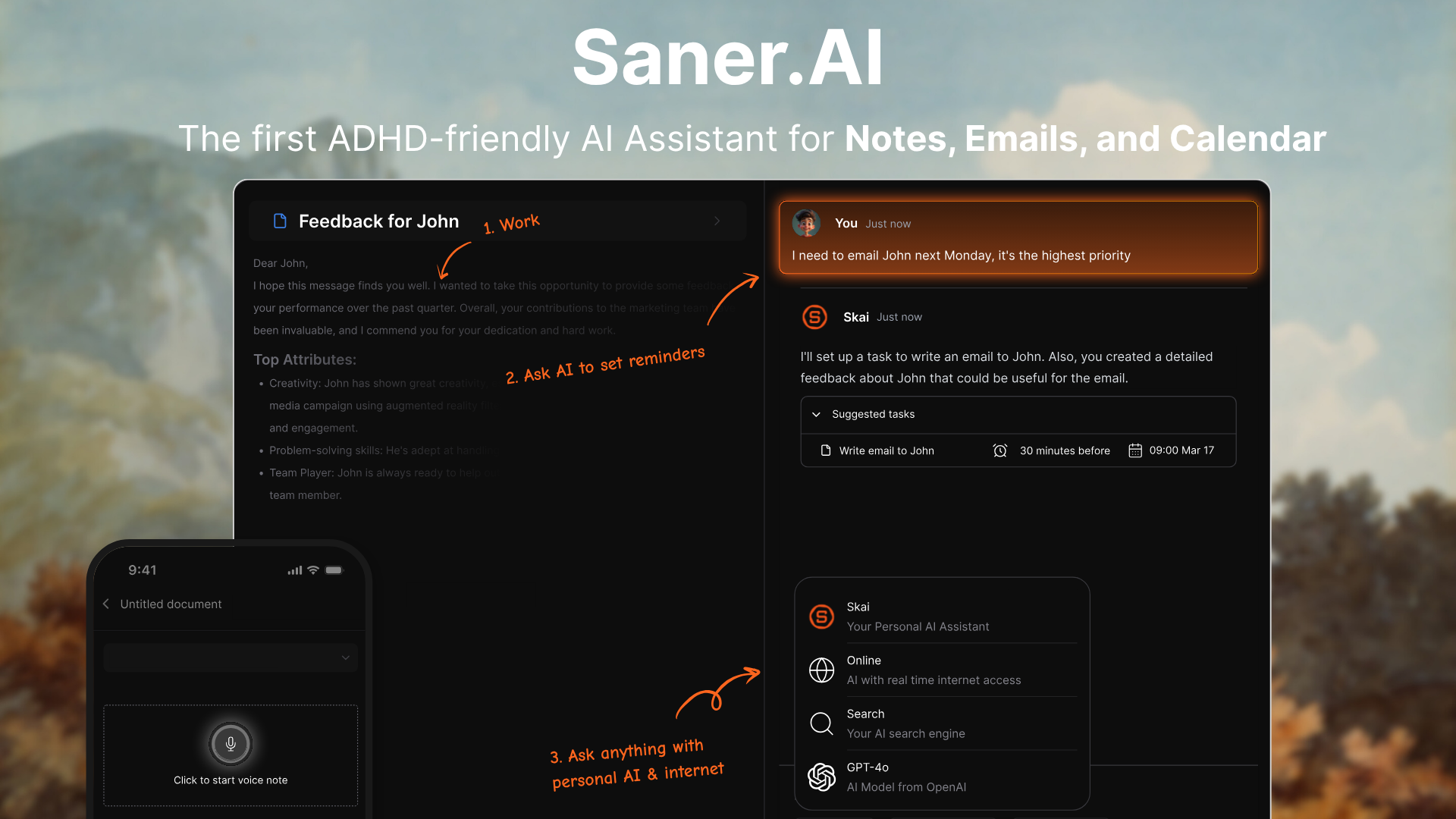
Saner.AI is an AI-powered personal productivity assistant built around helping users capture, organize, and act on their digital information (notes, emails, calendar events, tasks) without context switching or manual structuring. It uses a conversational AI called Skai to interpret natural language input so you can dump thoughts as they come and Saner turns them into organized tasks, reminders, and calendar items.
Its design prioritizes users with ADHD or overwhelm issues, aiming to reduce distraction and friction in everyday planning and execution.
Key features:
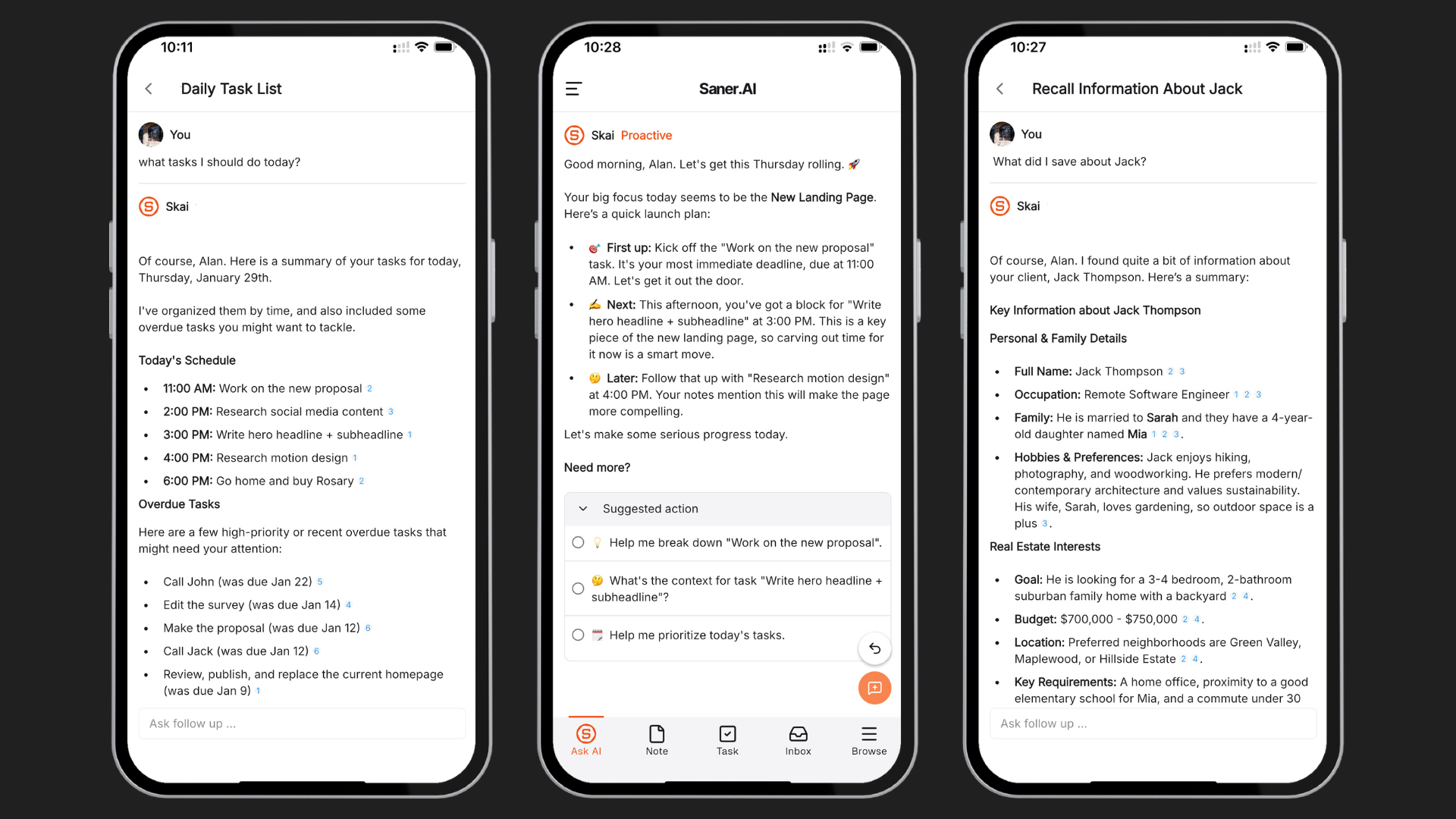
- Automatically pulls tasks from emails, docs, and chats, breaks them down into actionable steps, and sets reminders based on context and schedule.
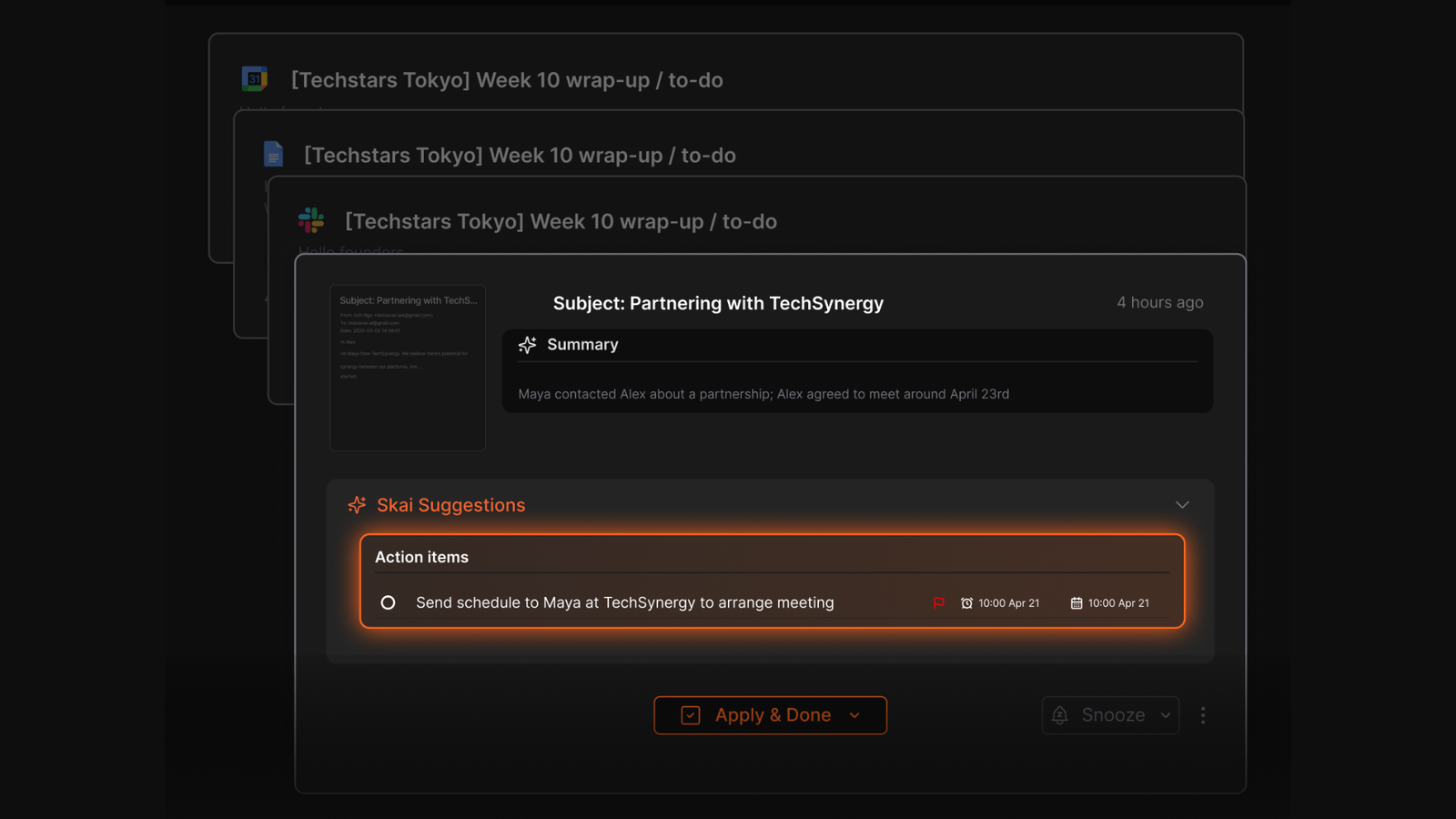
- Chat or voice input lets you query your information, brainstorm ideas, or get recommendations on prioritization without manual tagging.
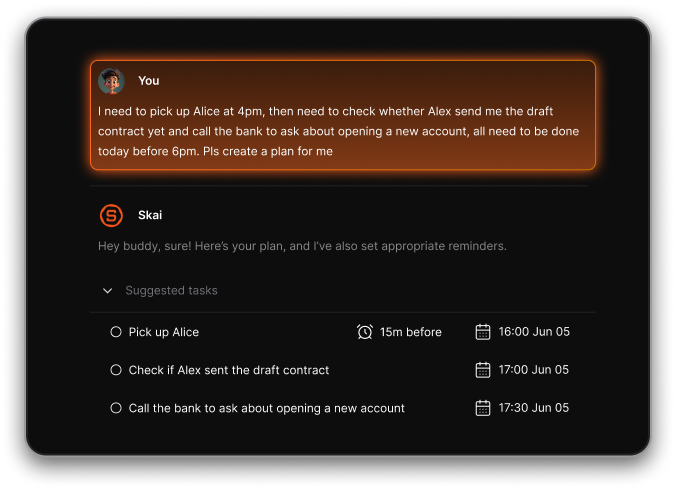
- Smart daily planning prompts that suggest what to focus on based on urgency, deadlines, and workload.
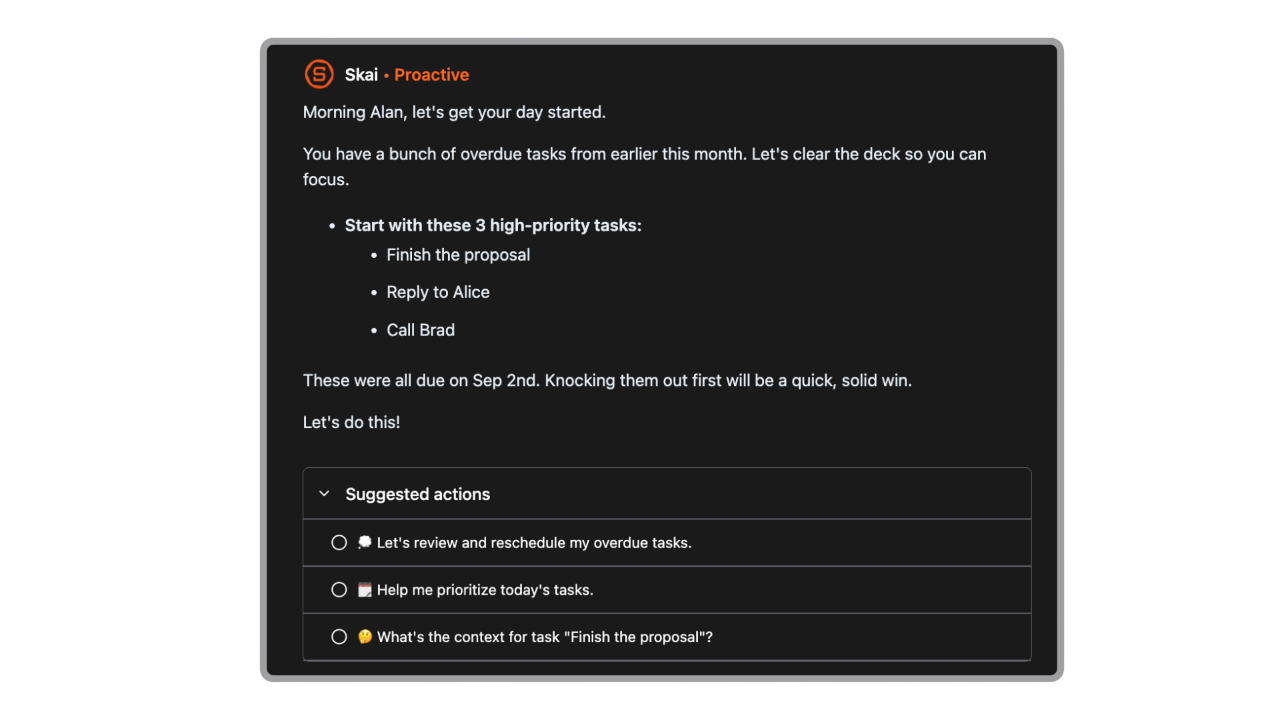
- Centralizes notes, emails, cloud files, and tasks with natural language search that understands your intent rather than just keywords.
- Clean interface with focus tools plus syncing across Gmail, Google Calendar, Drive, Slack, and browser extension for capture on the fly.
Pros:
- Lets you capture ideas fast and turns chaos into structured action steps.
- By automating task breakdown and reminders, it nudges users toward completion instead of avoidance.
- Syncs with major productivity tools so you don’t juggle multiple disconnected apps.
- You talk/write normally, and the AI interprets and organizes for you.
Cons:
- Most AI functions require connectivity and don’t work well offline.
- It’s more tailored to individual use than complex team project management.
Who it’s best for:
- Individuals struggling with procrastination, overwhelm, and task paralysis who benefit from AI-assisted planning.
- People with ADHD or low-focus days who want a productivity tool that adapts to their workflow.
- Knowledge workers, entrepreneurs, and students managing lots of notes, inbox items, and calendar events.
- Anyone who wants an AI to turn rough ideas into organized action steps without manual setup.
Clear pricing plans:
- Free plan
- Starter: ~$8/month with higher AI request limits, more storage, expanded note count.
- Standard: ~$16/month with unlimited AI requests, unlimited notes, 100GB storage, priority support.
Saner.AI reviews
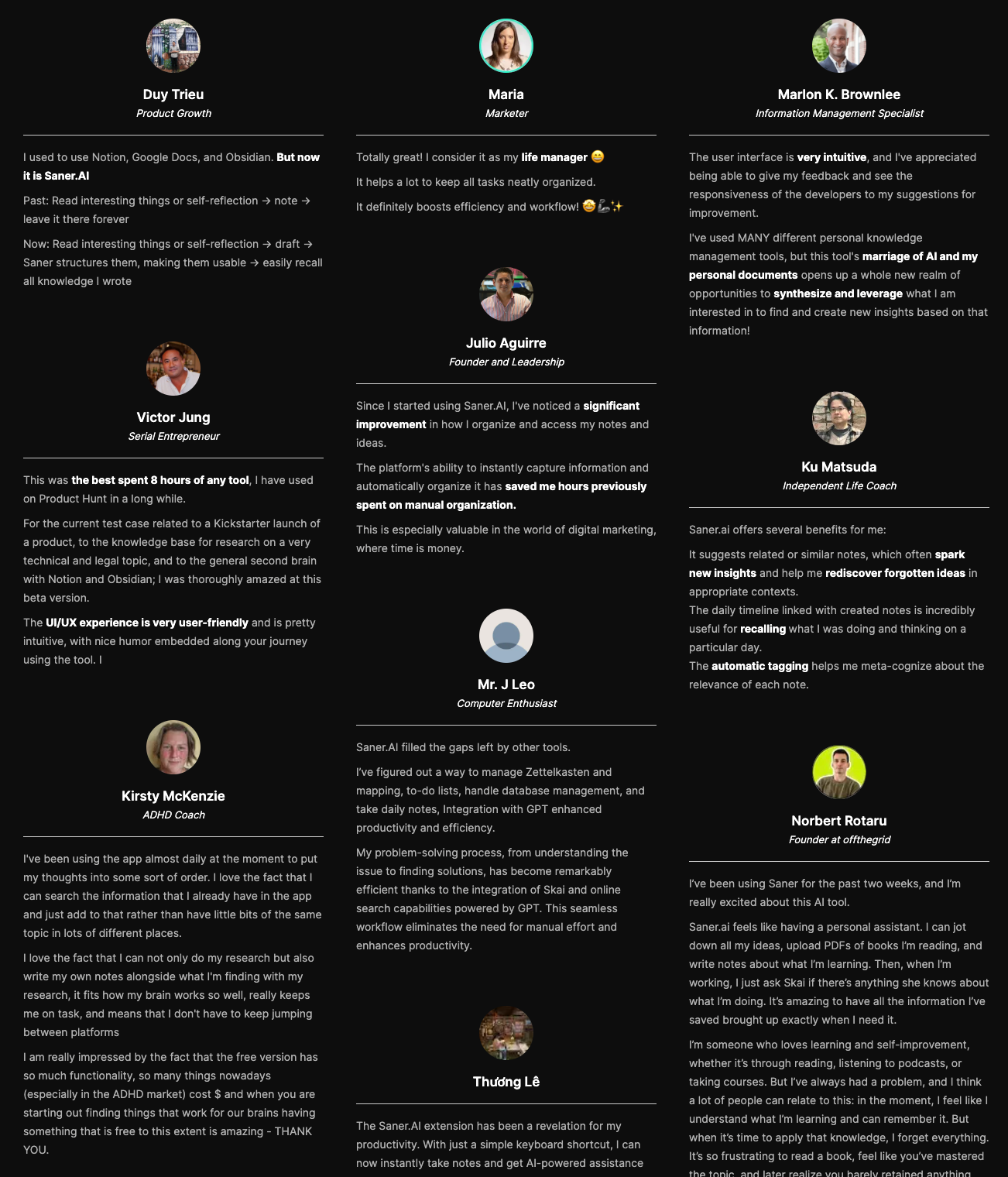
"The biggest benefit for me in using Saner is the Proactive AI. Staying on top of the constant flow of email and multiple calendars is challenging, and so far, Saner is the only AI-based tool that truly feels like a personal assistant." - Jerry
How to get started:
- Visit saner.ai and create a free account.
- Connect your email, cloud storage, and calendar.
- Install the mobile app or Chrome extension for quick capture.
- Start chatting with Skai, dump tasks and thoughts, then let the AI organize them into actionable plans.

Stay on top of your work and life
2. Forest
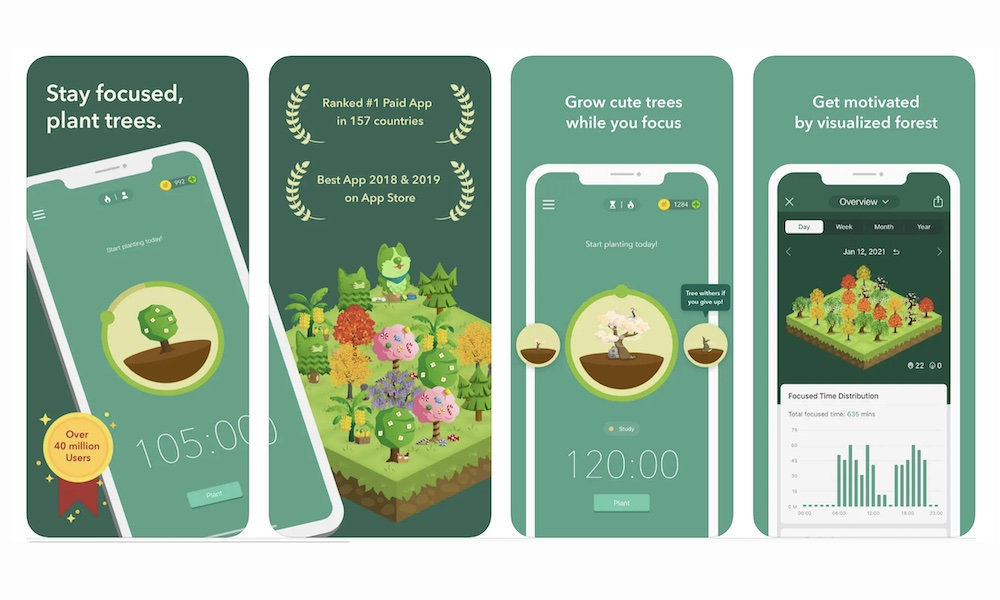
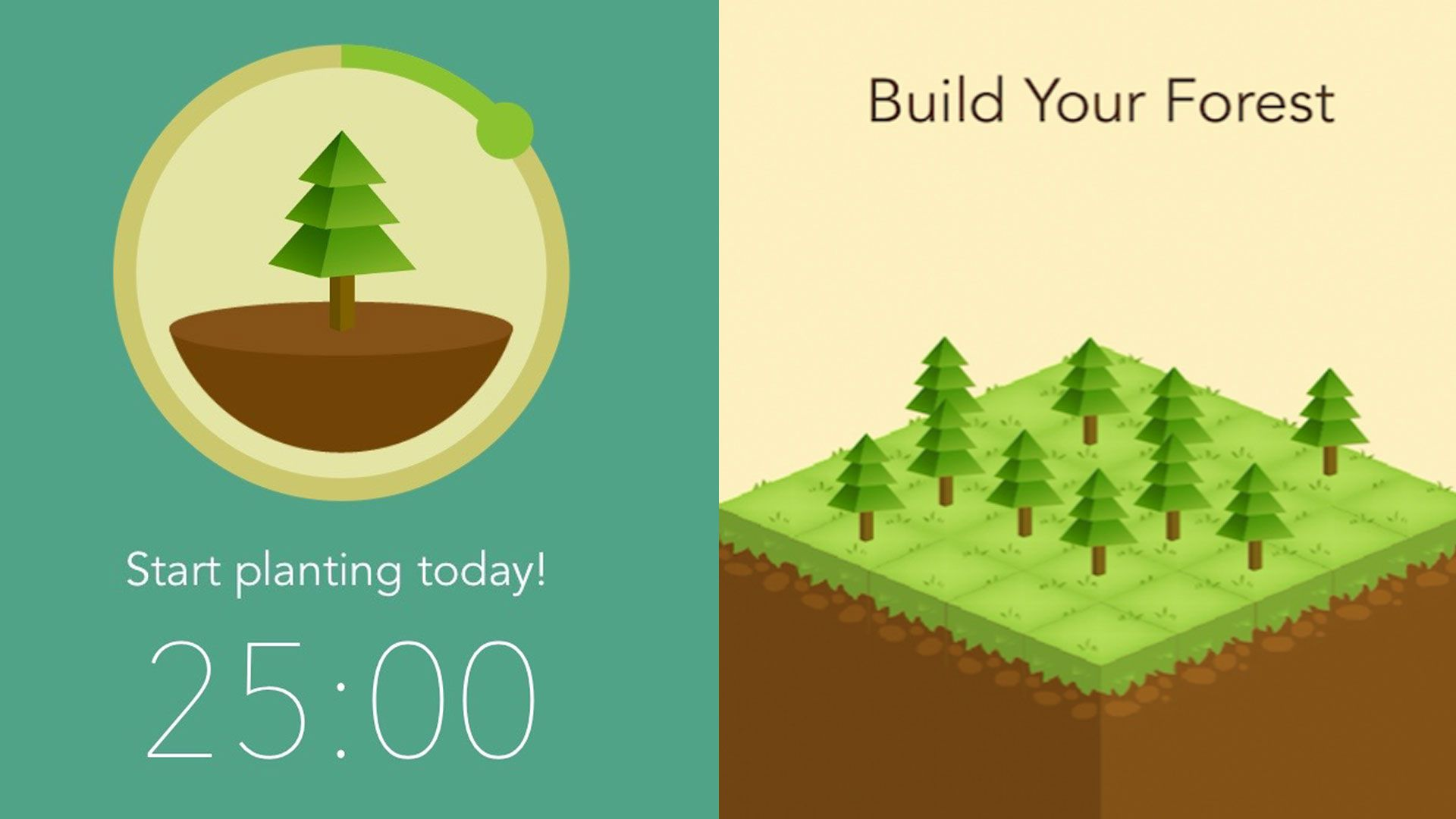
Forest is a focus timer app built around a simple concept: if you stay focused, you grow a virtual tree. If you leave the app to check social media or other distractions, your tree dies. It uses behavioral psychology and gamification to help users reduce phone addiction and build deep work habits.
Unlike AI planning tools, Forest doesn’t organize your tasks. Its role among AI tools to beat procrastination is different, it helps you protect focused time once you know what you need to work on. You set a timer (for example, 25–50 minutes), and Forest locks you into that session.
Key features
- Set a timer and grow a tree while you work. If you exit the app, the tree withers. On Android, it can block selected apps during sessions.
- You build a visual forest over time. It tracks focus sessions, streaks, and total hours worked.
- You can label sessions (study, writing, coding, etc.) and review productivity reports weekly or monthly.
- Users can spend in-app coins to fund real tree planting through partner organizations.
What I liked
- Extremely simple to use. No setup complexity.
- Strong psychological commitment mechanism.
- Visual progress motivates consistency.
- Works well with Pomodoro-style focus blocks.
What I disliked
- Not an AI tool - no smart planning or prioritization.
- Limited task management features.
- App blocking capabilities vary by platform (stronger on Android than iOS).
- May lose effectiveness once novelty wears off.
Pricing
- Free version (limited features)
- One-time purchase (iOS) - around $3.99
- Android version - free with optional premium features
- Chrome extension available (free)
Suitable for
- Students preparing for exams.
- Remote workers easily distracted by their phones.
- People who already have a task list but struggle to stay focused.
- Anyone trying to reduce social media distraction.
How to start
- Download Forest from the App Store or Google Play
- Choose your focus duration
- Start your session and keep the app open
- Track your forest growth over time
Forest review (source)
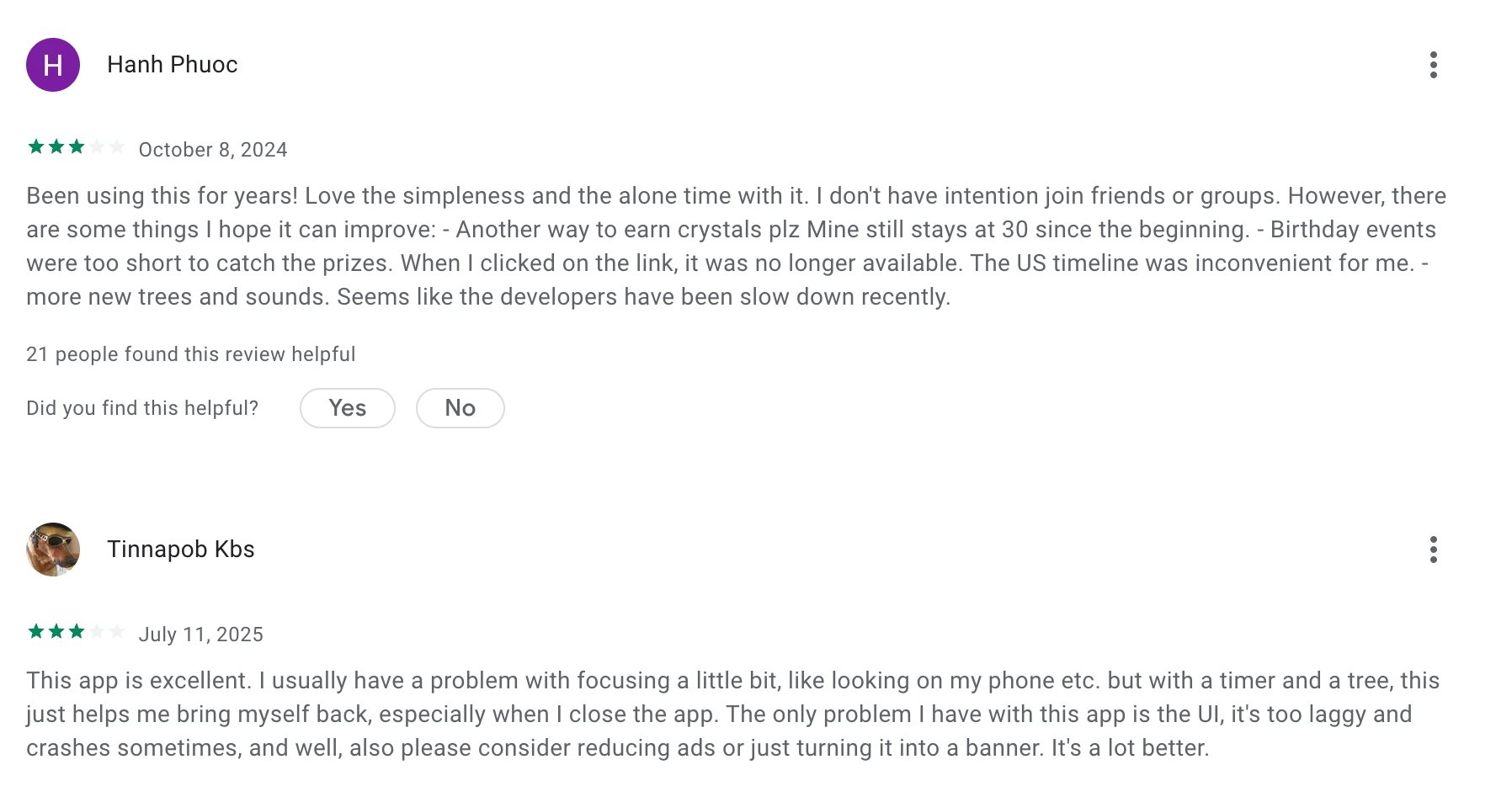
I have been using forest nearly since the beginning (from high school to now in my PhD). I LOVE this app and being able to see my data from so long ago too. BUT I love it for its core mechanic, and I don't necessarily want it to do other things. - Sarah Richman
I bought the premium version because I love the idea of this app, but I keep getting a bug when trying to double my coins. also, the UX needs a lot of work. I have a lot of trees, and I don't know what they are unless I go back to the store. I also wish you could use this app when growing trees. And why can't we move trees around? That would double the fun. I also wish we could more easily see different tree stages. I could say more, but I'm near my character limit. - John Sorina
3. Finch
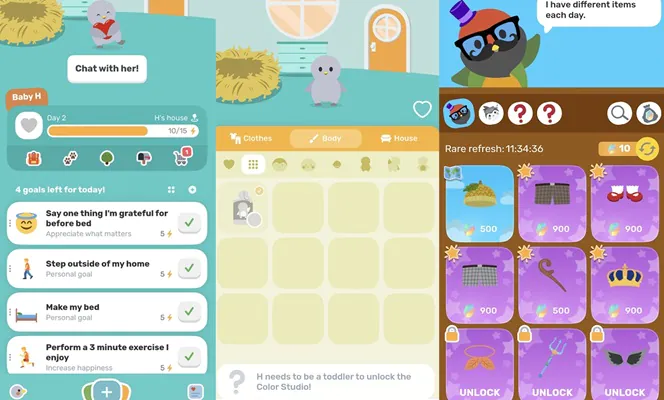
Finch is a self-care and habit-building app designed to help users stay consistent with small daily actions. Instead of focusing purely on productivity, it blends mental wellness, micro-goals, and gamification. You take care of a virtual pet by completing real-life tasks.
Among AI tools to beat procrastination, Finch plays a different role. It doesn’t automatically plan your workload. Instead, it motivates you to take small steps such asgetting out of bed, journaling, finishing one task, which helps reduce avoidance behavior.
Key features
- You can set simple goals like “reply to one email” or “study 20 minutes.” The app nudges you gently throughout the day.
- Completing goals earns rewards to customize and grow your virtual pet. This adds emotional engagement and consistency.
- Includes guided journaling, breathing exercises, and mental health tracking.
- Tracks progress over time with visual statistics, helping reinforce routine building.
What I liked
- Gentle and non-intimidating approach to productivity.
- Very effective for people struggling with low motivation or burnout.
- Strong emotional reinforcement through gamification.
- Simple interface with low setup friction.
What I disliked
- Not an AI planning or to-do list system.
- Limited task prioritization features.
- More focused on self-care than complex work management.
- Advanced features locked behind premium plan.
Pricing
- Free version (limited features)
- One-time purchase (iOS) - around $3.99
- Android version - free with optional premium features
- Chrome extension available (free)
Suitable for
- Free plan
- Finch Plus ~$9.99/month
How to start
- Download Finch from the App Store or Google Play
- Create your virtual pet
- Add 3–5 small daily goals
- Complete tasks and grow your pet consistently
Finch reviews (source)
This is not the kind of app I usually try, but I am a little obsessed with Finch. This is a really cute app that makes my self care a little more attainable for me, because I know that when I do, I have an excuse to see little Arlo. Most of this apps features have been free: so far, so good. Give it a try. If you don't like it you can always delete it. I'm finding it motivating and have hit my goals on an 8-day streak. - Paula Owens
I love this app. It's so cute. but there are some bugs like the items you can buy. some are randomized, and at the bottom, the rest stay the same. there's an option to pick things when you go to this part of the shop called the Catalog it has alot of clothes you wouldnt normally see and they are all so cute and it tells you how much the item costs. but you aren't able to find and buy it anywhere even if you click on it and its kinda sad. - Winter Fox
4. Goblin.tools
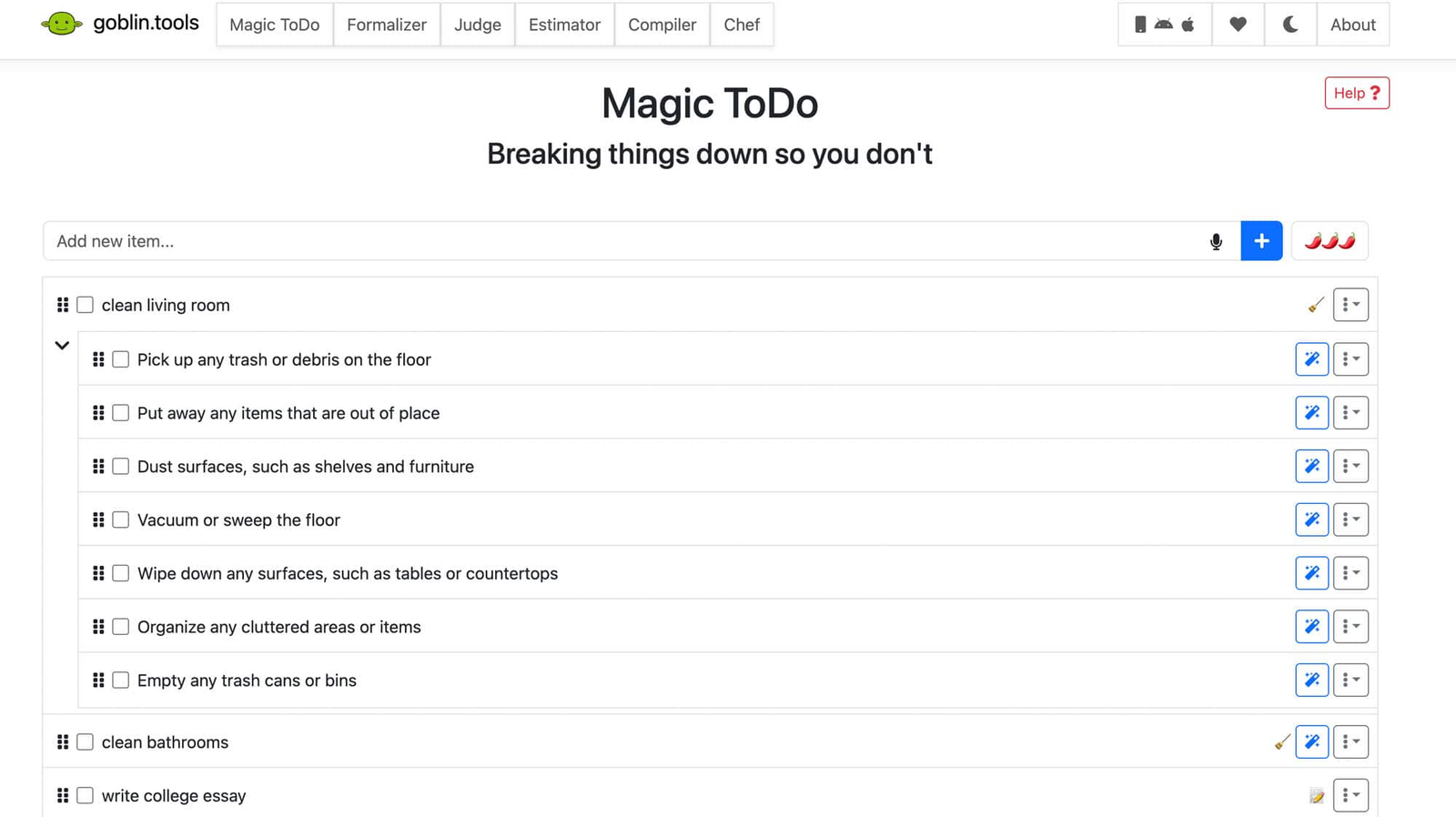
Goblin.tools is a lightweight AI-powered task breakdown tool designed to help people who struggle with executive dysfunction. It’s best known for its “Magic ToDo” feature, which takes a vague task like “write report” and breaks it into clear, manageable steps.
Among AI tools to beat procrastination, Goblin.tools focuses specifically on reducing task paralysis. It doesn’t manage projects or sync calendars. Instead, it helps you figure out what “start” actually looks like.
Key features
- Enter any task and adjust the “spiciness” level to control how detailed the steps are.
- Provides rough time estimates for tasks, helping you plan realistically instead of guessing.
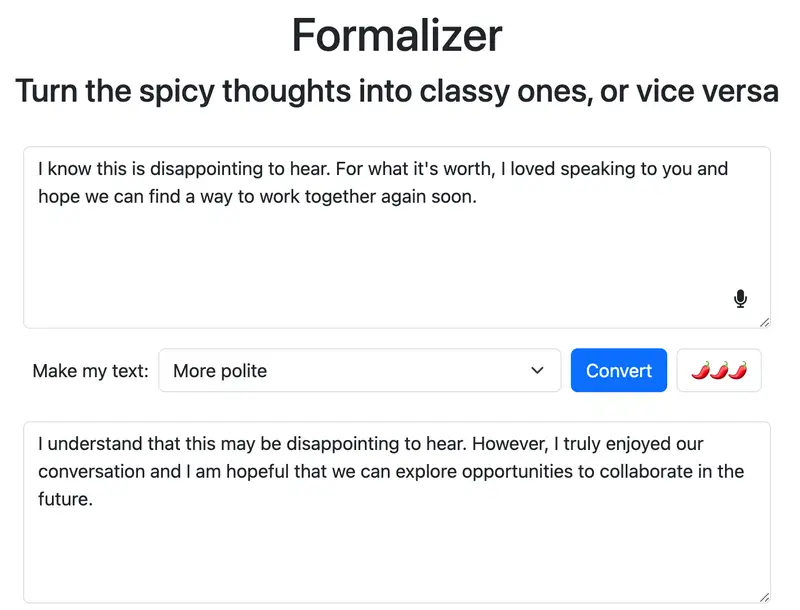
- Rewrite text to sound more professional, polite, simpler, or more direct - useful for emails and communication.
- Helps interpret tone in messages or clarify social expectations, which can support users with ADHD or autism.
What I liked
- Extremely simple and fast to use.
- Very effective for breaking down overwhelming tasks.
- No complex setup or learning curve.
- Web version is free and accessible immediately.
What I disliked
- Not a full productivity system.
- No deep integrations with calendar or task managers.
- Limited long-term tracking features.
- AI output sometimes needs minor adjustment.
Pricing
- Web version - Free (donation-supported)
- iOS app - Small one-time purchase (around $0.99–$1.99 depending on region)
Suitable for
- People struggling with task paralysis.
- ADHD users needing micro-step clarity.
- Students facing large assignments.
- Anyone who procrastinates because they don’t know where to start.
How to start
- Visit goblin.tools
- Open “Magic ToDo”
- Enter one task you’ve been avoiding
- Generate a breakdown and start with the first micro-step
Goblin.tools review (source)
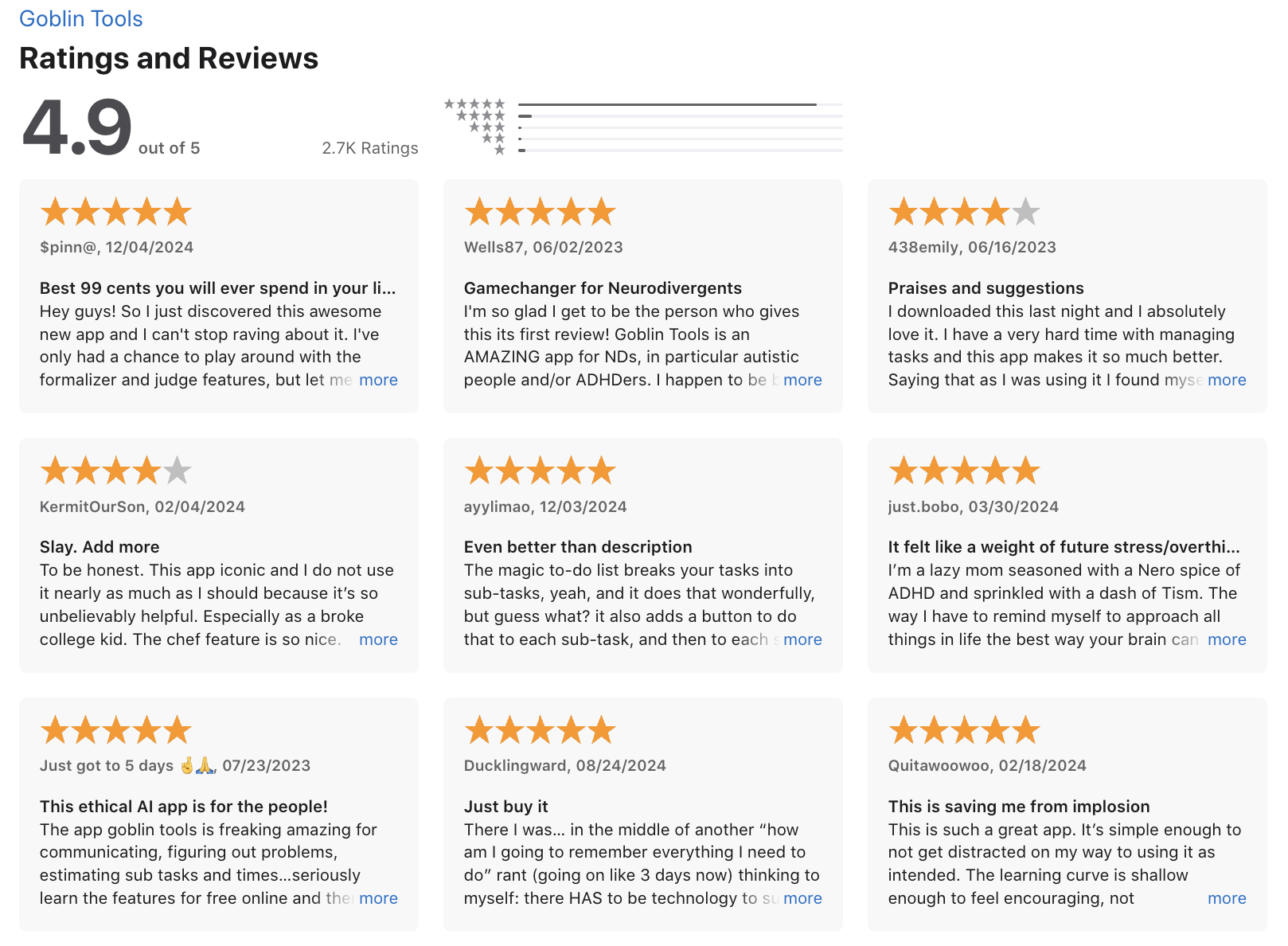
"If you have email anxiety or are just a lil autistic, have a lot to do and don’t know how to do it or even were to start or what to eat or want to ask a question that only god himself or a computer can answer download the app or use your browser. I think all schools and jobs should have this as a resource for neurospicy people it’ll save all of us so much misunderstanding and neurospicy people anxiety." - Anta Touray
"The task I put in task helper kept dissapering, and none of them showed up on the homepage or on the calendar. Many other features don't show up when I tap on them. I bought a life time subscription and now I never want to use this app. Not helpful for ADHD." - pangomynapple
Final Thoughts: You’re Not Lazy - Your Brain Just Works Differently
Beating ADHD procrastination isn’t about fixing yourself. It’s about understanding how your brain works and then using the right tools, strategies, and support to work with it, not against it.
Whether it’s breaking down tasks into micro-steps, rewiring negative thoughts with the ABCDE model, or designing an environment that supports focus, you’re building a system that fits your unique brain.
Even one small win today (like reading this guide!) is proof that change is possible.
The next step? Pick one method or one tool above, try it out, and reward yourself for showing up.
You’ve got this - one step, one dopamine boost, and one decision at a time.
Stay on top of your work and life
FAQ on ADHD Procrastination
1. What is ADHD Procrastination?
ADHD procrastination is more than just putting things off - it’s a neurological struggle with task initiation, time blindness, and emotional overwhelm. People with ADHD often know what they need to do but can’t get themselves to start, especially when the task feels boring, uncertain, or too big.
It’s not laziness. It’s a brain wired for stimulation, constantly pulled by distractions, emotions, or the need for instant reward.
2. What does ADHD procrastination look like in real life?
Here’s how it typically shows up:
- You keep rewriting your to-do list instead of doing the work
- You scroll social media or clean your room right before a deadline
- You wait for the “right mood” or a magical burst of motivation
- You start a task, hit one tiny obstacle, and quit
And then feel guilty for hours or even days.
3. Why is procrastination worse with ADHD?
Because ADHD affects executive function, the mental system that handles planning, prioritization, and self-regulation. This means:
- It’s harder to see time clearly (time blindness)
- Starting feels like pushing through a brick wall (task paralysis, )
- Small tasks don’t feel urgent until there’s a crisis (interest-based nervous system)
- Emotional overwhelm blocks action (emotional dysregulation)
The result? You know the stakes, but your brain won’t cooperate.
4. How can I beat ADHD procrastination?
There’s no one-size-fits-all fix, but these science-backed strategies help:
- Externalize tasks: Use tools that get your ideas out of your head and into a visible system
- Chunk big tasks: Break things into the next tiny step
- Time blocking: Schedule work like an appointment so your brain sees it as real
- Accountability: Tell someone your plan—it boosts follow-through
- Use AI assistants: Tools like Saner.AI help by turning rants into tasks, setting reminders, and breaking projects down automatically
Even better? You don’t have to rely on willpower.
5. Can AI help with ADHD procrastination?
Absolutely. AI tools like Saner.AI are especially helpful because they reduce friction.
Here’s how they help:
- Task from text: Just rant, and the AI creates a to-do list with reminders
- Smart planning: It auto-prioritizes your day based on urgency and context
- Calendar sync: Suggests the best time for each task
- Note linking: Brings up past ideas or files when you need them
It’s like having an executive function coach in your pocket.
6. Is ADHD procrastination the same as laziness?
No. This is one of the biggest myths.
Laziness is a lack of desire to do something.
Procrastination - especially with ADHD - is a disconnect between intent and action. You want to do the task. You just can’t get started, stay on track, or manage the overwhelm. That’s a brain difference, not a character flaw.
7. What tools or apps help with ADHD procrastination?
Here are a few ADHD-friendly tools designed to reduce overwhelm and increase action:
- Saner.AI – Great for task extraction, calendar sync, and organizing notes automatically
- Focusmate – Real-time virtual body doubling
- Structured – Visual daily planner for ADHD brains
- Pomofocus – Simple Pomodoro timer to break the freeze
Choose the one that feels easiest to start with. Momentum matters more than perfection.
8. What’s the best way to plan your day if you procrastinate?
Try this ADHD-friendly structure:
- 3-task max: Pick only 3 priorities to focus on
- Anchor task: Choose 1 small, doable win to start the day
- Use AI: Let tools like Saner.AI create a day plan based on what’s urgent and important
- Time block breaks: Schedule pauses so your brain doesn’t seek them by default
- End-of-day wrap: Review what worked and reset gently for tomorrow
Planning shouldn’t feel like another chore. Done right, it’s a lifeline.
9. Why do I procrastinate even on things I care about?
Because emotion hijacks logic. ADHD brains often associate big, meaningful tasks with pressure, fear of failure, or perfectionism. That emotional weight causes your brain to avoid the task, even if it matters to you.
The trick is to reduce friction and emotional load:
- Make it smaller
- Make it visible
- Make it safe to start
- Let tools like Saner.AI help automate the hard parts
Get over your Procrastination with an AI Assistant