
The Best AI Life Assistant: Manage Notes, Tasks, Email, and Calendar automatically

You already own a note app, a task app, a calendar, and an inbox. That's 4 systems, and somehow none of them talk to each other. What you wrote down on Tuesday isn't what your calendar knows on Thursday, and the email that mentioned both is buried under forty others by Friday.
That gap between four separate apps is where most people's actual life falls through.
I work at Saner.ai. This guide reflects my approach to the topic and includes our product among the suggestions.
Quick answer
The best AI life assistant app is Saner.AI. It manges your work and life notes, tasks, email, and calendar automatically
Saner.AI does this by connecting to Gmail, Outlook, Google Calendar, Slack, and Google Drive, then using its AI to search across all of it, automatically turn a brain dump into tasks, and plan your life automatically.
It's free to start, with paid plans from $8 a month on annual billing, and it was built by a team that includes someone who has ADHD
Why do we need a life assistant? What does a life assistant do?
A life assistant isn't "one more app." It's supposed to be the thing that closes the gap between all the other apps. A thought, a task, and a meeting can belong to the same hour of your day, but nothing about a note app, a calendar, and an inbox invites them to behave that way. Each one was built to do a single job well, not to know about each other.
👉 You may like this post on the Context Switching Statistic in 2026
It's what happens when every tool is built to hold one type of information, and a person is left to be the connector between them.
For some brains, playing connector is harder than for others. CHADD describes executive function as the set of skills that let someone plan, hold information in mind, start a task, and organize the steps toward finishing it, and notes these are exactly the skills ADHD affects. In simple words, people with ADHD are not able to switch between multiple apps and work on them productively.
So what should a life assistant actually do about that? A few specific things:
- Catch whatever crosses your mind before it's gone.
- Turn that capture into something usable, without you doing the filing.
- Read your notes, email, and calendar as one connected picture
- Tell you what needs attention today on its own.
That's the job description.
How Saner.AI works as a top AI life assistant
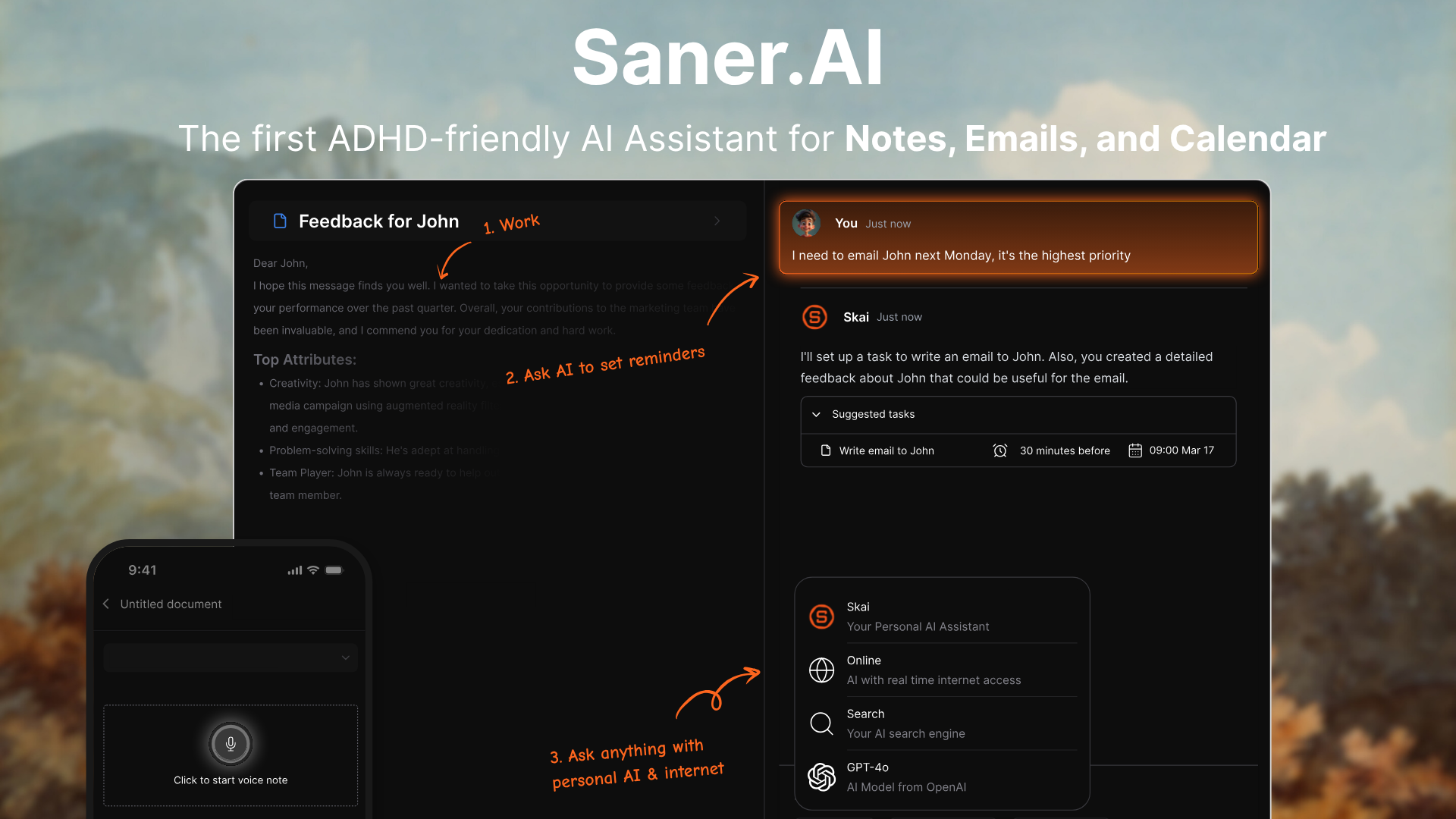
I don't open Saner.AI and wonder what today looks like. It already knows, because it's been reading my calendar and inbox in the background instead of waiting for me to ask.
1) Proactive planning
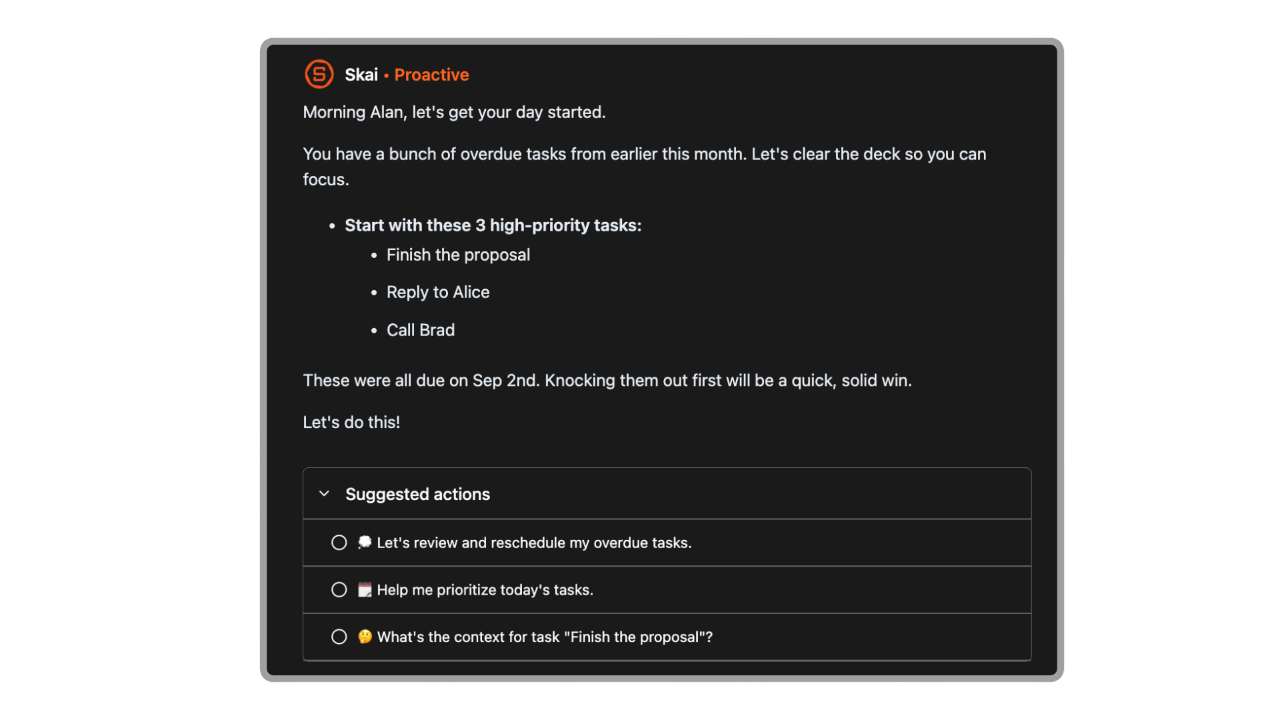
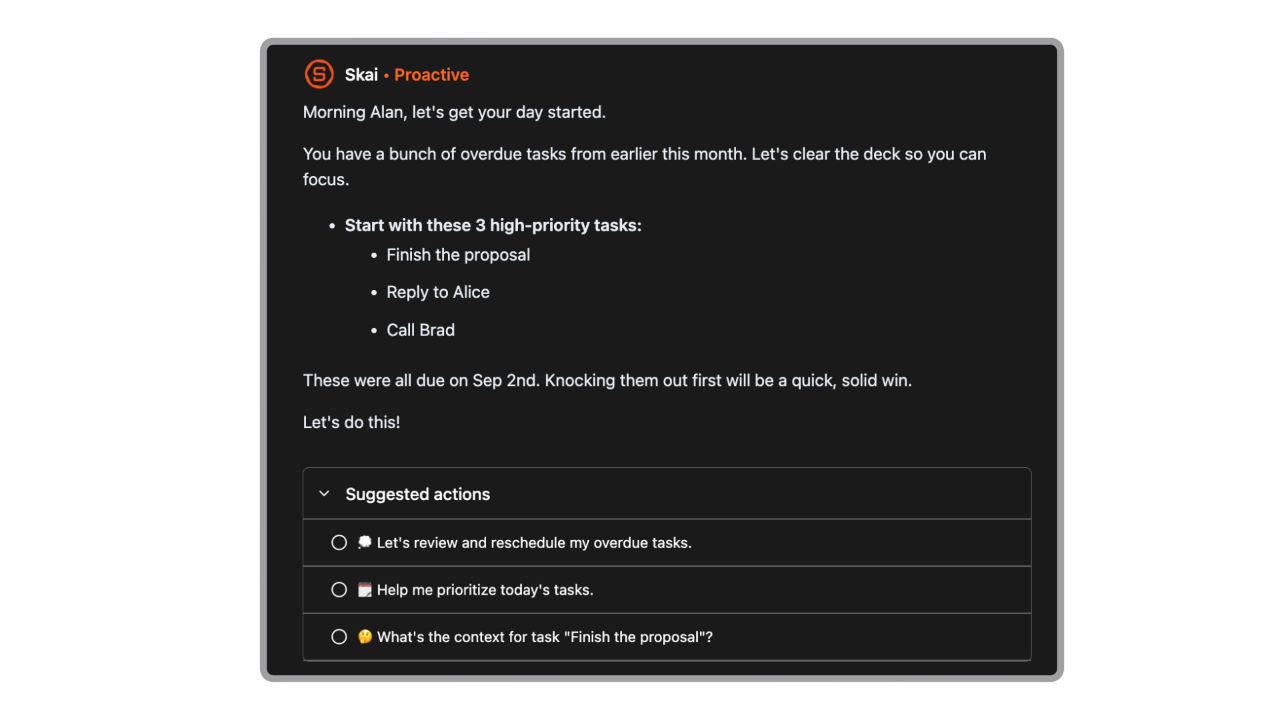
Here's what that looked like on an ordinary Monday: I opened the app, and it had already flagged a client email I'd sent the previous Thursday and never heard back on, pulled the relevant meeting notes into that morning's 10 a.m. call, and put a short list at the top of the day of what actually needed me.
Jerry, an information security manager who uses Saner.AI, described the same thing in a testimonial on Saner.AI's site: "Staying on top of the constant flow of email and multiple calendars is challenging, and so far, Saner is the only AI-based tool that truly feels like a personal assistant... It's saved my butt many times, bringing things to my attention that I forgot about."
2) Brain dump into tasks
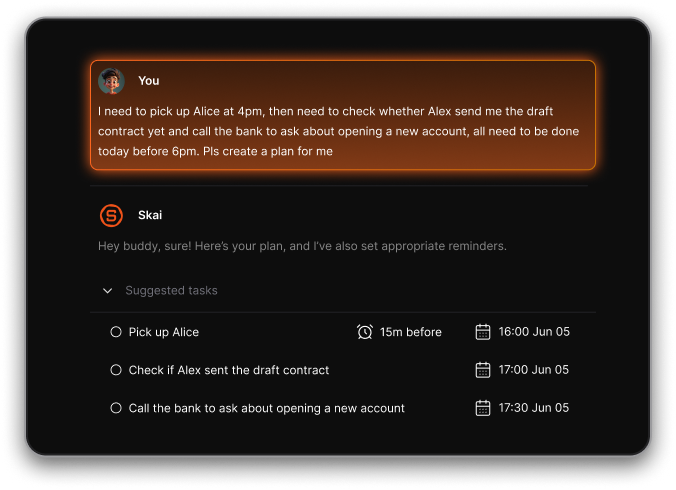
Some mornings my head is loud before I've had coffee. Half a thought about a project, something I need to buy, a line I want to use in an email later. I used to lose most of that by 9 a.m., because writing it down "properly" felt like its own task.
Now I just talk to Skai and dump it all out in one go, unsorted. Skai split that into separate items on its own, flagged the time-sensitive ones, and kept the note somewhere I'd actually see it again closer to the date. I didn't organize any of it. I just said it out loud.
3) AI Calendar
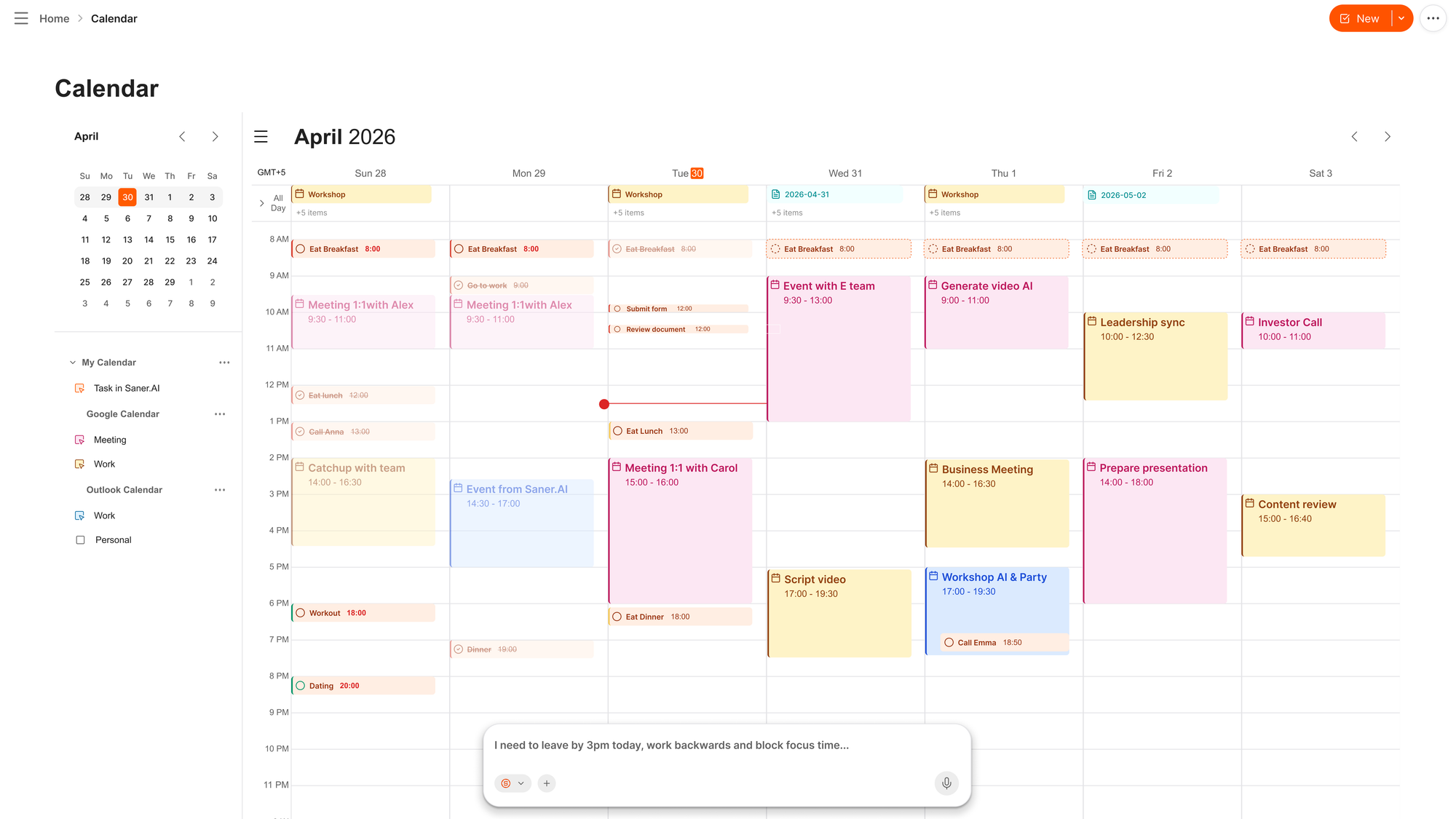
Saner.AI calendar is what it feels like when you have an assistant. Just talk to it, and it reschedules, reprioritizes, and remakes your whole day in 30s
4) Manage your emails
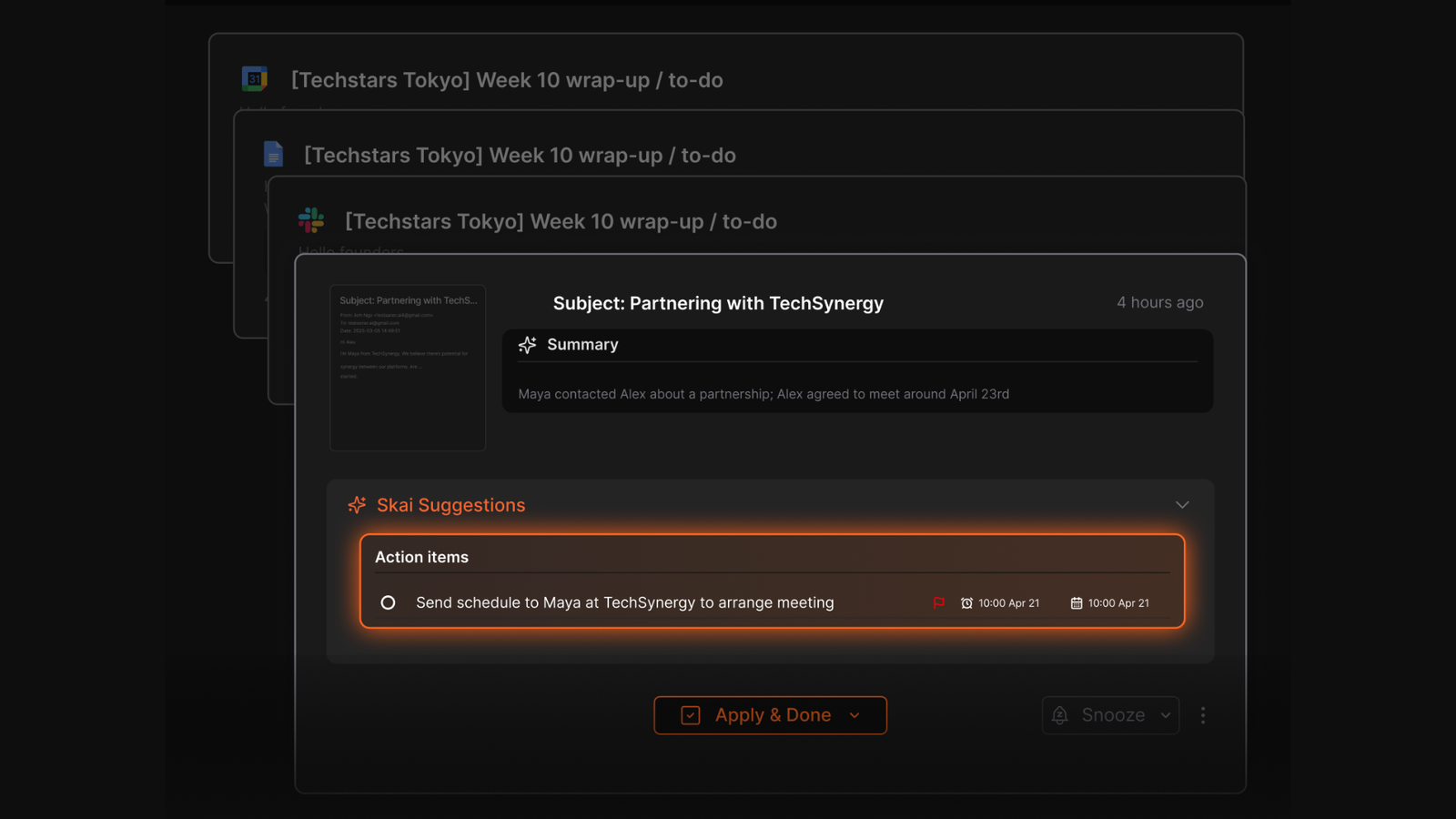
Connected to Gmail, Skai reads my email and pulls out action items as two separate tasks, not just the one I would have caught on a quick read. It became things I could actually act on, instead of things I remembered and things I didn't.
5) Organize notes and tasks automatically
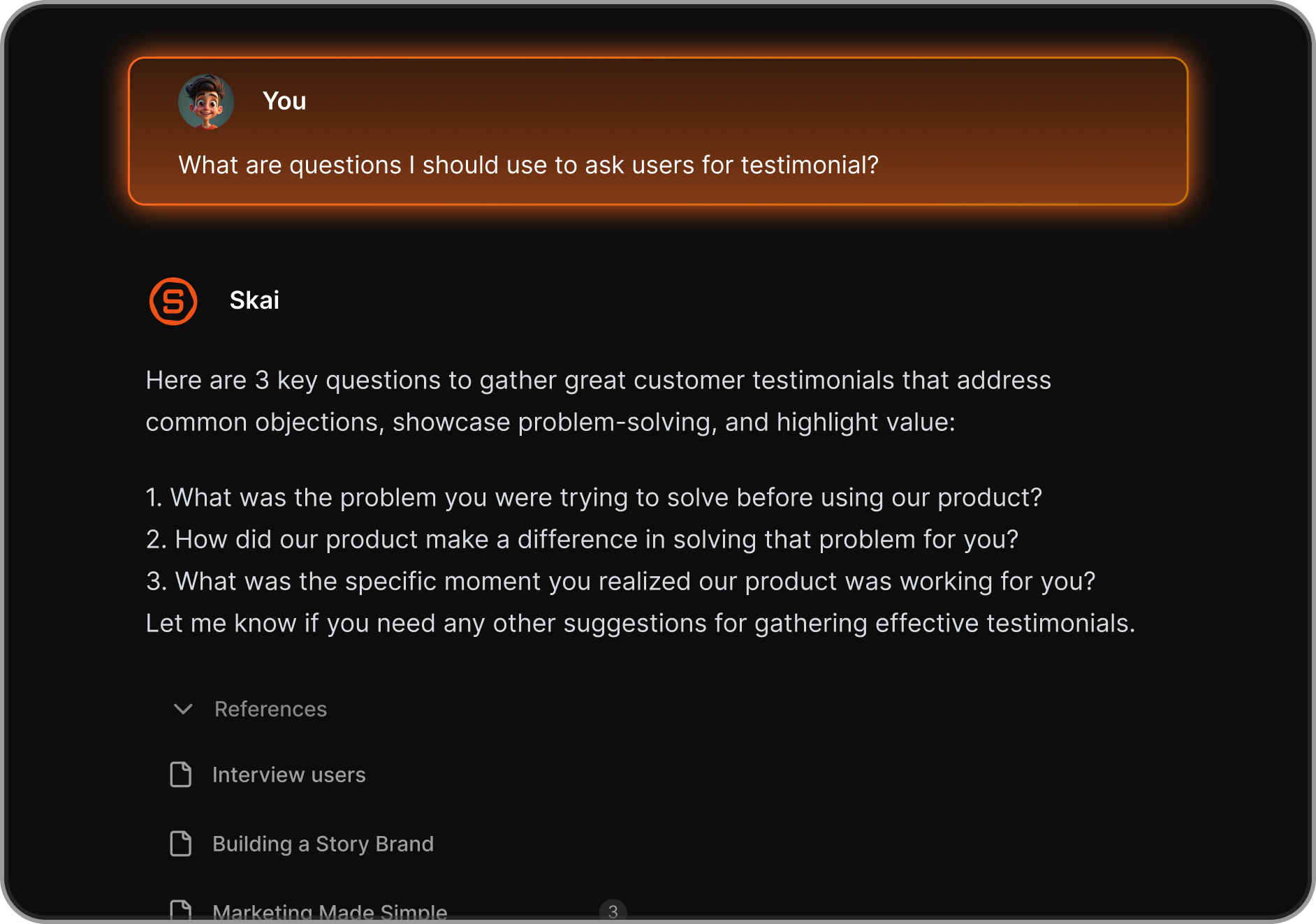
A few days ago I needed a note from a call I'd taken back in the spring, and I couldn't remember what I'd titled it or where I'd filed it. I asked Skai something close to "that call where we talked about pricing changes," and it found the note without me remembering an exact word from it.
That's the part that actually changed how I work day to day. I stopped trying to build a perfect filing system, because the system stopped needing me to build one.
Pricing
- Saner.AI's official pricing page lists a free plan, a Starter tier at $8 a month on annual billing (or $12 month-to-month)
- Standard tier at $16 a month on annual billing (or $20 month-to-month).
Getting started
- Sign up for free, no credit card required.
- Connect the accounts that hold your information, such as Gmail, Outlook, Google Calendar, Slack, or Google Drive.
- Start capturing normally. Write a note, clip a page, or talk to Skai. The organizing happens on its own from there.

Stay on top of your work and life effortlessly
What changes when one thing handles all of it
Nobody can promise you a specific number of hours back, and any post that does is guessing. What the research does support is the mechanism: fewer app switches means fewer 40%-productivity-cost moments, and a system that surfaces things on its own means fewer intentions relying purely on your memory to survive the day.
That shows up in how people describe using it more than in a spreadsheet.
Duy Trieu, who works in product growth, described the shift from three separate apps to one: "I used to use Notion, Google Docs, and Obsidian. But now it is Saner.AI... Read interesting things or self-reflection, draft, Saner structures them, making them usable, easily recall all knowledge I wrote."
Maria, a marketer, called it her "life manager" in a review posted on Product Hunt, saying it "helps a lot to keep all tasks neatly organized" and "boosts efficiency and workflow."
A day with an actual AI life assistant
- Without it:
- You jot a task idea in your phone's notes app during a commute. It sits there. Three days later, you remember it existed but can't find which app it's in.
- Meanwhile, a client email asked you to also loop in a colleague, and you replied to the first half and forgot the second.
- Your calendar has the meeting, but not the context for it, so you're scrambling ten minutes beforehand to remember what it's about.
- With it:
- The commute thought becomes a voice note, tagged and searchable within seconds.
- The client email gets read once, and both action items are captured instead of one.
- Ten minutes before the meeting, Skai already has the relevant notes pulled up because it knows what's connected to what.
- Nothing here required you to remember a system. It required the system to remember for you.
Is an all-in-one AI life assistant the right fit?
It depends on what's actually broken for you.
- A note-only app is great if writing things down is your bottleneck and retrieval already works for you. If you can always find what you wrote, you may not need anything more.
- A calendar-only scheduler solves time-blocking and protecting focus time, but it won't touch your inbox or your notes, so you're still doing the cross-referencing by hand.
- An email-only triage tool clears your inbox, which matters, but the tasks and context buried in old emails don't automatically become part of your broader planning.
- A general-purpose AI chatbot can answer questions well, but it doesn't have your notes, your inbox, or your calendar connected unless you paste them in every time, which defeats the point.
- An all-in-one assistant like Saner.AI trades some depth in any single category for not having to be the glue between four separate systems yourself.
None of these are wrong choices. They're just built for different bottlenecks.
Conclusion - Saner.AI is the best AI life assistant
An AI life assistant like Saner.AI handles capture, retrieval, and follow-through. It's not a replacement for everything else that helps a scattered brain function, such as body doubling- working alongside another person during a task- which has real support behind it as a way to make starting easier, and apps built around that concept are worth exploring separately.
The same goes for working with an ADHD coach on the bigger patterns, or for medication where that's part of someone's care plan. An AI assistant reduces the administrative load. It doesn't replace clinical support, and it isn't trying to.
Stay on top of your work and life effortlessly
Frequently asked questions
What makes an AI app a "life assistant" instead of just a productivity app? A life assistant works across categories, notes, email, calendar, and tasks, rather than handling just one of them. The value is in the connections it can make between a note, a message, and an event, not in any single feature alone.
Do I need to have ADHD to use Saner.AI? No. Saner.AI was built with ADHD-friendly design as a starting point, since that's a population where scattered information and executive function load hit hardest, but the same problems (too many apps, too much to remember manually) affect plenty of people without a diagnosis.
Will this replace my calendar or email client? No. Saner.AI connects to the tools you already use, like Gmail, Outlook, and Google Calendar, rather than asking you to leave them. It adds a layer that reads across all of them.
How much setup does it take? Signing up and connecting an account or two takes a few minutes. There's no complex rule-building required to get value from the basic capture and search features.
Is my data safe? Saner.AI does not train on, sell, or share user data, stores information encrypted in transit and at rest, and offers full data export at any time. Anyone handling sensitive information should still read the current privacy policy directly before connecting accounts.
Stay on top of your work and life effortlessly