
We tested 16 Kimi AI Alternatives. Here are the best 8

You spent two hours uploading documents to Kimi AI, hoping it would summarize your dense research reports. Midway through, the tool choked on the complex formatting, hit its feature limits, and threw back a generic two-line answer that missed the point entirely.
If you are tired of wrestling with Kimi's quirks, you have plenty of other options.
I tested and ranked 8 Kimi AI alternatives, highlighting the single best use case for each so you can find a tool that actually fits your workflow. I work at Saner.ai. I tested it alongside the other tools here and used the same criteria throughout.
Quick guide: What are the best Kimi alternatives?
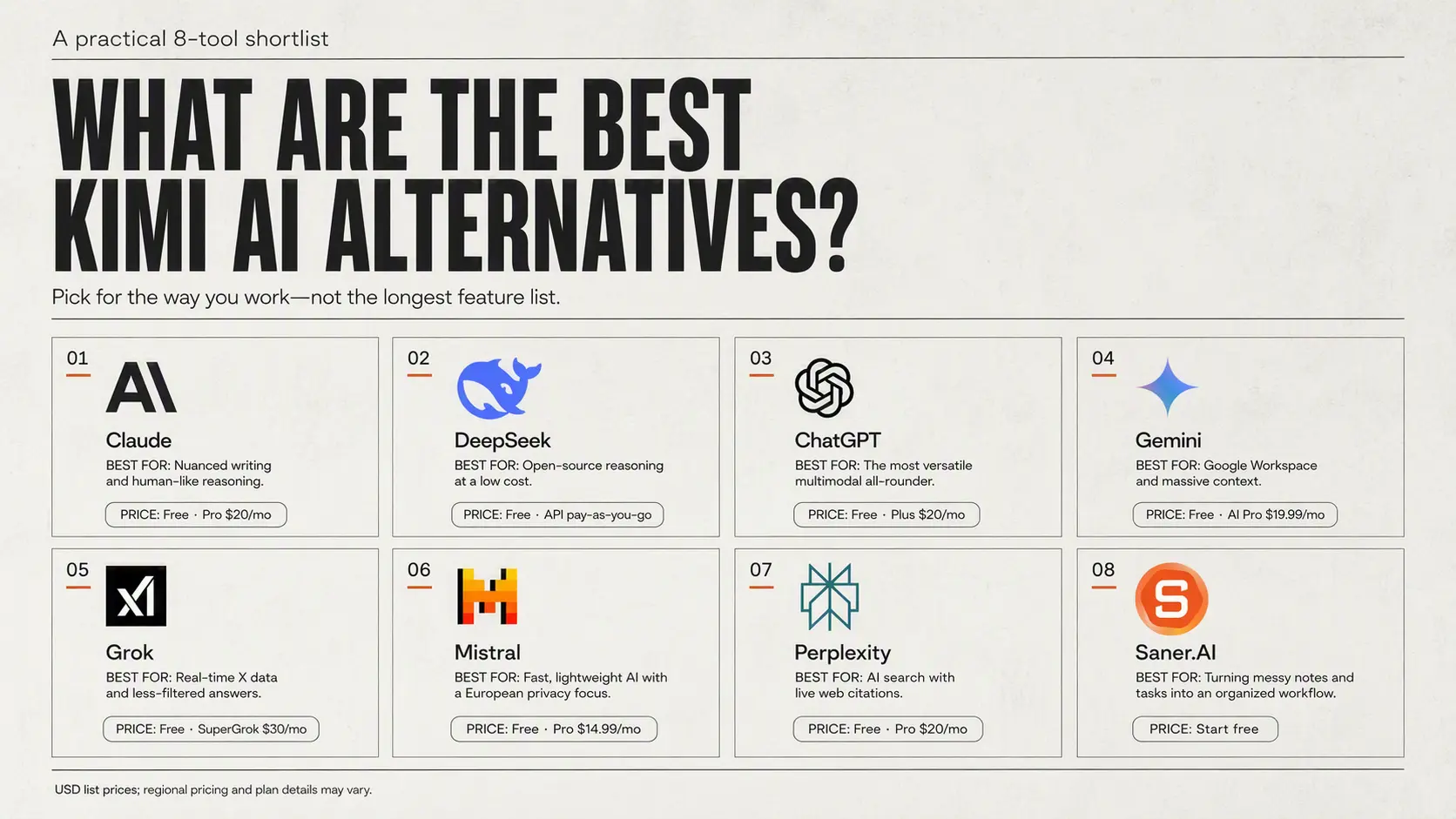
2. You need open-source reasoning at a low cost: DeepSeek
3. You need the most versatile all-rounder with multimodal features: ChatGPT
4. You need seamless integration with Google Workspace and massive context handling: Gemini
5. You want real-time X (Twitter) data access and unfiltered answers: Grok
6. You need lightweight, fast, European privacy-compliant AI: Mistral
7. You need a dedicated AI search engine with real-time web citations: Perplexity
8. You want an assistant that organizes your messy notes and tasks: Saner.AI
How do we evaluate these alternatives?
Testing Kimi AI alternatives isn't just about reading spec sheets or running synthetic benchmarks. I spent weeks putting models through real tasks—parsing massive multi-hundred-page documents, managing complex codebases, and executing long-running agent workflows—to see how they actually hold up under pressure.
Here are the criteria we used to rank them:
- Context window handling: We checked how well each tool processes enormous amounts of information, testing whether they could ingest massive files or large codebases without losing track of details or hallucinating halfway through.
- Task execution and agentic capability: We looked beyond basic chat to evaluate how independently a model handles multi-step, autonomous tasks, tool use, and complex coding workflows.
- Ecosystem integration: We tested how easily these platforms fit into existing developer environments, browser extensions, and enterprise workflows without forcing teams to overhaul their entire setup.
- Pricing and token efficiency: We weighed performance against real-world API and subscription costs, because paying top-tier frontier prices only makes sense if the output quality justifies the bill.
Now let's dive in!
What are the best Kimi alternatives?
Best Kimi alternatives in 2026 are Claude, Gemini, ChatGPT, DeepSeek, Grok, Perplexity, Mistral and Saner.AI
Comparison Table - Kimi AI Alternatives
| Tool | Best feature | Price | Device / access |
|---|---|---|---|
| Claude | Excellent writing, analysis, reasoning, and coding | Free plan; Pro from $20/month | Web, iOS, Android, Windows, macOS |
| Gemini | Strong integration with Google Search, Gmail, Docs, Drive, and other Google services | Free plan; Google AI Pro $19.99/month; Ultra from $99.99/month | Web, iOS, Android |
| ChatGPT | Versatile all-purpose assistant with voice, image generation, data analysis, custom GPTs, and coding tools | Free plan; Plus $20/month; Pro from $100/month | Web, iOS, Android, Windows, macOS |
| DeepSeek | Free access to capable reasoning and coding models | Free consumer chat; API billed separately by usage | Web, iOS, Android |
| Grok | Real-time web and X search, current-event awareness, voice, and image/video generation | Free plan; SuperGrok $30/month; higher tiers available | Web, iOS, Android |
| Perplexity | AI-powered search with source citations and research-focused answers | Free plan; Pro $20/month; Max $200/month | Web, iOS, Android |
| Mistral — Le Chat | Cost-effective AI with strong multilingual performance, coding, and privacy options | Free plan; Pro $14.99/month | Web, iOS |
1. Claude
Anthropic's flagship model handles long-form writing, coding, and heavy reasoning tasks without feeling like a generic text generator.
What it does well
- Long context retention and natural prose: Claude holds onto details across massive prompts without dropping the thread, and its default tone sounds surprisingly human right out of the box. As one developer noted
"Writing-wise, it doesn't have that overly-formal, obviously-AI tone that makes you rewrite half of what it gives you". - verfied review
- Deep codebase and multi-file reasoning: Instead of just giving you quick code snippets, Claude can look at entire project repositories to debug and refactor. A founder highlighted that
"the reasoning holds up on hard, multi-step problems where other models hand-wave". - verified review
- Iterative visual workspace: The Artifacts side panel lets you build, view, and edit code or documents right next to your main chat. Another user on mentioned:
"I just keep iterating in that side panel instead of digging back through chat to find the good version from 3 messages ago". - verified review
What it doesn't do well
- Aggressive message caps: Usage limits kick in surprisingly fast on heavy workdays, which forces paid subscribers into taking unwanted breaks.
Multiple complaints on Trustpilot point to quick session cutoffs, with one reviewer noting they hit a strict limit within just "15 min in the session".
- Poor web search integration: Claude isn't built to be a live web browser or a real-time news aggregator, so it falls short when you need up-to-the-minute web data.
- Non-existent customer support: Getting help for billing glitches or locked accounts is a real headache.
Frustrated users on Trustpilot regularly point out that "customer support only relies on a bot," leaving payment issues unresolved for days.
Who it's actually for: Marketers, software developers, and researchers who care about clean prose and complex reasoning, and who don't mind hitting a few usage ceilings along the way.
2. Google Gemini
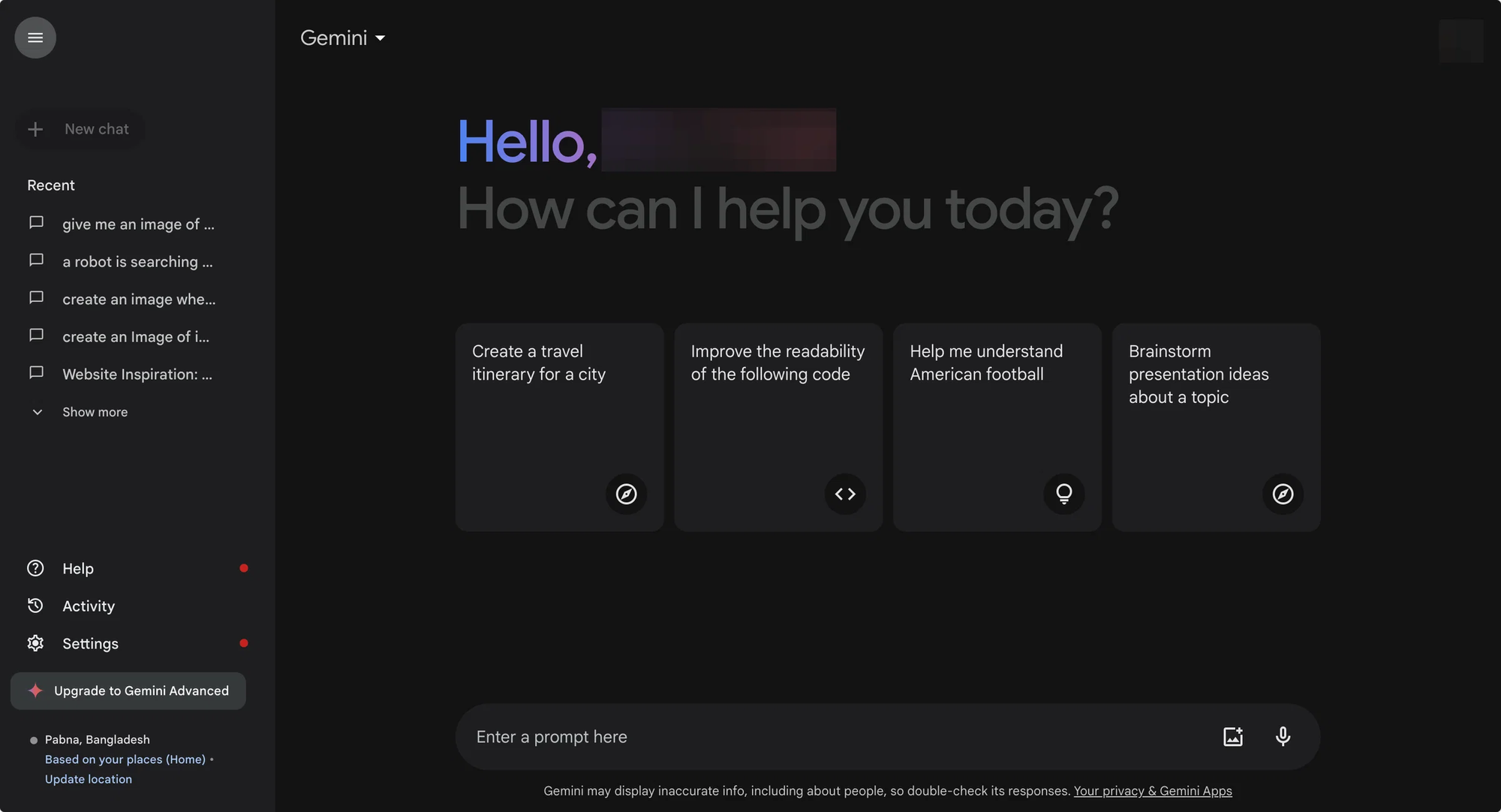
Passively logs your context across sessions so you don't have to keep re-explaining yourself. It tracks key details, personal preferences, and project goals across different chats, then ties those memories directly into your Google Workspace.
What it does well:
- Continuous context retention: Gemini automatically notes job roles, personal coding styles, and ongoing project targets without requiring explicit prompts to save them.
- Direct workspace integration: Memory layers pull background data from your Gmail threads and Google Docs to draft replies that sound like you.
- Chat import option: You can upload your past chat exports from other providers, which saves you from training a new assistant from scratch
What it doesn't do well:
- Over-clipping details: The auto-memory function occasionally saves temporary notes or obsolete project details
- Strict admin limits: Workspace admins frequently block memory and data-saving features on enterprise accounts for compliance reasons.
- Inconsistent output tone: When drawing on older memories, it sometimes shifts tone midway through a response or misses specific formatting rules you set earlier.
"Gemini can still make logical errors, lose context during long conversations, and occasionally hallucinate... [It] can get verbose, and there are moments where it misses the nuance of what I asked, especially when I'm specific about tone." — Verified review
Who it's actually for: People heavily invested in the Google ecosystem who want an AI tool with memory that picks up on past habits without requiring manual setup.
3. ChatGPT
The default standard for general conversational AI and workflow automation. It keeps track of user preferences, custom instructions, and long-term project contexts, then updates its internal memory as you chat.
What it does well:
- Flexible persistent memory: ChatGPT passively catches details from your conversations and applies them across new chats without requiring manually saved prompts.
- Massive integration network: With custom GPTs, a built-in code interpreter, and extensive web connectivity, it acts as a central operational hub rather than just a simple chat box.
- Solid multimodal toolset: It handles voice processing, image generation, and live canvas editing natively, keeping everything under one roof. Verified review quote on overall capability:
"It has become one of my most-used productivity tools, helping with everything from writing and marketing to research, planning, and everyday questions."— Real Estate Professional on Capterra
What it doesn't do well:
- Memory updates can be unpredictable: The automatic memory system sometimes saves odd, temporary details or forgets subtle nuances over time, requiring periodic manual cleanups in your settings.
- Strict context limits compared to Kimi: While Kimi focuses on processing massive single files and huge context windows, ChatGPT can hit limits on extremely large documents or massive codebases. Verified review quote on context windows:
"Users find the limited context window of ChatGPT frustrating, affecting its ability to process extensive information effectively."— Verified Review
- Heavy rate limits on high-tier models: Even on paid tiers, heavy usage of reasoning models can result in sudden cap limits during busy hours.
Who it's actually for: Users looking for a general-purpose AI assistant that learns about them over time, rather than a specialized tool built strictly for long-document analysis.
4. DeepSeek
DeepSeek offers open-weight intelligence and deep step-by-step reasoning without forcing you to pay a monthly subscription. It handles long context windows, dense technical problems, and long-term conversation tracking at zero cost.
What it does well:
- Deep logic and coding: DeepSeek breaks down complex programming logic, architectural decisions, and math problems with clear step-by-step reasoning.
"It provides strong reasoning and coding support at a very accessible cost... especially useful when I need step-by-step reasoning for architecture decisions". - Verified reviewers
- Massive context window: The model supports up to a 1M token context window, allowing you to feed full codebases, books, or dense research PDFs into a single session without losing track of details.
- Open weights and self-hosting: Developers can pull open-weight versions off Hugging Face to host locally, keeping proprietary data entirely on their own hardware.
- Truly free access: The web interface offers generous usage limits and reasoning capabilities without a $20 monthly paywall.
What it doesn't do well:
- Rigid creative writing: It struggles with tone variation, brand voice, and long-form storytelling compared to tools built for creative writing.
- Server instability during peak hours: The free interface often encounters timeouts or slow response generation when global traffic surges.
- Content moderation boundaries: Politically sensitive topics and specific geographic inquiries receive filtered or deflective answers due to Chinese regional compliance requirements.
Who it's actually for: Developers, researchers, and cost-conscious users who need a powerful logic and coding assistant without paying for a monthly subscription.
5. Grok
Grok handles real-time information processing differently than traditional chat models. It plugs directly into the live data pipeline on X, letting you track breaking developments, public sentiment, and tech conversations seconds after they hit the web.
What it does well
- Live social search and trend analysis: Grok checks real-time posts across X to map out emerging news and shifting narratives instantly.
As noted in a verified review on G2, "It consistently highlights what seems true and makes research much easier by providing data I find accurate."
- Unfiltered and direct response style: Unlike models that hide behind excessive politeness, Grok delivers quick, blunt answers without standard corporate phrasing.
A user shared: "I like how grok gives direct and practical answers without unnecessary sugarcoating."
- Strong technical reasoning and coding support: Its core architecture handles complex logic, math problems, and quick scripts efficiently.
What it doesn't do well
- Inconsistent performance and service limits: High server load frequently leads to message caps or unexpected outages for active users.
One user mentioned: "Grok has become unreliable for paying users. They reduced the video generation limit to about 25 clips per day at 720p, which is not enough for serious creative work."
- Heavy reliance on unverified social data: Since part of its knowledge draws directly from public posts, answers can occasionally reflect rumor or unverified chatter instead of confirmed facts.
- Tightly bound to one ecosystem: If you aren't active on X or don't care about live social monitoring, much of its core appeal disappears.
Who it's actually for: Researchers, journalists, and power users who need live social insights and straight-to-the-point answers without standard AI guardrails getting in the way.
6. Perplexity
Perplexity functions like a hybrid search engine and research assistant, pointing directly to web sources while giving you real-time answers. It drops heavy long-form AI chattiness to focus on facts and citations.
What it does well:
- Flexible model access: The paid tier lets you run queries using models from Anthropic and OpenAI instead of forcing you into a single system.
"The ability to quickly verify information and access multiple AI models enhances its utility for various tasks." — Verified Review
- Deep research and source aggregation: It saves you from opening dozens of browser tabs by summarizing technical topics, news, and market data quickly.
- Live citations and link tracking: Perplexity backs up almost every statement with direct, clickable web links.
What it doesn't do well:
- Mediocre long-form writing: It struggles to generate nuanced long-form content, creative stories, or long scripts compared to dedicated writing tools.
- Inconsistent source quality: Sometimes it relies too heavily on weak, outdated, or SEO-bloated websites for its context.
- Limited conversational depth: It operates primarily as an answer engine, making it less helpful for ongoing brainstorming or unstructured, back-and-forth creative discussions.
Who it's actually for: Researchers, students, and professionals who need fast, source-checked facts without dealing with standard search engine ad bloat.
7. Mistral AI
Mistral AI brings an open-source, developer-friendly approach to the conversational AI market. While models like Kimi focus heavily on massive context windows for file processing, Mistral’s platform (Le Chat) centers on lightweight efficiency, native multilingual reasoning, and strict data privacy.
What it does well:
- Strong privacy and data control: Mistral explicitly commits to data minimization and GDPR compliance, making sure your chats aren't fed back into training pipelines.
- Speed and open-model efficiency: Built on lightweight MoE (mixture-of-experts) architecture, it delivers remarkably fast responses without relying on standard cloud overhead.
- Enterprise accuracy for complex files: The underlying models handle dense text, technical formatting, and multilingual documents with impressive precision.
What it doesn't do well:
- Strict rate limits on free tiers: Free access to larger models like Mistral Large gets capped fairly quickly during peak hours.
- Less consumer-friendly customization: Setting up custom workflows or complex integrations usually requires writing code rather than clicking through a simple menu.
Who it's actually for: Developers, privacy-conscious users, and technical teams who want a fast, secure Kimi alternative without handing their private data over to giant tech corporations.
8. Saner.AI
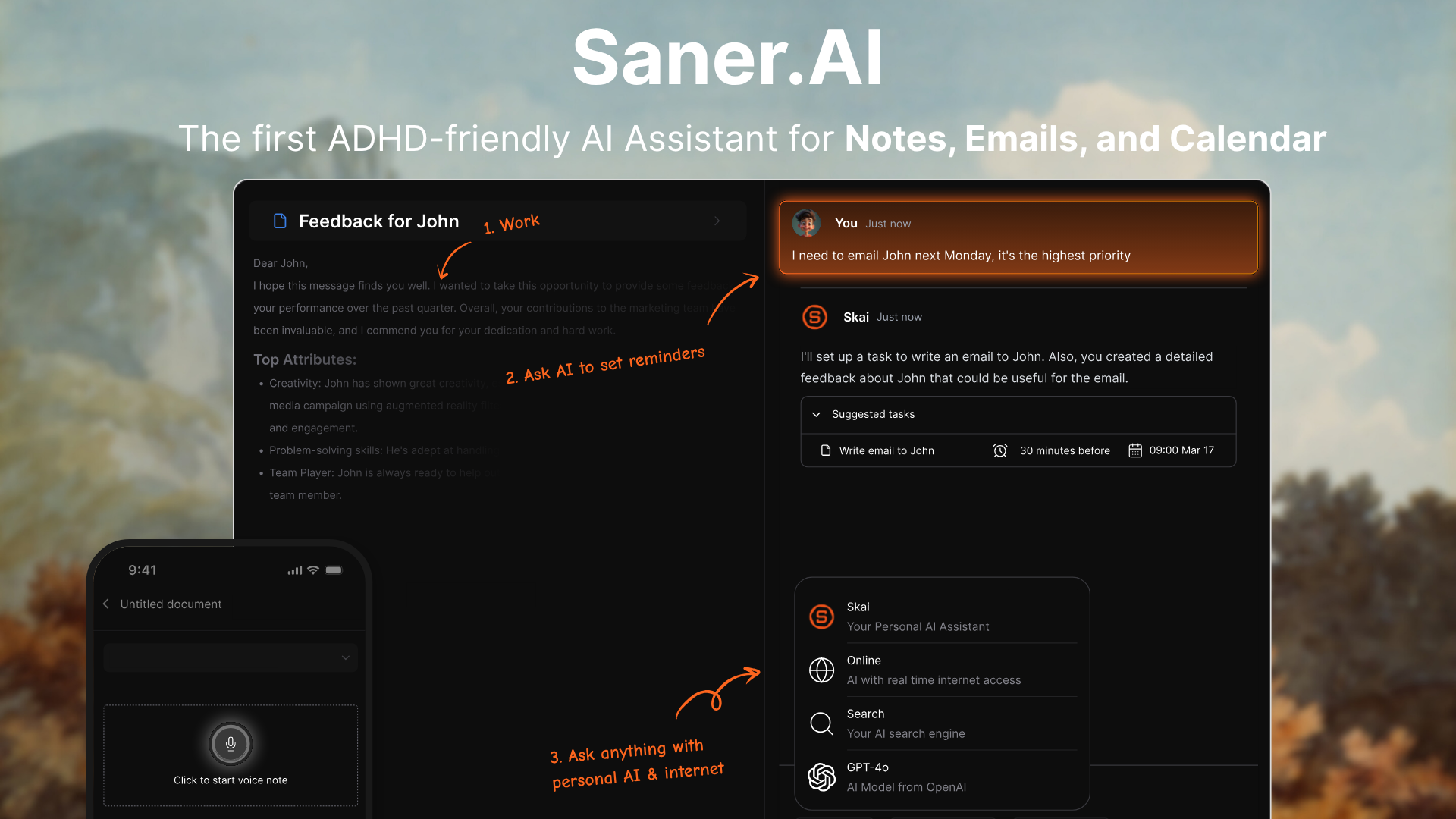
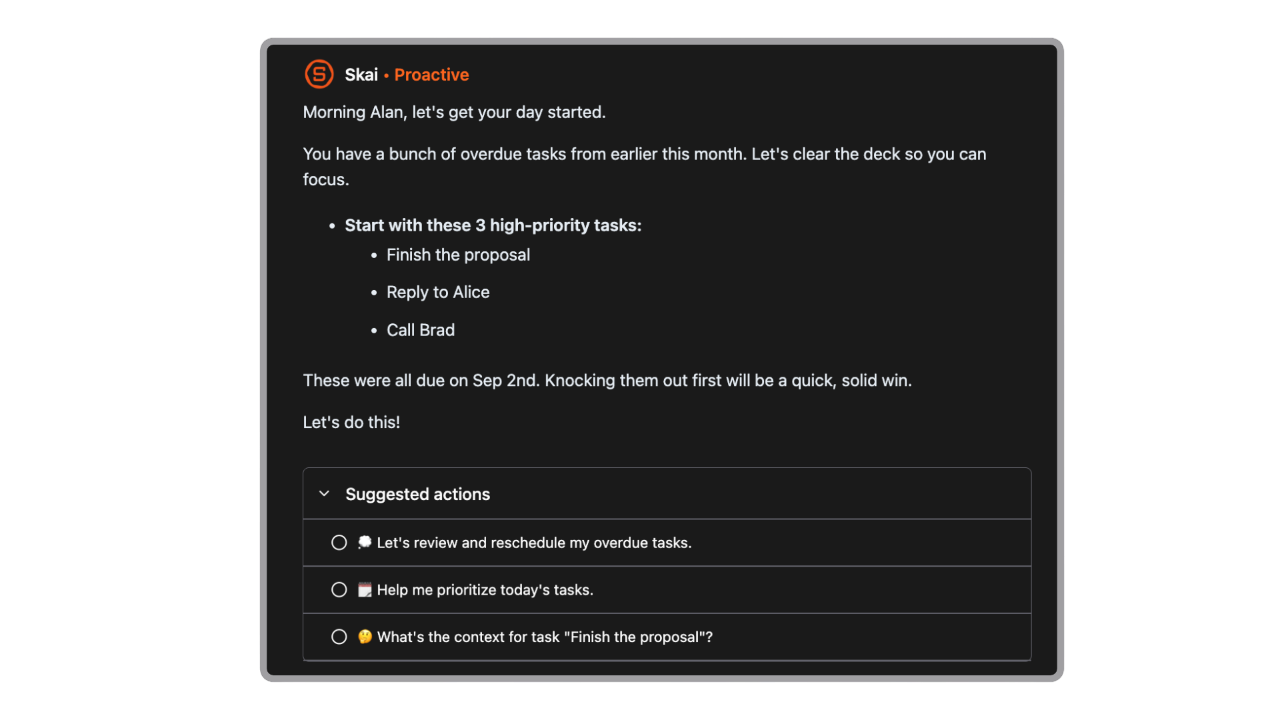
Saner.AI serves as an ADHD-friendly personal AI assistant built for professionals who want more than an AI chatbot like Kimi AI. The app searches, synthesize, and surfaces key details using natural language.
Key feature
- Skai personal AI assistant
I used Skai to query my personal notes and connected sources, which saves time compared to manual folder sorting. The assistant connects related concepts across different formats, turning disconnected thoughts into clear responses.
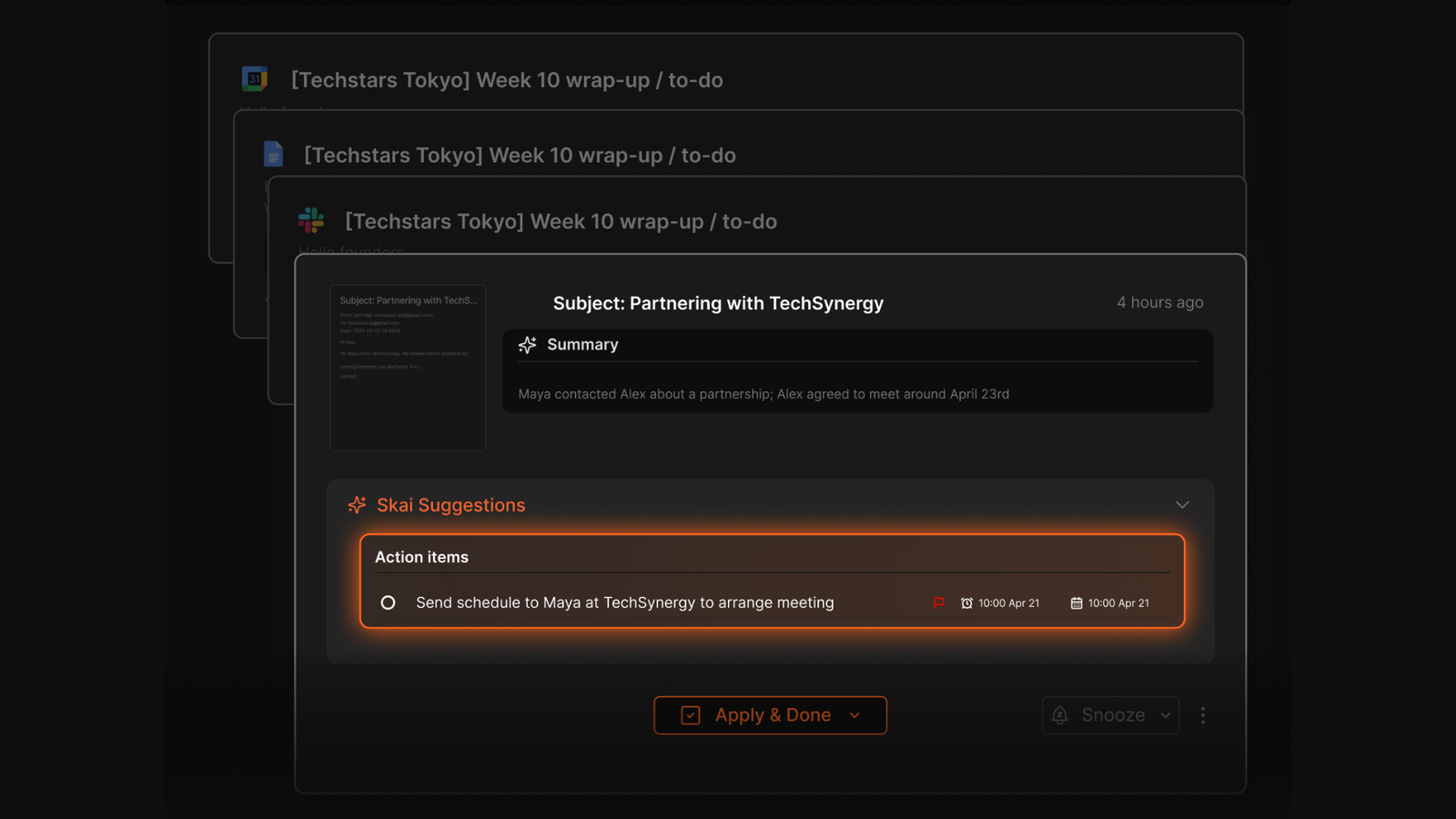
- Automatic task extraction
I used this feature to convert rough thoughts into actions. The app scans incoming emails, meeting notes, and daily entries to surface actionable items directly in your inbox without extra sorting effort.
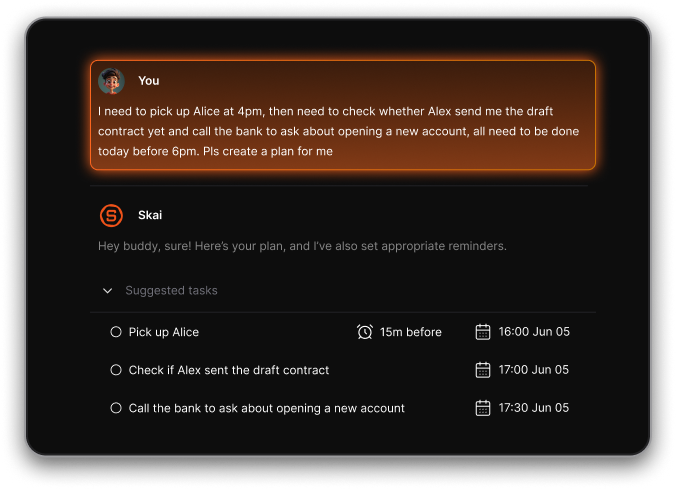
- Brain dump to tasks
You can type, voice your messy thoughts, to-dos, and Skai will arrange them into a perfect plan with time slot, reminders.
- Intelligent document import
I tried uploading various project files, including PDFs, Markdown files, and Word documents. The system processes these sources together, giving you a functional second brain without requiring tag setups or complex folder trees.
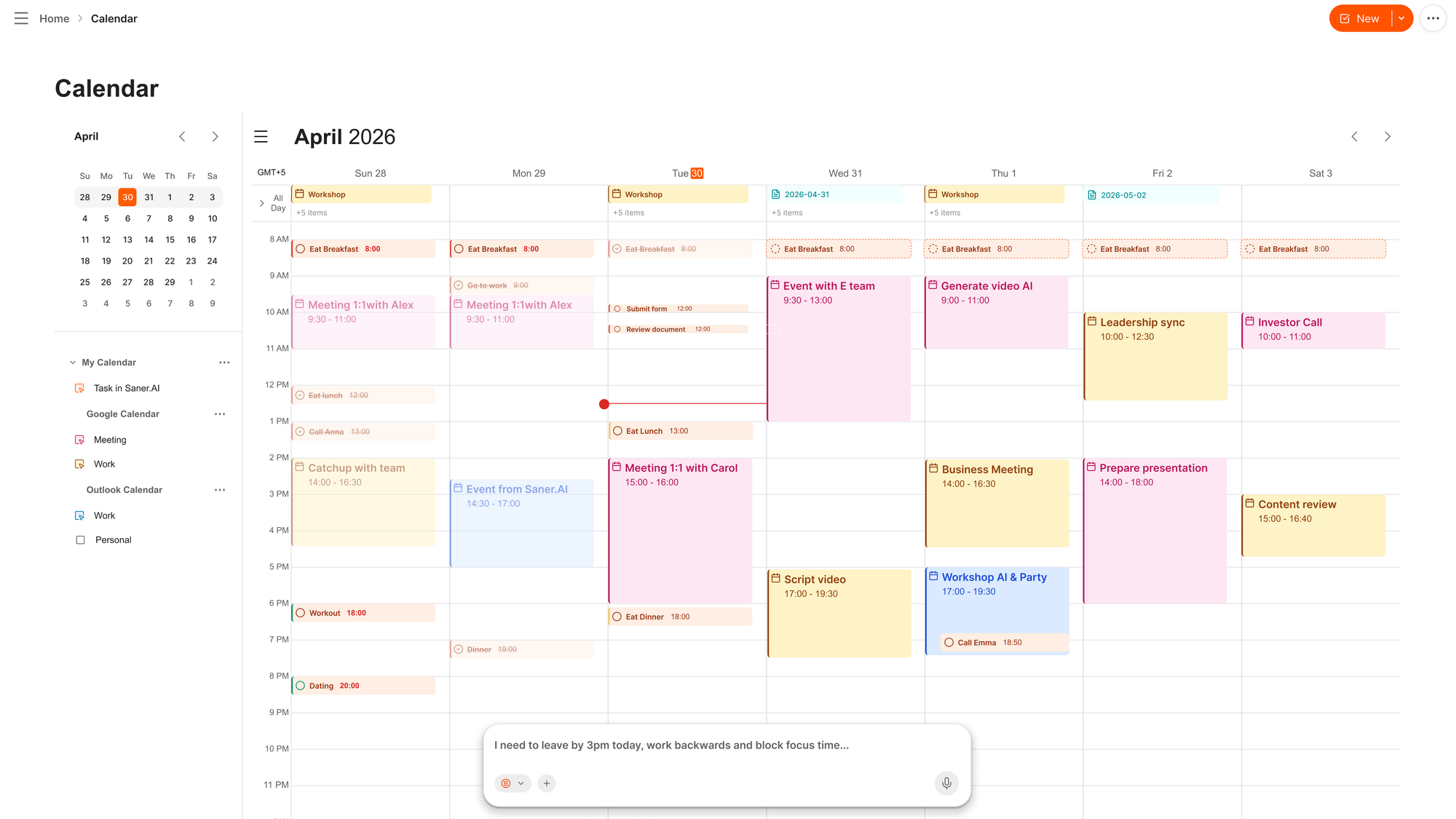
- AI calendar
I can just chat and the AI automatically schedules my tasks, move my day around my priorities.
Pros:
- I appreciate how the clean workspace cuts out unnecessary distractions so I can focus on writing.
- The AI links related notes automatically without forcing me to manage tag structures manually.
- I like having a single search bar to query emails, documents, and quick thoughts at the same time.
Cons:
- I dislike the strict 10MB per file size limit when trying to upload longer digital books.
Who is it best for
- Saner.AI works best for knowledge workers, researchers, and professionals with ADHD who want an effortless way to capture, connect, and search through scattered thoughts without spending hours organizing folders.
Pricing table
| Plan | Monthly price | Yearly price | Key limits and features |
| Free | $0/mo | $0/mo | 30 AI messages/mo, 100 notes limit, 1MB max file upload size. |
| Starter | $12/mo | $8/mo | 30 AI messages/day, 1,000 notes limit, 5MB max file upload size. |
| Standard | $20/mo | $16/mo | Unlimited AI messages, unlimited notes, 10MB max file upload size. |
What people say about Saner.AI
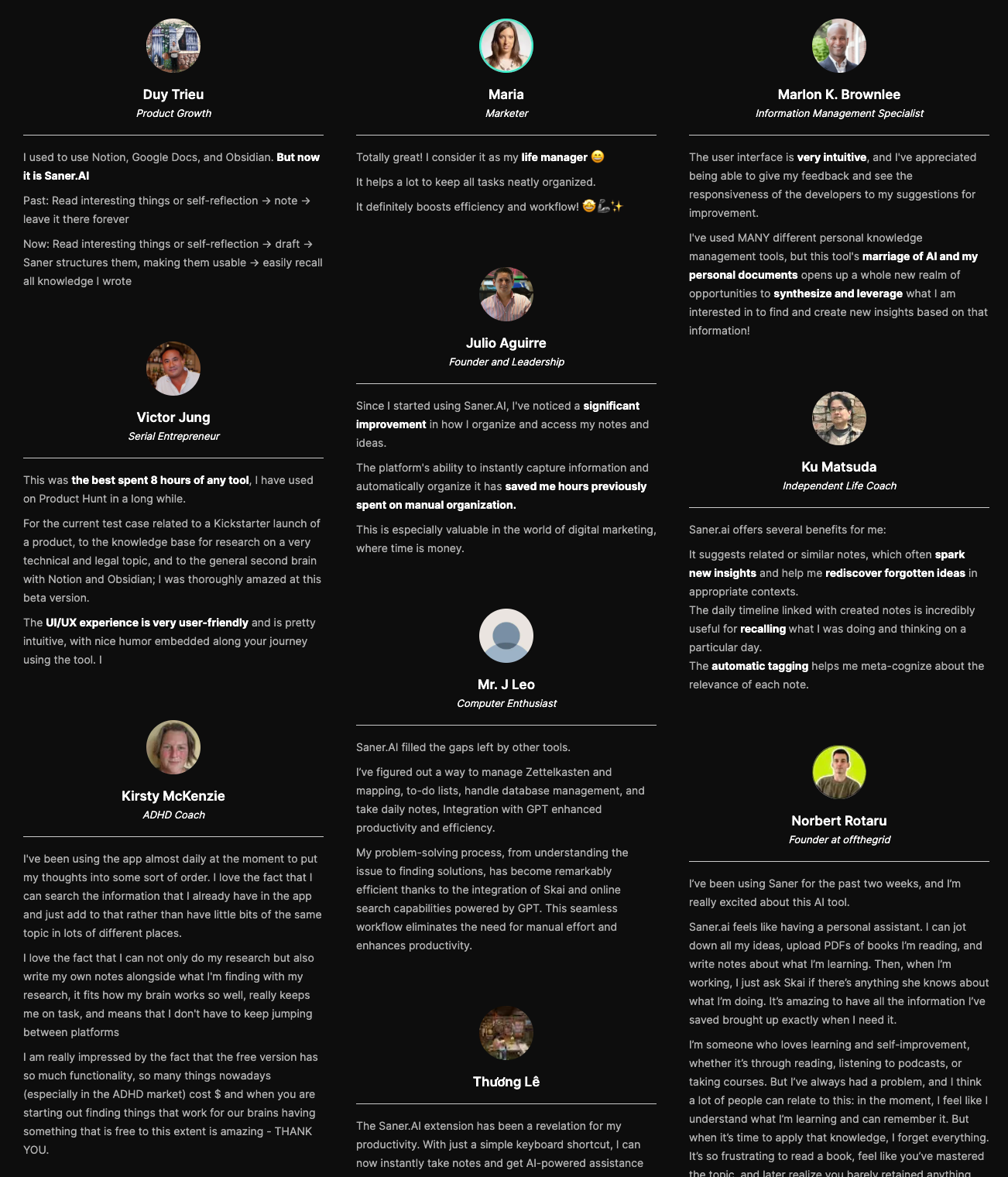
"I've used MANY different personal knowledge management tools, but this tool's marriage of AI and my personal documents opens up a whole new realm of opportunities to synthesize and leverage what I am interested in..." — Verified Review
How to get started
- Step 1: Create your account on the main website and install the browser extension.
- Step 2: Sync your data sources, such as Google Drive or email accounts, to pull your background notes together.
- Step 3: Open the Skai chat panel to search your files or organize your daily tasks using plain English.

Stay on top of your work and life effortlessly
Conclusion - Picking the right Kimi AI alternative comes down to what you actually need to do.
- If long context processing and reasoning are top priorities, Claude handles deep logic and long documents well.
- ChatGPT and Gemini remain solid all-rounders for broad research and writing, while Perplexity works best as an active search engine replacement.
- Grok brings real-time social context to the table, DeepSeek offers capable open-weight models for technical tasks, and Mistral provides lightweight, efficient performance.
- If you want something beyond a basic chatbot, Saner.AI takes a different approach. Instead of sitting in a separate tab waiting for prompts, it plugs into your existing notes, tasks, and emails to help organize your workload automatically.
I've found it particularly useful when I want to synthesize stored information without constantly switching contexts.
Stay on top of your work and life effortlessly
FAQ
1. Is Kimi AI free?
Yes, you can use Kimi AI for free. Moonshot AI offers a zero-cost plan called Adagio, which gives you unlimited basic chat, web search, and file uploads without needing a credit card. You only hit paywalls if you run heavy agent tasks, use Kimi Code, or exceed quotas on deep research features, which require paid tiers starting around $19 a month.
2. What is Kimi AI best for?
Kimi AI shines at processing massive documents and long-form context. Its native ability to handle up to 256K tokens means you can drop in entire books, massive code repositories, or hundreds of pages of research without chunking the text. It tracks detailed references across long files better than most standard conversational assistants, making it ideal for deep reading and research.
3. Is Claude better than Kimi?
It depends on what you need. Claude generally wins on natural, nuanced writing and complex reasoning tasks. Kimi, however, holds its ground with massive context handling and stronger built-in web search features on its free tier. If you want pure creative synthesis, go with Claude. If you are analyzing massive Chinese-English technical files for free, Kimi often feels more practical.
4. Is Saner.AI free?
Saner.AI has a permanent free plan, but it comes with monthly limits. If you plan to use it as your main workspace, though, you will likely need the $12 monthly starter plan.
5. Why are users looking for Kimi AI alternatives in 2026?
While Kimi is exceptional with long context, some users run into localized server latency, strict rate limits on advanced agentic tasks, or region-specific access blocks. Others simply need features Kimi does not focus on, like direct canvas-style project management, offline local storage, or specialized coding environments found in alternative tools.
6. What is the best open-source alternative to Kimi AI?
DeepSeek is the strongest open-source option available right now. Models like DeepSeek-V3 offer top-tier reasoning and coding performance while remaining fully open for local deployment or custom API hosting. It gives developers complete control over their data without relying on Moonshot AI's servers or regional access rules.
7. Which Kimi AI alternative is best for long-document analysis?
Gemini 3 is the closest direct competitor for heavy reading tasks. Its context window extends up to two million tokens, easily beating Kimi's 256K limit. If your main goal is uploading massive video files, audio recordings, or whole libraries of PDFs at once, Gemini handles that volume with less slowdown.
8. Can I use Kimi AI for coding tasks?
You can, but it works best if you use Kimi Code or its dedicated developer features. For basic scripts, the standard model works fine, but dedicated tools like Claude Sonnet 5 still outperform Kimi when writing complex multi-file software applications or debugging large codebases.
9. What is the best alternative to Kimi for personal productivity and note-taking?
If you want an AI that organizes your personal thoughts rather than just analyzing long files, Saner.AI or Notion AI work much better. They integrate directly with your daily calendar, notes, and task lists, focusing on reducing mental clutter instead of processing standalone text files.
10. Are Kimi AI alternatives safe for enterprise data?
It depends on the platform you choose. While Kimi's consumer terms focus heavily on personal and academic research, enterprise alternatives like ChatGPT Team, Claude Enterprise, or self-hosted models offer dedicated data privacy agreements. These privacy guarantees ensure your corporate documents are never used to train future public AI models.
Stay on top of your work and life effortlessly