Proactive AI Assistant: We Tested The Best 3 In The Market
The best Proactive AI Assistants are: Saner.AI, Gemini Spark, and ChatGPT Pulse

In this guide, we’ll walk through what proactive AI assistants are, how they differ from reactive ones, and review the best proactive AI tools. This is a new field in AI, so only a few AI tools have this feature.
Whether you're a busy entrepreneur, a multitasking executive, or someone with ADHD trying to stay on track, this post is for you.
Quick Answer: What are the Best Proactive AI Assistants right now?
- Gemini Spark — Best for people deep in the Google Workspace ecosystem who want a 24/7 agent running in the cloud. $100/month (AI Ultra, US-only beta).
- ChatGPT Pulse — Best for users who want a smart morning briefing built from their own history and interests. $200/month (ChatGPT Pro).
- If budget matters and you need something that works across your notes, calendar, and email right now, Saner.AI is the clearest starting point.
- If you live in Google Workspace and want full task delegation, Gemini Spark is worth watching.
- If you are already a ChatGPT Pro subscriber, Pulse adds real daily value at no additional cost.
1) What Is a Proactive AI Assistant?
- Proactive AI acts before you ask. It nudges you to follow up on that email, blocks time on your calendar for an unfinished draft, or reminds you that your client meeting tomorrow still needs a prep doc.
- Reactive AI waits for you to act. You prompt ChatGPT to summarize something or ask Gemini to write an email.
Think of it this way:
| Assistant Type | Example Behavior |
|---|---|
| Reactive | “Summarize this article” (you ask first) |
| Proactive | “You saved this article yesterday—should I summarize it for you now?” |
2) Why People Are Searching for the Best Proactive AI Assistant
Cause we’re drowning in tools and information.
- You’ve got tasks in Notion, emails in Gmail, deadlines in Asana, and files in Drive.
- You start your day reacting to pings, meetings, and stress.
- You forget to follow up, or worse, don’t even realize what you missed.
That’s why proactive AI is taking off. It’s not about doing more. It’s about doing the right things - with clarity and calm.
The benefits of AI are huge
- 🧘 Less mental load from juggling tools and remembering tasks.
- ⏰ Better time-blocking without you needing to set it up manually.
- ✉️ Timely follow-ups that don’t fall through the cracks.
- 🧠 Especially helpful for ADHD-prone professionals who struggle with context switching.
3) How I Chose These Tools
I tested tools over multiple weeks across note capture, calendar management, email triage, task creation, and unprompted suggestions in real work conditions. No controlled lab settings.
The criteria:
- Proactivity depth — Does it actually surface things you didn't ask for, or is "proactive" just a marketing word on a chatbot?
- Context accuracy — Does it use your real calendar, email, and past notes, or generic training data?
- Latency of insight — How quickly does it flag something important after it enters your inbox or notes?
- Privacy and control — Can you choose what it reads and what it ignores?
- Pricing clarity — Is the cost honest and proportionate to what you get?
- Workflow fit — Does it actually fit into how people work, or does it require you to change your entire system to use it?
What Are The Best Proactive AI assistants?
The best Proactive AI Assistants are: Saner.AI, Gemini Spark, and ChatGPT Pulse
Comparison Table: Best Proactive AI Assistant Tools
| Tool | Core Proactive Feature | Best For | Free Plan | Paid From | Platforms |
|---|---|---|---|---|---|
| Saner.AI | Proactive task surfacing, daily planning, email + calendar nudges | Knowledge workers, ADHD users, solopreneurs | Yes (30 AI requests/month) | $8/month | Web, iOS, Android, Chrome |
| Gemini Spark | 24/7 autonomous cloud agent acting across Google Workspace | Google Workspace power users | No | $100/month (AI Ultra) | Web, Gmail, macOS (coming) |
| ChatGPT Pulse | Overnight research + personalized morning briefing cards | ChatGPT Pro subscribers, morning planners | No | $200/month (ChatGPT Pro) | Mobile (iOS, Android) |
1. Saner.AI - Proactive AI Assistant for ADHDer
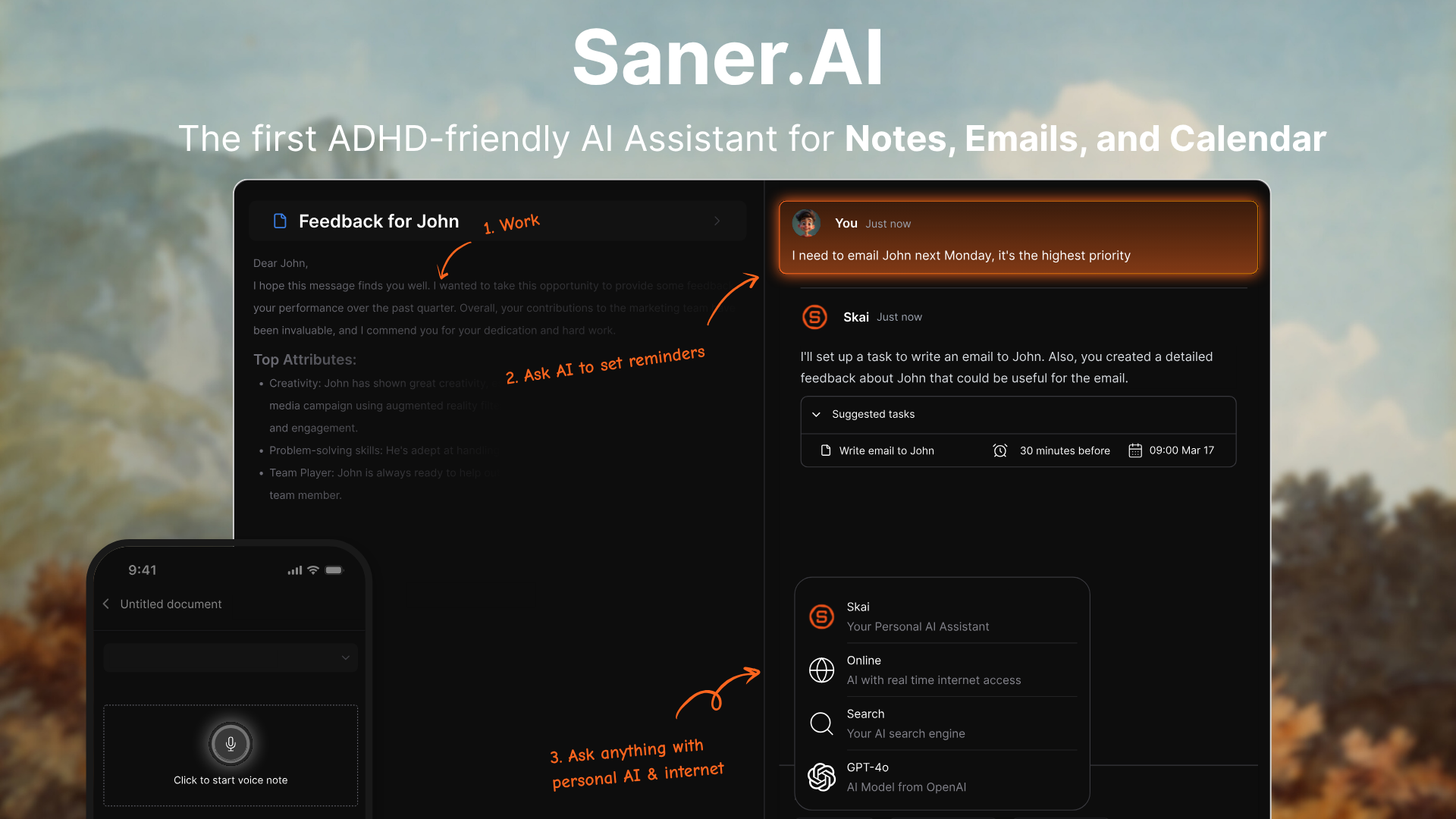
Saner.AI is a proactive AI assistant designed to function like a second brain. Instead of relying on your memory to recall where something is or what to do next, it helps organize notes, tasks, emails, and calendar events automatically - so you can focus less on managing tools and more on doing actual work.
Key Features:
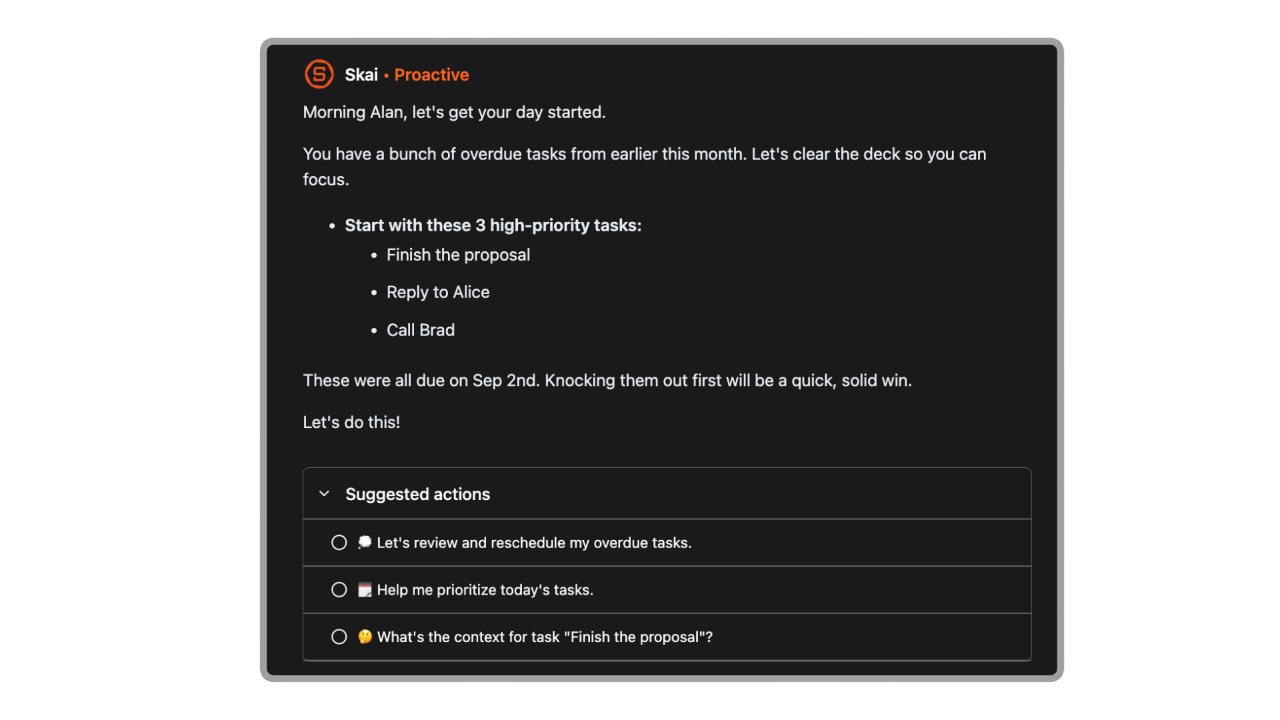
- Your day, planned for you
Every morning, Saner proactively looks at your emails, to-dos, and notes - then gives you an optimal plan. It then checks in with you during the day to make adjustments if needed
- Smart tagging and summarization that automatically categorizes and highlights what matters
- A conversational AI assistant that lets you ask things like “what do I need to follow up on?” or “what's the key takeaway from this doc?”
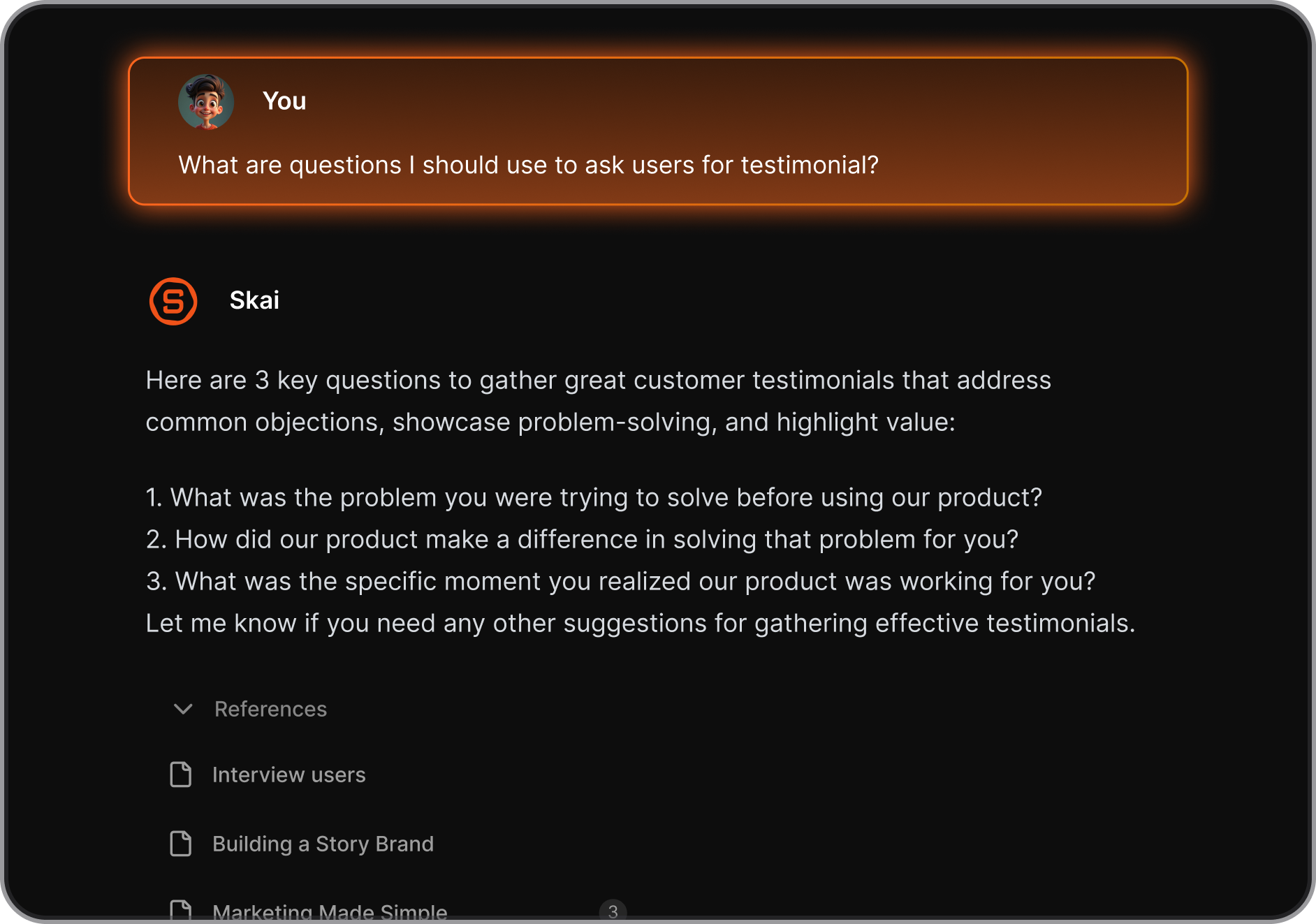
- Not sure how to start something? The AI can break it down, give suggestions, and remind you later.
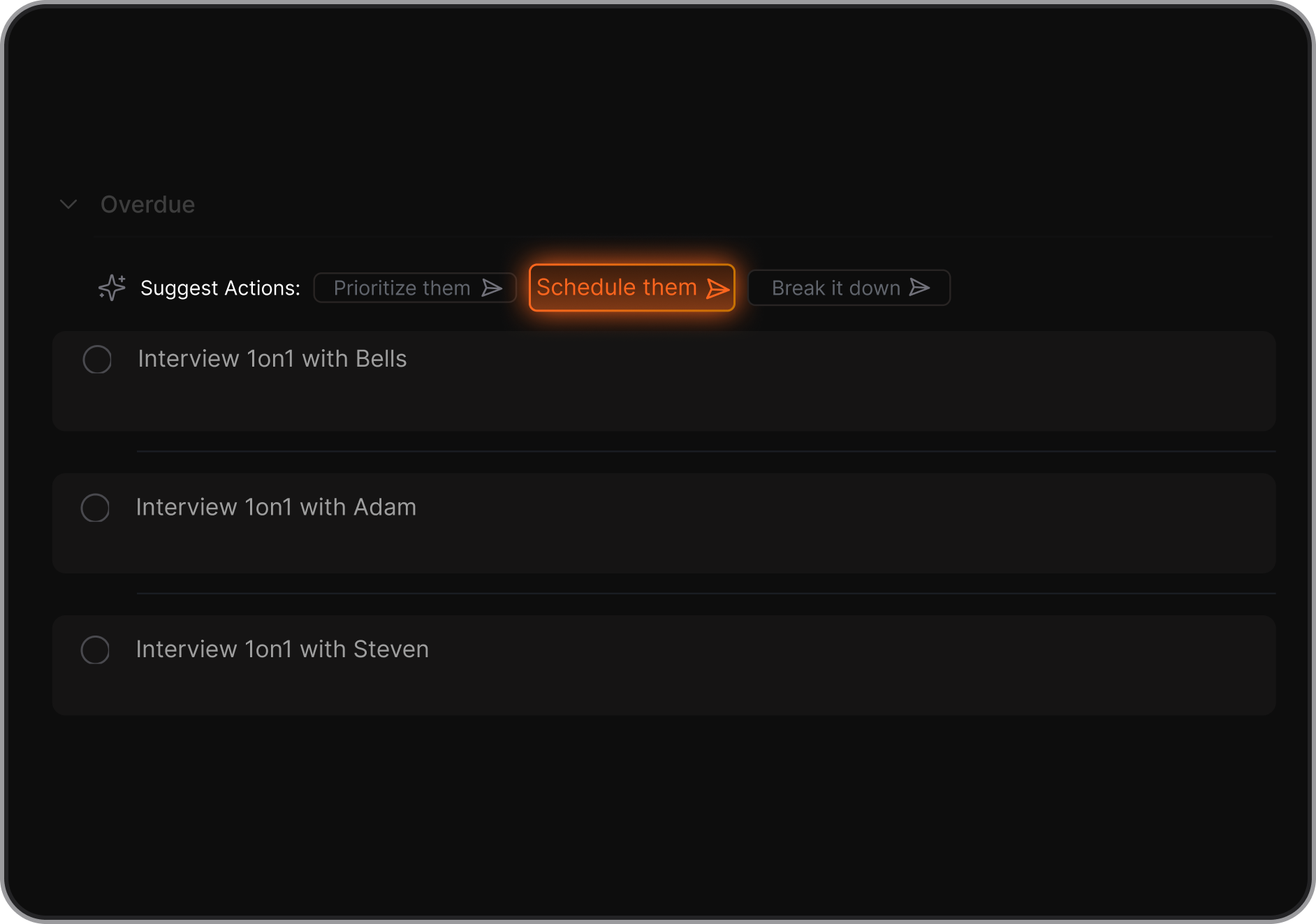
- Super simple to use
- Google Calendar, Gmail, Google Drive, and Slack integration for pulling in relevant data
- Unified workspace that brings together notes, tasks, emails, calendar events, and documents
Pros
- The proactive day plan helps me start the day focused without needing to plan manually
- The ability to chat with my notes and get summarized insights saves tons of time
- One-click conversion of notes and thoughts into tasks or scheduled events
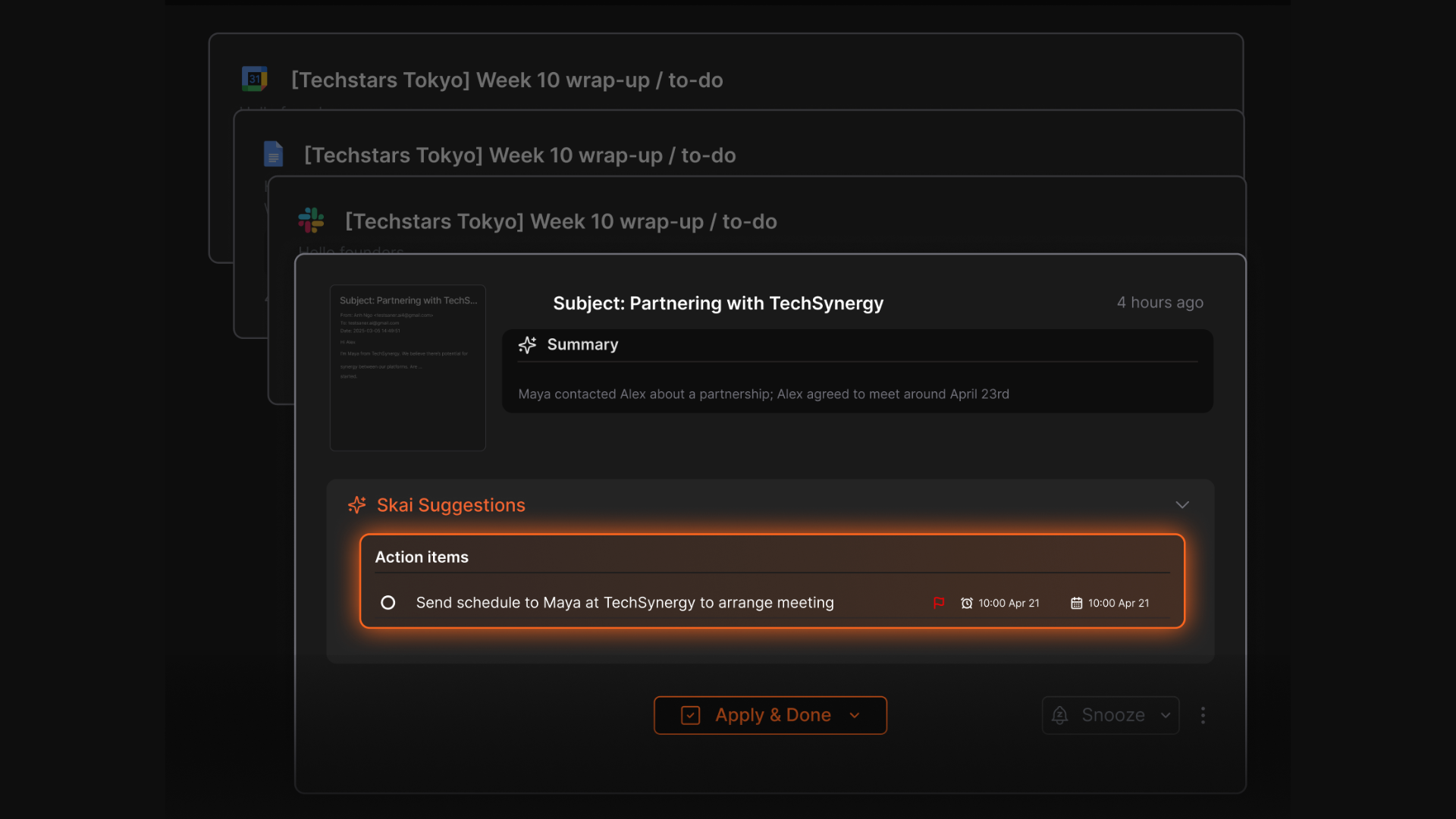
- Designed with ADHD brains in mind
- Free plan available with no credit card required.
Cons
- Requires internet access for full functionality.
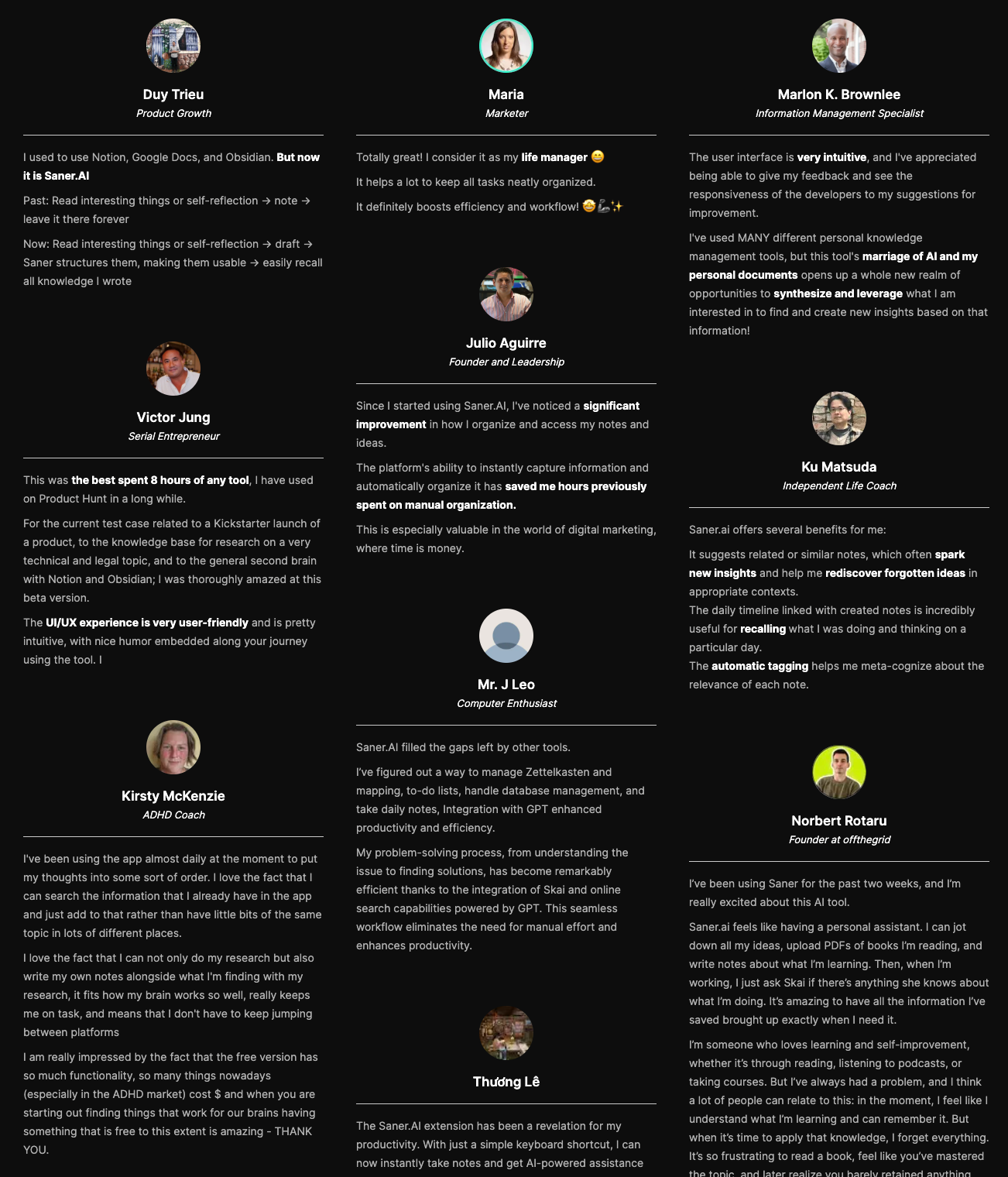
Saner.AI Reviews
Pricing
- Free Plan — $0
- Starter Plan — $8/month
- Standard Plan — $16/month
Who is it suitable for?
- Best for: Knowledge workers, ADHD users, solopreneurs, and anyone managing multiple projects across email, notes, and calendar
- Also works well for: Students and researchers who want to build a searchable personal knowledge base
How to start using it?
- Go to saner.ai and create a free account
- Connect your calendar, email, and notes
- Brain-dump a few things you’re working on
- Ask Skai something like “what’s important this week?” or “summarize this”
- Watch how it automatically organizes and prioritizes for you

Stay of top of work with an Proactive AI Assistant
2. ChatGPT Pulse

ChatGPT Pulse is OpenAI’s latest attempt to make ChatGPT feel more like a proactive assistant than just a chatbot. Instead of waiting for you to ask questions, it works behind the scenes overnight to curate visual updates based on your chats, memory, and connected apps
Features
- Asynchronous Research: It automatically researches updates for you overnight based on memory, past chats, and what it thinks you’ll find useful
- Visual Summary Cards: Delivers daily updates in a clean card format you can quickly skim, tap, or follow up on
- App Integrations: Connects with Gmail, Google Calendar, Google Drive, and more to give context-aware updates like meeting reminders or travel alerts
- Curation Controls: Lets you thumbs-up/down topics to see more of what you want and less of what you don’t
Pros:
- It feels like a personal morning briefing that just appears without me asking — no setup required
- You can give feedback to train it over time, and the curation felt surprisingly spot-on after a few days
Cons:
- Only available on mobile right now - not having it on desktop feels like a big limitation
- Some people may feel uneasy with how much data it uses, even though OpenAI says it's private and filtered
- You can’t “talk” to Pulse — it’s not a conversational assistant that schedules things directly from a card
Pricing:
- Available as part of ChatGPT Pro
- Pro pricing is currently $200/month (or higher if using Team plans)
- No free or Plus-tier access to Pulse as of now
Suitable For:
- ChatGPT Pro users who rely on mobile
- Professionals who want a quick daily summary of what matters without asking
How to Start:
- Enable ChatGPT Pro on your account
- Use the mobile app (iOS or Android) — Pulse doesn’t work on desktop yet
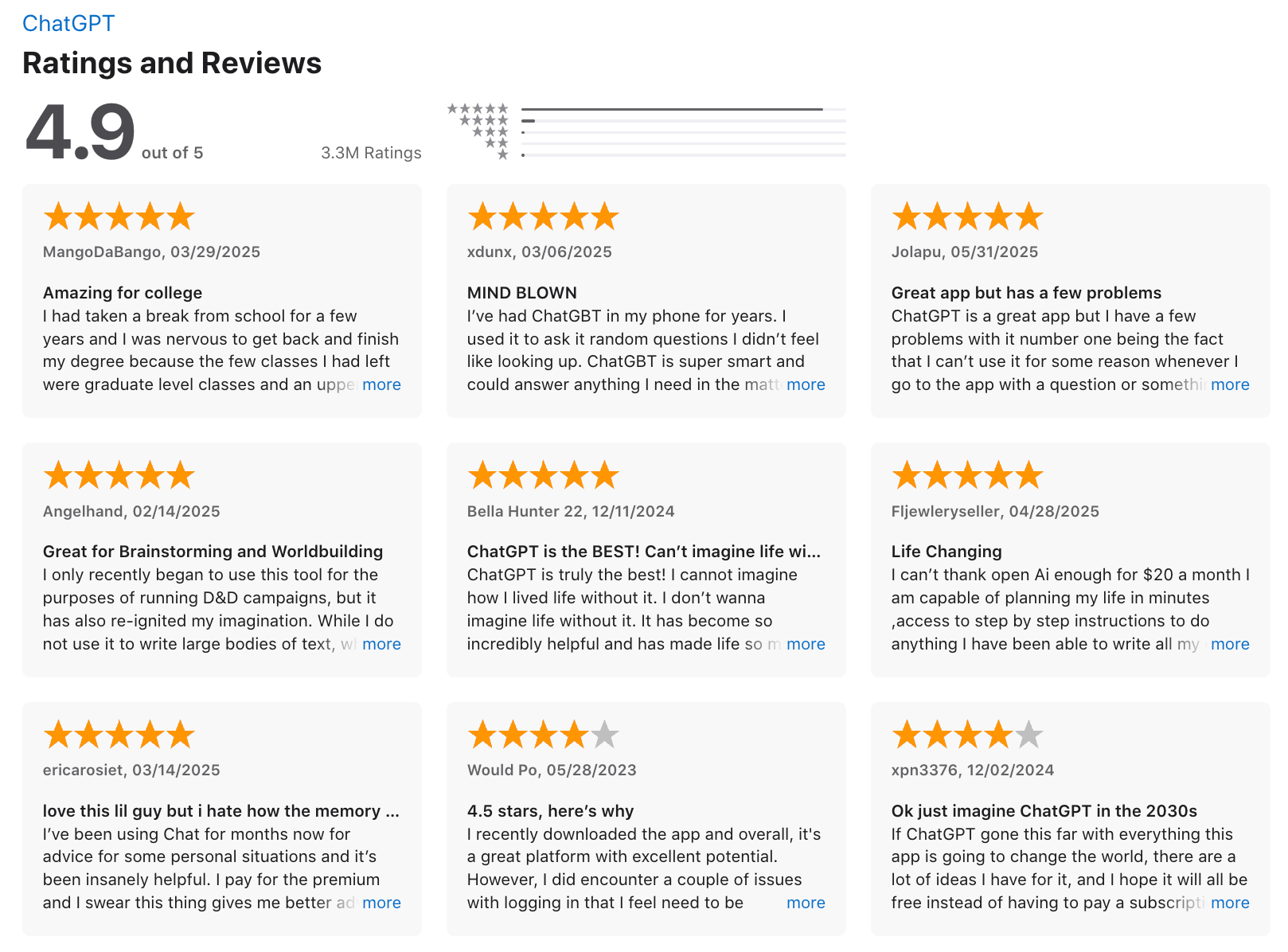
ChatGPT Review (source)
3. Gemini Spark

Gemini Spark is an always-on AI agent that can receive tasks via a dedicated Gmail address, browse the web through Chrome, and work around the clock on cloud virtual machines without requiring users to keep a laptop open. That is a real architectural difference from the other tools here. Most proactive assistants are passive notifiers. Spark is an agent that acts.
Features
- 24/7 Cloud Execution: Spark runs on dedicated virtual machines on Google Cloud and keeps working despite the closure of the application by the user.
"Spark can pull all the facts from your emails, your docs, your sheets, and slides and write the draft for you." — reviews
- Gmail Task Reception: Users can send tasks to Gemini Spark through their Gmail address, and it helps create tasks related to meeting scheduling, event invitations, organizing files, and preparing documents.
- MCP Integration: Spark can be integrated into a wide range of services over MCP, and Google plans to roll out more connections in the months ahead.
- Web Browsing via Chrome: Gemini Spark can gather information from websites, fill out forms, and handle repetitive web-based tasks.
Pros:
- I have not used another tool in this category that actually keeps running after I close my laptop.
- If your work already lives in Gmail, Docs, Sheets, and Calendar, Spark connects to those through proper APIs rather than screen-reading workarounds, which means it is more reliable than browser-based agents.
Cons:
- $100 per month is steep for what is still a beta product with US-only availability. As of now, Spark is a US-only beta, limited to Google AI Ultra subscribers, and Google hasn't announced a timeline for international availability.
- Spark currently only works within Google's own apps. If you use Notion, Slack, or any non-Google tool as your primary workspace, you will run into walls quickly.
Pricing:
- Google AI Ultra — $100/month — Access to Gemini Spark (beta), Gemini 3.5 with 5x Pro usage limits, 20TB cloud storage, YouTube Premium. US only. (Google AI Ultra pricing)
- No standalone Spark pricing exists. It is bundled with the Ultra subscription.
Suitable For:
- Early testers are impressed with the overnight task completion and inbox monitoring. The use case for small business owners is getting particular attention.
How to Start:
- Subscribe to Google AI Ultra and accept the Spark beta invite. Start by giving it one specific, low-stakes task through Gmail, something like organizing a category of emails or drafting a status update from your Doc
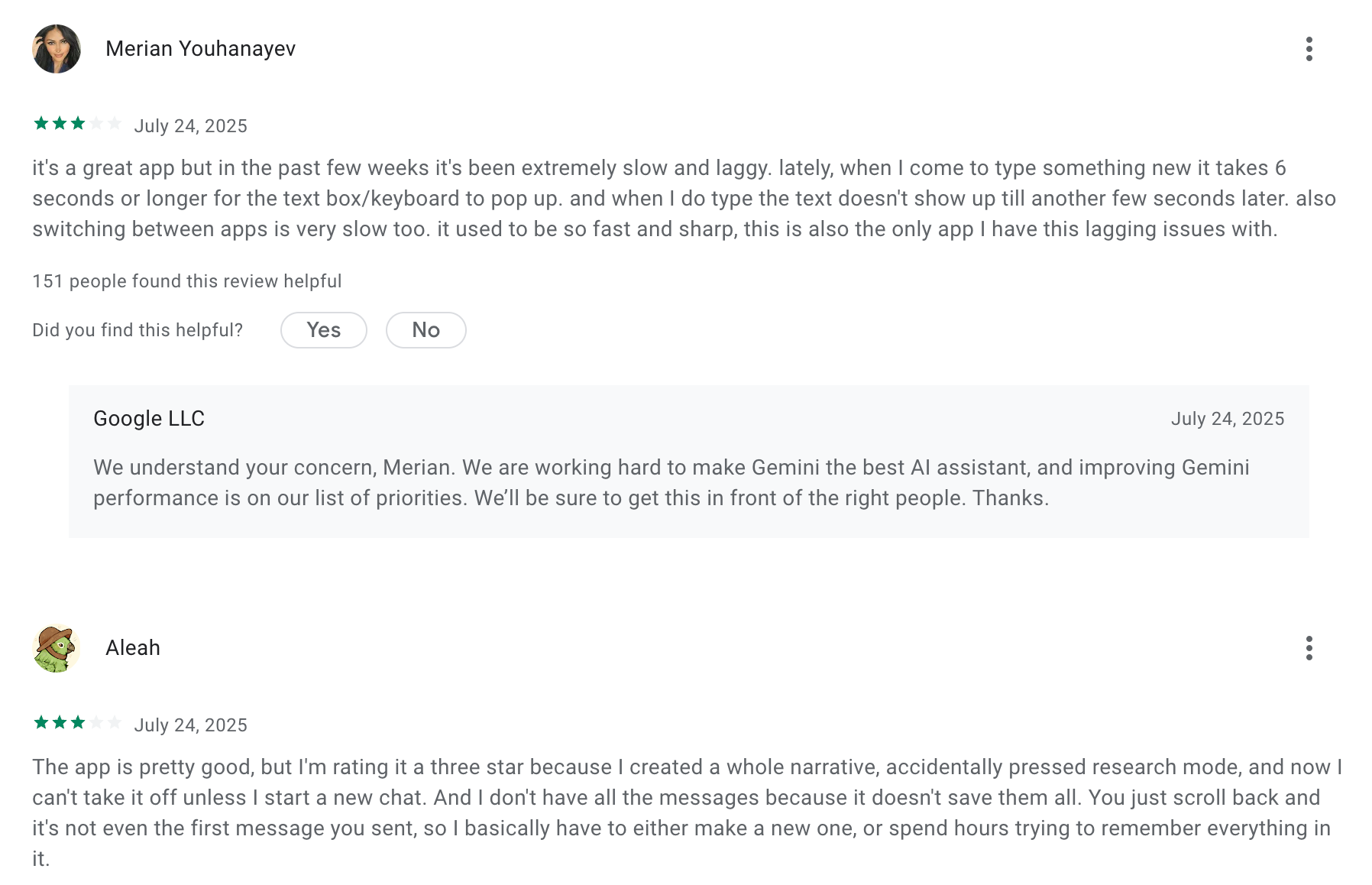
Google Gemini review (source)
The Benefits and Drawbacks of Proactive AI Assistants
As powerful as proactive AI assistants can be, they're not perfect. Let’s break down the key benefits - and the trade-offs - to help you decide if one fits your workflow.
✅ Benefits of Proactive AI Assistants
1. Reduced Cognitive Load
Instead of constantly trying to remember what to do next, your AI assistant surfaces tasks, emails, and documents when you need them - before you even ask. That’s a big deal for people with ADHD or anyone juggling multiple responsibilities.
“It feels like the AI is holding your mental to-do list for you.”
— Real user feedback from Saner.AI early testers
2. Better Time Management
By proactively planning your day, blocking out time, and nudging you to stay on track, AI assistants help you move from reactive to intentional work. You don’t just work more—you work smarter.
3. Follow-up You Didn’t Know You Missed
Many proactive assistants (like Saner.AI) can remind you of unread emails, forgotten drafts, or conversations that slipped through the cracks - without needing manual setup.
4. Less Context Switching
A proactive assistant can consolidate tasks, surface what matters now, and reduce jumping between tools. This is especially helpful for knowledge workers overwhelmed by tabs, apps, and distractions.
5. More Consistency with Less Effort
Proactive AI can spot patterns you forget - like recurring tasks, overdue follow-ups, or workflow gaps - and help maintain habits or routines without you having to set dozens of reminders manually.
⚠️ Drawbacks of Proactive AI Assistants
1. Over-Automation Can Feel Intrusive
If not tuned well, proactive nudges can become noise. An AI that constantly surfaces reminders you don’t care about becomes another distraction instead of a productivity booster.
Think: helpful suggestions vs. annoying interruptions.
2. Trust and Accuracy Still Matter
If the assistant nudges you to follow up on something that’s already done—or misunderstands your priority—it breaks trust. Proactive AI needs context, and not all tools handle nuance well.
3. You Might Feel Overwhelmed by Your Own Backlog
The AI might remind you of 40 tasks you’ve ignored or 17 unread emails you’ve mentally buried. If poorly designed, this “helpfulness” becomes overwhelming instead of empowering.
4. Proactive ≠ Psychic
Let’s be clear: these tools aren’t mind readers. They use patterns, history, and data - but they can’t always understand your shifting priorities or personal nuance. You'll still need to steer the ship.
Conclusion: A Calm Mind Starts with a Proactive Assistant

We’re not just looking for smarter AI - we’re looking for calmer days.
In 2026, the best AI assistants don’t just answer your questions. They anticipate your needs, remind you before things slip, and help you plan your day with less friction. These tools aren’t here to take over - they’re here to help you think clearly, follow through, and stay focused on what matters.
- Gemini Spark is the most autonomous, but it costs $100/month, it is US-only, and it requires you to live in Google Workspace.
- ChatGPT Pulse is the most accessible if you are already on Pro, but it advises rather than acts.
- Saner.AI is the most balanced: proactive across email, calendar, and notes, genuinely affordable, and not locked to one platform.
The right proactive AI assistant can reduce your overwhelm, improve clarity, and save you hours each week.
You don’t need to hustle harder - you need tools that support your brain the way it actually works.
Never miss your deadlines again with your Proactive AI Assistant
FAQ: Best Proactive AI Assistant
1. What is a proactive AI assistant?
A proactive AI assistant doesn’t wait for your commands - it anticipates your needs and acts or alerts you before you ask. Instead of merely responding to queries, it:
- Sends you morning briefings or reminders
- Suggests next actions based on context
- Automates recurring tasks behind the scenes
- Seamlessly links emails, calendars, notes, and your workflow
In essence: the best proactive AI assistant reduces your mental load by working in the background.
2. What makes an AI assistant “best” in 2026?
To rank among the best, a proactive AI assistant should:
- Act, not just chat — perform tasks, not only respond
- Integrate deeply — connect with calendars, email, docs
- Learn your patterns — adapt to your behavior over time
- Respect privacy & control — opt-ins, clear data rules
- Be reliable & transparent — you should know what it’s doing
Users increasingly search for “Best Proactive AI Assistant” to compare which tool delivers real value - not just flashy claims.
3. What is Saner.AI, and how proactive is it?
Saner.AI is an AI productivity assistant especially designed for ADHD users and knowledge workers.
Key proactive features:
- Sends you morning briefings or reminders
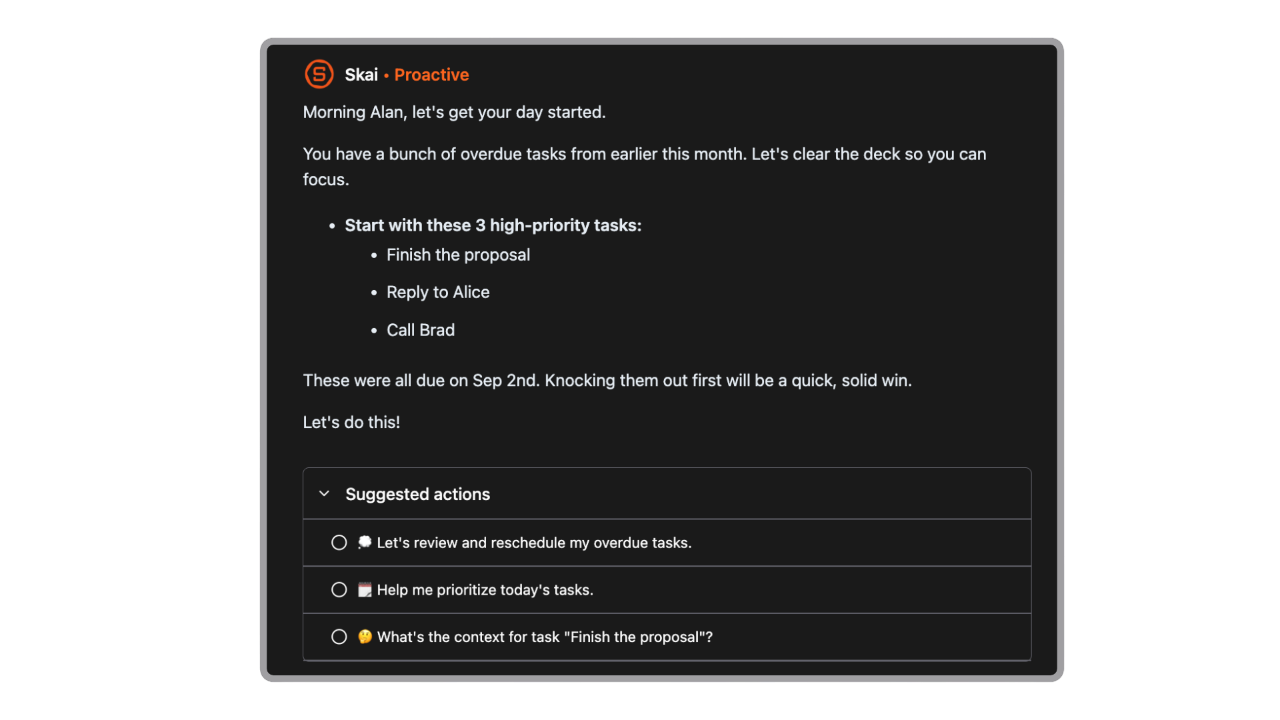
- Auto-task extraction & reminders: converts notes and chats into tasks, then nudges you at the right time
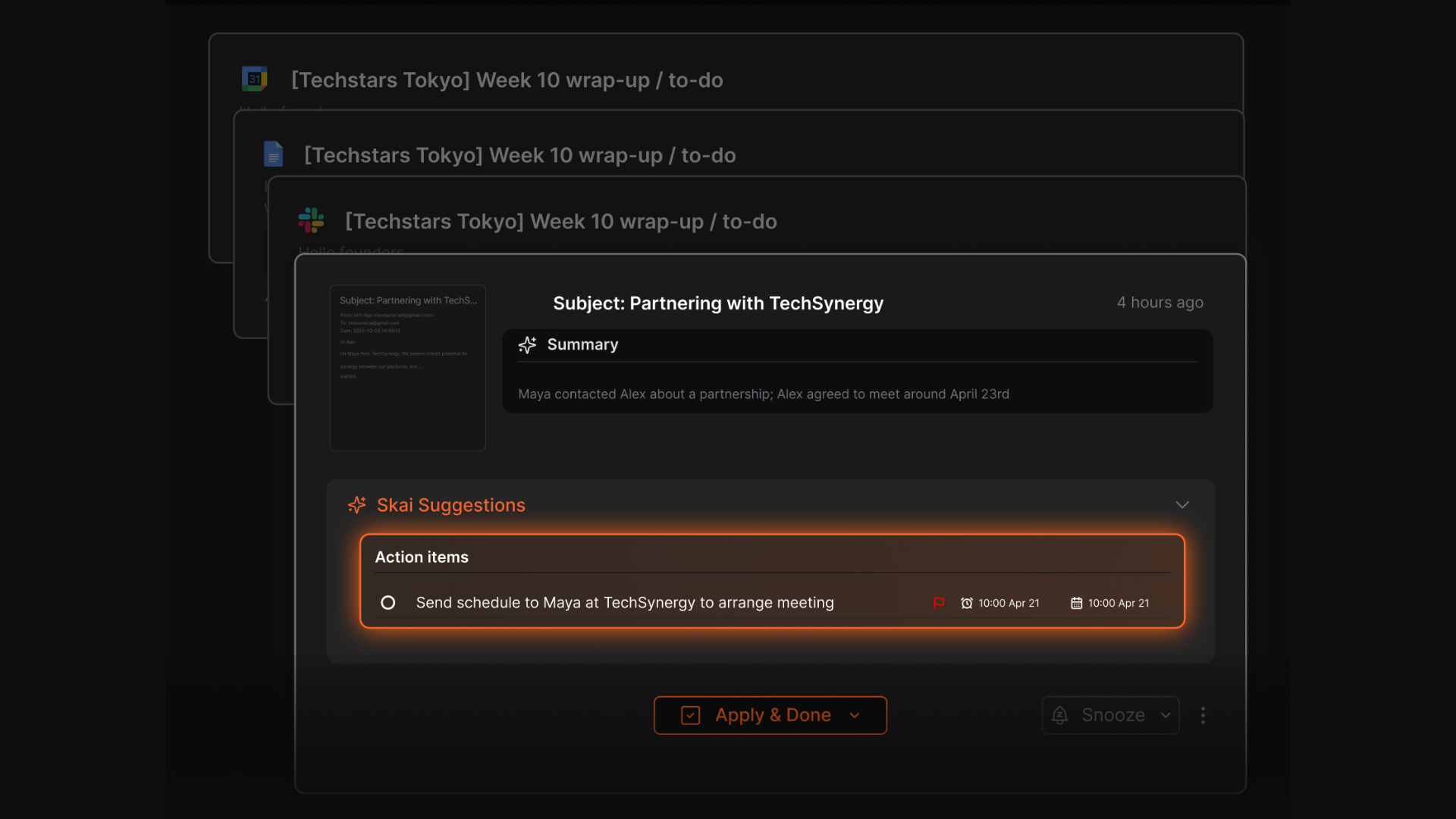
- Unified knowledge base: links notes, emails, and tasks so related content surfaces automatically
- Voice / quick capture: lets you capture ideas on the go with minimal friction
- AI insights & suggestions: suggests tags, connections, or overlooked notes you might find useful
Limitations to watch:
- Proactivity depends on how much data you connect
- Some features remain in beta
- Free plan has limited AI usage
4. Is Gemini Spark worth $100 per month?
That depends entirely on whether you live inside Google Workspace. If Gmail, Calendar, Docs, and Sheets are your primary tools and you are in the US, the 24/7 autonomous execution is genuinely useful. If you use any non-Google tools as your primary workspace, it is not worth it yet.
5. What is ChatGPT Pulse, and how proactive is it?
ChatGPT Pulse is OpenAI’s feature that shifts ChatGPT from reactive chat to a proactive assistant.
How Pulse works:
- Analyzes your chat history, calendar, and feedback overnight
- In the morning, delivers scannable “cards” with updates, reminders, and suggestions
- Lets you curate topics and how much detail you see
- Surfaces context from memory, emails, and apps to make cards actionable
Pros:
- Provides a proactive daily briefing with actionable insights
- Encourages action instead of passive scrolling
- Easy to set up
Cons:
- Currently in preview for Pro users
- Effectiveness depends on how much data you allow it to access
- Less automation control compared to task schedulers
6. Is there a free proactive AI assistant in 2026?
Saner.AI has a free plan that includes 30 AI requests per month, 100 notes, and 100MB of storage. This is enough to experience the proactive task surfacing and daily nudges. Neither Gemini Spark nor ChatGPT Pulse offers a free tier.
7. Will proactive AI assistant tools boost productivity for real?
Yes, when used correctly. They reduce friction from remembering, juggling apps, and context switching. Benefits include:
- Surfacing what needs attention without constant checking
- Turning passive notes or chats into actionable tasks
- Automating repetitive workflows
- Helping you follow through on priorities
8. What should I look for in a proactive AI assistant?
Check four things: whether it connects to your actual email and calendar (not just asks you to type information in), whether the proactive suggestions are based on your real data or just generic recommendations, whether you can control what it reads, and whether the pricing model makes sense for how often you will use it.
9. Which is the best proactive AI assistant for entrepreneurs?
Entrepreneurs juggle investors, customers, and ideas.
- Saner.AI → Give you a daily brief - what to do, high priority tasks as well as hidden insights from your emails, notes
- ChatGPT Pulse → surfaces research about the market
- Gemini → automates recurring weekly reports
10. Which is the best proactive AI assistant for managers?
Managers deal with constant meetings and updates.
- Saner.AI → organizes notes and proactively tells what to follow up on
- ChatGPT Pulse → gives you daily cards with updates from the industry
- Gemini → schedules recurring tasks like weekly team summaries
11. How much does a proactive AI assistant cost in 2026?
The range is wide. Saner.AI starts free and goes to $16/month for unlimited use. ChatGPT Pulse comes with the $200/month ChatGPT Pro plan. Gemini Spark requires Google AI Ultra at $100/month. Most people who are starting out will find the $8/month Saner.AI Starter plan covers their needs.
12. Can a proactive AI assistant help with ADHD?
Yes, and Saner.AI was specifically designed with ADHD users in mind. The interface is low-distraction, the proactive nudges help prevent forgotten tasks, and the AI extracts action items from unstructured notes automatically.
Several reviews from ADHD users cite it as the first tool that actually reduces their cognitive load rather than adding to it.
13. Which is the best proactive AI assistant for remote workers?
Remote workers need to stay aligned across tools and need to remember their tasks. That's why Saner.AI is the best option for them; it centralizes notes, tasks, and project updates and provides daily alignment briefings
Stay on top of your work and life