
We Tested The 5 Best Town.com Alternatives In 2026

I've spent the past few weeks running Town.com and 5 of its closest competitors against the same real workload: a Gmail inbox that never empties, a calendar with back-to-back meetings, and a task list that grows faster than I can clear it.
I'm part of the team building Saner.ai, so yes, that's one of the tools on this list. I'm also going to tell you exactly where it isn't the right fit, because a roundup that only flatters its own product isn't useful to anyone, including me. This is written for founders, ops leads, and knowledge workers who've outgrown a plain to-do list and are trying to figure out which AI assistant actually earns its subscription.
Quick answer: What are the best Town.com alternatives?
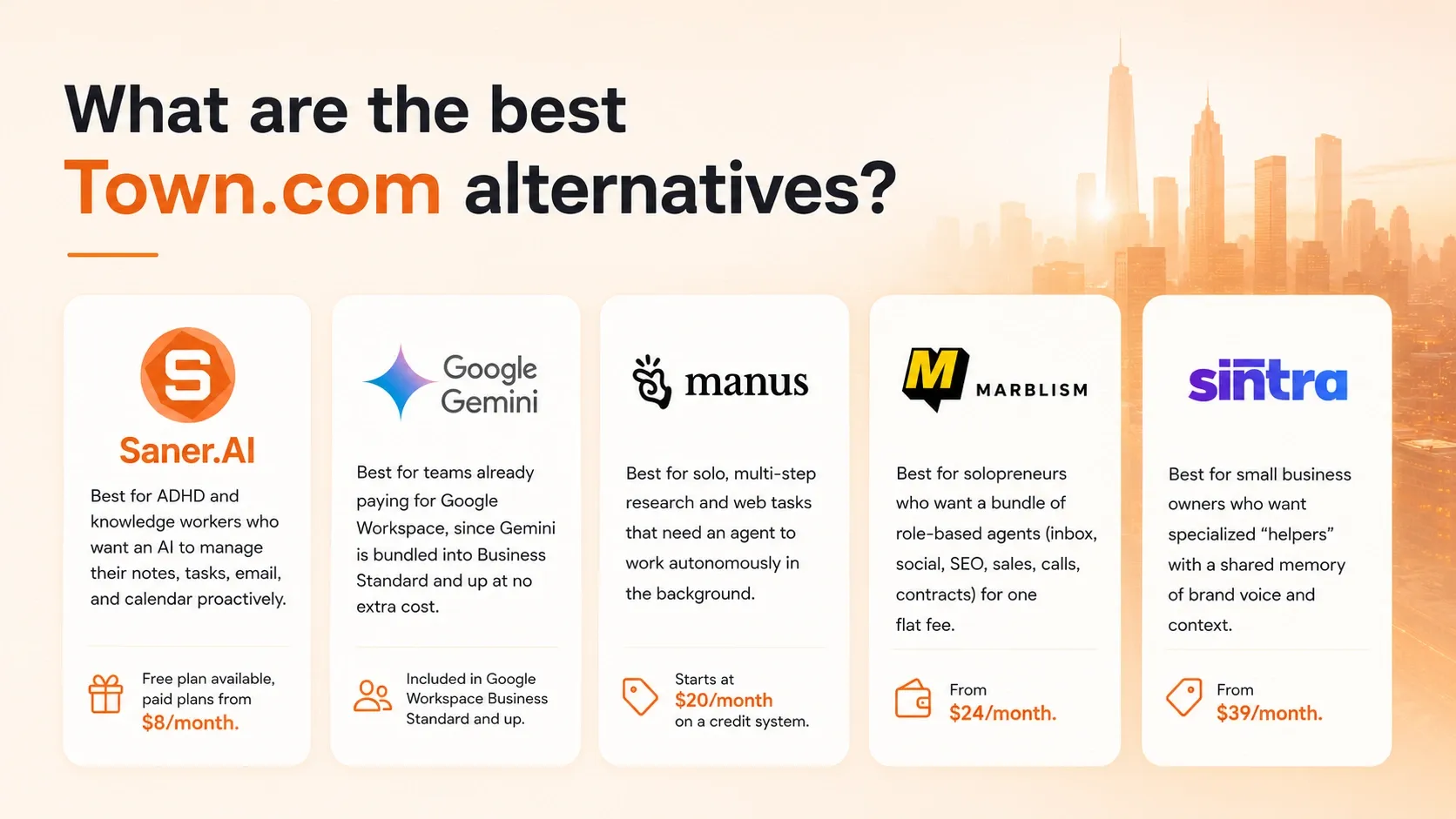
- Saner.AI — best for ADHD and knowledge workers who want an AI to manage their notes, tasks, email, and calendar proactively. Free plan available, paid plans from $8/month.
- Google Gemini — best for teams already paying for Google Workspace, since Gemini is bundled into Business Standard and up at no extra cost.
- Manus — best for solo, multi-step research and web tasks that need an agent to work autonomously in the background. Starts at $20/month on a credit system.
- Marblism — best for solopreneurs who want a bundle of role-based agents (inbox, social, SEO, sales, calls, contracts) for one flat fee, from $24/month.
- Sintra — best for small business owners who want specialized "helpers" with a shared memory of brand voice and context, from $39/month.
What is Town.com?

Town is an email-native AI assistant. It reads your Gmail and Google Calendar, learns your voice and your recurring patterns, and runs both pre-built and custom routines: auto-triaging your inbox, drafting replies, prepping meeting briefings, sending a morning summary of what needs your attention.
Why people are looking for Town.com alternatives
Town works well for what it's built for, but a few limits keep showing up across reviews and push people to look elsewhere:
- It's Google-only. Town connects to Gmail and Google Calendar, with no Outlook or Microsoft 365 support.
- Pricing is credit-metered, not flat. Starter runs $15/month for 1,250 credits, and Pro is $49/month billed annually before pay-as-you-go overage kicks in at $0.03 to $0.044 per credit. A heavy month costs more than a light one
- The free plan is thin. Free gives you 30 chats a month, five messages each, which works as a preview but not as a daily driver.
- Routines are largely fixed. You can build custom routines, but the workflow is built around Town's predefined menu. If what you need is off-menu, there's no way to build or install a custom skill the way you could with an open agent framework.
- It's cloud-only and closed. There's no self-hosting option and no way to inspect how it processes your data. Everything lives on Town's infrastructure, which is a dealbreaker for some teams and a non-issue for others.
How we chose these alternatives
I tested each tool over roughly two weeks against the same daily workflow: a Gmail inbox with 40-plus messages a day, a calendar with recurring and ad hoc meetings, and a running task list pulled from email, Slack, and meeting notes. I judged them on:
- Setup time — how long it takes to go from signup to a genuinely useful first output, and whether that requires technical skill.
- Integration depth — whether it connects to the tools you already use (Gmail, Outlook, Slack, calendar) or asks you to change how you work to fit it.
- Autonomy vs. oversight — how much you can hand off without approving every single step, and how clearly the tool shows you what it actually did.
- Pricing transparency — whether the cost is a flat number you can predict or a credit meter that creeps up on you mid-month.
- Data handling — what the vendor does with your information, and whether it trains models on your data by default.
- Non-technical usability — whether a solo operator with no engineering background can run it day to day without a manual.
What are the best Town.com alternatives
The best Town.com alternatives are Saner.AI, Gemini, Manus, Marblism, Sintra
1) Saner.AI - manage your notes, tasks, emails, calendar automatically
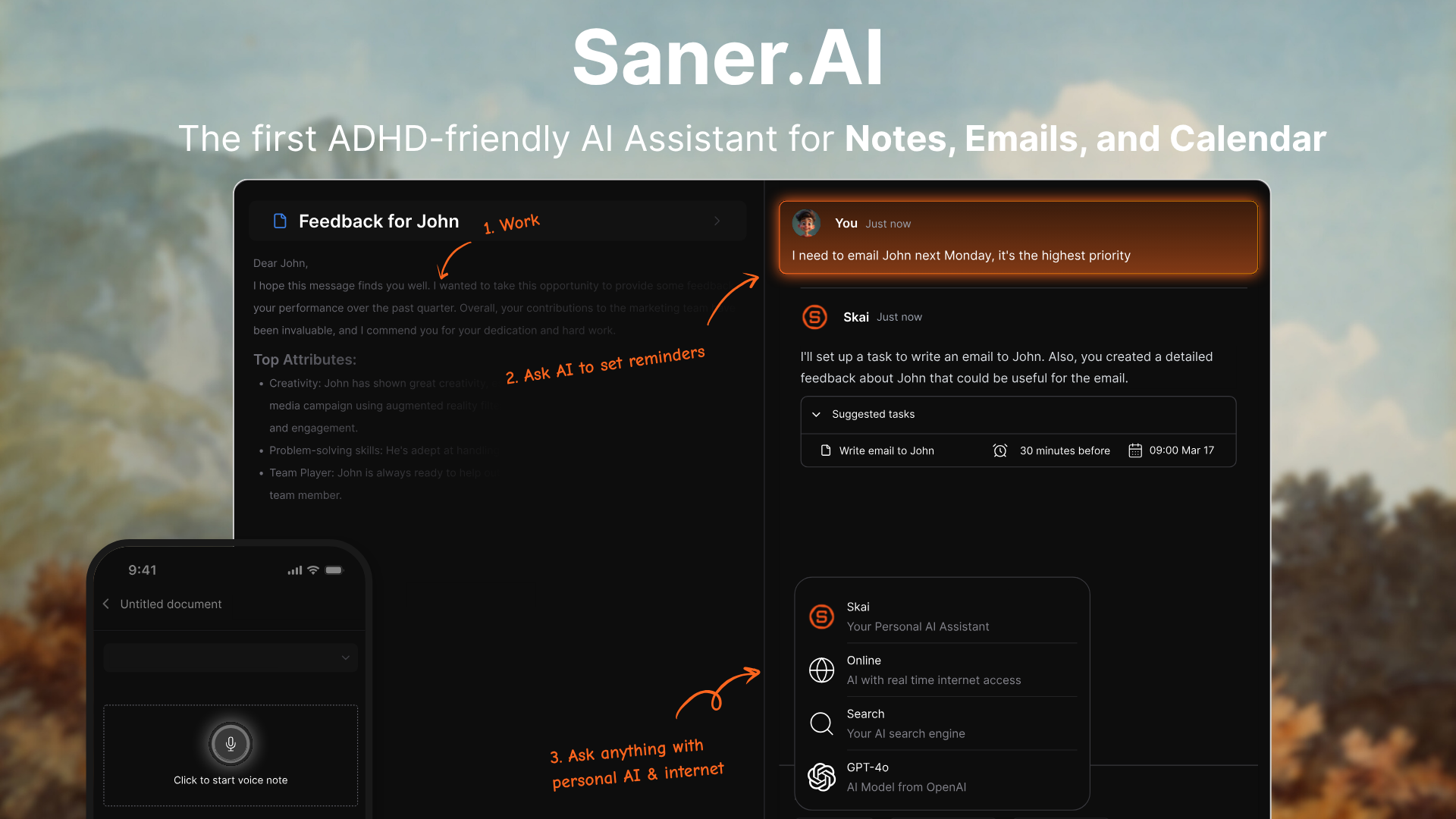
Saner.AI unifies notes, tasks, email, and calendar into one workspace, with an AI agent called Skai that captures and organizes information as it comes in. It's designed specifically around ADHD and cognitive overload rather than bolted onto a generic productivity template.
Key features
- Skai captures notes, emails, and calendar items from a single chat and organizes them without a rigid folder system.
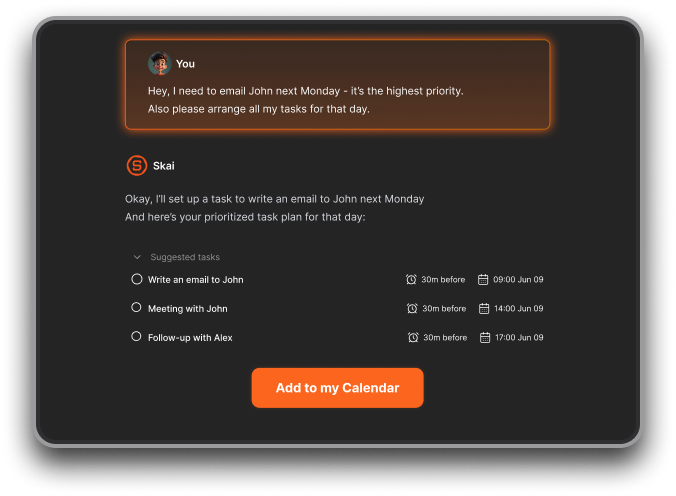
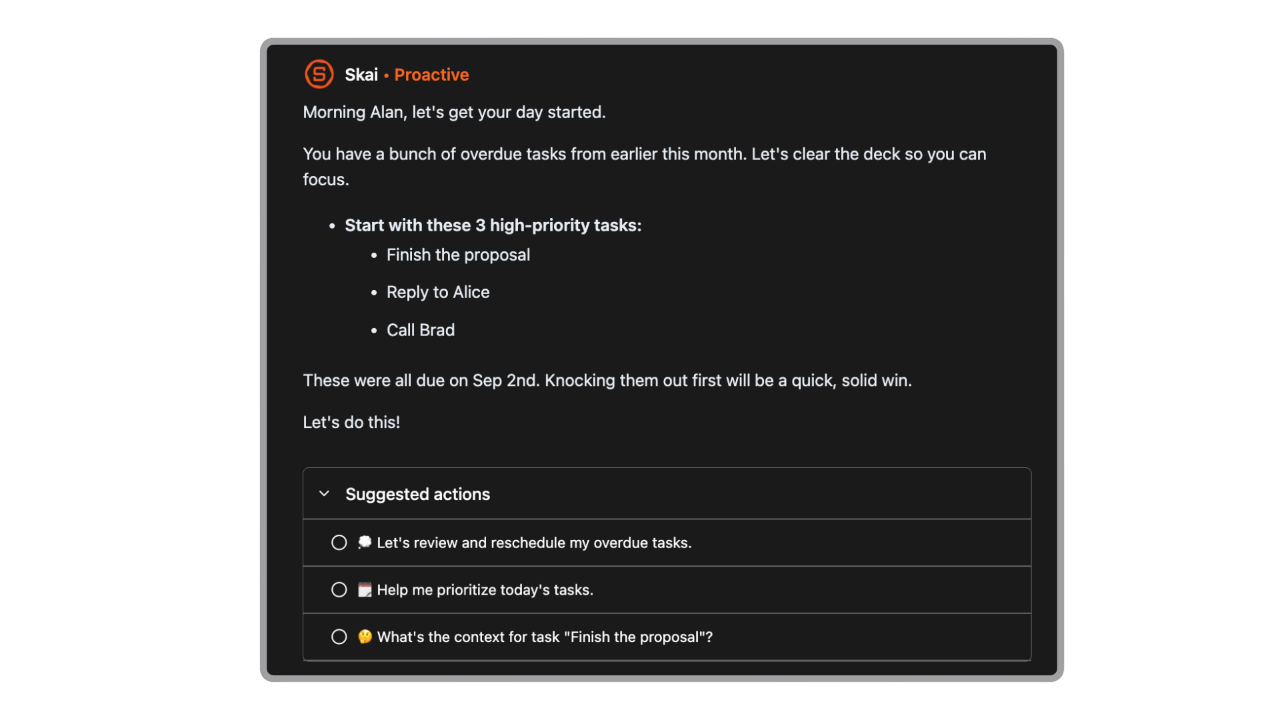
- Automatically plan your day every morning
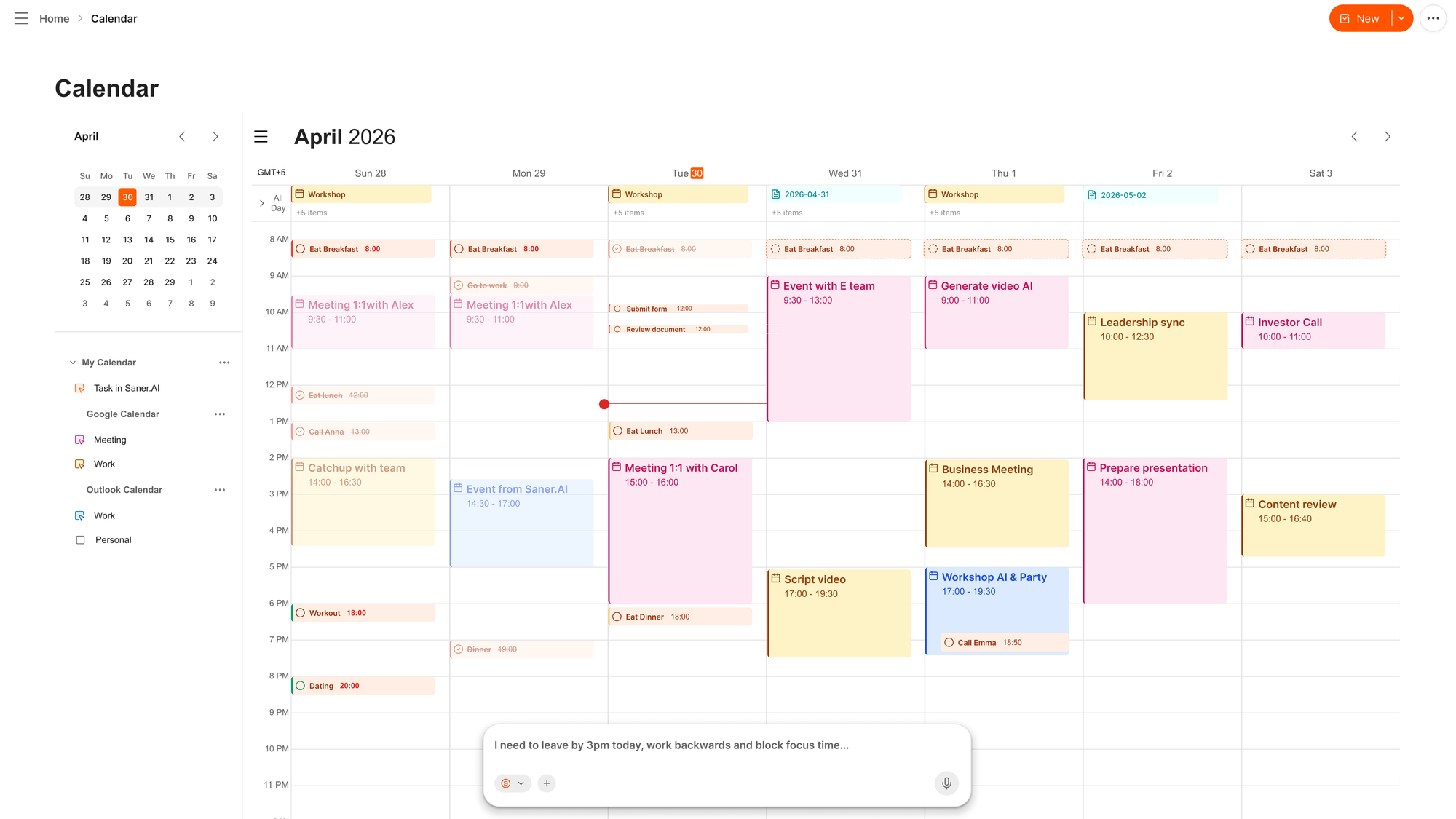
- An AI calendar where you can just chat to organize your schedule
- An AI inbox for Gmail suggests next steps and turns emails into tasks, with one-click review before anything is confirmed.
Pros
- The design starts from ADHD rather than having an ADHD label stapled onto a generic system.
- Capture is genuinely fast. I can dump a half-formed thought and it gets structured later instead of me filing it correctly in the moment.
Cons
- Team collaboration is still early
Pricing
- Free — core capture and organization
- Starter — $8/month billed annually — expanded AI assistant use
- Standard — $16/month billed annually — full feature set
Suitable for
- Best for: ADHD and neurodivergent knowledge workers who need notes, email, and tasks in one low-friction workspace instead of five disconnected apps.

Stay on top of your work and life with the Top Town alternatives
2) Google Gemini - free if you're already paying for Workspace
Gemini is Google's assistant, built into Gmail, Docs, Sheets, and Meet for anyone on a Workspace Business Standard plan or higher. It's reactive rather than proactive: you ask, it answers, inside the app you're already using.
Key features
- Native integration across Gmail, Docs, Sheets, and Meet, with no separate app to open.
- A 1 million token context window on the Pro and Ultra tiers, enough to load a long research brief or email thread in one pass.
- Gems, which let you build a small custom assistant for a repeatable task like drafting client proposals.
Pros
- It's already there. If your company pays for Workspace, Gemini shows up at no added cost.
- Translation and cross-language work is a genuine strength.
Cons
- Consistency is the weak spot. T
- It won't proactively draft your morning briefing. You have to ask.
Pricing
- Free — $0/month — basic access, no Workspace integration
- Google AI Pro — $19.99/month — Gemini 3.1 Pro, Deep Research, Gems, 1M token context
- Bundled in Workspace Business Standard — from $14/user/month — Gemini in Gmail, Docs, Sheets, Meet
Suitable for
- Best for: teams already committed to Google Workspace who want AI inside tools they use daily, not a new one to learn.
How to get started If you're on Business Standard or higher, Gemini is likely already live in your Gmail side panel. Try "Help me write" on a real draft first. If you're not on Workspace, start with the free consumer tier before paying for Pro.
3) Manus — the agent that works while you're not watching
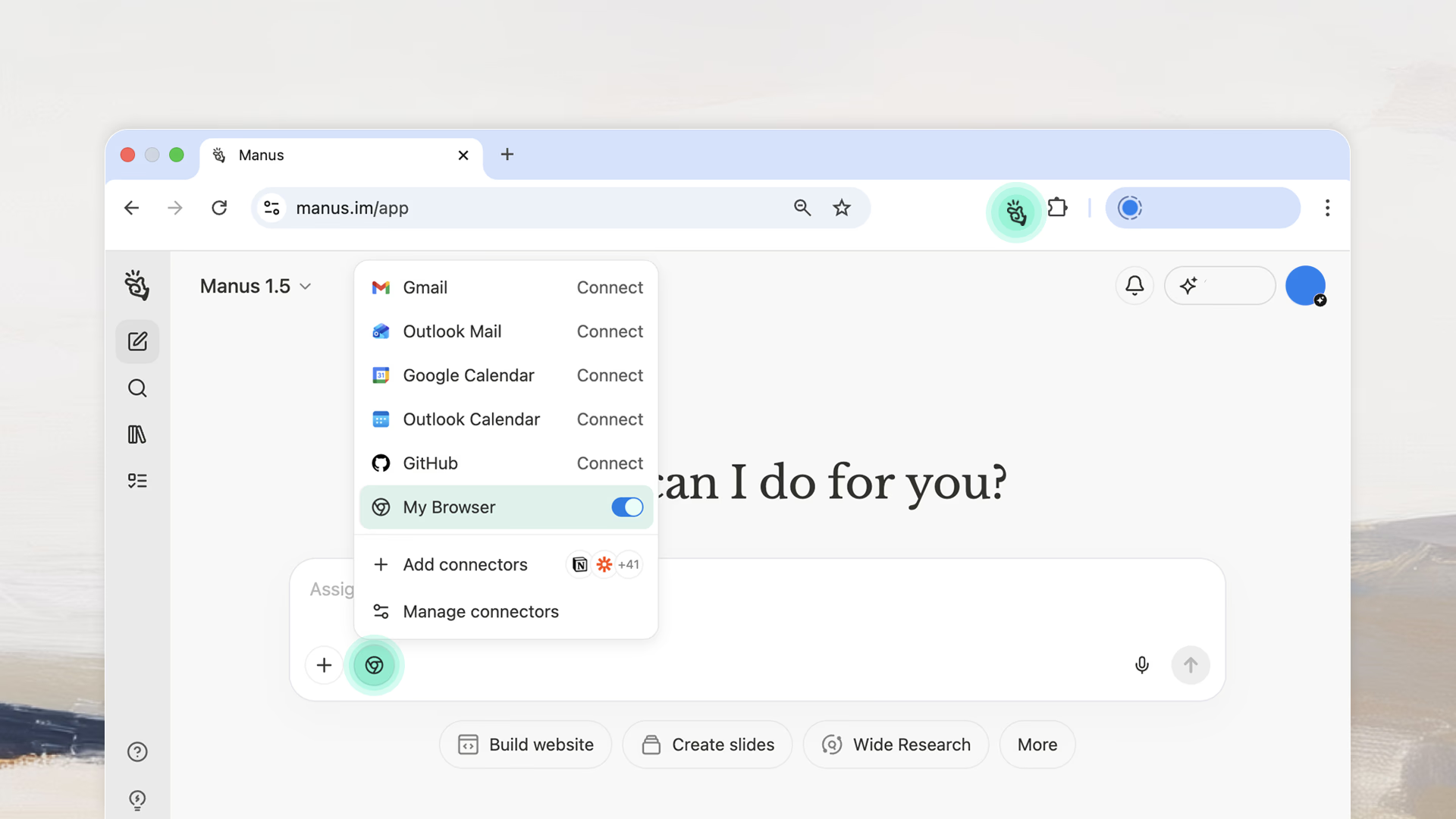
Manus is a general-purpose autonomous agent that browses, codes, and compiles a finished deliverable across a long task, largely without supervision. It's built for defined, multi-step jobs rather than daily inbox management.
Key features
- A multi-agent system that runs research, browsing, and code execution in the background while you do something else.
- Task Replay, which lets you review every step the agent took after the fact, including screenshots and decision points.
- Domain-general design, meaning it can handle research, data entry, or app building rather than one narrow task.
Pros
- For research-heavy jobs with a clear end state, it delivers.
- It doesn't interrupt me mid-task, so I can hand off a job and come back later.
Cons
- Credits burn fast. Reviewers consistently flag it as "super expensive" for what you get, reviews.
- It struggles on complex, branching logic and doesn't always learn from a mistake once it's made one.
Pricing
- Free — $0/month — 300 daily refresh credits
- Pro — from $20/month — 4,000 monthly credits
- Team — from $20/seat/month — SSO, analytics, shared templates
Suitable for
- Best for: solo researchers and operators who need a bounded, multi-step task done autonomously, not a daily assistant.
How to get started Start with a bounded task, like compiling a comparison spreadsheet from ten sources, rather than an open-ended one. Check your credit balance before running anything labeled "wide research," since that's where costs climb fastest.
4) Marblism — six AI employees for one subscription

Marblism bundles six named agents, Eva, Sonny, Penny, Stan, Rachel, and Linda, each covering a specific business function: inbox, social, SEO, sales, calls, and contracts, for one flat monthly fee.
Key features
- Six role-based agents that each own one function instead of one general chatbot trying to do everything.
- Inter-agent communication, so Sonny's social posts can reference what Penny just wrote in a blog post.
- Agents trained on your specific business context, so you're not re-explaining your brand every session.
Pros
- The math is hard to argue with. Reviewers point out it replaces what would otherwise be several separate subscriptions for a fraction of the cost, reviews.
- One dashboard for six functions beats six separate logins.
Cons
- Each individual agent is less capable than a dedicated specialist tool. If content is your main need, a tool built only for writing will likely outperform Penny.
- It's not fully hands-off. You'll spend real time daily reviewing what the agents drafted before it goes out.
Pricing
- Annual — $24/month — all six agents, unlimited tasks
- Monthly — $44/month — same features, billed monthly
- 7-day money-back guarantee on either plan
Suitable for
- Best for: solopreneurs and very small teams who want one flat bill instead of five separate tool subscriptions.
How to get started: Pick the one or two agents your business actually needs first, most people start with Eva for inbox or Stan for lead generation, instead of turning all six on at once. Feed real business context in the first session, since output quality depends heavily on that.
5) Sintra — specialized helpers with a shared memory
Sintra gives you 12 named AI helpers, each built for one business function: social, email, SEO, ad copy, customer support, and more, all drawing on a shared memory of your brand voice and context.
Key features
- 12 role-based helpers instead of one general-purpose chat window.
- Brain AI, a shared memory layer that stores your brand voice, audience, and business context so every helper stays consistent.
- A built-in library of more than 2,000 prompts to skip the blank-page problem.
Pros
- Not prompting from scratch matters more than I expected. Reviewers describe it as similar to having several subject-matter experts on call, reviews.
- Brand voice consistency genuinely holds up across helpers once Brain AI is set up properly.
Cons
- Credits are shared and tight. All plans get 250 credits a month regardless of whether you pay $39 or $97, and heavier users report running out before the month ends.
- It's an idea and content generator more than an execution tool. The social helper drafts posts but doesn't schedule or publish them.
Pricing
- Single helper — $39/month
- Sintra X, all 12 helpers — $97/month
- Annual billing — from roughly $16/month at the lowest published rate
Suitable for
- Best for: small business owners and solopreneurs who want role-based AI help without learning prompt engineering.
How to get started Spend the first 30 minutes filling out Brain AI with your actual brand voice, audience, and goals before asking any helper to produce something. Skipping that step is the most common reason new users say the output feels generic.
Conclusion
The real decision here isn't "which tool is best" it's whether you need something proactive that works in the background or something reactive that waits for your instructions, and whether your inbox lives in Google or Microsoft.
- If you're already paying for Google Workspace, Gemini is effectively free money left on the table if you're not using it.
- If your real problem is too many disconnected apps and a mind that won't stay organized on its own, that's a different problem than inbox automation, and it's the one Saner.ai is built to solve.
Pick the tool that matches your actual bottleneck, not the one with the flashiest demo, and give it a real week of your messy, unfiltered work before deciding if it earns a permanent spot in your day.
Stay on top of your work and life
FAQ
What is the best Town.com alternative for ADHD or neurodivergent professionals?
Saner.ai is built specifically around ADHD workflows rather than a generic productivity template with an ADHD label added on. It unifies notes, tasks, email, and calendar in one AI workspace, which matters most for people whose real problem is scattered information rather than a slow inbox.
What's the difference between Town and Sintra?
Town is an AI assistant tied to your Gmail, with one Townie handling everything from triage to scheduling. Sintra splits the work across 12 specialized helpers, each owning one function like social media or SEO, sharing a common memory of your brand voice.
Does Town.com work with Outlook?
No. As of mid-2026, Town connects to Gmail and Google Calendar only, with no Microsoft 365 or Outlook support. If your company runs on Microsoft, look at Carly, Cora, or Microsoft Copilot instead.
What should I look for in an AI personal assistant?
Check integration depth with the tools you already use, whether pricing is flat or credit-metered, how much oversight you keep before actions go out, and how the vendor handles your data. Setup time matters too. A tool that takes a week to configure properly won't get used.
Can Gemini replace Town.com?
Not directly. Gemini is reactive and waits for a prompt, while Town proactively runs routines and drafts work before you ask. Gemini works best as an assistant inside Google Workspace apps, not as a standalone inbox manager with its own email address.
Is there a free AI personal assistant?
Yes. Gemini, Manus, and Saner.ai all offer usable free tiers, though each caps usage differently: Town limits you to 30 chats a month, Gemini's free tier lacks Workspace integration, and Manus gives 300 daily refresh credits.
How much does an AI personal assistant cost?
Most tools in this category range from free to around $50 a month for an individual plan. Town runs $15 to $49 a month depending on tier, Sintra runs $39 to $97, and Saner.ai runs $8 to $16, all before enterprise or team pricing.
Is Manus AI worth the credit-based pricing?
It depends on your task type. For bounded, research-heavy work with a clear deliverable, reviewers consistently say it earns its cost. For daily inbox or calendar management, the credit model gets expensive fast and a flat-rate tool like Town or Saner.ai will cost less.
Does Saner.ai support team collaboration?
Not yet at the same depth as Notion or ClickUp. Saner.ai is built primarily for individual use, so larger teams needing shared workspaces should treat it as a personal productivity layer rather than a team platform.
What's the difference between Marblism and Sintra?
Both bundle multiple role-based AI agents under one subscription, but Marblism leans toward business operations (sales, contracts, receptionist-style tasks) while Sintra leans toward marketing and content, with a shared "Brain AI" memory layer across all 12 helpers.
How do I get started with an AI personal assistant?
Start with the one function costing you the most time each week, usually inbox triage or content drafting, rather than turning on every feature at once. Connect your real accounts, not a test setup, and give the tool a full week before judging whether it's worth keeping.
Stay on top of your work and life