
Cue Alternatives: Here are the best 5 AI personal apps (Free & Paid)

I work on the team that builds Saner.AI, an AI personal assistant. Watching every "agent that works for you" launch is part of my job. September 2026 had three of them within three weeks.
Manus launched Cue on September 28 and got lots of attention.
Quick answer: What are the best Cue alternatives?
- ChatGPT Dots: The closest thing to Cue for work. It's an always-on agent with its own cloud computer, but it starts at $100/month and isn't on personal plans in the EU or UK.
- Saner.AI: Best for most individuals. It reads your email, calendar, notes, and tasks, then tells you what to do today. It doesn't need your logins to click around the web. Free, or from $8/month.
- Meta Muse: Best for US personal errands like bookings, forms, and shopping, with a free tier and WhatsApp access.
- Grok Bot: Best for a small team of named bots working on websites that have no API. It comes bundled with SuperGrok or Cursor plans from $20/month.
- OpenClaw: Best free, self-hosted option for technical users who will own the security setup themselves.
Full disclosure: Saner.AI is our product, and it's on this list. I've tried to be at least as hard on it as on the others.
What is Cue, and what is a personal AI agent?
A personal AI agent is software that does tasks for you instead of just answering questions. You give it a goal. It works in the background, uses apps and websites, and comes back when it's done or needs a decision.
👉 If you want the wider picture, we keep a running list of AI agent tools and AI personal assistants.
Each Cue agent gets its own email address, phone number, wallet, and computer. It can take your calls and leave a summary. It can pay for things inside a budget you set. Several agents can sit in one group chat and split up a job.
Ask one question about any agent: whose identity does it use?
- Its own identity (Cue). The agent emails people from its own address and pays from its own capped wallet. Your accounts stay out of it. The trade-off is that you now have a non-human "person" acting in the world
- Your identity (Dots, Muse, Grok Bot, OpenClaw). The agent signs into your Gmail, your bank, your Amazon, and acts as you. That gives it more reach, and it also means a mistake or a hijack happens under your name.
- No identity needed (Saner.AI). The assistant reads what's coming at you and decides what deserves your attention. It drafts and plans. You press send.
Why people look for a Cue alternative right now:
- Price. It's free in early access, but Manus hasn't said what it will cost afterward.
- Platforms. The iOS app was still awaiting App Store review at launch, and phone numbers work only in select countries.
- Controls. There are no published admin controls, so it's a hard sell for anyone at a company with an IT team.
- Four days before Cue launched, researchers at Salt Labs disclosed a flaw that let a single email hijack a Manus agent and reach the user's connected accounts.
How we chose these Cue alternatives
We started with 10 products that call themselves personal agents or AI assistants. We cut anything that only works while you're actively chatting with it, and anything that's invite-only too. For the five left, we went through official docs, pricing pages, security pages, early user reports, and published hands-on tests.
- Autonomy: How much it does without being prompted. That's the core of Cue's pitch.
- Identity model: Whether it uses its own accounts, borrows yours, or doesn't need any. This decides how bad a mistake can get.
- Trust controls: Approvals, spending limits, activity logs, and where your credentials live.
- Setup friction: Minutes until the first useful result, and whether you need a terminal.
- Real cost for one person: What you'll pay for daily use, including usage caps.
- Availability: Region, platform, and plan restrictions.
What are the best Cue alternatives?
The best Cue alternatives are chatGPT Dots, Muse, Openclaw, Grok Bot and Saner.AI
1. ChatGPT Dots: the Cue alternative for work
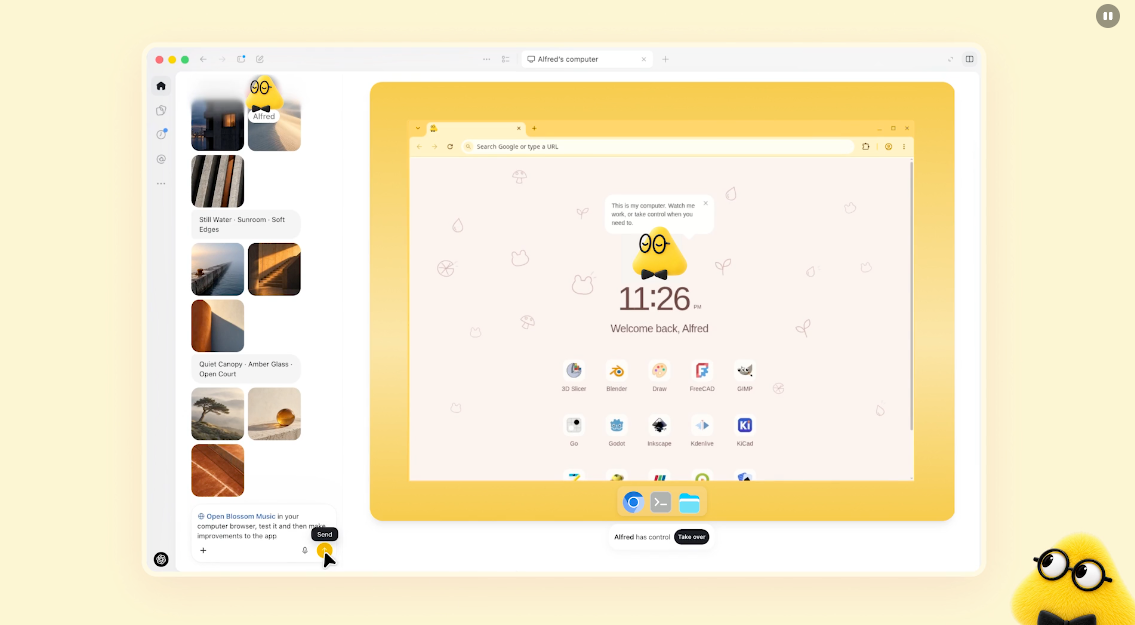
Dots are always-on agents inside ChatGPT. OpenAI announced them at DevDay on September 29, one day after Cue. Each dot runs on GPT-6 Astra and gets its own cloud computer and browser. Structurally, it's the nearest thing to Cue. The big difference is that a dot works through your accounts and your connected apps, while a Cue agent has its own.
I wrote a longer breakdown in our ChatGPT Dots alternatives post.
Key features
- Its own cloud computer: The dot browses, runs code, and uses apps on a separate machine, so your laptop stays out of it.
- 4,000+ app connections: It reaches your tools through ChatGPT's plugin ecosystem.
- Read-only when idle: When you're away, its background "proactive research" can only read your connected apps, not change anything. I think that's the right default.
- Reachable where you work: You can message or call it in ChatGPT, or ping it in Slack and Teams.
Pros
- I like the idle-mode default.
- I like the Slack and Teams reach.
Cons
- I don't like the price ladder. There's no dot on Free, Go, or Plus, so the cheapest way in is $100/month.
- Pro users in the EEA, UK, and Switzerland are locked out at launch. That rules out a big chunk of readers.
- You can only create a dot on desktop, not mobile.
Pricing
- ChatGPT Pro: $100/month, first dot included. Not available in the EEA, UK or Switzerland at launch.
- Business Premium: first dot included, available in all supported ChatGPT regions.
- Enterprise, Edu, Healthcare: beta access turned on by admins.
Suitable for
- Best for: people already paying for ChatGPT Pro who want an agent that lives in Slack or Teams.
- Best for: work tasks that cross many SaaS apps.
How to get started
- Open ChatGPT on desktop, find "Your dot" in the sidebar, name it, and connect only two or three apps at first. Give it one narrow goal, like "flag invoices I haven't sent."
2. Saner.AI: the Cue alternative that doesn't need your logins
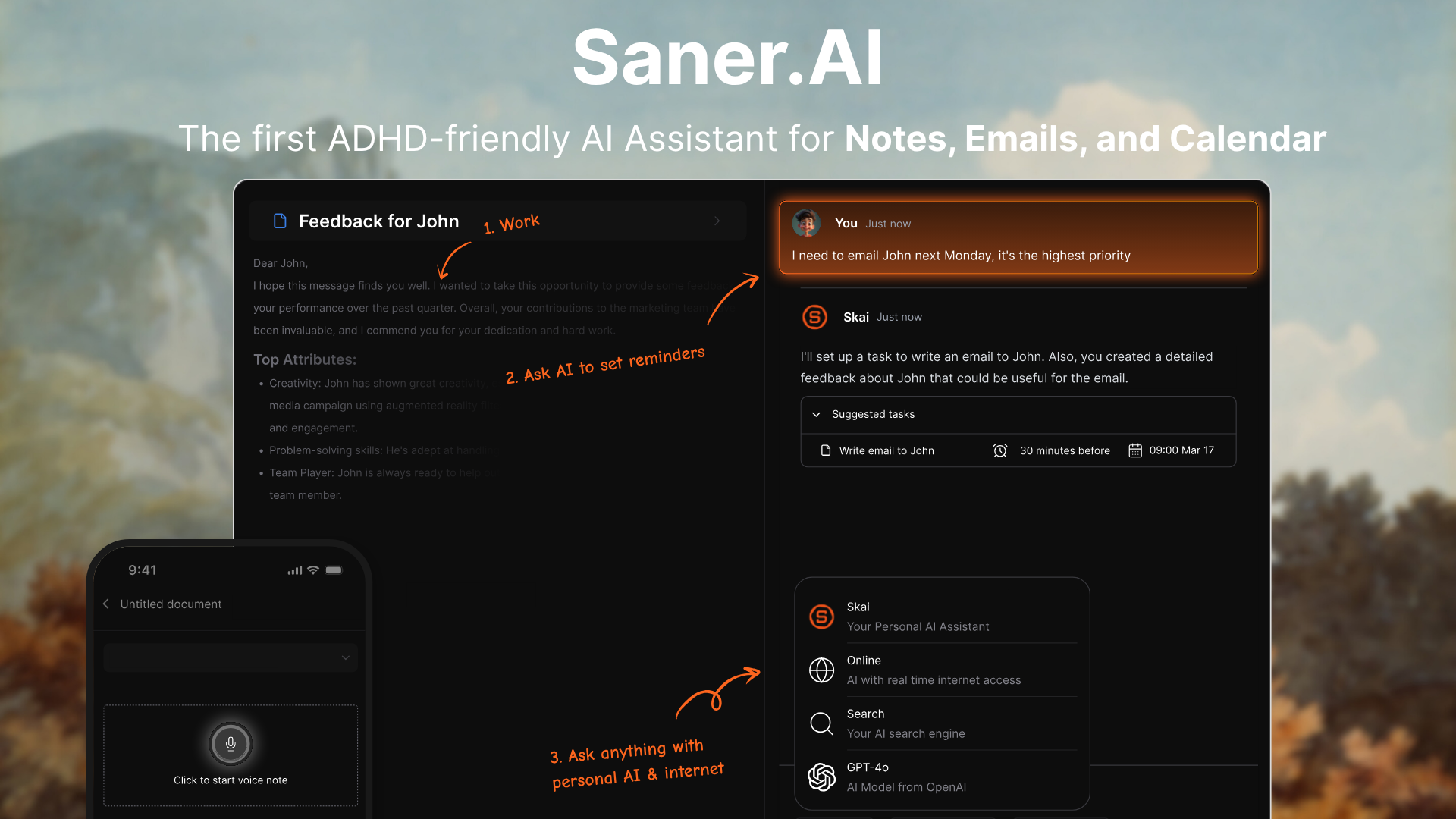
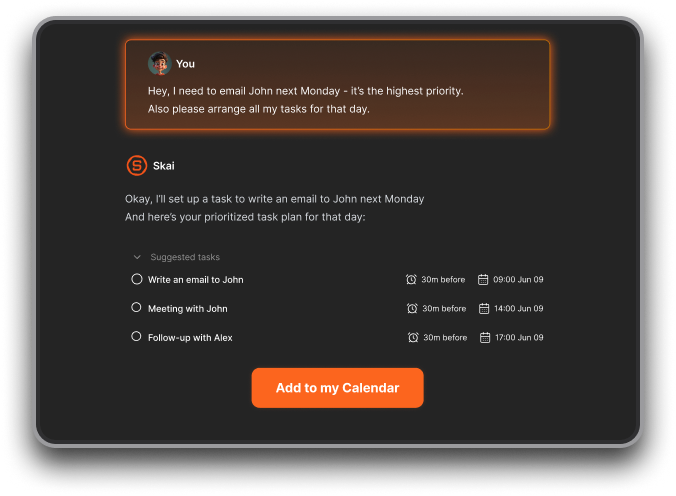
Saner.AI is an AI personal assistant that pulls your notes, email, calendar, and tasks into one place. Its assistant, Skai, uses all of that to plan your day. Cue goes out into the world and does errands. Saner does the part that comes first: working out what actually needs doing, and when.
Key features
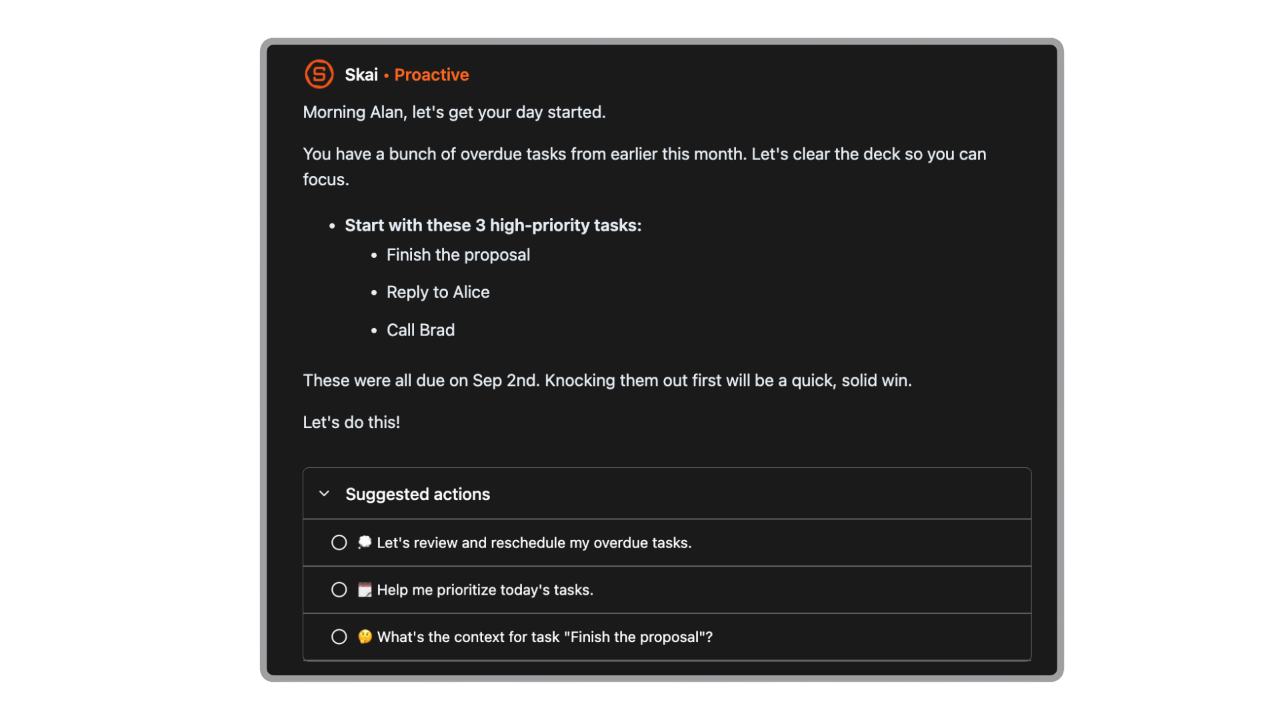
- Proactive daily plan: Each morning Skai builds a plan from your emails, meetings, and open tasks, so you start with priorities instead of a blank list.
- Email-to-task: It pulls action items out of Gmail or Outlook threads and turns them into tasks with dates.
- Brain dump to tasks: You type or speak a messy stream of thoughts, and Saner splits it into tasks with reminders.
- Ask your own knowledge: Skai answers from your notes, files, and synced sources, not the open web.
Pros
- I like that it tells me what matters first thing, before I've opened five apps.
- Nothing gets bought or sent without me. It plans and drafts, and I stay the one who presses the button.
- It's about a twelfth of what Dots costs, and the free plan is enough to judge it
- Connectors work on the free tier
Cons
- It can't act for me on the web the way Cue, Dots, or Muse can. If you need someone to book the table, this isn't it.
- There are no real team workspaces yet. It's a personal tool.
Pricing
- Free: $0, with all connectors included.
- Starter: $12/month billed monthly, or $8/month billed yearly.
- Standard: $20/month billed monthly, or $16/month billed yearly.
Suitable for
- Best for: professionals buried in email and meetings who want a daily plan without handing an agent their passwords.
- Best for: people with ADHD who need nudges and a place to dump thoughts.
- Best for: anyone who can't justify $100/month for an agent.
How to get started
- Sign up for free, then connect Gmail or Outlook and your calendar before anything else. The daily plan is only as good as what Skai can see.

Stay on top of your work and life effortlessly
3. Meta Muse: the Cue alternative for US errands

Muse is Meta's personal agent, launched September 8 in the US on iOS, Android, the web, and WhatsApp. Ironically, Meta had agreed to buy Manus before Beijing blocked the deal, so Cue and Muse now compete directly. Muse borrows your identity, but carefully.
It's the consumer-friendly agent. I covered it in more depth in our honest Muse review.
Key features
- Secure VM and Sentinel: Each user gets a dedicated virtual machine, and a separate "Sentinel" agent decides what can reach the internet.
- Real errands: It handles bookings, forms, shopping, and email on your behalf, and stops for approval before money or messages go out.
- Single-use cards: Purchases go through one-time Stripe Link card numbers, so the agent never holds your real card.
- WhatsApp access: There's no new app to learn if you already live in WhatsApp.
Pros
- It doesn't flood me with approvals but still stops before money and email.
- I like the free tier. You can judge it without paying.
Cons
- It's US-only and 18+.
- I don't like that the big stores can just say no. Amazon blocked Muse from shopping on Amazon.com 12 days after launch.
- I don't like the opaque usage meter. Meta doesn't say how many "tokens" a typical task costs, so it's hard to know when you'll hit the cap.
Pricing (see Muse)
- Free: about 100 million tokens a week, card on file.
- Power: $20/month, about 500 million tokens a week.
- Maximum: $100/month, about 3 billion tokens a week.
Suitable for
- Best for: US households drowning in bookings, forms, and returns.
- Best for: people who'd rather text an agent in WhatsApp than open a new app.
How to get started
- Download Muse or open muse.ai, sign in, and add a card (the free tier needs one). Start with public-web tasks like "find three Thai places open Sunday near me" before connecting email.
- If Muse isn't for you, here are the best Muse alternatives.
4. Grok Bot: the Cue alternative for teams of bots
Grok Bot is SpaceXAI's always-on agent, in beta since August 11. Like Cue, you get several named bots that hand work to each other. Unlike Cue, the bots don't get separate identities. They all share one cloud computer, with the same files, browser sessions, and logins. SpaceXAI's own security page tells you not to treat separate bots as a security boundary.
Key features
- Named bots with roles: You call one "Inbox Triage" and another "Research," and a lead bot can coordinate them, a bit like an AI chief of staff.
- Teach a Task: You do a workflow once in the bot's browser while it watches, and it turns that into a routine.
- Works on sites with no API: It logs in through a browser like a person would, so any web app is fair game.
- Team Bots: Since September 28, bots can be shared across a team.

Pros
- I like Teach a Task. For clunky internal tools with no API, showing beats prompting.
- Files and installed tools stay on the machine between sessions.
Cons
- I don't like the shared machine. The bot you gave your finance login to shares a browser with your marketing bot.
- There's no audit log yet, no published data retention policy, and no way to pick the model.
- Work often stops just short of done.
- There's no Android and no Linux.
Pricing
- Cursor Pro: $20/month. Pro+: $60/month. Ultra: $200/month.
- SuperGrok: $30/month. SuperGrok Plus: $100/month. SuperGrok Heavy: about $300/month.
Suitable for
- Best for: founders and small teams already paying for Cursor or SuperGrok.
- Best for: repetitive admin on websites with no clean API.
How to get started
- Install the macOS, Windows, or iOS app and create one bot with a narrow job title. Teach it a short task, five steps or fewer. Keep finance and production logins off the shared machine until audit logs ship.
5. OpenClaw: the free, self-hosted Cue alternative

OpenClaw is the open-source agent that started this whole category. It runs on your own hardware, talks to you through messaging apps, and works while you sleep. You pay for Cue (eventually) in money. You pay for OpenClaw in setup time and security homework.
Key features
- Lives in your chats: One agent across 29 channels, including WhatsApp, Telegram, Slack, Discord and iMessage.
- Runs on your machine: Your data stays on hardware you control.
- Skills: There's a large community skill marketplace, and the agent can write new skills itself. Every skill is code running with your agent's authority, so review it like software you're installing.
- Any model: Claude, GPT, Gemini, Grok, DeepSeek, or a local model.
Pros
- I like that it's $0 apart from my model bill.
- Nobody can change the terms on me, cap my usage, or sunset the product.
- OpenClaw 2.0's masked-credential system means passwords don't touch the model anymore.
Cons
- It's not safe by default.
- I don't like how unpredictable it can be. A Meta safety director said her OpenClaw agent deleted her whole inbox even though she'd told it to confirm first.
- I don't like the setup. You need a terminal, patience, and a spare machine.
Pricing
- OpenClaw: free and open source (MIT).
- Models: pay-as-you-go to your AI provider, or $0 with local models.
- Hosting: your own machine, or a small cloud server.
Suitable for
- Best for: developers and tinkerers who want full ownership.
- Best for: privacy-first users running local models.
How to get started
- Install it on a spare machine or small cloud server, not your daily laptop.
Quick-pick guide: which Cue alternative should you use?
- If you just want to stop forgetting things buried in email: Saner.AI, which pulls tasks out of Gmail and Outlook automatically.
- If you want the closest thing to Cue and already pay for ChatGPT Pro: ChatGPT Dots, an always-on agent with its own computer. $100/month.
- If you're in the EU or UK: Saner.AI (worldwide, from $8/month) or OpenClaw ($0).
- If you want someone to book, fill out forms, and shop for you in the US: Meta Muse, metered free or $20/month.
- If you live in WhatsApp: Meta Muse (US) or OpenClaw (anywhere, $0).
- If you repeat the same clicks on websites with no API: Grok Bot with Teach a Task, from $20/month via Cursor Pro.
- If you already pay for Cursor or SuperGrok: Grok Bot, included at no extra cost.
- If you have ADHD and need nudges: Saner.AI, built around brain dumps and morning plans.
- If you're a developer who wants full control: OpenClaw, self-hosted and model-agnostic.
- If you won't give any AI your passwords or card: Saner.AI, which plans and drafts without acting as you. From $8/month.
- If your work lives in Slack or Teams: ChatGPT Dots, reachable in both. $100/month.
Conclusion
The real choice is about identity. Do you want an agent that acts as itself, an agent that acts as you, or an assistant that tells you what to act on?
If your bottleneck is doing (booking, filling, clicking), pick Dots for work, Muse for home, Grok Bot for no-API websites, or OpenClaw if you'll host it yourself. If your bottleneck is knowing what matters today, Saner.AI gets you there for a fraction of the price, and without handing anyone your logins.
Stay on top of your work and life effortlessly
FAQ
What is the best Cue alternative?
For most individuals, Saner.AI. It covers what people actually want from a personal agent, which is knowing what needs doing and when, and it starts free. If you need an agent with its own cloud computer that acts on websites, ChatGPT Dots is the closest match.
Is Manus Cue free?
Yes, for now. Cue is free in early access with an invite code. Manus hasn't announced what it will cost after early access.
Is it safe to give an AI agent a wallet?
Only with a hard cap would you be fine losing. Cue's wallet is limited to a budget you set, and Muse uses single-use card numbers, which both reduce the risk. Prompt injection is still the top-ranked risk for AI applications, so keep budgets small and approvals on.
What's the difference between Cue and ChatGPT Dots?
Cue gives each agent its own email, phone number, and wallet, so it acts as itself. A dot works through your ChatGPT account and connected apps, so it acts as you. Dots also costs $100/month on Pro, while Cue is currently free but invite-only.
What's the difference between Cue and Meta Muse?
Muse borrows your accounts through a secure vault and focuses on US errands like shopping and bookings. Cue agents have separate identities and can work together in group chats. Muse is open to anyone in the US with a free tier, while Cue needs an invite.
Can I use ChatGPT Dots on ChatGPT Plus?
No. Dots launched for Pro and Business Premium only, with an Enterprise beta. Plus users who want something similar can try Saner.AI or Muse.
Does Meta Muse work outside the US?
No, not yet. Muse launched US-only for users 18 and over. Meta has said WhatsApp access and AI-glasses support are planned, but hasn't given a date for other countries.
Is OpenClaw safe to use?
Not in its default setup. Sandboxing is off by default, and 2026 brought several serious security advisories. With hardening, a dedicated machine, and limited permissions, experienced users can use it for low-risk personal tasks.
Is there a free Cue alternative?
Yes. OpenClaw is free and open source if you can self-host it. Saner.AI and Meta Muse both have free tiers, though Muse requires a card and is US-only.
Can Saner.AI replace Cue?
It replaces the planning half: knowing what's urgent, pulling tasks out of email, and building your day. It can't take phone calls or spend money for you. If you need both, pair Saner.AI with Muse or Dots.
What's the best Cue alternative for people with ADHD?
Saner.AI. It's built around starting tasks and not forgetting commitments, with brain-dump capture, morning plans, and check-ins. Errand agents help with chores, but they don't fix the "what do I do next" problem.
Stay on top of your work and life effortlessly