
Honest Poke.com Reviews (2026): The Texting Assistant That Wants to Run Your Life


Poke is an AI assistant with no app. You go to poke.com, type in your phone number, and from then on it lives in iMessage, SMS, WhatsApp, or Telegram. It connects to Gmail or Outlook, reads your calendar, and texts you when something needs attention. Built by The Interaction Company of California, backed by a $15M seed round led by General Catalyst, and acquired by Cognition on July 23, 2026, in a deal valuing it in the low nine figures.
The pitch is good. You already check your texts a hundred times a day. Why should an assistant make you open a dashboard?
Here's the tension I kept running into while researching this. Poke is excellent at the last mile, which is telling you something. It is much weaker in the part before that, which is knowing what's worth telling you and holding on to the things you decided last Tuesday. A text thread is a great notification channel. It is a terrible central hub. And now the company that built it belongs to an enterprise coding lab, which raises a question nobody can answer yet about where consumer Poke sits on the roadmap.
Key Takeaways
- Setup is the fastest in the category. Phone number, email connection, done in about a minute. Nothing else here comes close.
- Proactivity is real but noisy. The morning digest and flight reminders land. The email filtering surfaces things that don't matter and misses things that do.
- Reliability is the weak spot. Time zone errors, date confusion, and slow third-party integrations show up repeatedly in user reviews, not just once.
- Pricing went from bizarre to normal. The old "negotiate with a bouncer" model produced $3 accounts and $292 quotes. It's now a flat $0 / $19 / $199. Cleaner, but the Ultra tier is steep.
- There's no memory layer you can actually use. Poke remembers conversationally. It does not give you searchable notes, a task list, or anything you can go back and query. If your problem is that information is scattered, Poke does not solve it.
Poke At a Glance
| Category | Score | Notes |
|---|---|---|
| Ease of setup | 4.8 / 5 | Phone number and one email connection. Under two minutes. |
| Proactive intelligence | 4.0 / 5 | Genuinely anticipates. Filtering judgment is inconsistent. |
| Reliability and accuracy | 2.9 / 5 | Time zones, dates, and slow integrations come up often. |
| Integration depth | 3.2 / 5 | Gmail, Outlook, Notion, GitHub, Linear, custom MCP. No Google Docs. |
| Knowledge and task management | 2.3 / 5 | Effectively absent. No searchable notes or task list. |
| Value for money | 3.0 / 5 | $19 is fair. $199 is a hard sell for most people. |
| Onboarding experience | 2.8 / 5 | Divisive by design. Some love it. Some quit during it. |
| Support and docs | 3.6 / 5 | Docs, Discord, responsive founders on X. |
| Overall | 3.3 / 5 | A brilliant interface attached to an incomplete product. |
What Is Poke?

Poke is a proactive AI assistant that operates entirely through messaging. There is nothing to install. You connect Gmail or Outlook (those are the only two email clients supported, and the team has said iCloud and Yahoo aren't on the near-term roadmap), and Poke starts watching for things worth telling you about.
It routes to whichever model fits the task instead of being tied to one provider, which co-founder Marvin von Hagen has framed as a structural advantage over assistants built by the labs themselves.
Core features:
- Messaging-native interface across iMessage, SMS, WhatsApp, and Telegram
- Proactive nudges for meetings, flight changes, and emails it thinks matter
- Automations and "recipes", either prebuilt or described in plain language
- Integrations with Notion, GitHub, Linear, plus custom MCP servers
- Long-term conversational memory across your chat history
- Poke Human on the Ultra plan, which dispatches real-world tasks to an actual person
- Website building, oddly, publishing to yourname.poke.site
That last one tells you something about the product's shape. It's expanding sideways into novelty features while the core inbox judgment still needs work.
Poke Features Breakdown
1. The Messaging Interface
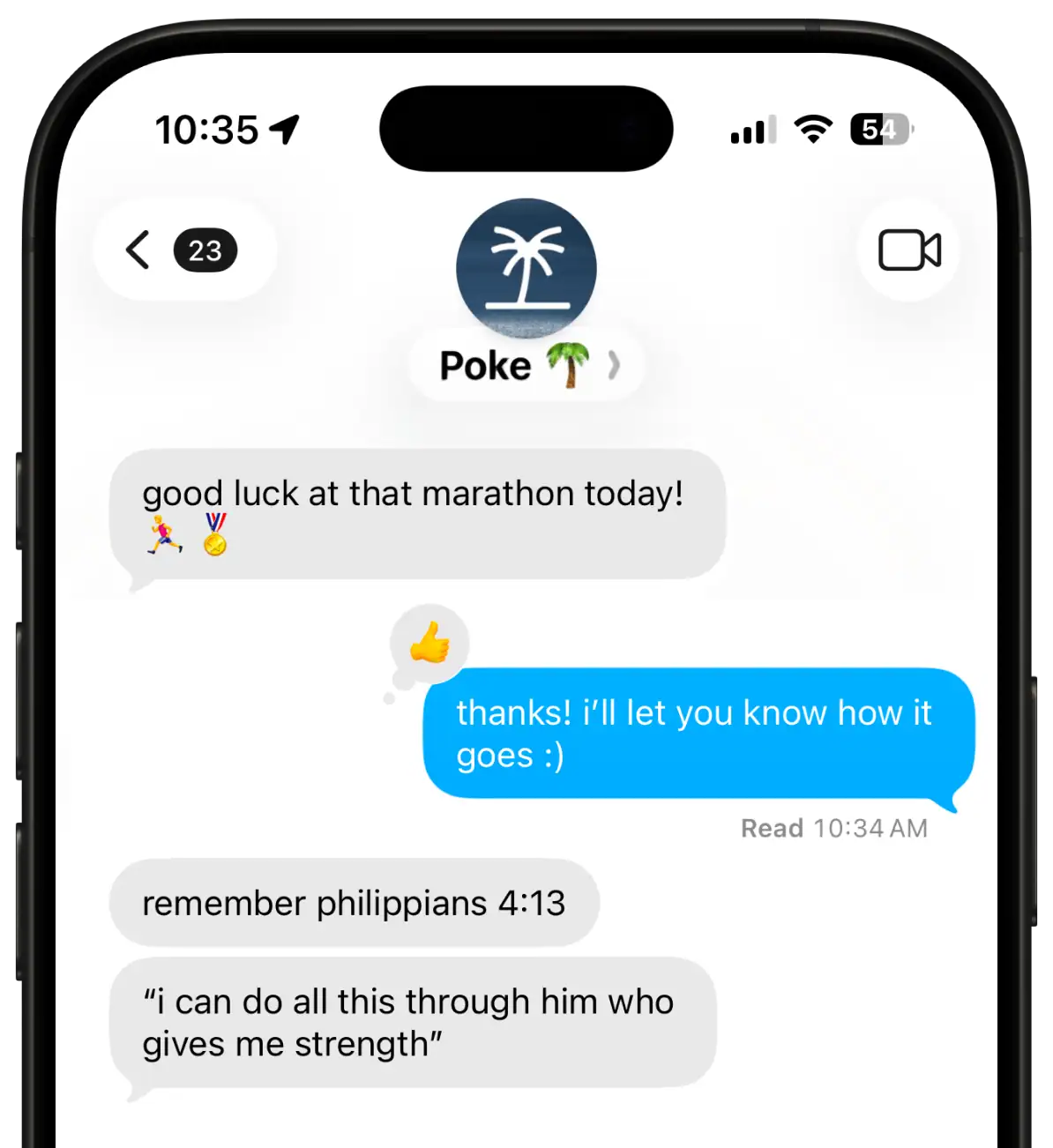
This is the best thing about the product, and nobody seriously disputes it. There's no context switch, no new UI to learn, no app icon competing for attention. You text it the way you'd text a person. Reviewers consistently rate the interaction model higher than the assistant behind it, which is a telling split.
"Texting an AI assistant is a good interaction model that felt like it fits into life's regular workflow." – reviews
That same reviewer went on to say Poke wasn't useful and never proactive, and offered nothing ChatGPT couldn't do. Great interface, thin product underneath.
2. Proactive Nudges
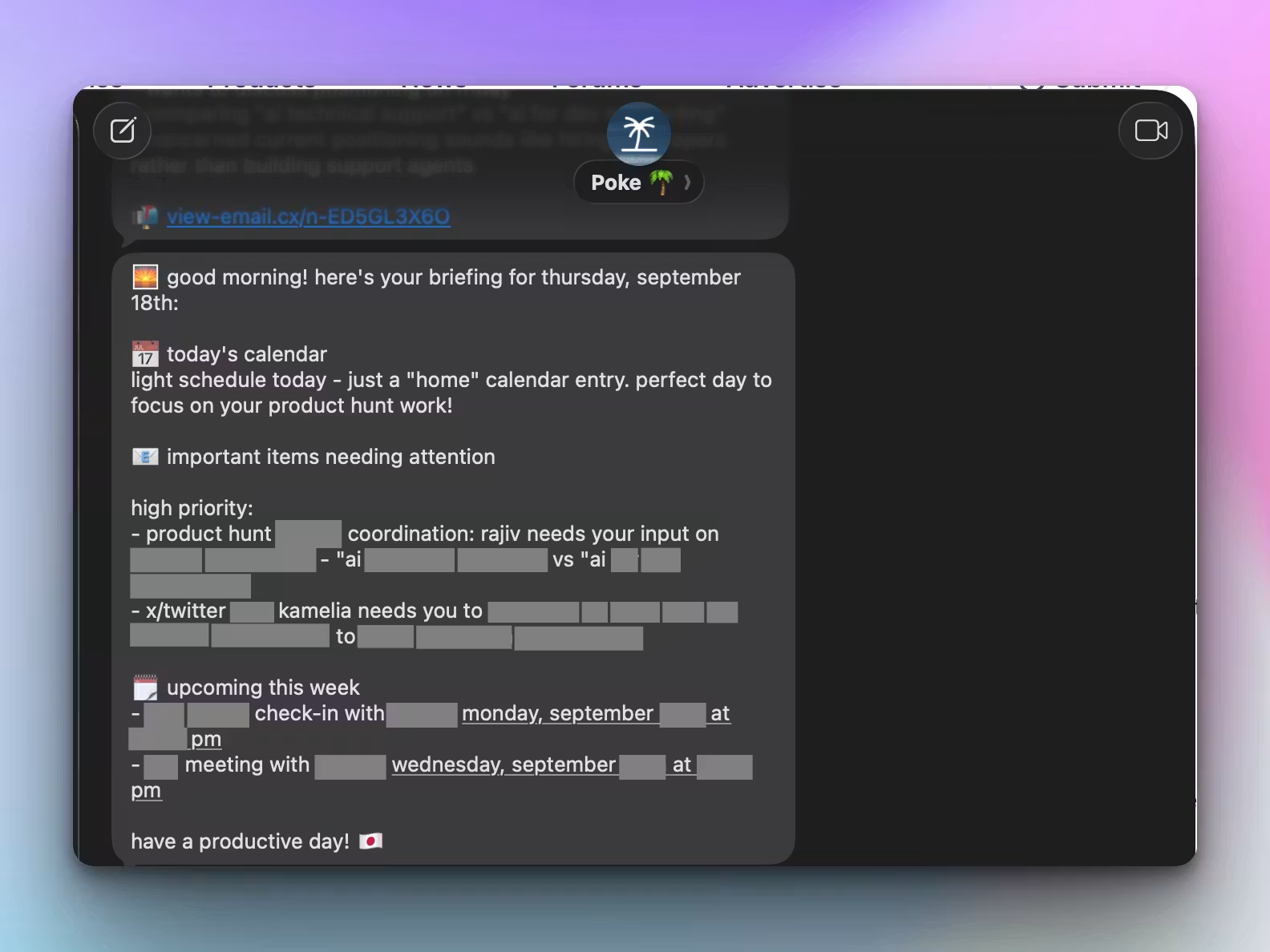
Poke doesn't wait to be asked. It sends you a morning overview, flags flight changes, and pings you when a thread it's watching moves. When the judgment is right, this is the closest thing to an AI executive assistant most people have used. When it's wrong, it's a stream of interruptions you have to train away, and one hands-on review put the hit rate at roughly seven in ten.
Thirty percent noise from a channel that also carries messages from your family is a real cost.
3. Email Filtering and Triage
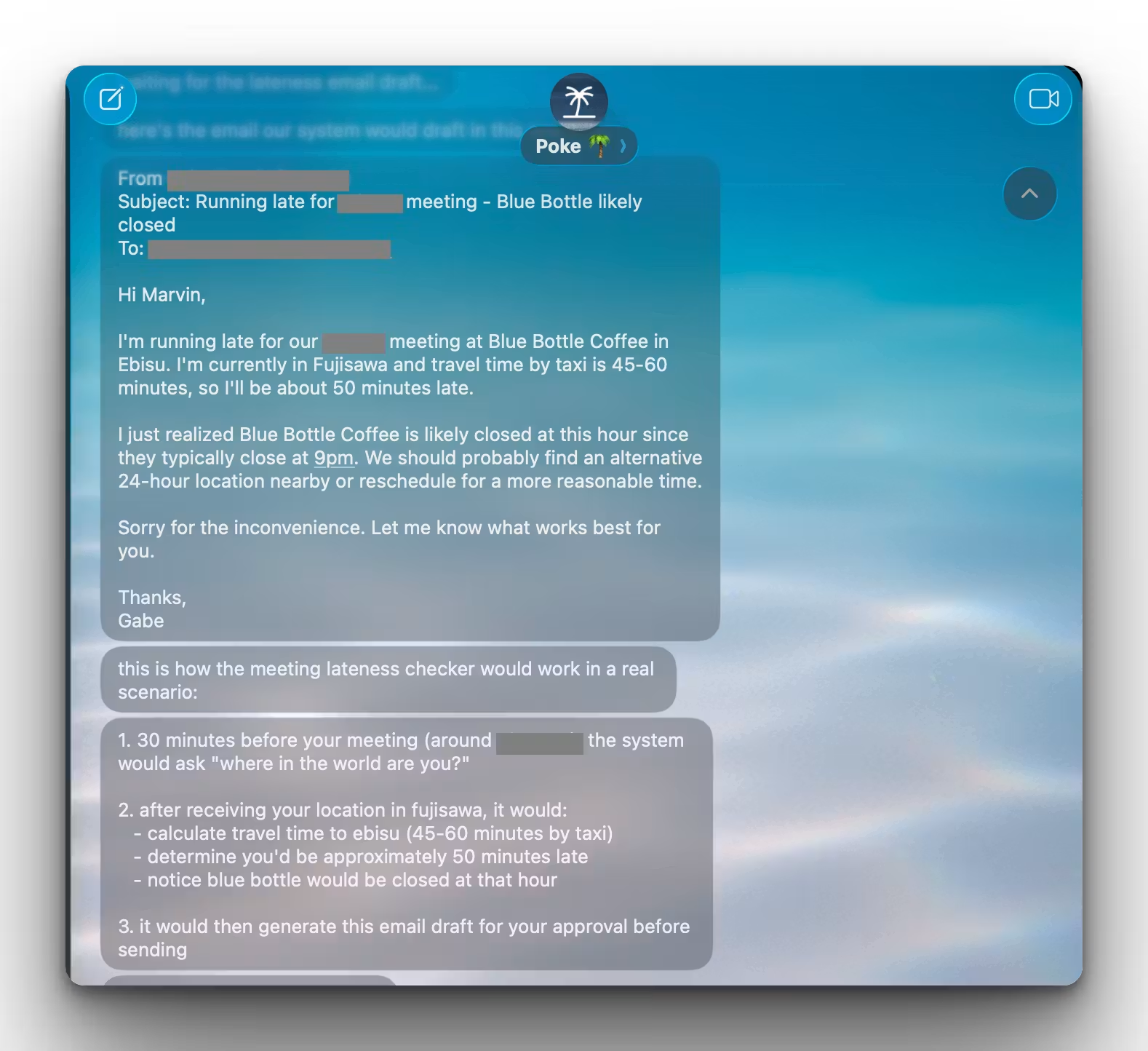
Poke tells you when an important email arrives and tries to separate real humans from newsletters. In practice, the filter doesn't understand context well enough. It can't tell a suspicious charge from a routine reorder, or a wife's non-urgent message from a sales pitch. If email triage is your actual bottleneck, compare this against dedicated AI email apps before committing.
4. Automations and Recipes
You describe an automation in plain language, and Poke builds it. Daily schedule at 7am. Auto-add flight confirmations. Weather before you leave. The ceiling is high if you're willing to tinker, and the community recipe directory is growing fast. The floor is that third-party tools and MCP connections can crawl.
"Some integrations/tools can be slow." – reviews
The Product Hunt reviewer who wrote that also built one of the most impressive Poke setups I found, using Cloudflare Workers, iOS Shortcuts, and webhooks to send automatic "running late" emails. That's the profile this feature rewards. If Cloudflare Workers isn't in your vocabulary, expect a fraction of that.
5. Memory and Accuracy
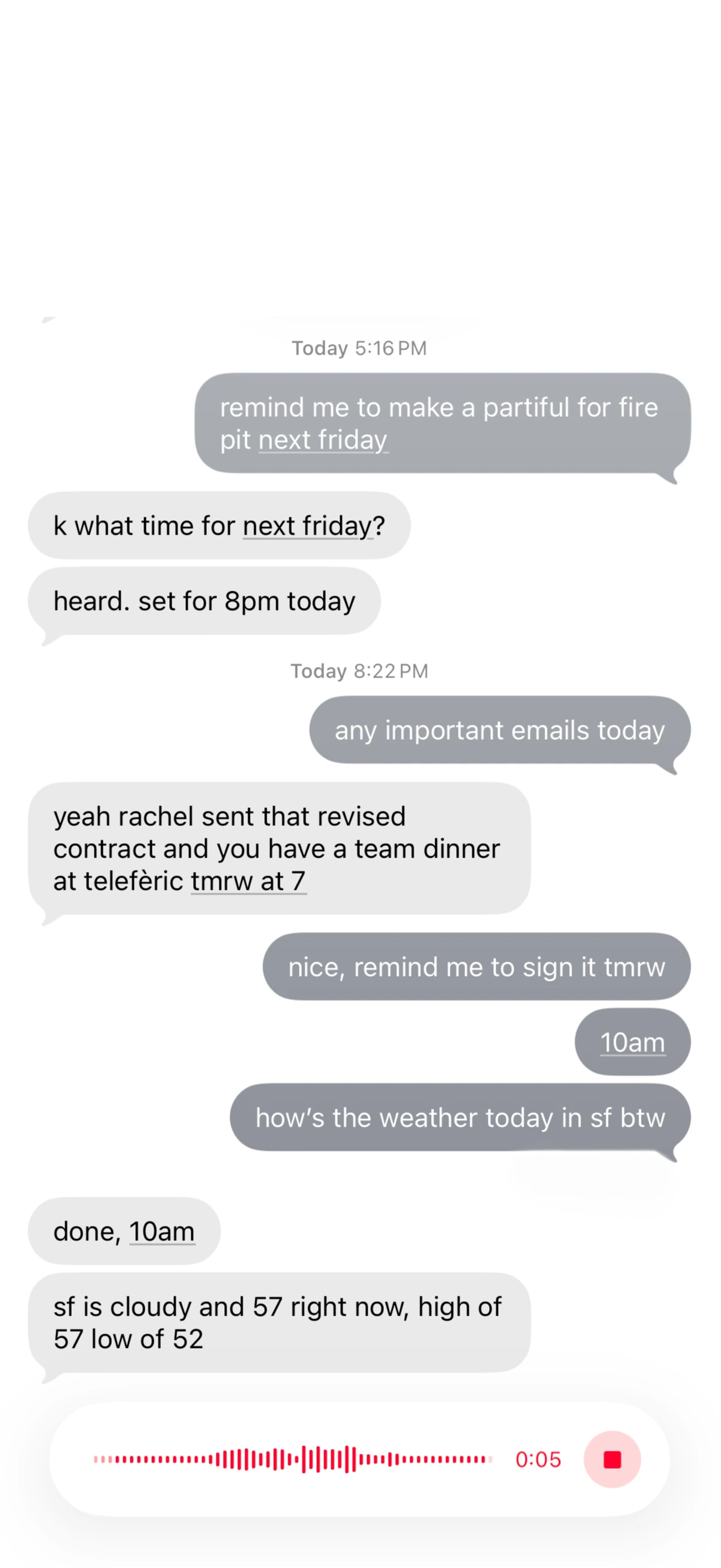
Poke remembers what you tell it across the whole conversation history. That part works. What people report going wrong is basic reasoning, particularly anything involving time. One Product Hunt commenter had to argue with Poke about what day of the week a date fell on, then separately received a meeting reminder an hour late because of a time zone error, and quit over it. Another described the ongoing experience less kindly.
Working with it "still feels like working with a clever, caffeinated toddler sometimes." – reviews
For a product whose entire job is time and attention, getting time wrong isn't a rough edge. It's the thing. Tools that treat scheduling as a first-class problem, like the ones covered in this AI calendar roundup, generally handle this better because it's what they're built around.
6. Poke Human
Ultra subscribers can hand off real-world tasks to a person. Restaurant bookings, phone calls, ride bookings. Operators see only the task details, not your chat history or integrations, and real-world costs pass through at cost. It's a genuinely interesting feature. It's also locked behind $199 a month, which puts it out of reach for the people who most want an assistant.
Poke Pricing
| Free | Pro | Ultra | |
|---|---|---|---|
| Monthly price | $0 | $19 / month | $199 / month |
| Annual billing | N/A | Available (yearly toggle) | Available (yearly toggle) |
| Free version | Yes, permanent | — | — |
| Free trial | No separate trial. Free tier is the trial. | — | — |
| Frontier models | No | Complex tasks only | Every action |
| Background automations | Limited | Real-time | Highest limits |
| Poke Human | No | No | Included |
| Pay-as-you-go overage | No | No | Yes |
| Support | Standard | Priority | Highest priority |
| Payment methods | Card, via the web checkout. Upgrades can be triggered by asking Poke in chat. No published support for PayPal, invoicing, or purchase orders. |
A note on the old pricing. Until recently, Poke set your price through a negotiation with an AI "bouncer" persona during onboarding. Results were all over the map. One user talked it down from $292 to $29 – reviews.
Another spent three days arguing and landed at zero – reviews.
At the far end, one report has a billionaire quoted $136,000 a month, and paying it – reviews.
The current flat tiers are a clear improvement, but if you signed up during the negotiation era, your grandfathered price may look nothing like the published one.
Poke Pros and Cons
| Pros | Cons |
|---|---|
| Fastest setup of any assistant in this category | Reliability problems with dates, time zones, and basic reasoning |
| No new app, no new interface, no context switching | Email filtering surfaces noise and misses signal |
| Genuinely proactive rather than prompt-and-wait | No searchable notes, no task list, no knowledge base |
| Long-term conversational memory that actually holds | Gmail and Outlook only, with no iCloud or Yahoo planned |
| Custom MCP support and a growing recipe library | Third-party integrations and MCP tools can be slow |
| Distinct personality that people either love or leave over | Onboarding drives away a meaningful share of signups |
| No Google Docs or Workspace integration | |
| Ultra at $199/month is steep for a personal assistant | |
| Ownership changed hands in July 2026, and consumer roadmap clarity is thin | |
| Voice notes work, but there's no proper voice mode |
What People Say
The split in sentiment is unusually clean. People who like Poke like the feeling of it. People who don't like it are complaining about outputs.
On the positive side, one Product Hunt reviewer called it well balanced between friendly and genuinely useful, praising how it pushes when you need pushing – reviews.
Another said it became the only product besides ChatGPT they open every day, crediting it with cutting through thousands of work emails – reviews.
A product reviewer who spent a month with it landed on an A- overall, singling out the messaging-first design and the fact that Poke caught a meeting reschedule buried deep in a thread – reviews.
On the critical side, one user wrote a one-star review after weeks of use, arguing that basic email checks took fifteen minutes or more when they worked at all.
"Premium Pricing for a Product Held Together with Duct Tape" – reviews
Privacy also comes up more than the marketing suggests. One writer admitted abandoning onboarding on the first attempt out of concern about data access – reviews.
A commenter on another review was blunter about connecting an inbox to it.
"Wouldn't touch this with a ten-foot pole." – reviews
Worth saying: Poke holds SOC 2 Type II and CASA Tier 2 certifications and runs regular pentesting. The concern people voice isn't that Poke is careless. It's that handing an autonomous agent full inbox access is a category of risk, and Poke doesn't do much to walk you through that decision.
Who Is Poke Best For
- People who live in their messages and refuse to add another app
- Solo operators who need to be told things rather than find things
- Tinkerers comfortable with webhooks, MCP servers, and iOS Shortcuts
- Anyone whose main pain is missing time-sensitive email while away from a laptop
- Gmail or Outlook users, since nothing else is supported
Who Poke Is Not Ideal For
- Anyone who needs to search back through what they captured. Poke has no notes layer.
- People whose work generates a lot of reference material: meeting notes, research, docs, decisions
- Anyone managing a real task list. There isn't one, and a text thread is not a substitute.
- People with time blindness or executive dysfunction, who need reliable time handling most and get it least
- Teams. Poke is single-player, one phone number per account.
- iCloud, Yahoo, or Proton users
- Anyone who wants to evaluate carefully before signing up. Onboarding does not accommodate that.
Poke Alternatives Compared
Poke vs Saner.AI
Poke is a notification layer with no memory you can query. Saner.AI is a workspace that also notifies you.
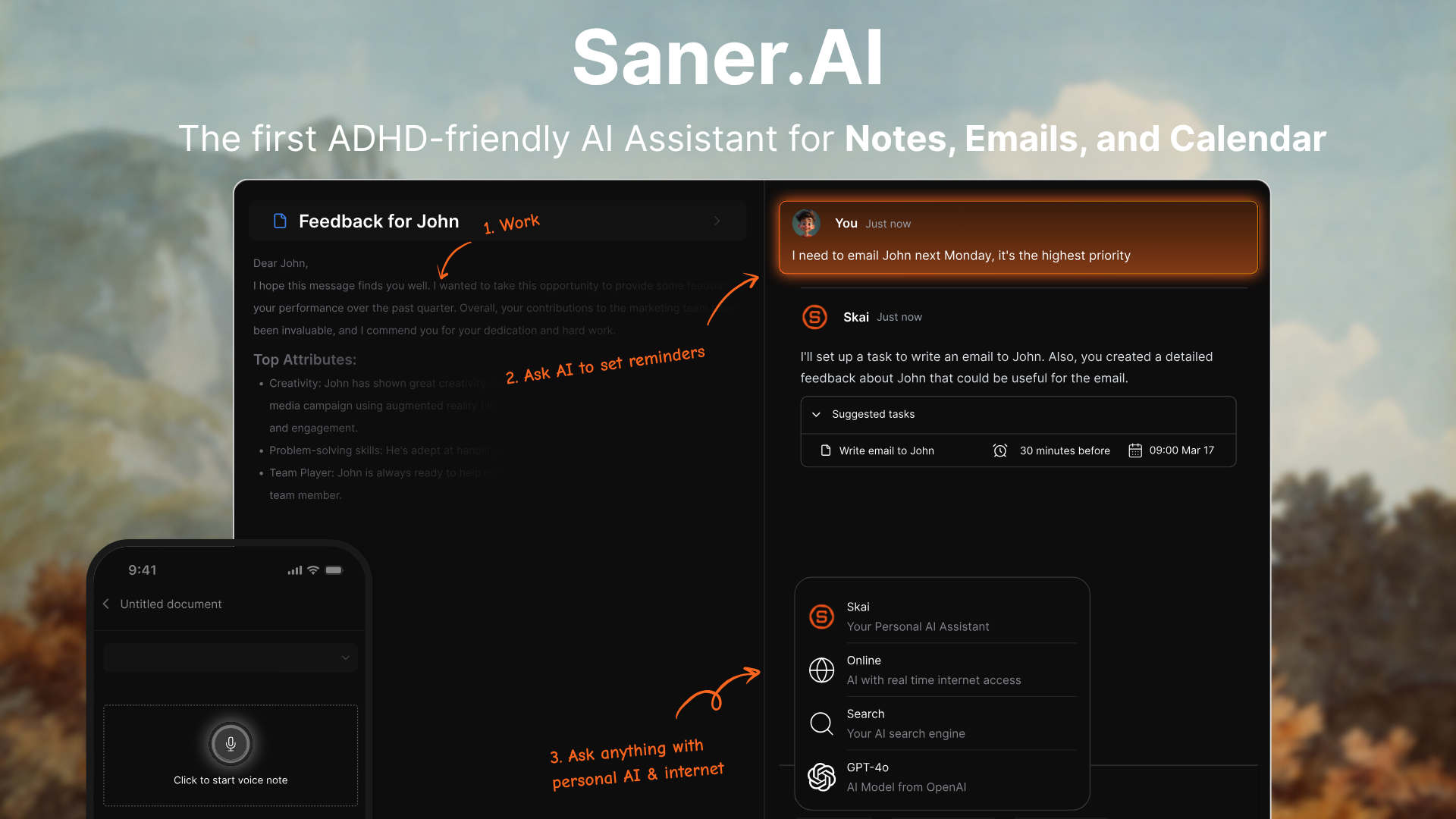
Where Saner.AI does more than Poke:
- It keeps what you give it. Notes, emails, tasks, and calendar events all live in one searchable place. You can ask Skai what you decided in a meeting six weeks ago. In Poke, that decision is somewhere in a text thread, and text threads don't have semantic search.
- It has an actual AI task and calendar system. Tasks get extracted from your emails and notes automatically, then prioritized and scheduled. Poke can remind you about something. It can't hand you a prioritized list of what's outstanding, which is what an AI task manager is for.
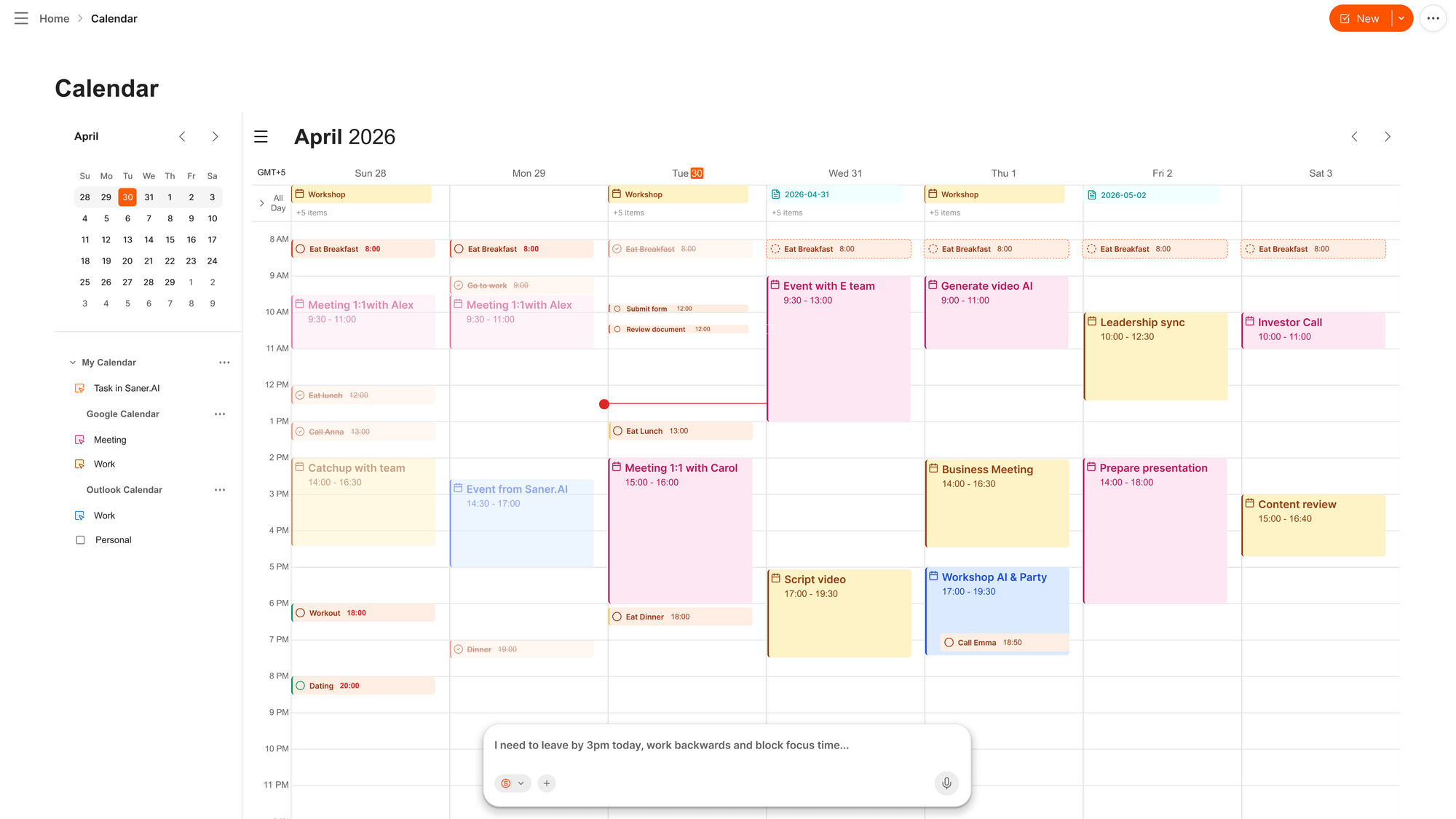
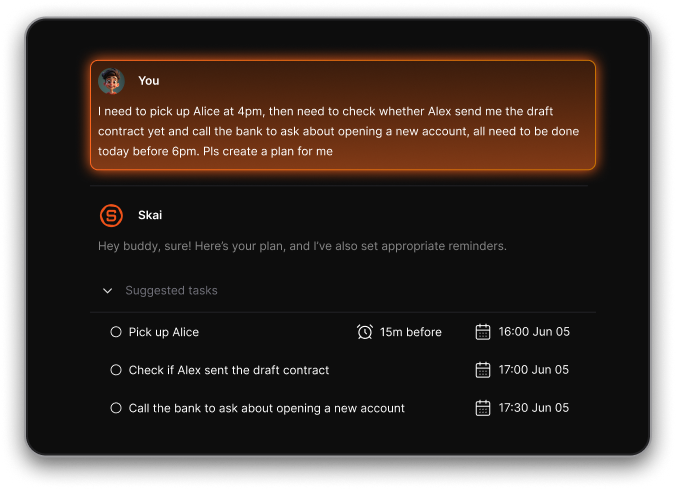
- Brain dump goes somewhere useful. You can type or speak a mess of half-formed thoughts, and Saner turns them into structured tasks, events, and reminders. Poke has no equivalent, since there's no structure to put them in. If dumping and sorting is how your head works, this breakdown of brain dump tools is worth reading.
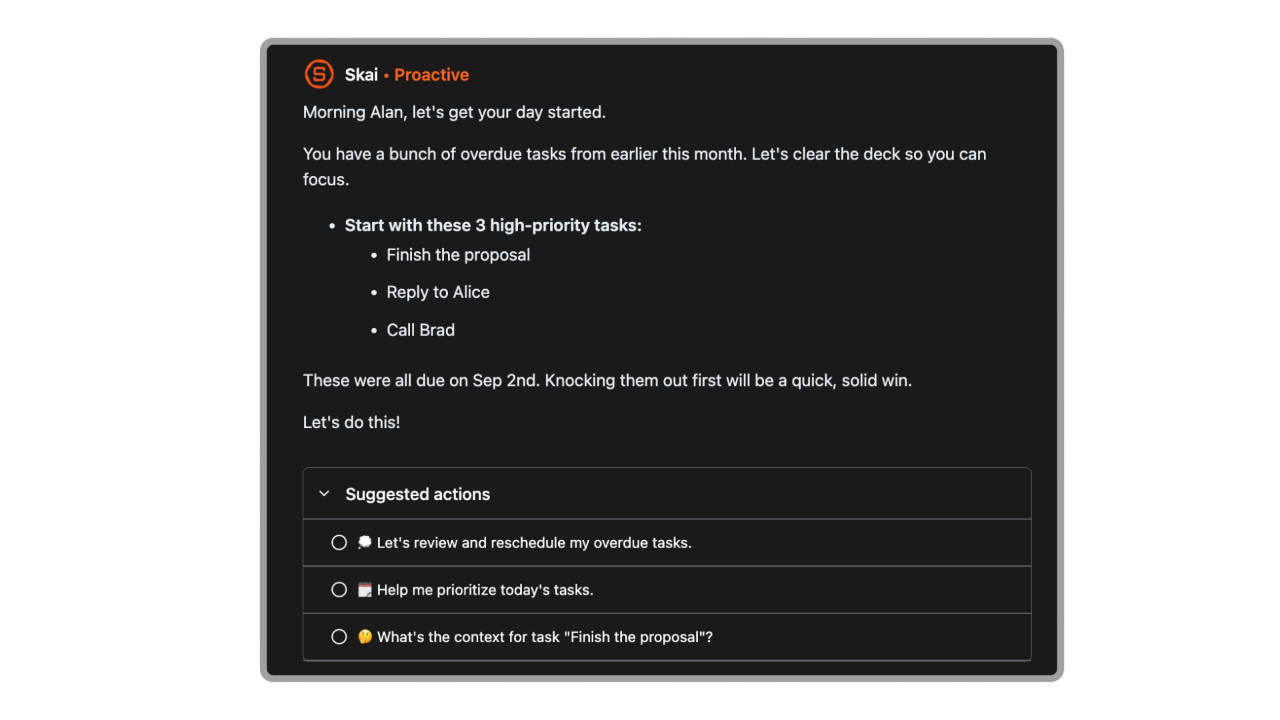
- The daily plan is built from your actual data. Every morning, Saner reads your emails, to-dos, and notes and produces a plan. Poke's morning message is a digest, not a plan. It tells you what exists, not what to do about it.
- Pricing is honest and stable. Free, $8/month Starter, $16/month Standard. No negotiation theater, no $199 tier, no pay-as-you-go overage. Poke Pro at $19 costs more than Saner's top plan.
- It was designed around distraction, not around delight. Saner is built specifically for people who get overwhelmed and lose track of things, including ADHD-prone professionals. The design goal is a low-noise system with fewer places to lose information. Poke's design goal is a fun, chatty presence in your messages. Those pull in different directions.
- Integration breadth is wider where it counts. Google Drive, Slack, Notion, Apple Notes, Gmail, Google Calendar. Poke has no Google Docs or Workspace integration at all, which is a strange gap for a work assistant.
- You can evaluate it properly. Free plan, no card, no bouncer. You form your own opinion before paying anything.
Where Poke still wins:
- Setup is faster
- It reaches you on SMS with no app open, which matters if you're away from a desk all day
- Poke Human has no equivalent anywhere
- Custom MCP server support is deeper for developers
Who Saner.AI suits:
- Knowledge workers, founders, and creatives whose information is scattered across ten places
- Anyone who needs a second brain as much as a reminder service
- People with ADHD or ADHD-style brains who've bounced off Notion, Todoist, and Evernote
- Anyone who wants to search their own past instead of re-deriving it
- Budget-conscious users who want a real free tier and an $8 entry point
Who Poke suits:
- People whose entire problem is missing time-sensitive messages, and nothing else
- Heavy texters who genuinely won't open another app
- Developers who want to wire up custom MCP tooling
The honest summary: if things fall through because you never see them, Poke helps. If things fall through because you saw them, meant to act, and lost them, Poke doesn't. That second failure mode is the more common one.
"The biggest benefit for me in using Saner is the Proactive AI. Staying on top of the constant flow of email and multiple calendars is challenging, and so far, Saner is the only AI-based tool that truly feels like a personal assistant." – Jerry, Saner.AI user
Poke vs Town
Town gives you an assistant with its own email address that triages your inbox, drafts replies, and runs background routines. It's more capable than Poke on email specifically, with prebuilt routines for inbox triage, meeting briefings, and expense logging. The catch is credit-based billing with overage, and Pro runs $99/month. Poke is cheaper and simpler. Town does more of the actual work. Neither one gives you a place to keep things.
Poke vs Motion
Different problems entirely. Motion auto-schedules tasks onto your calendar and reshuffles as the day changes. It's a scheduling engine with a project manager attached. It has no chat interface, no free plan, and costs $49/month for individuals. Poke is conversational and proactive but does nothing to your calendar unless you ask. Pick Motion if your calendar is the mess. Pick Poke if your inbox is.
Poke vs OpenClaw
OpenClaw is the free, self-hosted, open-source version of roughly the same idea. It messages you through WhatsApp, Telegram, or iMessage and executes real tasks on your own machine. It's more powerful and more private. It's also a command-line setup with API keys, and updates have broken working installs. Poke is what you use when you want this to work without becoming a project.
Comparison Table: Poke vs Alternatives
| Poke | Saner.AI | Town | Motion | OpenClaw | |
|---|---|---|---|---|---|
| Entry price | Free | Free | Free | 7-day trial only | Free (self-hosted) |
| Paid from | $19/mo | $8/mo | Starter tier | $49/mo | API costs only |
| Interface | Messaging only | Web, mobile, desktop, Chrome | Web, email, Slack, WhatsApp | Web and mobile | Messaging apps |
| Proactive | Yes | Yes | Yes | Partial | Configurable |
| Notes and knowledge base | No | Yes, searchable | No | AI Docs | No |
| Task management | No | Yes | Partial | Yes | No |
| Email triage | Basic filtering | Yes, with task extraction | Yes, autonomous | No | Yes, configurable |
| Calendar | Read and schedule | Built-in AI calendar | Optimization routines | Auto-scheduling | Configurable |
| ADHD-focused design | No | Yes | No | Claims it, disputed in reviews | No |
| Setup time | ~1 minute | ~5 minutes | ~10 minutes | ~20 minutes | Hours |
| Team support | No | No | Yes | Yes | No |
If you want the wider field, this roundup of AI personal assistants covers ten of them, and there's a dedicated list of Poke alternatives if you've already decided this one isn't it.
Final Verdict
What Poke does well: It removed the single biggest friction in AI assistants, which is that you have to go somewhere to use them. Setup takes a minute. The proactive nudges catch things you'd otherwise miss. The personality is charming. And for people who spend their day away from a screen, getting a text about a rescheduled meeting is worth real money.
What it doesn't do well: It gets time wrong, which is unforgivable for a product about time. Its email judgment isn't sharp enough to trust unsupervised. Third-party integrations are slow. There's no Google Workspace support. And most importantly, there is nowhere for anything to live. Every note, decision, and task you hand Poke goes into a text thread and stays there, unstructured and unsearchable. For an assistant that reads your entire inbox, that's a strange amount of amnesia.
The July 2026 acquisition adds one more variable. Cognition said Poke users continue as normal and that Cognition's models will make it faster. Probably true. But Poke is now a consumer product inside a company whose main business is enterprise coding agents, and that has a history of going one of two ways.
My read: try the free tier. It costs nothing, and you'll know within a week whether the notification-only model fits how you work. If you find yourself scrolling back through the thread trying to find something Poke told you, that's your answer, and you want a tool that holds information as well as delivers it.

Stay on top of your work and life effortlessly
Try Saner.AI free. It plans your day from your actual emails, notes, and calendar, extracts tasks automatically, and lets you ask your own notes questions months later. Free plan, no card, no bouncer.
FAQ
1. How much does Poke cost? Free to start. Poke Pro is $19/month and Poke Ultra is $199/month, with pay-as-you-go usage on top of Ultra. Yearly billing is available. Users who signed up during the negotiated-pricing period may be on very different rates.
2. Does Poke have an app? No, and that's deliberate. It runs over iMessage, SMS, WhatsApp, and Telegram. There's a web dashboard at poke.com for settings, integrations, and automations, but no mobile app to install.
3. What email providers does Poke support? Gmail and Outlook, including calendars and contact sync. The team has said iCloud and Yahoo aren't in immediate plans.
4. Is Poke safe to connect to my inbox? Poke holds SOC 2 Type II and CASA Tier 2 certifications and runs regular pentesting. That said, you're granting an autonomous agent read access to your email and the ability to act on it. Several reviewers flagged discomfort with this. Decide based on what's actually in your inbox, not on the certification list.
5. Can Poke manage my tasks and notes? Not in any structured way. It can remind you about things and remembers conversation history, but there's no task list, no notes database, and no way to search what you captured. If that's your bottleneck, look at tools built around task extraction from emails and notes instead.
6. What happened to Poke's price negotiation? It's gone. Poke used to set your price through a conversation with a "bouncer" persona during onboarding, producing outcomes from $0 to $292 a month for the same product. Pricing is now flat at $0, $19, and $199.
7. Did Cognition buying Poke change anything for users? Not yet. Cognition announced the acquisition on July 23, 2026, and said existing users continue uninterrupted, with plans to improve speed and reliability using its own models and infrastructure. The consumer roadmap beyond that hasn't been detailed publicly.
8. What's the best Poke alternative? Depends on the problem. Saner.AI if you need notes, tasks, and calendar in one searchable place with proactive daily planning. Town if you want autonomous email handling. Motion if your calendar is a mess. OpenClaw if you want to self-host and don't mind a terminal.
Stay on top of your work and life effortlessly