Sunsama Reviews (2026): Honest Features, Pricing, Pros, Cons, and Whether It’s Worth $25/Month


Sunsama has earned a devoted following by promising not more productivity, but calmer productivity. At $25/month with no free plan, it's a bet that intentional rituals can fix your overwhelmed workday. But in a world where AI is rewriting the rules of personal productivity, is Sunsama keeping up?
Key Takeaways
- Sunsama is a premium daily planner built around mindful rituals — guided morning planning, time-blocking, and end-of-day shutdowns that genuinely help users work with more intention.
- At $25/month with no free tier, it's one of the most expensive individual productivity tools on the market — and the lack of any permanent free plan is a real barrier for many.
- It excels at calendar-task fusion and integration breadth, pulling tasks from Asana, Notion, Trello, Gmail, Jira, and more into one clean workspace - but the mobile app significantly underdelivers.
- If knowledge management, AI planning, or a free entry point matter to you, tools like Sunsama may not be a good fit.
At a Glance - Overall Score: 7.3 / 10 ★★★★☆
A polished, thoughtfully designed daily planner with real ritual-building value - let down by a steep price, absent AI, and a weak mobile experience.
| Category | Notes | Score |
|---|---|---|
| Daily Planning & Rituals | Guided morning/evening workflows, shutdown rituals, weekly reviews | 9.0 / 10 |
| Integrations | 15+ integrations — Notion, Asana, Gmail, Jira, Slack, Trello, ClickUp | 8.5 / 10 |
| UI / Design | Clean, calm, minimal — desktop is excellent. Mobile is a letdown. | 8.0 / 10 |
| Time Blocking / Calendar | Two-way sync, drag-and-drop, Google & Outlook support | 8.0 / 10 |
| AI Features | Essentially none. Manual-first by philosophy. | 3.5 / 10 |
| Mobile Experience | Limited functionality vs. desktop; full planning not available on mobile | 4.5 / 10 |
| Value for Money | $25/month, no free plan — steep for individual users | 5.5 / 10 |
| Knowledge Management | Not a feature — Sunsama is a planner, not a second brain | 3.0 / 10 |
| Team Collaboration | Limited — individual-first, Slack plan sharing only | 5.0 / 10 |
| Overall | 7.3 / 10 |
What Is Sunsama?
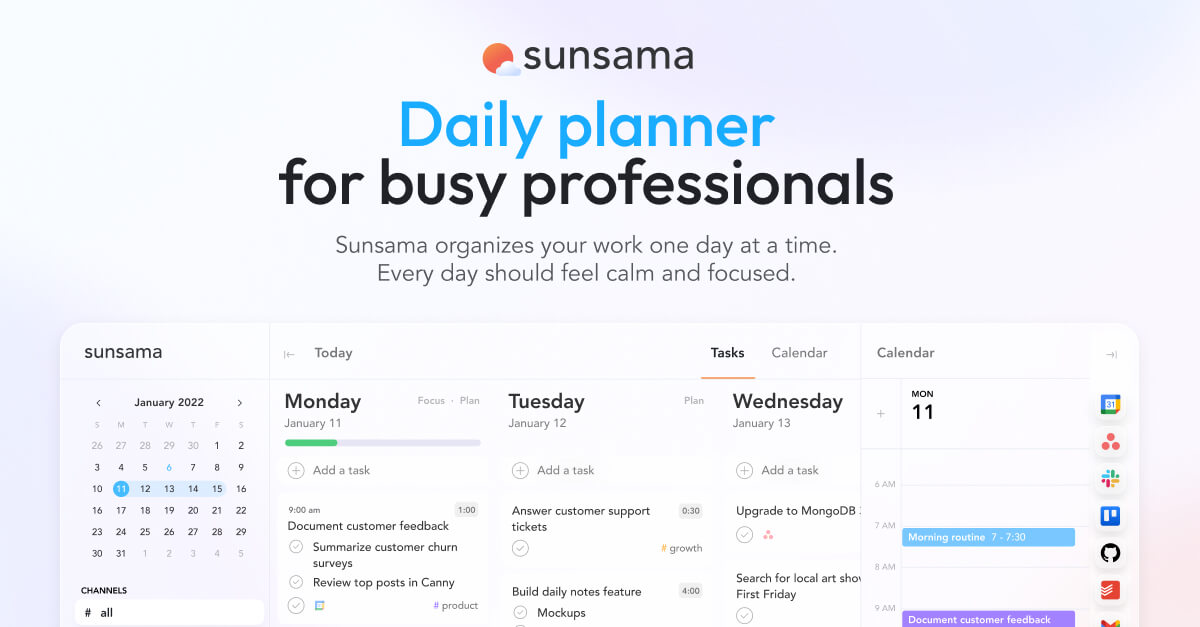
Sunsama is a daily planner and calendar-task fusion tool built for professionals who want to work with intention rather than just volume.
Sunsama stands out for combining calendar-based planning with task managers across multiple tools - enabling users to manage work from Asana, Trello, Gmail, Notion, and more, without context switching.
The product runs on web, macOS, Windows, iOS, and Android. Its philosophy, quite deliberately, is to help you do less more effectively rather than cram more into your day.
Core features include: guided daily planning ritual, time-blocking calendar, multi-tool task integration, weekly objectives, focus mode, daily shutdown ritual, weekly review, Pomodoro timer, and analytics.
Features Breakdown
🌅 The Daily Planning Ritual
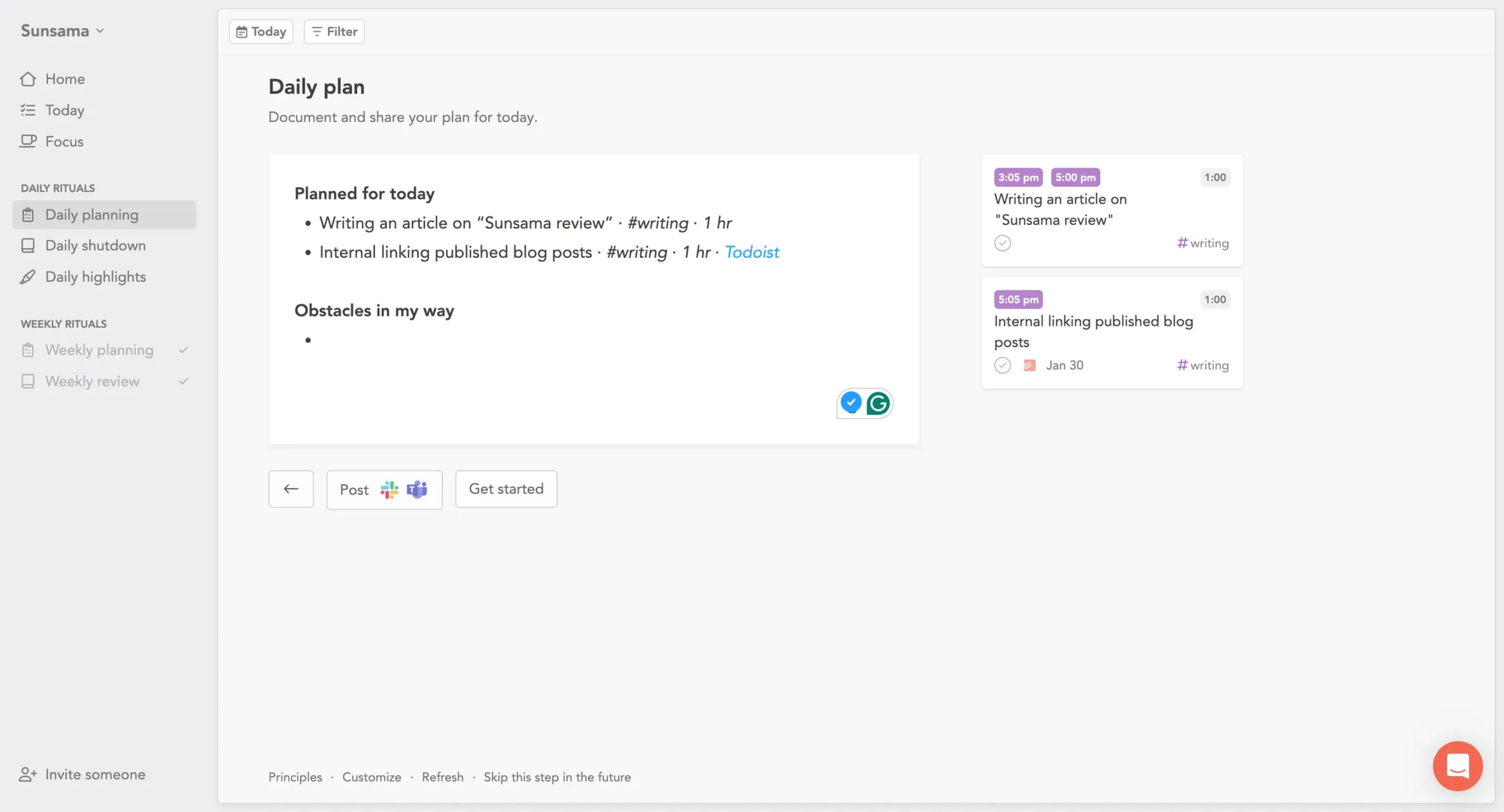
Every morning, Sunsama walks you through a structured planning session - typically 10–15 minutes. You review your calendar, pull in tasks from connected tools, set realistic time estimates, and commit to a daily focus.
💡 Small note: Saner.ai takes this further with AI proactive planning, - its Skai assistant can analyze your notes, emails, and tasks to suggest your day's priorities, rather than waiting for you to curate them manually. If you want guided planning without spending 15 minutes doing it yourself every morning, Saner.ai is worth exploring.
📅 Time Blocking & Calendar Sync
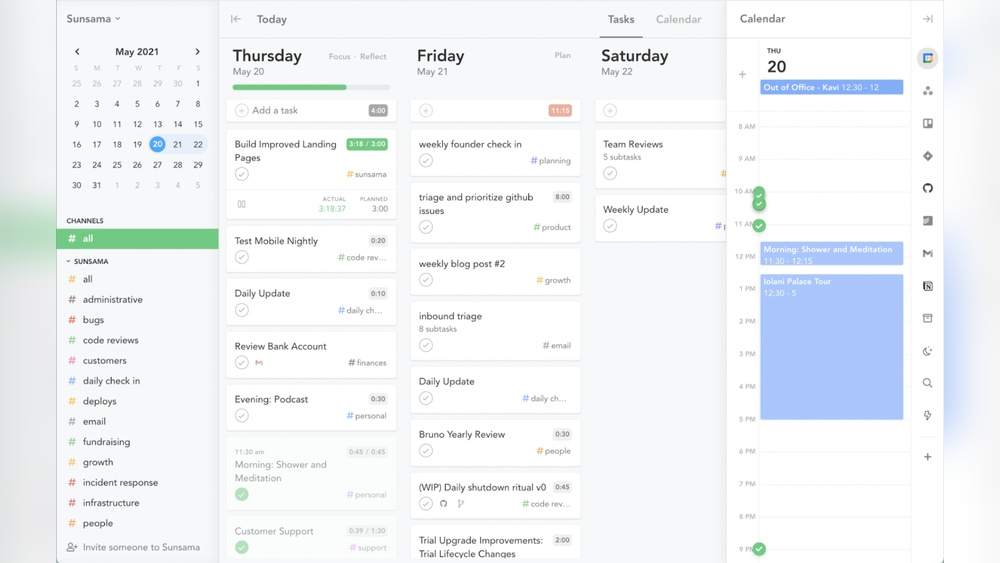
You can drag tasks directly onto your calendar at a specific time - turning to-do items into scheduled blocks. Sunsama syncs with Google Calendar and Outlook, and any edits sync instantly, so your calendar and action plan always match. This makes it genuinely useful for professionals whose days are dominated by meetings.
Time-blocking is where Sunsama shines brightest — it bridges the gap between "things I need to do" and "when I'll actually do them.
🔗 Integrations Hub
Sunsama connects with Notion, ClickUp, Asana, Trello, Jira, GitHub, Gmail, Outlook, and Slack - pulling tasks into one view so you can choose what to bring in each day. The two-way sync means changes you make in Sunsama propagate back to the source tool, keeping everything consistent.
With 15+ integrations covering the most popular productivity stack, Sunsama functions as a genuine aggregation layer for scattered work.
💡 Saner.ai Does This Better: Saner.ai integrates with Gmail, Google Drive, Slack, and Calendar - and goes further by reading those sources via AI to automatically surface and create tasks from your emails and documents. You don't have to manually pull anything in; the AI does the extraction for you.
🎯 Focus Mode & Shutdown Ritual
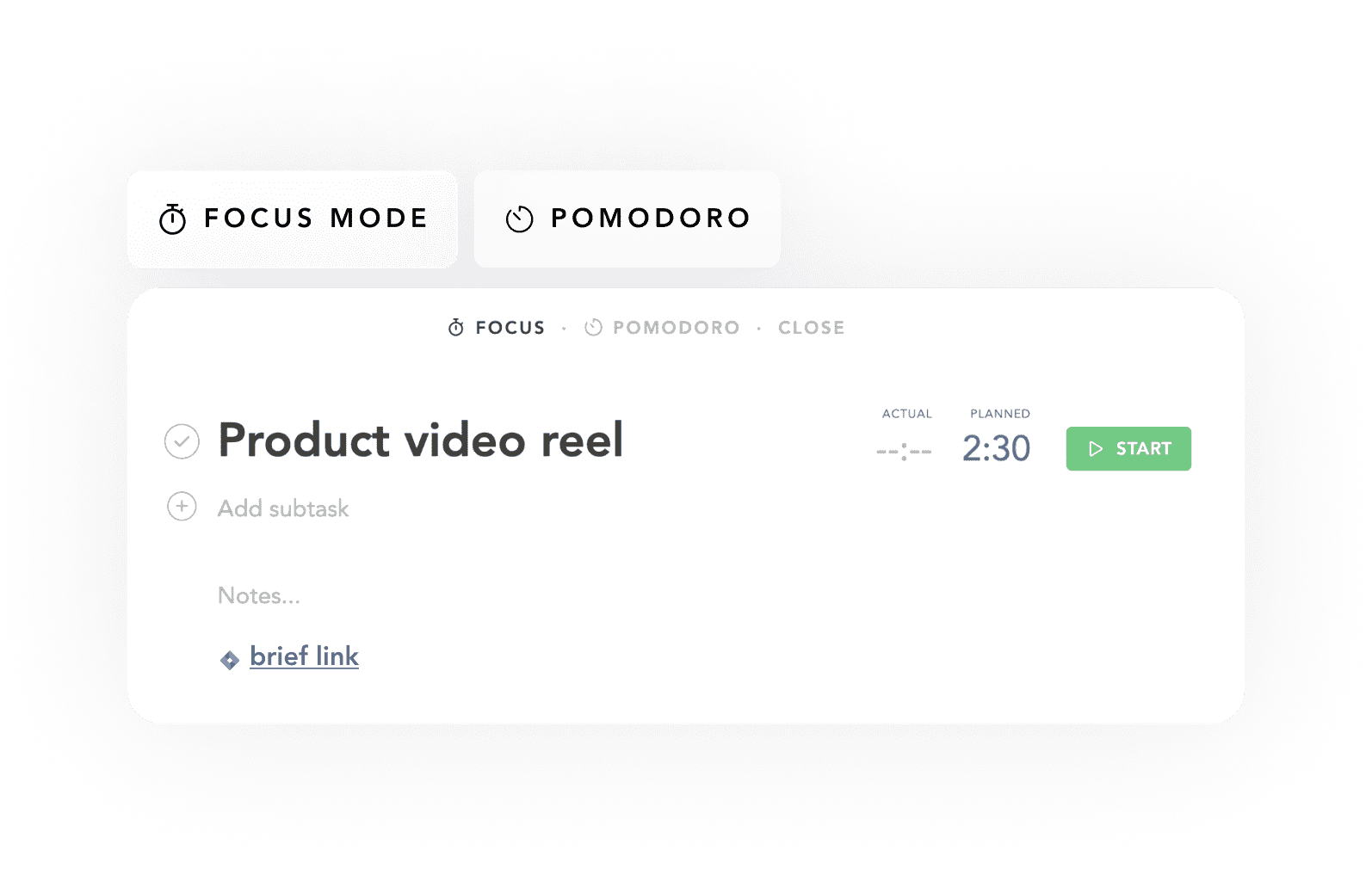
Focus Mode minimizes distractions by entering a dedicated full-screen environment that highlights your current task and hides others. At day's end, Sunsama prompts a shutdown ritual - reviewing what was completed, what moves to tomorrow, and logging reflections. It's a small but meaningful habit.
The shutdown ritual is deceptively powerful - it closes cognitive loops that would otherwise follow you into your evening.
📊 Weekly Reviews & Analytics
Every Friday, Sunsama invites you to do a weekly review - showing how you spent your time, which projects took the most effort, and what you actually achieved. The visual summary helps reveal patterns like over-planning Mondays or under-planning Fridays.
💡 Saner.ai Does This Better: Where Sunsama's analytics stop at time-tracking summaries, Saner.ai's Skai assistant can analyze patterns across your notes, tasks, and communications to surface deeper behavioral insights - not just what you did, but what knowledge gaps or recurring bottlenecks are slowing you down.
📱 Mobile App - The Weak Link
User reviews indicate that Sunsama's mobile apps offer limited functionality compared to the desktop version. Users have noted the inability to conduct advanced planning or daily reviews on mobile devices, limiting the app's usefulness on the go. For a $25/month tool in 2026, this is a real gap.
Pricing
Sunsama costs $25/user/month when paid monthly and $240/user/year ($20/month) when paid annually. Sunsama doesn't have a free forever plan and doesn't plan to, arguing that free plans create bad incentives that hurt users.
💡 Saner.ai starts at free - permanently. The Starter plan is $8/month (billed annually), and the Standard plan is $16/month (billed annually). For budget-conscious professionals or those who want to try before committing, Saner.ai's pricing is far more accessible — and includes a free tier that doesn't expire.
Pros & Cons
✅ Pros
- Daily planning ritual and structured workflow
- Calm desktop UI that reduces cognitive overwhelm
- Excellent two-way calendar sync (Google & Outlook)
- 15+ integrations covering most productivity stacks
- Weekly review and time analytics
- Genuinely helps with work-life balance
❌ Cons
- $25/month with zero free plan — expensive for what it does
- No meaningful AI features — everything is manual
- Mobile app is severely limited vs. desktop
- No knowledge management or second-brain capability
- Not built for teams — individual-first by design
- No quick-capture scratchpad for fleeting thoughts
- Limited Apple ecosystem integration
- No offline mode for most features
- No project management depth (Gantt, dependencies, etc.)
What People Say
Across Product Hunt, Capterra, TrustRadius, and community forums, Sunsama's reviews are remarkably consistent: users who embrace the ritual philosophy are fiercely loyal. Users who expect automation or AI are disappointed.
"So I've been a subscriber to Sunsama for over a year now and honestly it's the single best productivity app I've used." – Reddit user, via reviews
"One of the best platforms out there. Easy to get started and great for time blocking. It is no doubt on the pricier side of productivity tools, but I believe if it helps you stay focused and get work done, it could be worth the price." – Paul Dittus, Creative Director, via reviews
"The Android app is intended as a companion, not a replacement of the desktop/web version, and it lacks some functionality." – Verified user, via reviews
"$20/month for a pretty to-do list? Pass." and "Mobile app is basically useless." – Startup Founder & Consultant, via reviews
Who Is It Best For - and Not Ideal For?
✅ Sunsama Is Ideal For:
- Professionals with packed calendars and fragmented task sources
- People already using Notion, Asana, Jira, or Trello
- Anyone struggling with work-life balance or burnout
- Remote knowledge workers who value structured daily habits
- Users who prefer manual control over automation
- Those willing to invest in a premium, philosophy-driven tool
❌ Not Ideal For:
- Budget-conscious users or those needing a free plan
- Teams needing shared tasks or project collaboration
- Mobile-first workers who plan on the go
- Anyone wanting AI to automate scheduling and prioritization
- Researchers or knowledge workers needing a "second brain"
- Users managing complex projects with dependencies
💡 Saner.ai is designed for exactly that second profile. It's built for ADHD-leaning knowledge workers who need intelligent capture, AI organization, and a tool that works where they work, including on mobile. And it starts free.
Alternatives Comparison
Sunsama vs. Saner.ai
Sunsama is a beautiful manual planner. Saner.ai is an AI productivity assistant that plans, organizes, and connects your knowledge for you. They share a philosophy of reducing overwhelm - but differ fundamentally on the role of AI in achieving it.
| Feature | Sunsama | Saner.ai |
|---|---|---|
| Daily Planning | Guided manual ritual (excellent) | ✅ AI-assisted proactive planning |
| AI Features | None — intentionally manual | ✅ Skai AI: auto-organize, semantic search, task extraction |
| Knowledge Management | Not applicable | ✅ Full second-brain with AI connections across notes/docs |
| Free Plan | ❌ None | ✅ Free tier available |
| Starting Price | $25/month ($16 annual) | ✅ $8/month (annual), $12/month monthly |
| Calendar Integration | Google + Outlook (excellent) | Google Calendar supported |
| Time Blocking | ✅ Core feature | Via calendar integration |
| Mobile App | Limited functionality | ✅ Full-featured iOS + Android |
| Voice Capture | ❌ Not available | ✅ Voice notes with AI transcription |
| Task Auto-extraction | Manual import only | ✅ AI extracts tasks from emails, docs, Slack |
| ADHD Optimization | Ritual-based, helpful | ✅ Purpose-built for ADHD + executive dysfunction |
| Integrations | 15+ (Asana, Jira, Notion, etc.) | Google Drive, Gmail, Slack, Calendar |
Bottom line: Sunsama helps plan ritual depth and integration breadth. Saner.ai wins on AI intelligence, affordability, knowledge management, and mobile. For users who want their productivity tool to also think with them - not just organize what they've already thought - Saner.ai is the stronger long-term bet.
Sunsama vs. Motion
While Motion uses AI to reschedule your entire day when meetings pop up, Sunsama makes you do it manually. It's intentional (mindfulness, remember?), but sometimes you just want the robots to help. Motion is priced similarly but takes the opposite philosophical stance: automate everything. Good for people who want zero decision-making overhead. Bad for people who want to feel in control.
Sunsama vs. Akiflow
Akiflow is arguably Sunsama's closest competitor — similar time-blocking focus, similar integration philosophy. Akiflow edges ahead on task capture speed and keyboard-driven workflows. Sunsama edges ahead on ritual depth and UX calm. Both lack meaningful AI.
Sunsama vs. Todoist
Todoist is a task manager; Sunsama is a daily planner. They're different tools. Todoist is better if you manage hundreds of tasks across projects. Sunsama is better if you want help deciding what to work on today. Todoist is also significantly cheaper.
Final Verdict
Sunsama is genuinely one of the best-designed daily planners ever built. The morning ritual, the time-blocking flow, the shutdown routine - these aren't just features, they're behavioral architecture that helps people work more intentionally. For the right user, this tool can be genuinely transformative.
But in 2026, the absence of any AI layer is increasingly hard to ignore. Every competitor is adding intelligent scheduling, task extraction, and smart prioritization. Sunsama's "manual by design" philosophy was a strength in 2021. Today, it's starting to look like a constraint. Throw in a $25/month price with no free plan, a mobile app that barely functions, and no ability to manage knowledge, and the gaps are hard to overlook.
Who should use Sunsama: Professionals with stable, calendar-heavy workdays who already use tools like Asana or Jira and want a beautiful command center to start each morning with intention.
Who should consider Saner.ai instead: Knowledge workers, ADHD users, mobile-first professionals, and anyone who wants AI to actually participate in their productivity - not just provide a pretty frame for manual work. At a fraction of the cost, with a free plan and built-in intelligence, Saner.ai is the smarter evolution of the "calm productivity" promise.
Frequently Asked Questions
Does Sunsama have a free plan? No. Sunsama has no free plan — only a 14-day free trial that doesn't require a credit card. After the trial, pricing is $25 per month when billed monthly or $16 per month when billed annually. The founders argue that free plans create bad incentives and prefer their model to fund quality development.
Is Sunsama good for ADHD? Many users with ADHD find Sunsama's ritual structure genuinely helpful — it provides external scaffolding for planning and limits the scope of what you're working on each day. That said, Saner.ai was purpose-built with ADHD users in mind, offering AI that reduces the cognitive load of organization itself, which may be a better fit for those with executive function challenges.
What are the best Sunsama integrations? Sunsama connects with Notion, ClickUp, Asana, Trello, Jira, GitHub, Gmail, and Outlook. It also links with Slack so you can share your daily plan directly with your team. The two-way sync with Google Calendar and Outlook is particularly praised by users.
Can Sunsama be used on mobile? Sunsama has iOS and Android apps, but they offer significantly reduced functionality compared to the desktop experience. Users have noted the inability to conduct advanced planning or daily reviews on mobile devices. If you work primarily from a phone or tablet, this is a significant drawback.
Is Sunsama worth $25 a month? For calendar-heavy professionals who are deeply invested in the daily ritual approach and already use multiple project management tools, yes — the integration breadth and planning quality justify the price. For budget-conscious users, those needing AI features, or mobile-first workers, alternatives like Saner.ai offer similar calm-productivity philosophy at a fraction of the cost with a free plan included.
How does Sunsama compare to Saner.ai? Sunsama excels at structured daily planning rituals and calendar-task integration. Saner.ai goes further with AI task extraction from emails and docs, a personal knowledge base (Skai), voice capture, ADHD-first design, and a free plan starting at $8/month. For users who want their tool to actively reduce cognitive load through intelligence — rather than structured manual input — Saner.ai is the stronger option.

Stay on top of your work and life
This review is based on public user data, verified reviews, and product documentation