
The 5 best AI for Coaches: Make your practice way more efficient.
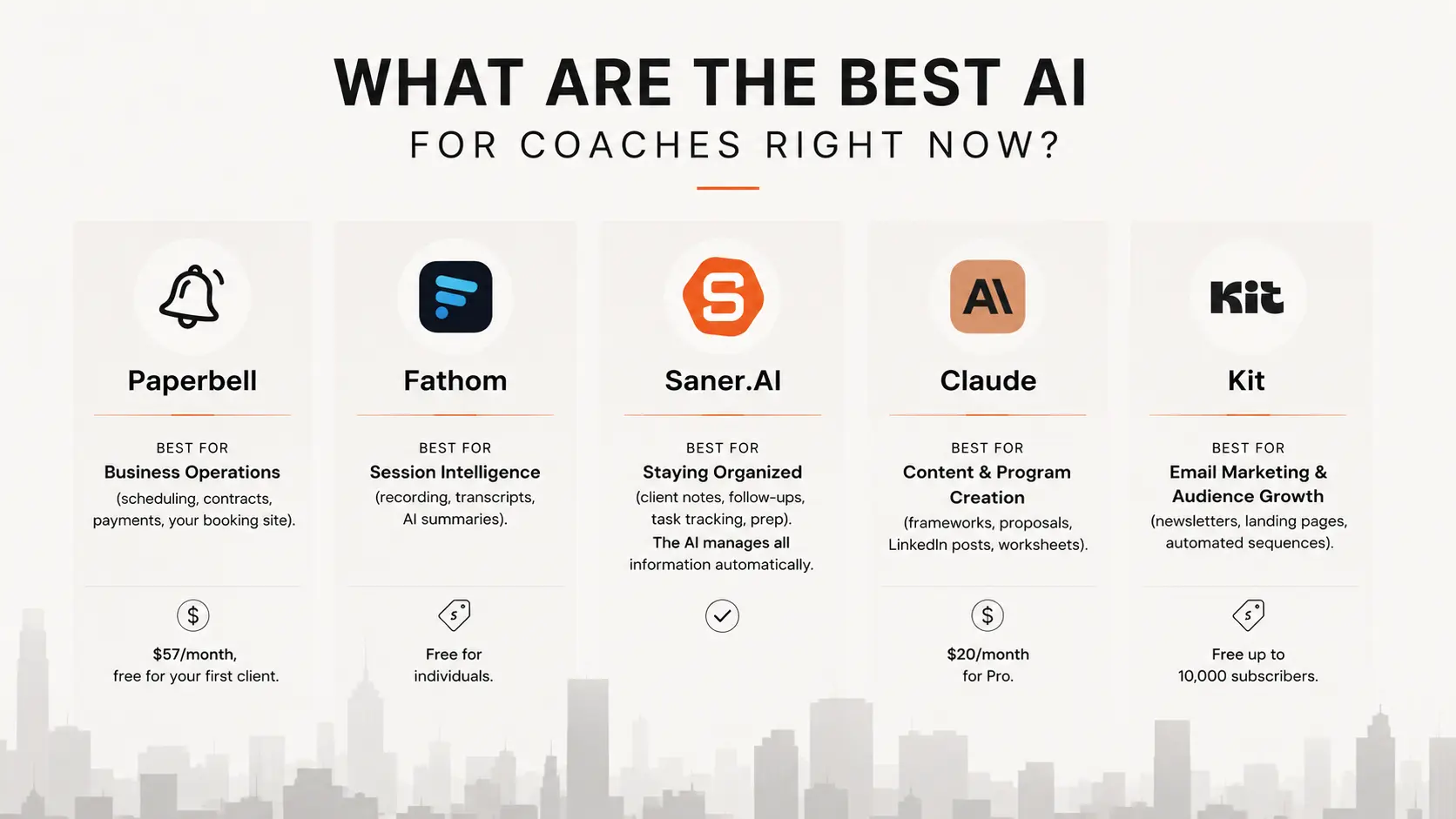
best AI for coaches in 2026 are Paperbell, Fathom, Saner.AI, Claude and Kit


I've spent the last few months buried in software, testing tools, and reading through hundreds of G2 and Capterra reviews about how coaches actually work day-to-day. It's what I'd tell a friend who coaches full-time and is tired of guessing which AI tools are worth the subscription. If you're a solo coach or run a small practice and you're drowning in admin instead of coaching, this one's for you.
You didn't get into coaching to spend half your week on scheduling, transcribing sessions, writing LinkedIn posts, and chasing invoices. But that's where most of your hours go. The 2025 ICF Global Coaching Study found that coaches spend just 11.6 hours a week actually coaching. The rest is everything else.
Quick disclosure: I work at Saner.ai, which is on this list. Keep that connection in mind as you read my recommendations.
Quick answer: What are the best AI for coaches right now?
- Paperbell — best for business operations (scheduling, contracts, payments, your booking site). $57/month, free for your first client.
- Fathom — best for session intelligence (recording, transcripts, AI summaries). Free for individuals.
- Saner.AI — best for staying organized (client notes, follow-ups, task tracking, prep). One place instead of five.
- Claude — best for content and program creation (frameworks, proposals, LinkedIn posts, worksheets). $20/month for Pro.
- Kit — best for email marketing and turning your audience into clients (newsletters, landing pages, automated sequences). Free up to 10,000 subscribers.
What is AI for coaches?

"AI for coaches" means tools that help you run your practice, but the coaching itself stays human.
The admin problem is big
Coaches aren't imagining the time drain. According to the 2025 ICF Global Coaching Study, 67% of professional coaches name administrative tasks as their primary constraint on taking new clients, ahead of both time availability and marketing effort. That's not a minor inconvenience. It's the single biggest thing standing between a coach and a bigger caseload.
AI adoption inside the profession is still surprisingly low given how much time it could save. The same ICF study found that only 6% of coaches currently use AI-powered tools, even though 54% say improved technology is a priority for meeting client demand. There's a real gap between wanting help and actually using it, and that gap is mostly about not knowing which tools are worth the setup time.
How we evaluated these tools
We tested each tool against real coaching workflows over several weeks, not just feature lists, and cross-checked pricing and claims against G2, Capterra, and Trustpilot reviews current as of mid-2026.
- Coaching-specific fit — does it solve a problem coaches actually have, or is it a generic business tool with coaching bolted on?
- Setup time — can a non-technical coach be running with it in under an hour?
- Data handling — client conversations are sensitive. Does the tool have a clear privacy policy and reasonable data retention?
- Price-to-value at solo scale — most coaches aren't running agencies. Does the pricing make sense for one person with 10 to 30 clients?
- Does it overlap with anything else on this list — we cut any tool that duplicated another's job.
Now, let's dive in!
Paperbell — the simplest way to stop chasing invoices
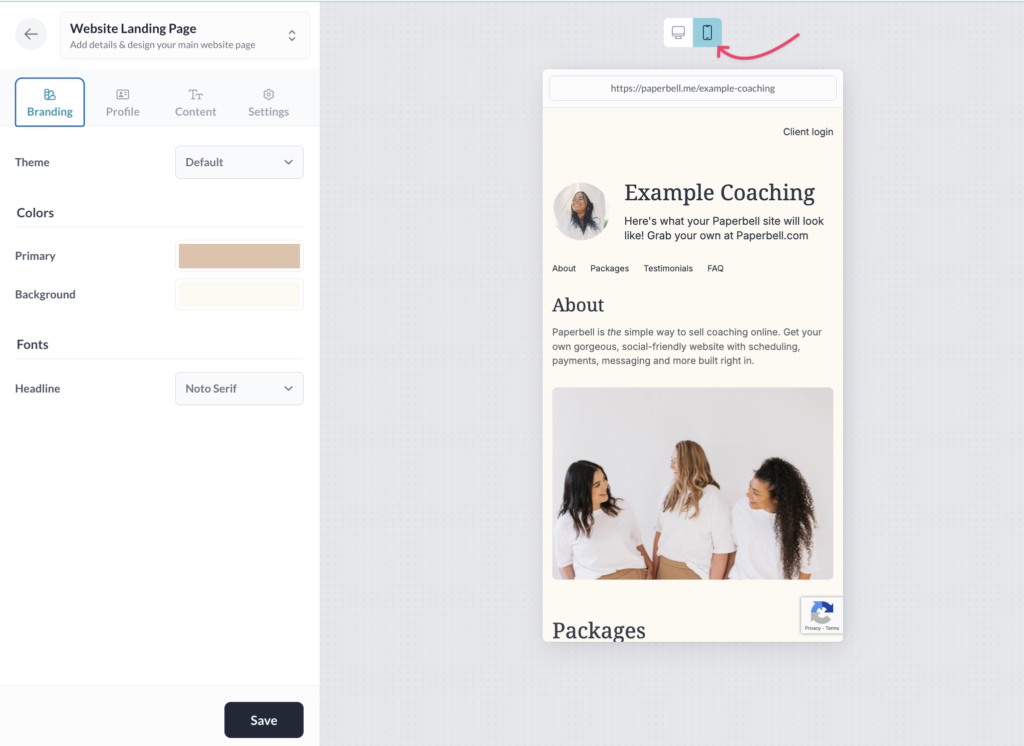
Paperbell handles the business side of coaching: booking, contracts, payments, and a branded website, all in one flat-fee tool. It's built specifically for coaches, not general service businesses, which is why setup takes under an hour for most people.
Key features:
- Package builder with payment plans, subscriptions, and pay-in-full discounts
- Auto-generated booking website with checkout built in
- Digital contracts and intake forms clients sign before their first session
Pros:
- Coaching in real time stops being a scheduling headache. One coach said Paperbell handles calendar syncing, time zones, and payments so they rarely think about any of it (review).
- Flat pricing with no per-client or transaction fees on top of Stripe/PayPal processing.
- Genuinely fast to set up, even for non-technical coaches.
Cons:
- No in-app messaging. Client communication happens over email.
- Not built for course delivery. No modules, quizzes, or progress tracking if you want to scale beyond 1:1 work.
Pricing:
- Free — full features, capped at 1 client
- All-Inclusive — $57/month, or ~$47.50/month billed annually
Suitable for: Solo coaches who want their business admin off their plate without learning new software.
Getting started: Build your package and contract templates first, using the free plan with your first real client before you pay anything.
Fathom — the notetaker that lets you actually be present
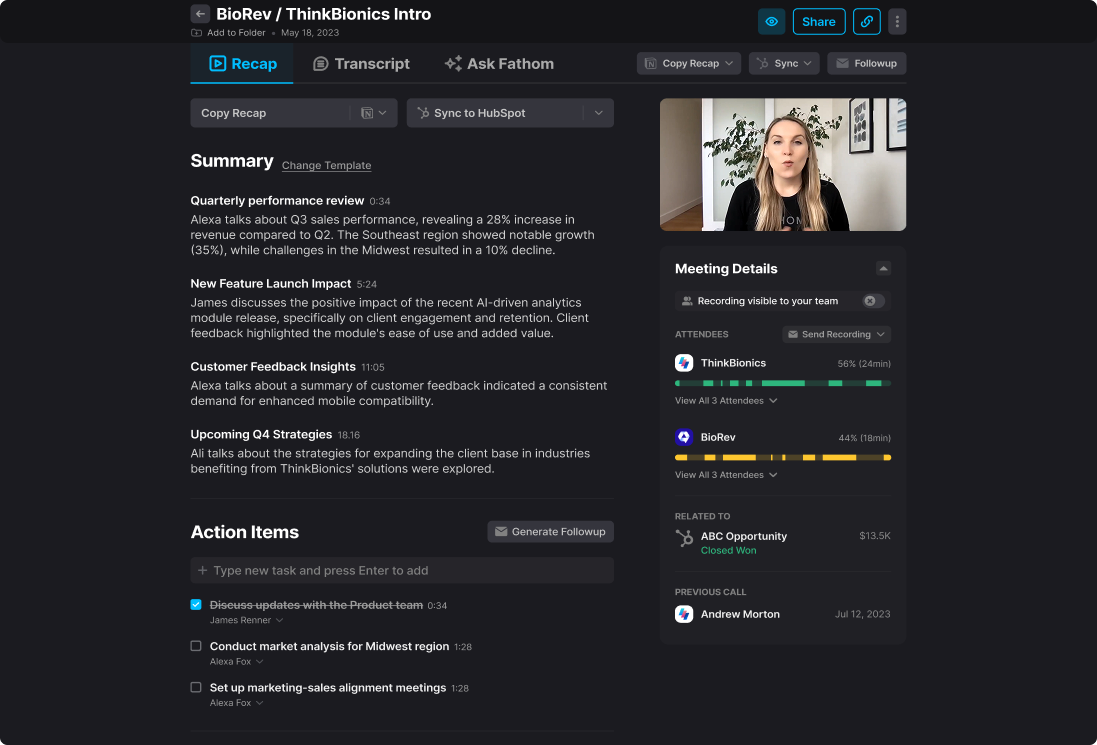
Fathom joins your Zoom, Teams, or Meet calls, records them, and turns the conversation into a structured summary with action items in about 30 seconds. For coaches, this means no more scribbling notes mid-session while trying to stay present with a client.
Key features:
- Auto-generated summaries with timestamps and action items
- Editable transcripts, including reassigning speakers and trimming sections
- Highlight clips for pulling a specific client moment without sharing the whole recording
Pros:
- The unlimited free tier for individuals is the most generous in its category, with no time limit on recordings or summaries.
- Summaries are ready to use, not just a reformatted transcript.
Cons:
- A visible "Fathom Notetaker" joins every call, which some clients notice and ask about.
- Cross-meeting search and sentiment analysis are weaker than dedicated sales tools like Fireflies.
Pricing:
- Free — unlimited recording, transcription, and summaries for individuals
- Premium — $19/month for advanced features and templates
Suitable for: Any coach running client calls over video who wants documentation without doing the documenting.
Getting started: Connect your calendar, let Fathom auto-join your next session, and review the summary right after. Most coaches keep the default settings.
Saner.AI — the second brain that holds everything between sessions
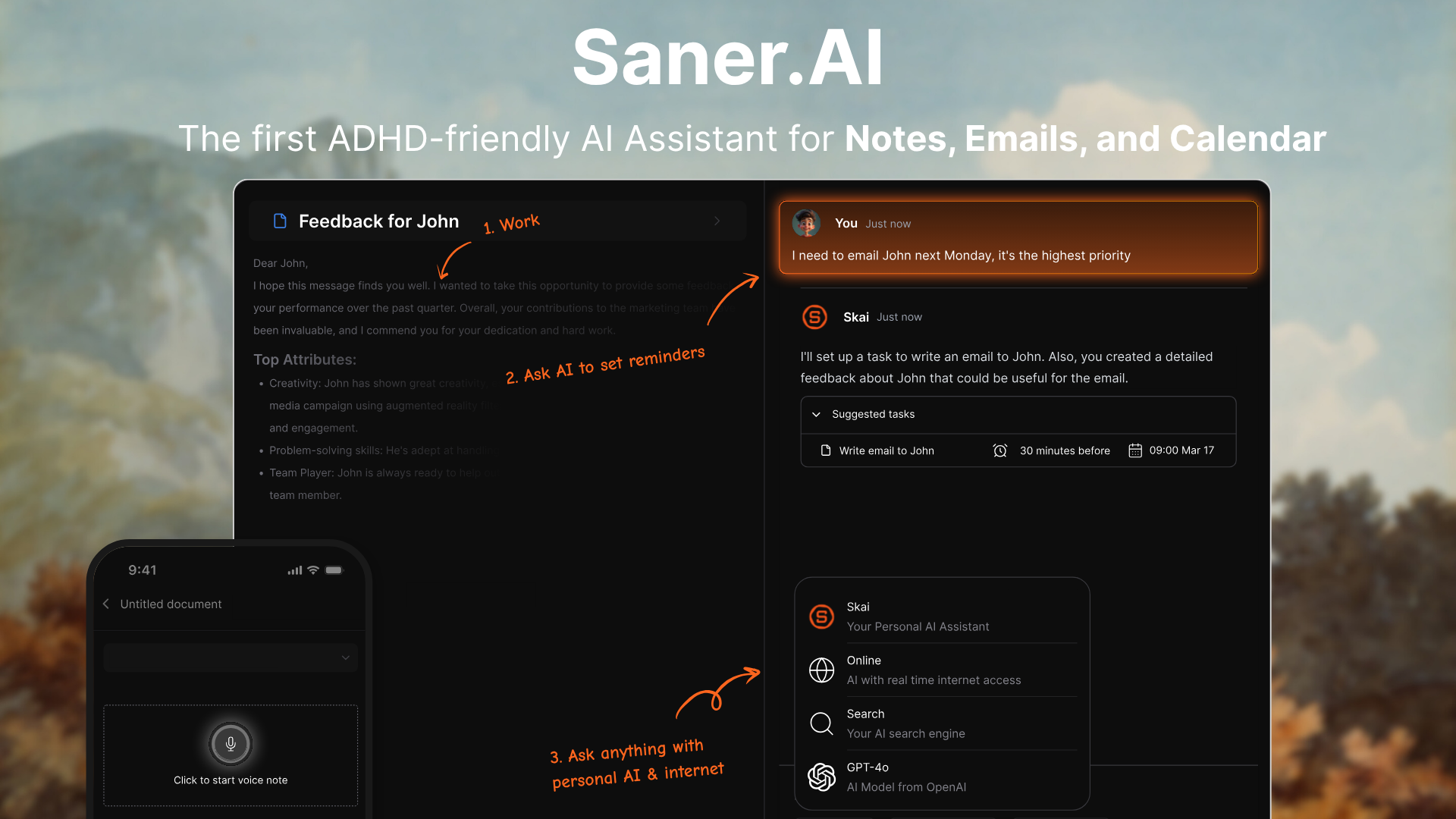
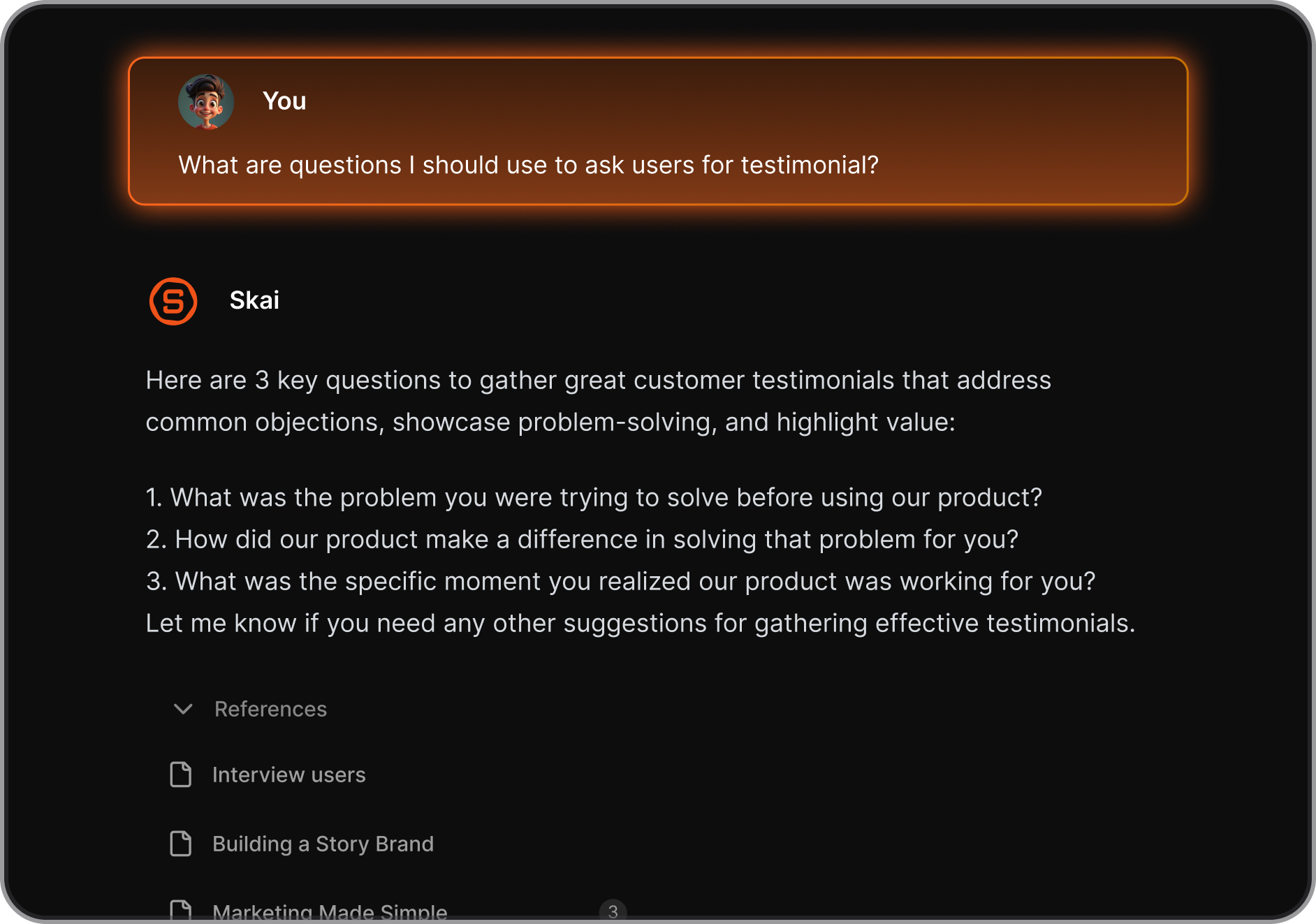
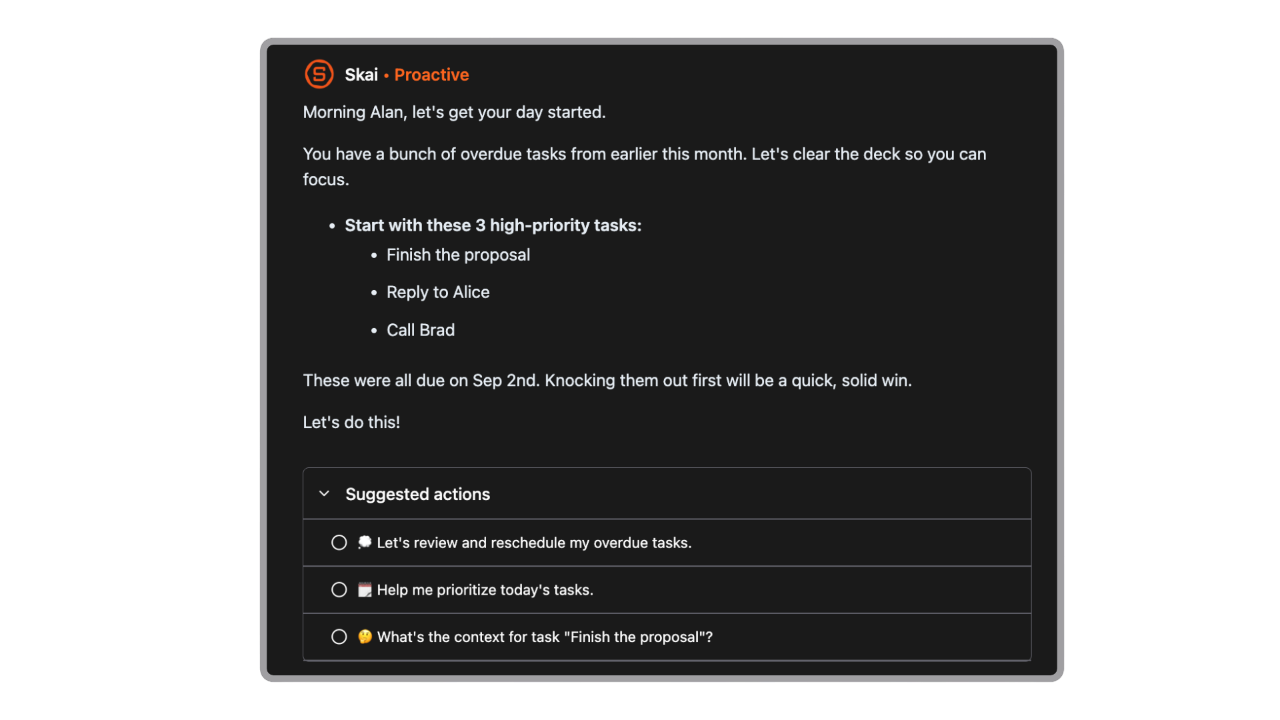
Every coach eventually hits the same wall: client notes in one app, follow-ups in another, task lists somewhere else, and no single place that remembers what you promised a client three weeks ago. Saner.AI is built to be that one place. Its assistant, Skai, reads across your notes, tasks, and email, then builds a daily plan so you're not starting each morning by hunting for context.
Key features:
- Skai answers questions using your own notes and files, so you can ask "what did we agree on with this client last month" instead of searching
- Automatic daily planning that pulls from your tasks, calendar, and recent notes
- Quick capture from voice, Chrome extension, or plain text, so nothing gets lost between sessions
Pros:
- Reviewers on Product Hunt consistently mention it replacing three or four separate apps, particularly Notion and scattered note docs (review).
- Genuinely useful for anyone who loses track of client follow-ups between sessions, not just people managing ADHD-related overwhelm.
Cons:
- No shared team workspace yet, so it's built for solo coaches rather than multi-coach practices.
- Smaller review footprint than more established productivity tools, so you're relying more on hands-on testing than a long track record.
Pricing:
- Free — core notes, tasks, and basic email sync
- Starter — $8/month for full email/calendar sync and voice notes
- Standard — $16/month for advanced AI features and priority support
Suitable for: Coaches juggling more than a handful of active clients who are tired of losing track of what they promised whom.
Getting started: Connect one calendar and one email account, then brain-dump your current client list and open commitments as a voice note. Skai organizes it from there.

Stay on top of your work and life
Claude — the writing partner for frameworks, proposals, and content
Claude is a general AI assistant, not a coaching-specific tool, but it's become the default for coaches who need to write well and think through a problem before publishing or sending it. It handles long documents without losing the thread, which matters when you're feeding it a full client history or a messy set of session notes.
Key features:
- Drafts full coaching frameworks, worksheets, and proposals from a short brief
- Holds up to 200K tokens of context, so you can upload a long transcript or several past sessions at once
- Pushes back on weak logic instead of just agreeing, useful when you're thinking through a client situation
Pros:
- Consistently described as the stronger writer for brand voice and long-form content compared to other general AI tools
- Excellent at synthesizing research and turning messy notes into a clean framework or proposal.
- Once you feed it writing samples, output starts to sound like you instead of generic AI copy.
Cons:
- More cautious than some alternatives, and will occasionally decline requests on sensitive topics.
- No native coaching-specific templates. You're building your own prompts and workflows from scratch.
Pricing:
- Free — limited daily use
- Pro — $20/month
Suitable for: Coaches who write their own content, proposals, and program materials and want a sharper first draft, not a coaching-specific automation tool.
Getting started: Start with one real task, like turning a session transcript into a set of follow-up talking points, and refine your prompt from there.
Kit — turning your audience into booked clients
Kit is an email marketing platform built for creators and coaches specifically, not general businesses. It handles the full top of your funnel: landing pages to capture leads, automated sequences to nurture them, and the infrastructure to sell coaching packages directly through email.
Key features:
- Visual automation builder for nurture sequences that move subscribers toward booking a call
- Landing pages and forms built specifically for lead capture, no separate tool needed
- Built-in monetization for paid newsletters, digital products, and coaching package sales
Pros:
- The free plan supports up to 10,000 subscribers with unlimited sends, unusually generous for the category.
- Tag-based subscriber system avoids the duplicate-contact billing problem that inflates bills on other platforms.
- Purpose-built for people who sell an offer to an audience, which is exactly the coach funnel
Cons:
- A 2026 price increase roughly doubled the Creator plan cost, which stings for coaches on a tight budget.
- Email template selection is limited compared to more design-heavy platforms like Mailchimp.
Pricing:
- Free — up to 10,000 subscribers, unlimited sends, 1 automation
- Creator — from $39/month for 1,000 subscribers (scales with list size)
- Creator Pro — from $79/month, adds subscriber scoring and advanced reporting
Suitable for: Coaches actively growing an email list and converting subscribers into paying clients through nurture sequences.
Getting started: Start on the free plan, build one lead magnet and a 3-email welcome sequence, then upgrade once your list needs more than one automation.
The bottom line
No single AI tool runs a coaching practice. The coaches getting real time back in 2026 are running five narrow tools instead of one bloated platform:
- Paperbell for getting paid,
- Fathom for capturing sessions,
- Saner.AI for holding everything together between them,
- Claude for writing, and
- Kit for filling the pipeline.
Start with whichever one is costing you the most hours right now, usually admin or session notes, and add the rest as your practice grows. The tools are cheap. The 8 to 12 hours a week you get back is not.
Stay on top of your work and life
FAQ
What is the best AI tool for coaches just starting out?
Paperbell is the strongest starting point since it's free for your first client and covers scheduling, contracts, and payments in one place. Add Fathom once you're running regular client calls.
Is AI going to replace human coaches?
No. AI handles admin, documentation, and content, but the coaching relationship itself, judgment, empathy, and reading what a client isn't saying, still requires a human. The 2025 ICF Global Coaching Study backs this up: clients consistently want human connection alongside AI convenience.
What's the difference between Fathom and Fireflies?
Fathom is built for individuals and small teams who want clean, fast summaries with a generous free tier. Fireflies is more analytics-heavy, with sentiment analysis and cross-meeting search, and is better suited to sales teams than solo coaches.
Is Claude worth paying for in 2026?
If you write your own proposals, frameworks, or client content regularly, yes. The $20/month Pro plan pays for itself in saved drafting time within the first proposal or program outline you write with it.
Does Saner.AI work if I already use Notion?
You can import from Notion, but Saner.AI isn't a Notion add-on. It's meant to replace scattered notes and task apps with one connected system, not sit alongside them.
What should I look for in a coaching AI tool?
Coaching-specific fit, clear data privacy policies since client conversations are sensitive, a setup time under an hour, and pricing that makes sense for a solo practice, not an enterprise team.
Can AI notetakers replace human session notes entirely?
Mostly, yes, for capturing what was said. You still need to add your own clinical or coaching judgment on top, since the AI summarizes conversation, not meaning.
Is there a free AI tool for coaches to manage client accountability?
Paperbell's free plan covers one client fully. Fathom's free tier is unlimited for individuals. Saner.AI also has a free tier for core notes and tasks. None of the free tiers scale past early-stage use.
How much does a full AI stack cost for a solo coach?
Realistically, $60 to $100/month once you're past the free tiers: Paperbell ($47.50), Claude Pro ($20), and Saner.AI Starter ($8) cover most of a working practice, with Fathom and Kit staying free until you scale.
What's the best AI tool for coaches who create a lot of content?
Claude for drafting, Kit for distribution. Claude writes the framework or newsletter; Kit sends it and nurtures the list toward booking a call.
Does Kit work if I already have a small email list on Mailchimp?
Yes. Kit offers free migration for paid plans if you're moving more than 5,000 subscribers over, and the tag-based system tends to be a smoother fit for coaches selling packages than Mailchimp's list-based structure.
How do I get started with an AI coaching stack without getting overwhelmed?
Add one tool at a time. Start with whichever pain point costs you the most hours this month- usually scheduling or session notes- get it fully set up, then move to the next.
Stay on top of your work and life effortlessly