
Best AI for Content Creators in 2026 (Tested and Ranked)
The Best AI for Content Creators are Claude, Elevenlabs, Saner, Nano Banana, Jasper, Canva, and Descript

Content creators, I see you struggling 😫
You've got 37 browser tabs open, random ideas scattered across 5 different note apps, and that one BRILLIANT content idea you had in the shower? Poof! Gone forever. And that's just one of many overwhelming problems that we - content creators face.

How to solve them? Well, one method more people are using is leveraging AI
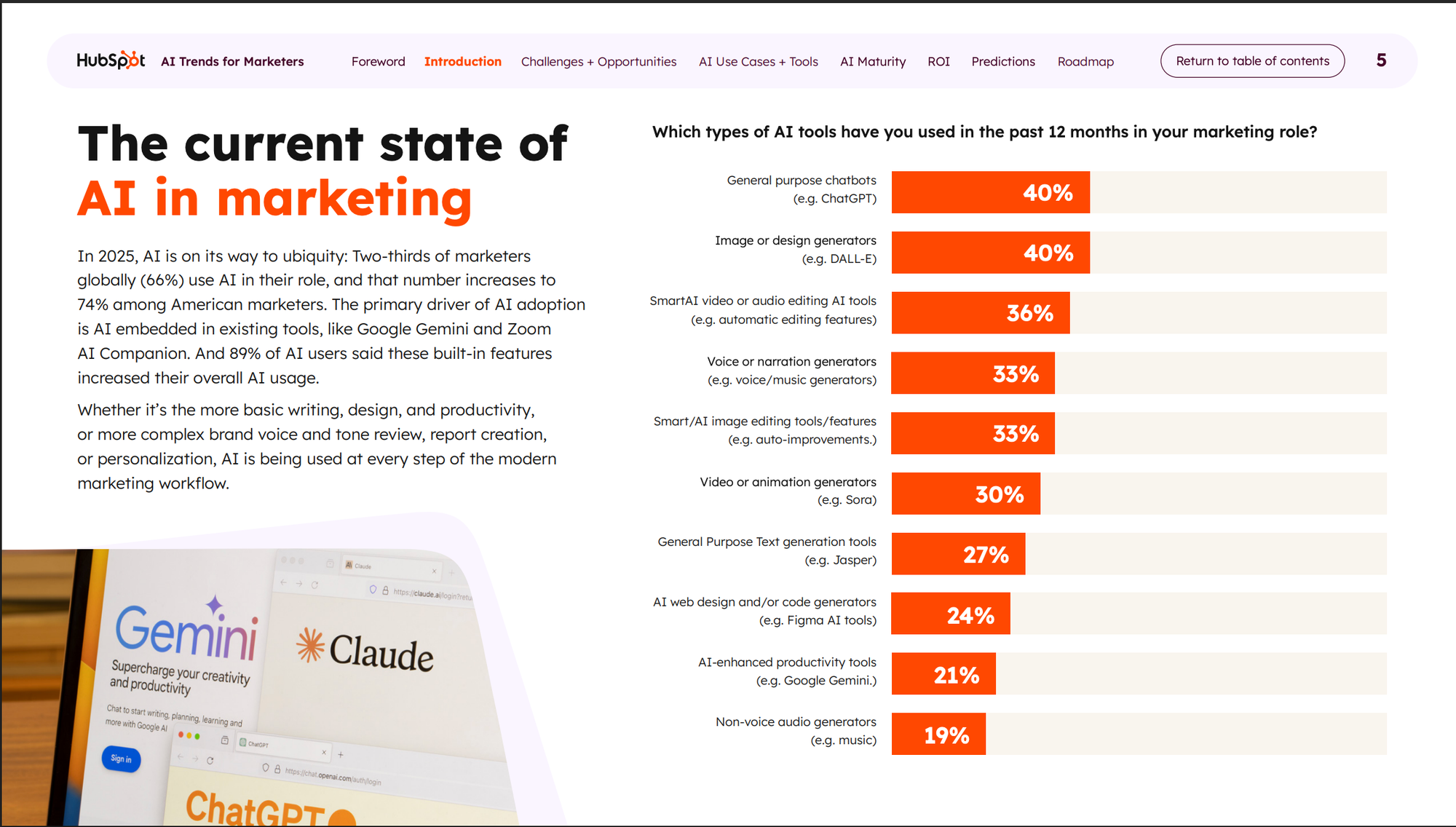
We tested over a dozen AI apps used by creators across writing, video, design, and knowledge management - and found that the ones that actually stick solve a specific problem rather than trying to do everything.
Key insights:
- The best creator stack is usually two or three tools with clear jobs - not one all-in-one platform that half-works at everything.
Quick guide — 7 top AI tools for content creators:
- Claude — The general-purpose workhorse for writing, ideation, and research at every skill level
- Jasper — Brand-safe content at scale, built for teams producing high volumes of marketing copy
- Canva AI — Design and visual content with no learning curve, all inside one browser tab
- Descript — Text-based video and podcast editing for creators who hate timelines
- Copy.ai — Short-form marketing copy and go-to-market workflows for solopreneurs and small teams
- Midjourney — High-quality AI image generation for creators who need original visuals
- Saner.AI — Knowledge management and idea capture for creators who need their research to compound over time
How we chose these AI tools
We evaluated each tool based on how it actually fits into a creator's day-to-day workflow - not just feature lists.
Criteria we weighted:
- Output quality and how much editing is required before publishing
- Ease of use for non-technical users
- Pricing relative to what you actually get
- Real user sentiment from verified review platforms
- Whether the tool fits solo creators, teams, or both
What are the Best AI for Content Creators?
The Best AI for Content Creators are Claude, Elevenlabs, Saner, Nano Banana, Jasper, Canva, Descript
Best AI for Content Creators - Comparison Table
| Tool | Best For | Free Plan | Paid Plan (starting) | Rating |
|---|---|---|---|---|
| Claude | Long-form writing, deep research, nuanced content | Yes | $20/month (Pro) | 4.7/5 Capterra |
| Jasper | Brand-consistent marketing copy at scale | No | $39/month | 4.7/5 G2 |
| Canva AI | Design and visual content | Yes | $15/month (Pro) | 4.7/5 G2 |
| Descript | Podcast and video editing | Yes | $16/month (Hobbyist) | 4.6/5 G2 |
| ElevenLabs | AI voice generation and voice cloning | Yes (10 min/month) | $5/month (Starter) | 4.5/5 G2 |
| Nano Banana | AI image generation, free and fast | Yes (20 images/day) | $19.99/month (AI Pro) | N/A |
| Saner.AI | Knowledge management and idea capture | Yes | ~$8/month | N/A |
1. Claude
Most content creators have used Claude at some point. Its 200,000-token context window (up to 1 million on the Max plan) also means you can paste in an entire research document, a draft, and a competitor piece and ask Claude to write something that draws from all three - without losing coherence partway through.
Key features:
- Long-form writing with a consistent voice. Claude produces blog posts, scripts, newsletters, and deep research pieces that hold together structurally over long outputs. The writing sounds more natural than most AI assistants
"responses sound like what you would expect from a person" and that it "doesn't seem to hallucinate like ChatGPT does." – reviews
- Document analysis and summarization. Feed Claude a PDF, a competitor blog, or a dense research report and it extracts the relevant information accurately.
"extremely capable" at comprehending large volumes of information — and that it could discuss "how to communicate your brand values effectively and which word choice would make a better fit and why." – reviews
- Agentic task execution (Cowork). Cowork lets Claude autonomously complete multi-step tasks
Pros:
- Produces the most natural-sounding long-form writing of any AI assistant - requires less editing than most tools
- The 200K context window means you can work with genuinely large documents, not just short prompts
- Projects make session context persistent, so returning to ongoing work doesn't mean starting from scratch
Cons:
- No built-in image generation - you need a separate tool for visuals, unlike Gemini
- Usage limits on the Pro plan frustrate heavy users: "The daily and weekly usage amounts have been slowly shrinking, and it's obvious." – reviews
- Can be overly cautious on certain topics, occasionally declining prompts that other models handle without friction
Pricing:
- Free: Core Claude access with usage caps; web, iOS, Android, desktop
- Pro: $20/month ($17/month annually)
- Max 5x: $100/month
- Max 20x: $200/month
Claude Reviews:
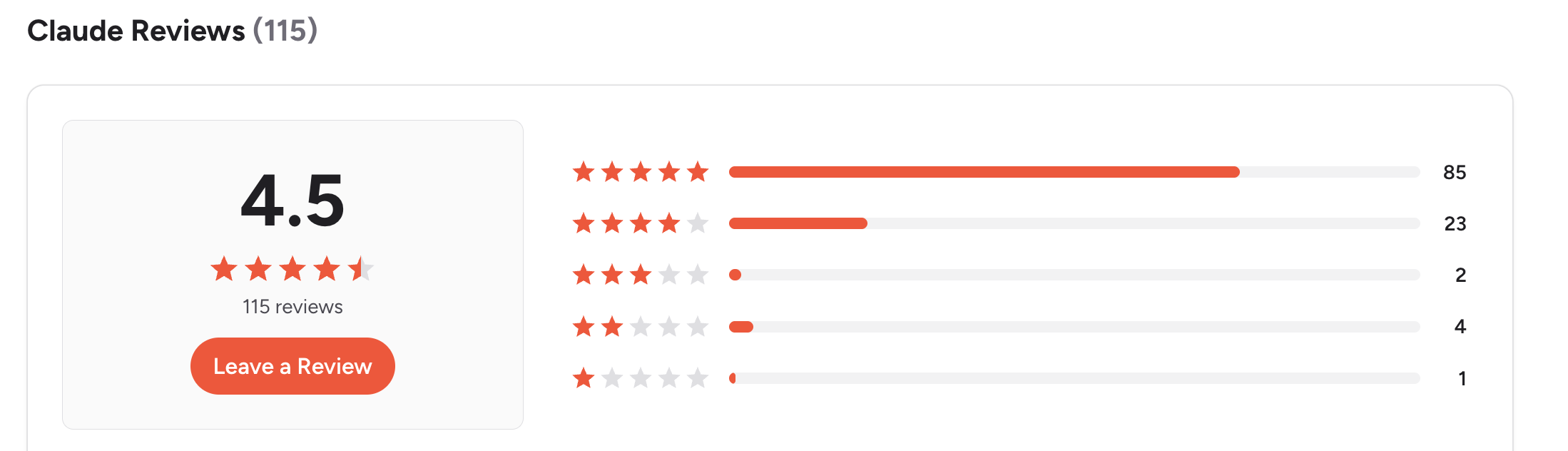
- "What's most useful about Claude is the AI's ability to flow more naturally. I like that responses feel more like human-to-human conversation." – reviews
- The main frustration is the rate limiting: "Message limits are set too low even for paid customers to make Claude of any real use." – reviews
Who it's best for: Writers, bloggers, and content marketers who produce long-form content regularly and want output that requires less editing.
How to get started: Sign up for free at claude.ai. Start by building a Project with your brand voice notes and a few examples of your best content.
2. Saner.AI
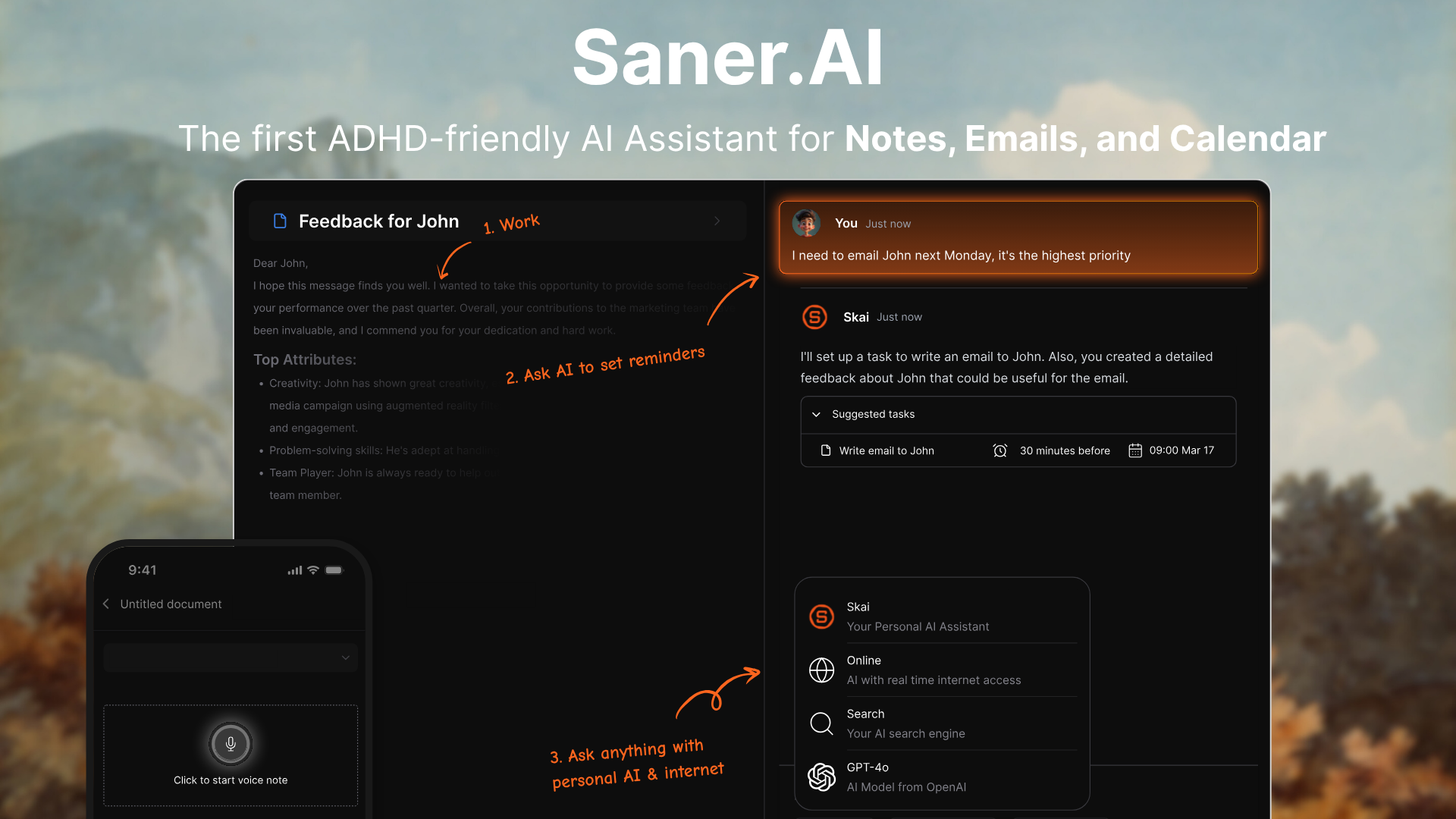
Most content creators have a version of the same problem: they open their laptop, see a wall of unfinished tasks, browser tabs from last week, unread emails that probably contain action items, and a notes app full of ideas that never went anywhere. The day starts, they react to whatever is loudest, and somewhere around 4pm, they realize the actual work they planned to do didn't happen.
Saner.AI is built around that specific failure mode. It's not just a notes app or a knowledge base - it's an AI workspace that pulls your tasks, emails, notes, and calendar into one place and then uses its built-in AI assistant (Skai) to give you a daily plan, break down tasks, and check in with you during the day so things don't slip.
Key features:
- Skai personal AI assistant. Instead of asking an AI what it knows, you ask Skai what you know. It searches your notes, saved articles, and research to answer questions and make connections you'd otherwise miss.
- Chrome extension for frictionless capture. A side-panel clipper lets you save web content, highlight key passages, and add quick notes without leaving the page you're reading. For creators whose research process involves a lot of browser time, this removes the copy-paste step that usually breaks the flow.
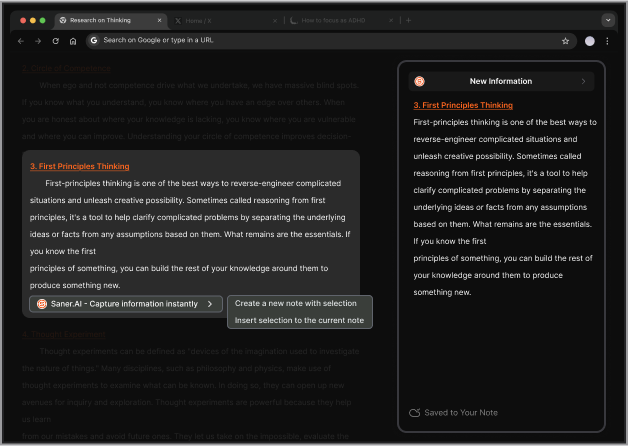
- Auto-tagging and organization. Saner.ai tags and categorizes what you save automatically, which means the organizational work you'd normally spend time doing gets handled in the background. – reviews
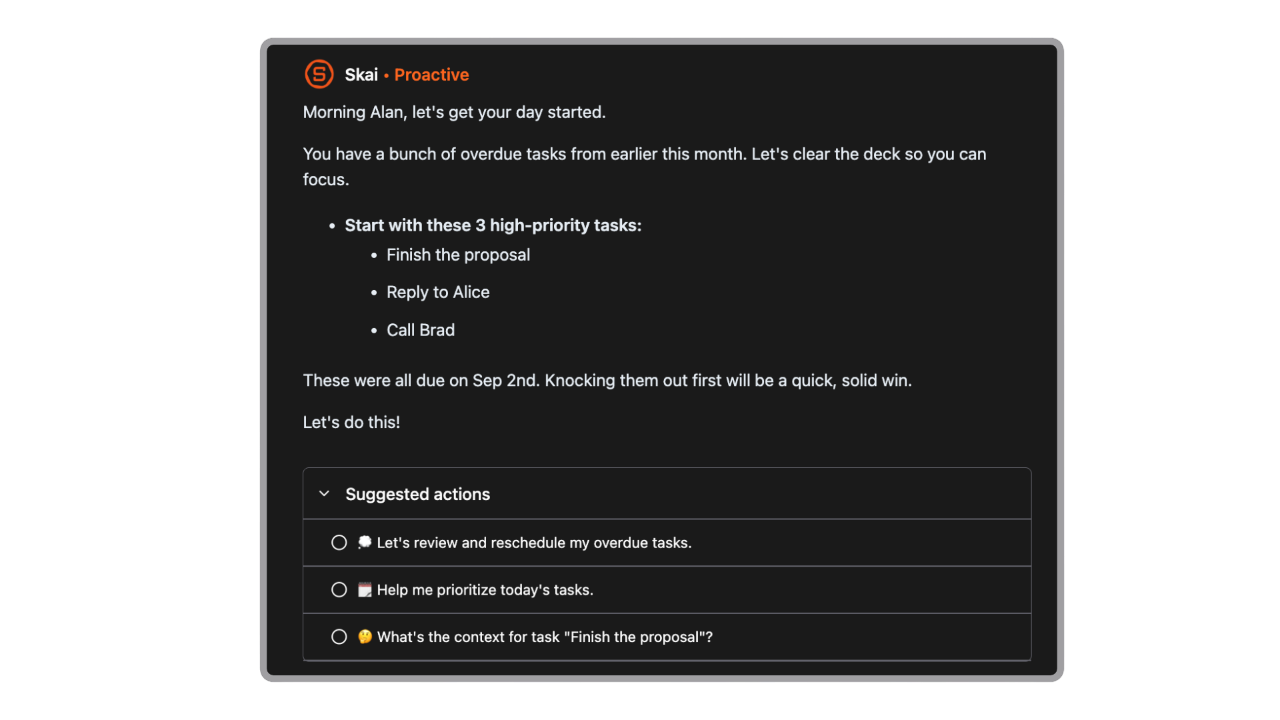
- Proactive daily planning. Every time you open saner.ai, Skai generates an optimal day plan based on your tasks, emails, and calendar - not a list you have to sort yourself, but an actual suggested schedule. A task assistant pop-up can follow you across browser tabs to keep a single task visible while you work, acting as a persistent nudge without requiring you to keep checking a separate app. – reviews
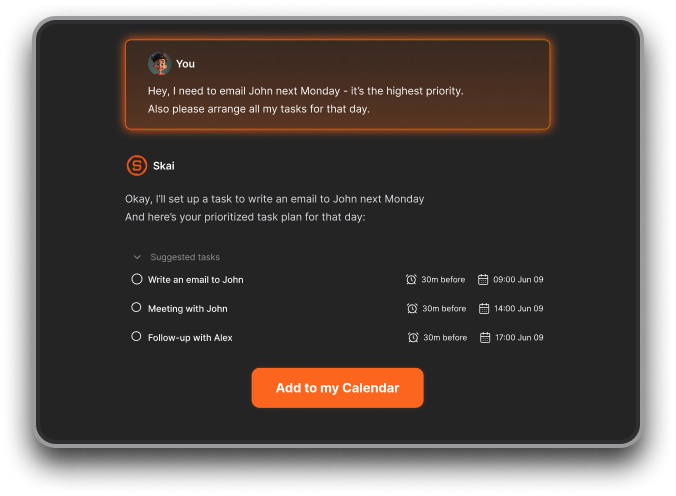
- AI task assistant that turns brain dumps into action. You can dump a paragraph of scattered thoughts into saner.ai, and Skai identifies the tasks, suggests due dates, and asks for confirmation before adding them.
Pros:
- The only tool in this list that helps you use what you already know, rather than just generate new content faster
- Works across notes, tasks, emails, and web research in a single workspace, which reduces the app-switching most creators deal with daily
Cons:
- Some features are still in development, and occasional lags occur when processing large data sets
Pricing:
- Free: 100 notes, 30 AI messages/month, Chrome extension, mobile app, Google Drive and Slack sync
- Pro: ~$8/month - unlimited notes, 100 AI requests/day, 100GB storage, full Skai access
- Custom plans available for teams
Reviews:
- Users who describe it most positively are those who've used it consistently over time: "Saner.AI has transformed their workflow, moving them away from juggling multiple apps to having a unified, intelligent system." – reviews
- The "second brain" concept resonates most with creators and researchers: "The ability to recall forgotten knowledge feels like a superpower." – reviews
Who it's best for: Content creators, writers, and solopreneurs managing multiple projects who struggle with the gap between capturing ideas and actually getting things done.
How to get started: Sign up at saner.ai and you can get going right away

Stay on top of your work and life
3. Jasper
Jasper was one of the first AI writing tools built specifically for marketers, and it still holds that positioning. The core pitch: brand voice consistency across every piece of content your team produces, backed by a library of 50+ templates and deep integrations with Surfer SEO and Semrush. For solo creators, the price tag often raises eyebrows.
Key features:
- Brand voice and knowledge base. Jasper learns your tone, style, and audience, then applies it across blog posts, emails, social content, and ad copy. Teams managing multiple brands use it to keep voice consistent without manually reviewing every output. – reviews
- 50+ marketing templates. Instead of staring at a blank chat window, you pick a template for what you're trying to create, and Jasper structures the output accordingly. – reviews
- Surfer SEO integration. Content marketers who care about rankings can use Jasper's Surfer SEO integration to optimize while writing. – reviews
- AI Agents for marketing workflows: Jasper's agentic features can handle campaign planning, content scheduling, and SEO audits without needing you to run every step manually. – reviews
Pros:
- The best brand voice consistency of any tool in this list
- Team collaboration and approval flows are genuinely useful for content agencies
- Templates make it much faster than free-form prompting for standard marketing formats
Cons:
- Expensive for solo creators - the Pro plan starts at $39/month and the value isn't there unless you're producing significant volume
- Long-form content can get repetitive and still requires a lot of editing
- The cancellation experience has frustrated multiple users: "If you want to unsubscribe from Jasper, you only have two choices: close your account or suspend it for one month." – reviews
Pricing:
- Creator: $39/month (1 seat, 1 brand voice, access to core templates)
- Pro: $59/month (billed annually)
Jasper Reviews:
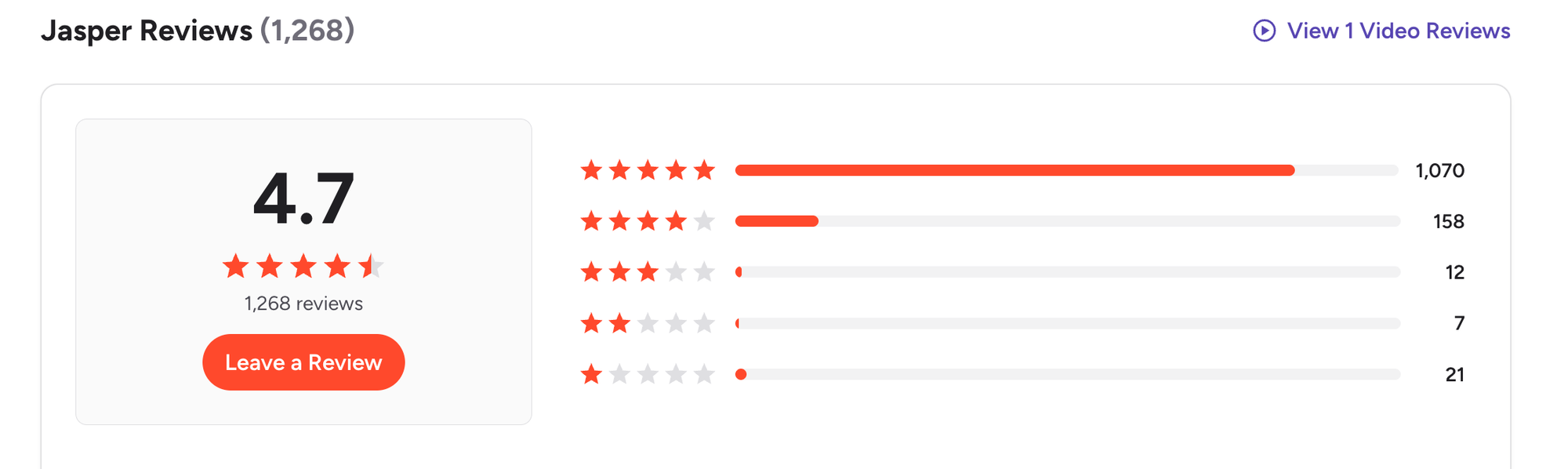
G2 users consistently praise the speed and the learning curve:
"The user interface is very clean and easy to navigate, even for someone new to AI writing tools. The learning curve was surprisingly low." – reviews
The price and content repetition come up most often as negatives:
"The only con is it tends to produce repetitive content when writing a long-form blog." – reviews
Who it's best for: Marketing teams and content agencies producing high volumes of on-brand copy across multiple channels.
How to get started: Visit jasper.ai and start a trial. Upload examples of your existing content to build a brand voice before generating anything
4. Canva AI
Canva has turned into something much bigger than a design tool. Its AI suite (Magic Studio) now covers image generation, text-to-video, AI copywriting, background removal, and smart resizing - all inside one interface that non-designers actually use without frustration.
Key features:
- Magic Design for instant visuals. Type a prompt, choose a content type, and Canva generates a design with layout, imagery, and copy suggestions. The drag-and-drop editor lets you tweak anything that needs adjusting.
- Magic Resize for multi-platform publishing. Resize one design for Instagram, LinkedIn, YouTube thumbnails, and Twitter headers in one click. – reviews
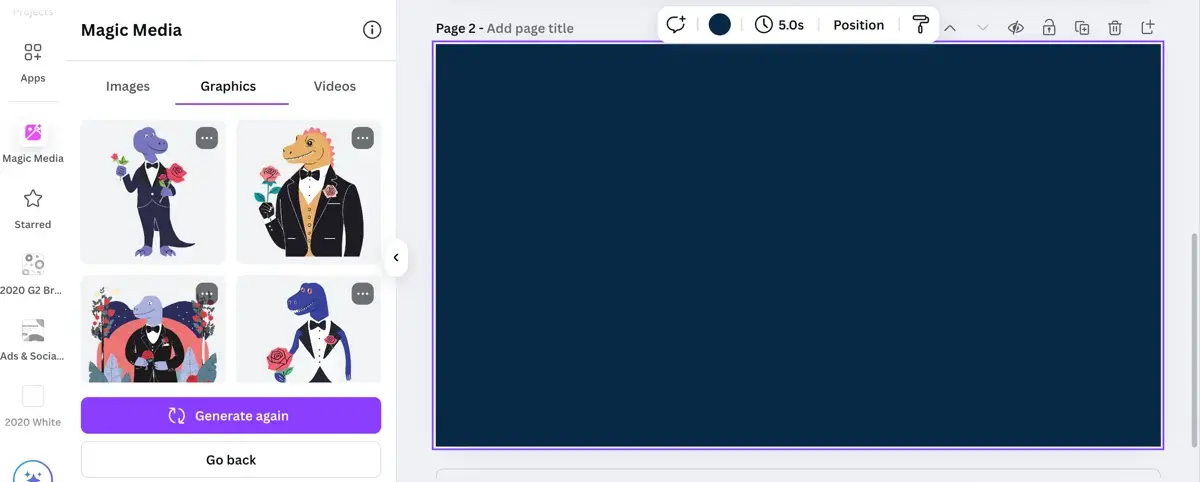
- Text-to-image and text-to-video (Magic Media). Generate original AI images and short video clips directly inside Canva without leaving the design. Magic Media now runs on Google's Veo 3 technology for video. – reviews
- Brand kit integration. Canva Pro stores your brand fonts, colors, and logos and automatically applies them to any AI-generated design. – reviews
Pros:
- The all-in-one workflow genuinely reduces context switching - design, write, and resize in one tab
- The free tier is genuinely useful for individual creators
- Templates across almost every content category you'd need as a creator
Cons:
- The AI image generation still struggles with realistic human faces
- Advanced features like Magic Media come with usage limits on the free plan (50 text-to-image credits, 20 lifetime Dream Lab uses)
- Not the right tool if you need professional-grade editing control: "The video editing feels limited, and I feel like I don't have full control over things like text overlays and images on the timeline." – reviews
Pricing:
- Free: 1,000+ templates, limited AI credits, basic features
- Pro: $15/month (or $120/year) — full brand kit, unlimited premium templates, higher AI generation limits
- Teams: $10/user/month (minimum 3 users) with shared brand kits and admin controls
- Enterprise: Custom pricing
Canva Reviews:
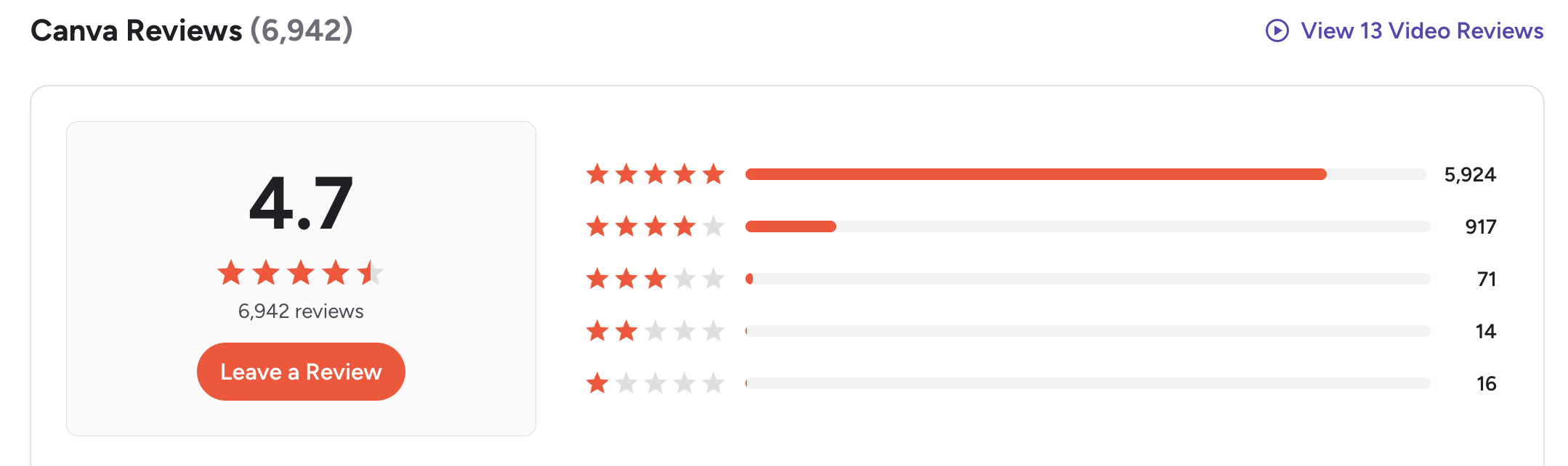
- "Canva lets me produce high-quality visuals without needing a full-time designer or complicated software. It solves the problem of creating on-brand graphics, presentations, and social media content quickly." – reviews
- The free tier frustrations come up regularly: "7.45% feel that the free version is too limited, with many features behind the Pro subscription." – reviews
Who it's best for: Creators who produce visual content regularly and want one tool for design, AI images, and video thumbnails.
How to get started: Sign up for free at canva.com. Start with the free tier to test Magic Write and Magic Design.
5. Descript
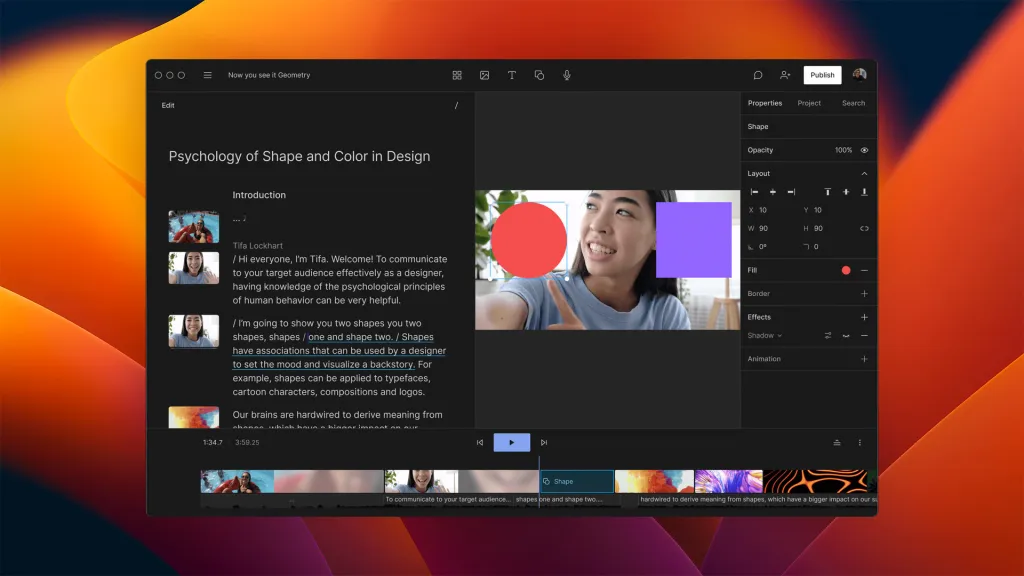
Descript built its entire editing experience around one insight: most people find video timelines intimidating. So it removed them. You upload a video or podcast, Descript transcribes it, and you edit the content by editing the text. Delete a sentence from the transcript, and it disappears from the video. Want to remove every "um" and "uh"? One click.
Key features:
- Transcript-based video editing. The main feature that defines Descript. You edit video by editing a text document. "A Google Docs-like editor for modifying video literally feels like living in the future." – reviews
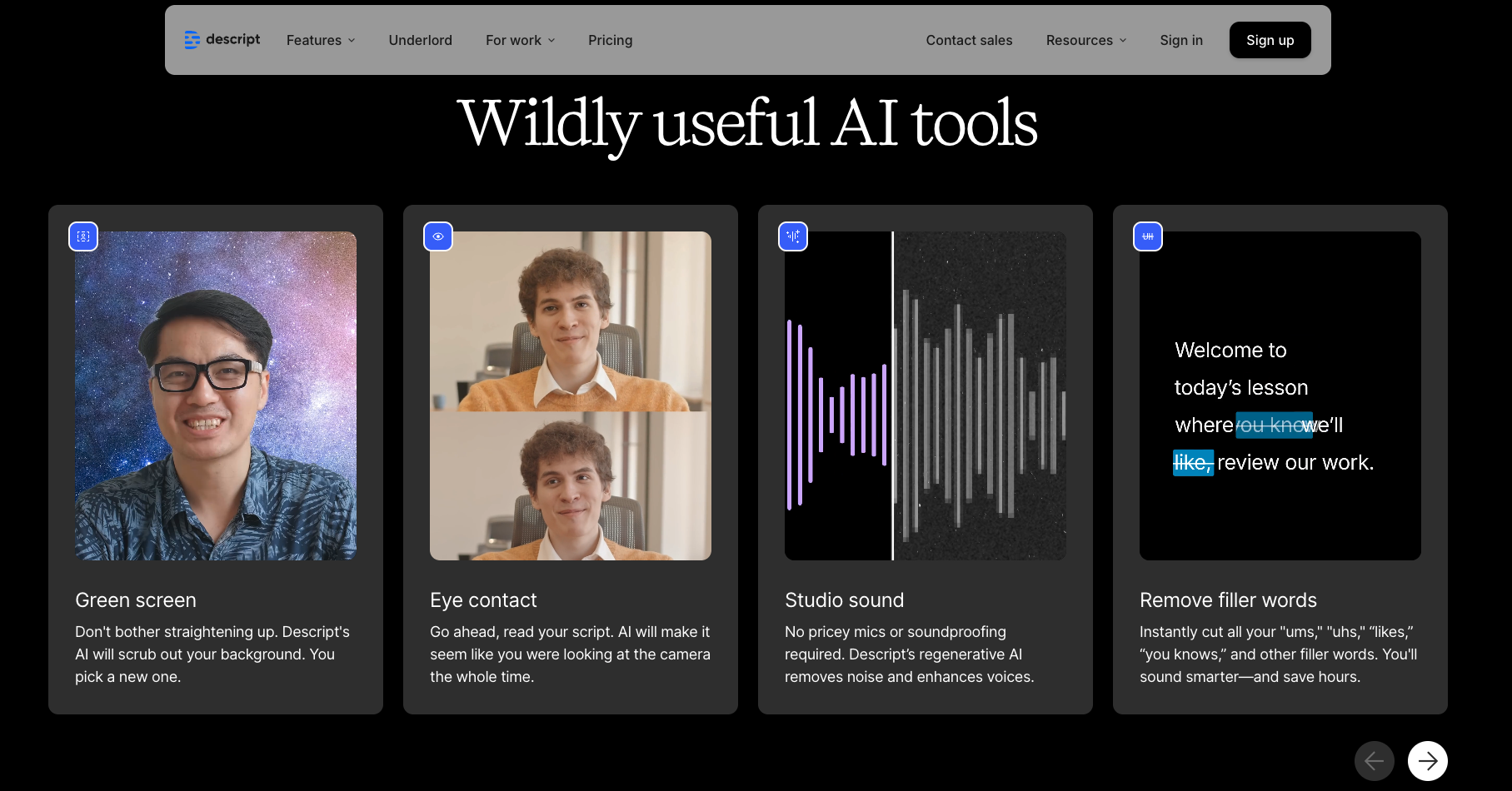
- AI filler word and silence removal. Descript auto-detects and removes "ums," "uhs," and awkward pauses in one click. For podcasters, this alone saves hours per episode compared to manual scrubbing through an audio waveform. – reviews
- Overdub voice cloning. Record a short voice sample, and Descript creates a clone of your voice. You can then fix audio mistakes or add pick-up lines by simply typing. Useful for correcting errors in long recordings without finding time to record again. – reviews
- AI clip generation for social media. Descript detects the best moments in your long-form video and suggests short clips for Instagram, TikTok, or YouTube Shorts. You can specify duration and quantity. For podcasters repurposing episodes, this cuts a multi-step process down to a few minutes. – reviews
Pros:
- The super-fast way for non-editors to produce polished podcasts and videos
- Cut work time significantly
- Regular updates; features improve quickly based on user feedback
Cons:
- Heavy files and complex multi-track projects slow it down - lag is a real complaint among advanced users
- Transcription quality drops with strong accents or heavy background noise, requiring manual correction
- Some users have reported data loss issues with the most recent major updates:
Pricing:
- Free: 5GB storage, 1 hour of transcription/month, 5 AI feature uses
- Hobbyist: $16/month — 100GB storage, 30 text-to-speech minutes, 10 transcription hours
- Creator: $24/month — remote recording, more transcription, translation
- Business: $40/month per user — priority support, 5 text-to-speech hours/month
Descript Reviews:
- One of the most praised features consistently is how quickly non-editors get up to speed:
"There are plenty of training resources and even for a novice it's not out of the question to hit the ground running on day one!" – reviews
But the update cycle also frustrates some users:
"It seems like every time you open it, some feature is new or modified when you haven't even had a chance to get comfortable with the way things were." – reviews
Who it's best for: Podcasters, solo video creators, and small teams who produce regular long-form content and want to cut editing time
How to get started: Start with the free plan at descript.com. Upload one recording to test the transcription quality and filler word removal before committing to a paid plan.
6. Nano Banana
Nano Banana is Google's AI image generation model, built on the Gemini 2.5 Flash architecture, and it arrived quietly before becoming one of the most-talked-about image tools of 2025.
What makes it worth including here is the combination of image quality and accessibility. The Nano Banana Pro model (released November 2025) added high-resolution output, reasoning-based composition, and reliable text rendering inside images
Key features:
- Text rendering inside images. Nano Banana Pro produces legible, correctly spelled text in generated images. Signs, labels, and title cards come out clean - something most AI image tools still handle poorly
- Reasoning-based image composition. Rather than assembling pixels from patterns like diffusion models, Nano Banana Pro reasons about the content of an image - understanding what belongs where, how elements relate spatially, and what real-world context the scene requires.
- Style flexibility without heavy prompting. The model handles photorealism, illustration, oil painting, cartoon, and diagram styles from the same interface without needing model-specific prompt syntax
- Free daily access through Gemini. Unlike most professional image tools, Nano Banana's base model is free to use through the Gemini app — 20 images per day at 1K resolution with a visible watermark.
Pros:
- The best free-tier image generator available in 2026 - 20 images/day covers most casual creator needs
- Text rendering and character consistency are meaningfully ahead of earlier diffusion-based tools
- Accessible through the Gemini app without needing a Discord account or a specialist interface
Cons:
- Usage limits are inconsistent - some Pro plan users report hitting generation caps after 20-30 images despite higher advertised limits: "Many complain about the inconsistent usage limits." – reviews
- All free-tier images include both a visible and an invisible SynthID watermark, regardless of plan
Pricing:
- Free: 20 images/day at 1K resolution via Gemini app, visible watermark
- AI Plus: $7.99/month — higher generation limits, faster queue
- AI Pro: $19.99/month — 4K output, watermark-free downloads, priority access
- Ultra: $249.99/month — maximum resolution, commercial-scale volume
Nano Banana Reviews:
- The usage cap inconsistency is the most common complaint among paid users
Who it's best for: Content creators who need high-quality images for thumbnails, blog headers, social posts, and marketing visuals
How to get started: Open the Gemini app at gemini.google.com, click "Create image" in the tools menu, and start generating.
7. ElevenLabs
If you produce video, podcasts, or any content where voice matters, ElevenLabs has become the standard. It converts text to speech with a genuinely hard realism to distinguish from a human recording.
For creators building faceless YouTube channels, producing audiobooks, recording podcast narration, or dubbing content for global audiences, ElevenLabs has become the default tool.
Key features:
- Ultra-realistic voice generation. The Eleven v3 model produces voices that hold up under close listening. Creators on Capterra consistently describe the output as sounding "like an actual person talking."
- Voice cloning from short audio samples. Record a few minutes of your own voice, and ElevenLabs creates a digital clone. You can then generate hours of narration in your own voice by typing
- AI dubbing across 29 languages. Upload a video, and ElevenLabs translates and re-voices it in another language, preserving the original speaker's tone and pacing.
- Emotional control in Eleven v3. Beyond choosing a voice style, v3 lets you insert emotional instructions directly into the script - pause here, laugh, whisper this line.
Pros:
- The most realistic AI voice quality available - genuinely usable for professional content without sounding synthetic
- Supports 70+ languages, making it one of the few voice tools built for global content
- Easy to set up; most creators are generating usable output within minutes of signing up
Cons:
- Credits don't roll over month to month on most plans - if you have a slow month, you lose what you paid for
- The dubbing tool can burn through credits unexpectedly fast, leading to surprise overages
- Voice cloning quality depends heavily on the quality of your source audio — poor recordings produce noticeably less convincing clones
Pricing:
- Free: ~10 min of audio/month, basic TTS, no commercial license
- Starter: $5/month — 30k credits (~30 min audio), commercial license, instant voice cloning
- Creator: $11/month — 100k credits, pro voice cloning, 192kbps quality, Projects feature
- Pro: $99/month — 500k credits, 44.1kHz PCM via API for production-scale use
ElevenLabs Reviews:
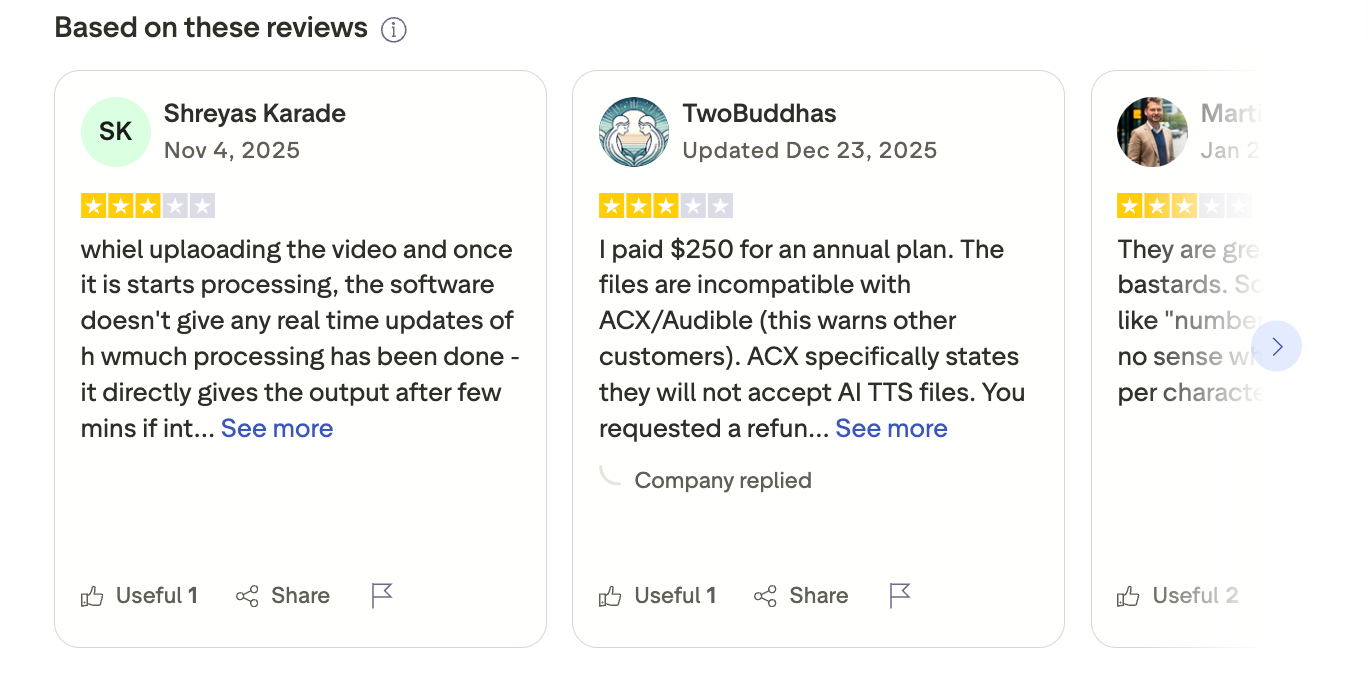
Creators using it for training content and professional narration are consistently impressed:
"I make use of Eleven Labs primarily for Text-to-Speech when editing and producing training materials for clients, and have found the tool to be exceptional. The value for money is exceptional, and I immediately purchased a Creator subscription for commercial use." – reviews
The pricing structure draws more mixed feedback:
"If you are a high-end content creator or a developer needing a robust API, ElevenLabs is the gold standard. However, if you are just starting out and on a tight budget, the 'credit burn' might feel a bit punishing compared to more affordable, albeit less realistic, alternatives." – reviews
Who it's best for: YouTubers building faceless channels, podcasters who want narration without recording, audiobook producers, and any creator dubbing content for international audiences.
How to get started: Sign up at elevenlabs.io. The free plan includes enough time to test voice quality across a few different voices and styles.
The bottom line
The AI tools getting the most consistent use aren't the ones that promise to do everything. Claude handles long-form writing and research. Descript handles video editing. Canva handles visual design. Jasper handles brand-consistent copy at volume. ElevenLabs handles voice and audio. Nano Banana handles image generation. Each one has a specific job it does well.
The gap that almost none of them address: after you use any of these tools, you're back to zero the next session. Your prompts don't carry forward. Your research doesn't connect to your drafts. The context you built up evaporates.
That's where Saner.ai fills something the other tools don't. It doesn't write your next post faster - it makes every piece of research and thinking you've done searchable and useful the next time you need it.
Stay on top of your work and life
Frequently asked questions: AI for content creators
1. What is the best AI tool for content creators overall? There's no single best option because it depends entirely on what type of content you create.
- For long-form writing and research, Claude produces output that requires the least editing and holds together over long documents.
- For video and podcast editing, Descript reduces production time significantly.
- For voice narration and audio content, ElevenLabs is the standard.
- For design and visual content, Canva AI covers most needs.
- For images specifically, Nano Banana's free tier handles most casual creator needs.
- If you're building a content business over time and want your research to compound, Saner.ai fills a gap that gap
2. Can AI tools replace human content creators?
No, and that's not what the best creators are using them for. The tools in this list are most useful as accelerators - they handle first drafts, repetitive formatting, and basic research so you can spend more time on strategy, voice, and ideas that actually require human judgment. The creators using AI most effectively treat it as an assistant, not a replacement.
3. Are there free AI tools for content creators?
Yes. Claude, Canva, Descript, ElevenLabs, Nano Banana, and Saner.ai all have free plans.
The free tiers are useful for testing but have real limits - message caps, credit limits on AI features, or restricted access to the tools that make a platform worth using.
Most working creators find at least one paid plan worth the investment once they've identified where AI genuinely fits in their workflow.
4. What AI tool is best for YouTube creators specifically?
Descript for editing and repurposing long-form video. Claude for scripting and research. ElevenLabs for voice narration if you're building a faceless channel. Nano Banana for thumbnails and custom graphics. Canva handles end cards and channel art. For organizing research and video topic ideas across multiple projects, Saner.ai works well as a second brain that carries context between projects.
5. Is Claude better than ChatGPT for content creation?
For long-form writing specifically, most creators who use both report that Claude produces output that sounds more natural and requires less editing. Claude doesn't generate images, which ChatGPT does via DALL-E - so if visuals are part of your workflow, you'd need a separate tool like Nano Banana or Canva alongside Claude. For general versatility, ChatGPT has a broader ecosystem. For writing quality and nuance, Claude tends to win in head-to-head comparisons.
6. Is Jasper worth the price for solo creators?
Probably not if you're working alone. Jasper's value shows up in brand governance features and team collaboration, which a solo creator doesn't need. For the same monthly spend, Claude Pro plus Canva Pro gives you broader utility. The exception: if you're a solo freelancer managing multiple client brands and want strict brand voice consistency per client, Jasper's setup justifies the cost.
7. What is Nano Banana and how does it compare to Midjourney? Nano Banana is Google's AI image model built on the Gemini 2.5 Flash architecture. It's more accessible than Midjourney (20 free images/day vs Midjourney's $10 minimum entry), produces better text rendering inside images, and works through the Gemini app without needing Discord.
8. Why do most AI tools forget what I told them last session? Because most AI tools are built as session-based chat interfaces. Each conversation starts fresh without access to your previous work. This is the gap that Saner.ai specifically addresses by building a persistent knowledge base around your notes, research, and saved content - so you can ask questions about work you did months ago and get relevant answers from your own context, not just the AI's training data.
9. What is ElevenLabs best used for? Voice-over narration, podcast production, audiobook creation, and content dubbing for international audiences. It's particularly popular with creators building "faceless" YouTube channels in documentary, history, or storytelling niches - formats where narration quality matters but a visible host isn't necessary.
10. How do I choose which AI tool to add to my content workflow? Start by identifying where you actually lose time.
- If it's editing video — Descript.
- If it's generating visual assets — Canva or Nano Banana.
- If it's writing first drafts — Claude.
- If it's voice narration — ElevenLabs.
- If it's keeping your research organized and findable — Saner.ai.
Stay on top of your work and life



