
We Tested and Compared The 5 Best AIs for Writers
Best AI for Writers are SudoWrite, ProWritingAid, Saner.AI, Grammarly, and Originality.ai


This post breaks down the writing process into five distinct jobs (drafting, organizing, editing sentences, structural editing, and originality verification) and picks one AI tool for each, tested against real G2, Capterra, and Trustpilot reviews rather than marketing pages.
It's built for working writers: freelancers, novelists, content marketers, and anyone juggling more writing projects than hours in the day. And please keep in mind that I am on Saner.AI's team, and I also list my product down here, but I evaluated it with the same criteria as others.
Quick answer: What are the best AI for writers?
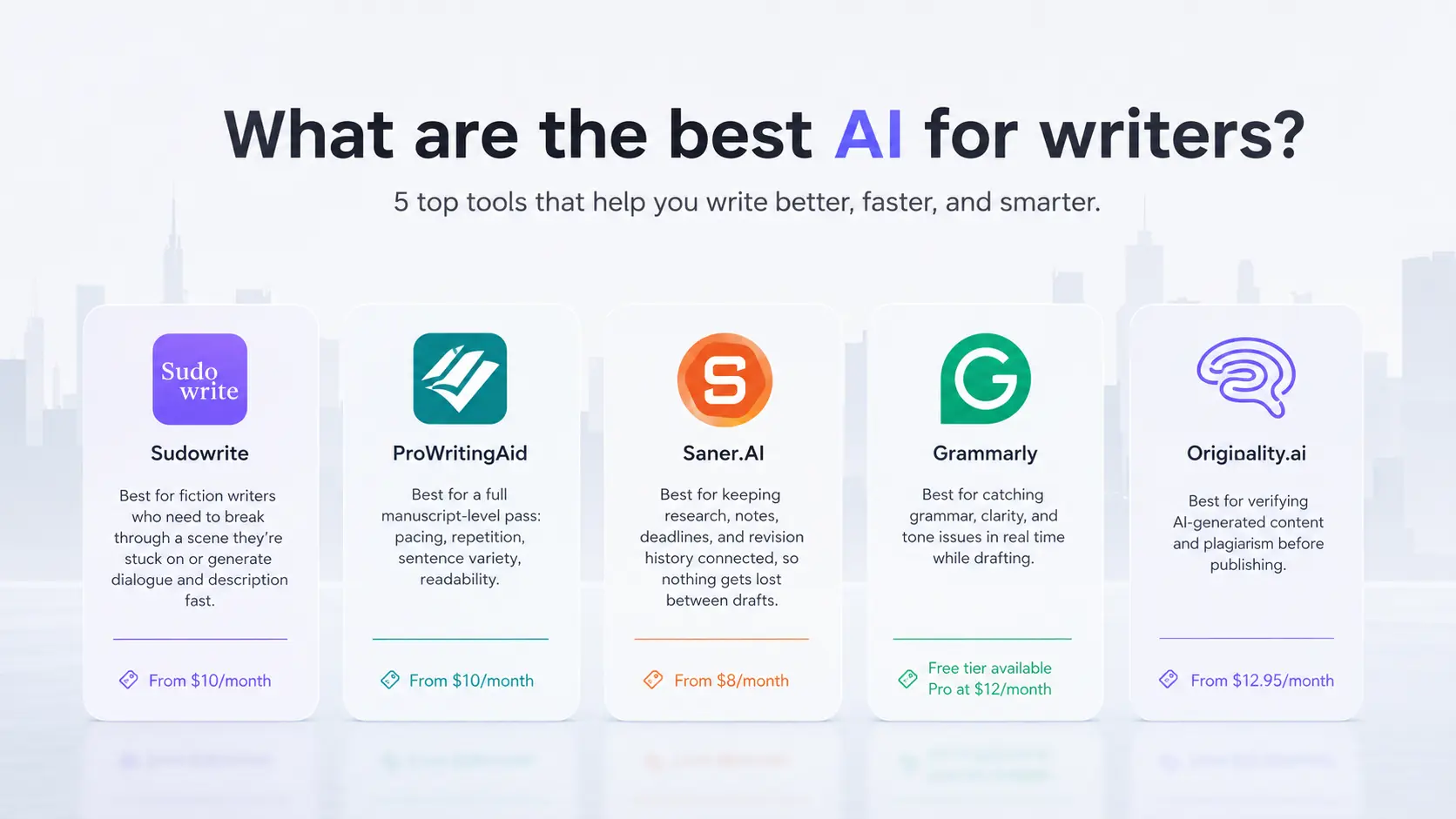
- Sudowrite — best for fiction writers who need to break through a scene they're stuck on or generate dialogue and description fast. From $10/month.
- ProWritingAid — best for a full manuscript-level pass: pacing, repetition, sentence variety, readability. From $10/month
- Saner.AI — best for keeping research, notes, deadlines, and revision history connected, so nothing gets lost between drafts. Free plan available, from $8/month.
- Grammarly — best for catching grammar, clarity, and tone issues in real time while drafting. Free tier available; Pro at $12/month.
- Originality.ai — best for verifying AI-generated content and plagiarism before publishing. From $12.95/month.
What is an AI writing tool?
An AI writing tool is any software that uses a language model to help produce, refine, or verify written text. That covers a wide range: autocomplete-style drafting assistants, grammar checkers, fiction-specific story generators, and detectors that flag AI-written content.
Why this matters
Writing income is thin, and getting thinner for anyone who isn't specialized.
- Full-time authors earned a median annual writing income of $23,329 in 2022, and that number drops to $8,500 once part-time authors are included in the count, according to the Authors Guild's income survey.
Content demand keeps climbing, but most teams admit it isn't working.
- In the Content Marketing Institute's 2025 B2B benchmarks report (n=980 B2B marketers), 58% rated their own content strategy as only "moderately effective."
AI adoption among writers is real but split down the middle, and no single tool covers the whole job.
- The Authors Guild's December 2023 survey of over 2,400 authors found 23% were already using generative AI somewhere in their writing process, most commonly for grammar and brainstorming rather than actual prose generation.
How these tools were evaluated
Five tools made the cut out of fifteen tested over several weeks of actual writing and editing work, across fiction drafts, blog posts, and a full manuscript pass. Each was scored against the same criteria:
- Workflow fit — whether the tool solves one clear part of the writing process without overlapping another tool on this list.
- Output quality — whether generated or corrected text holds up on a second read, not just a first glance.
- Depth of feedback — whether the tool explains a suggestion or just applies it, which matters for writers trying to actually improve.
- Integration — whether it works inside the apps writers already use (Word, Scrivener, Google Docs, browser) rather than forcing a separate workspace.
- Pricing transparency — whether the real cost at typical usage matches the advertised starting price, since credit-based and prompt-capped plans often don't.
- Review consistency — whether independent user reviews on G2, Capterra, and Trustpilot back up the vendor's own claims.
What are the best AI for Writers?
The best AI for Writers are SudoWrite, ProWritingAid, Saner.AI, Grammarly and Originality.ai
Comparison table of AI for Writers
| Tool | Best For | Key Strength | Starting Price |
|---|---|---|---|
| Saner.AI | Organizing research, tasks, and revision history across projects | Connects notes, email, and deadlines so nothing gets lost between drafts | $8/month |
| Grammarly | Everyday grammar, clarity, and tone | Real-time corrections across nearly every app and browser | Free (Pro at $12/month) |
| Sudowrite | Fiction drafting and breaking writer's block | Story Engine and fiction-tuned models built for novel-length work | $10/month (annual) |
| ProWritingAid | Full-manuscript structural editing | 25+ reports covering pacing, repetition, sentence variety, and readability | $10/month (annual), or $399 lifetime |
| Originality.ai | AI detection and plagiarism verification | Combined AI-detection and plagiarism scan in a single pass | $12.95/month (annual) |
1. Sudowrite - Best for breaking through fiction writers' block
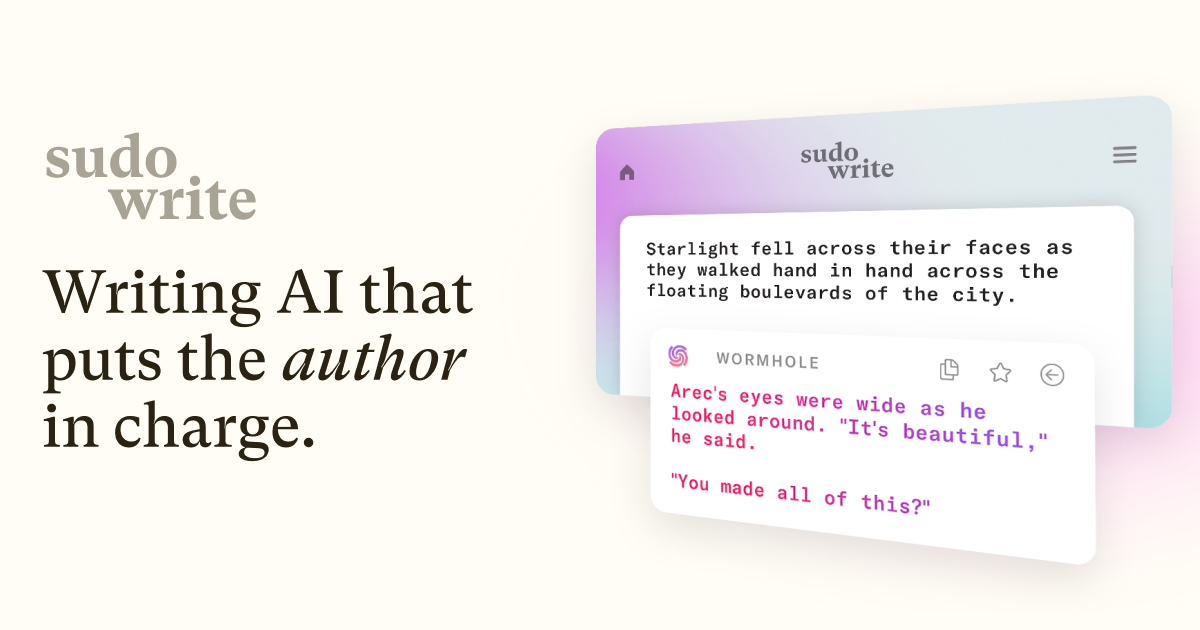
Sudowrite is built specifically for novelists and screenwriters, not general content writers. Its Story Engine and fiction-tuned Muse model exist to solve one problem: getting unstuck on a scene, a description, or a plot point without leaving the manuscript.
Key features:
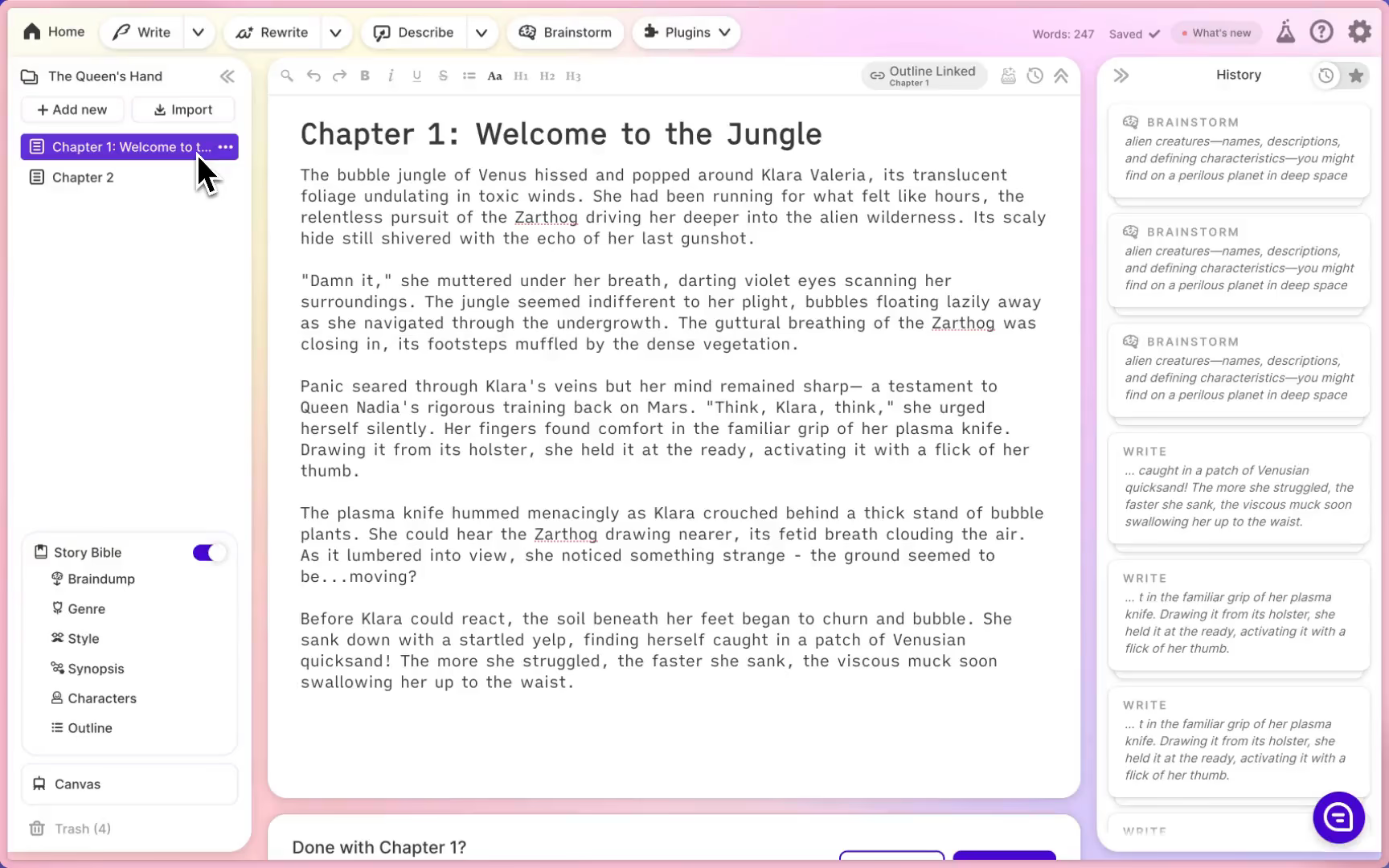
- Story Engine for chapter-by-chapter novel planning that keeps characters and plot consistent across long projects
- Describe tool that generates sensory detail and metaphor from a single word or phrase
- Rewrite tool for tone shifts, tightening dialogue, or expanding a thin paragraph into a full scene
- Feedback, which gives margin-note-style critique referencing the Story Bible's characters and world rules
Pros:
- Handles narrative structure and character voice in a way general-purpose chatbots don't
- The Describe and Rewrite tools produce usable prose-level output fast when a scene is stuck
Cons:
- No export to DOCX, PDF, or EPUB, so formatting and publishing still happen in a separate tool
- Credit consumption is inconsistent between features, and support responsiveness has been inconsistent according to one - Trustpilot review
Pricing:
- Hobby & Student — $10/month (billed annually) or $19/month, 225,000 credits
- Professional — $22/month (billed annually) or $29/month, 1,000,000 credits
- Max — $44/month (billed annually) or $59/month, 2,000,000 rollover credits
Suitable for:
- Best for: novelists and screenwriters who need help pushing through a stuck scene or generating dialogue and description fast
- Best for: writers who already have a formatting and publishing workflow and just need the drafting layer covered
How to get started: Use the free trial credits on one difficult chapter rather than a full manuscript import, since credit consumption varies heavily by feature. Turn on the Story Bible early so character and plot consistency carries through every later generation.
2. Saner.AI - Best for keeping research, tasks, and revisions connected
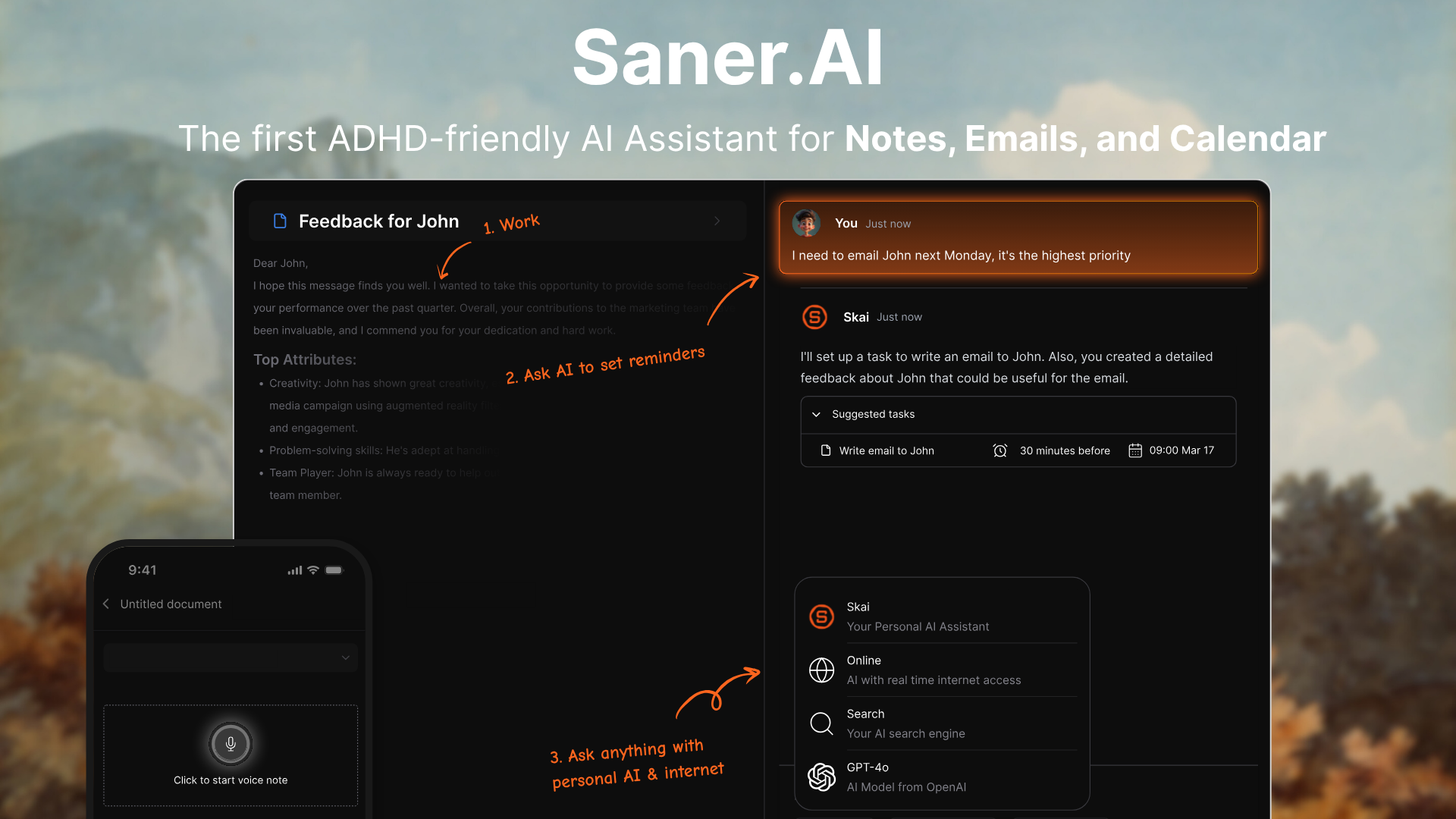
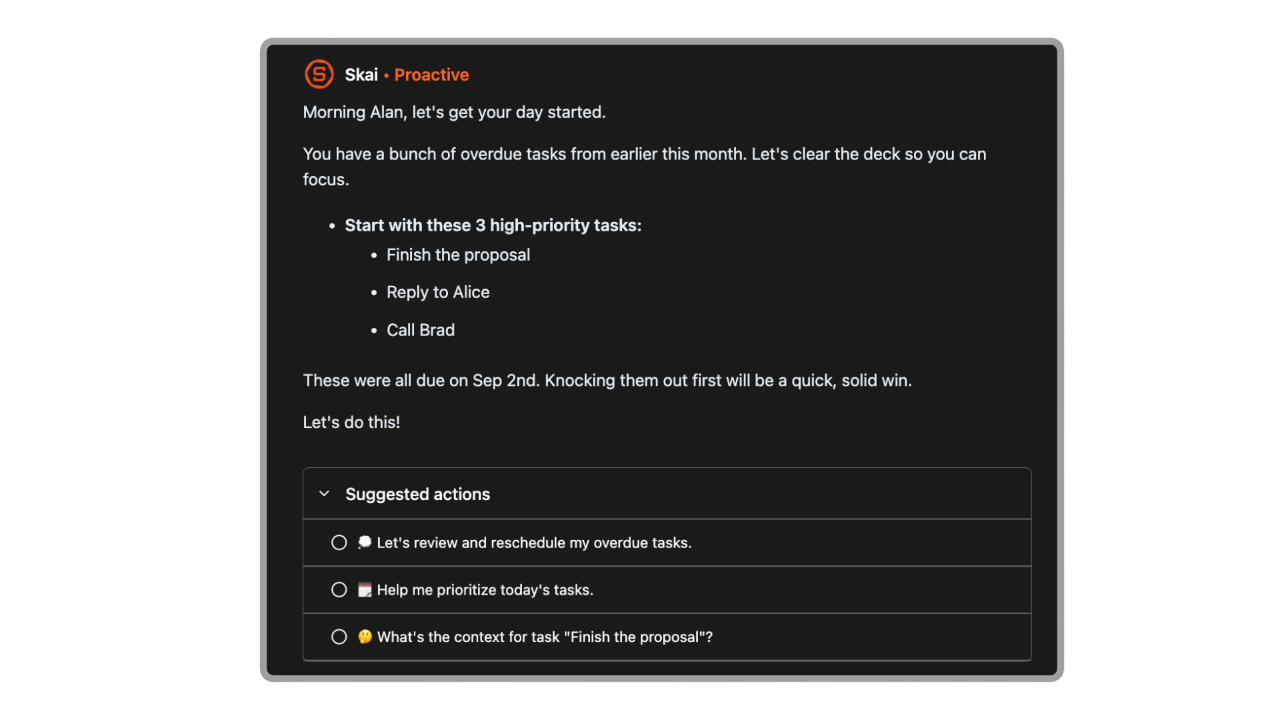
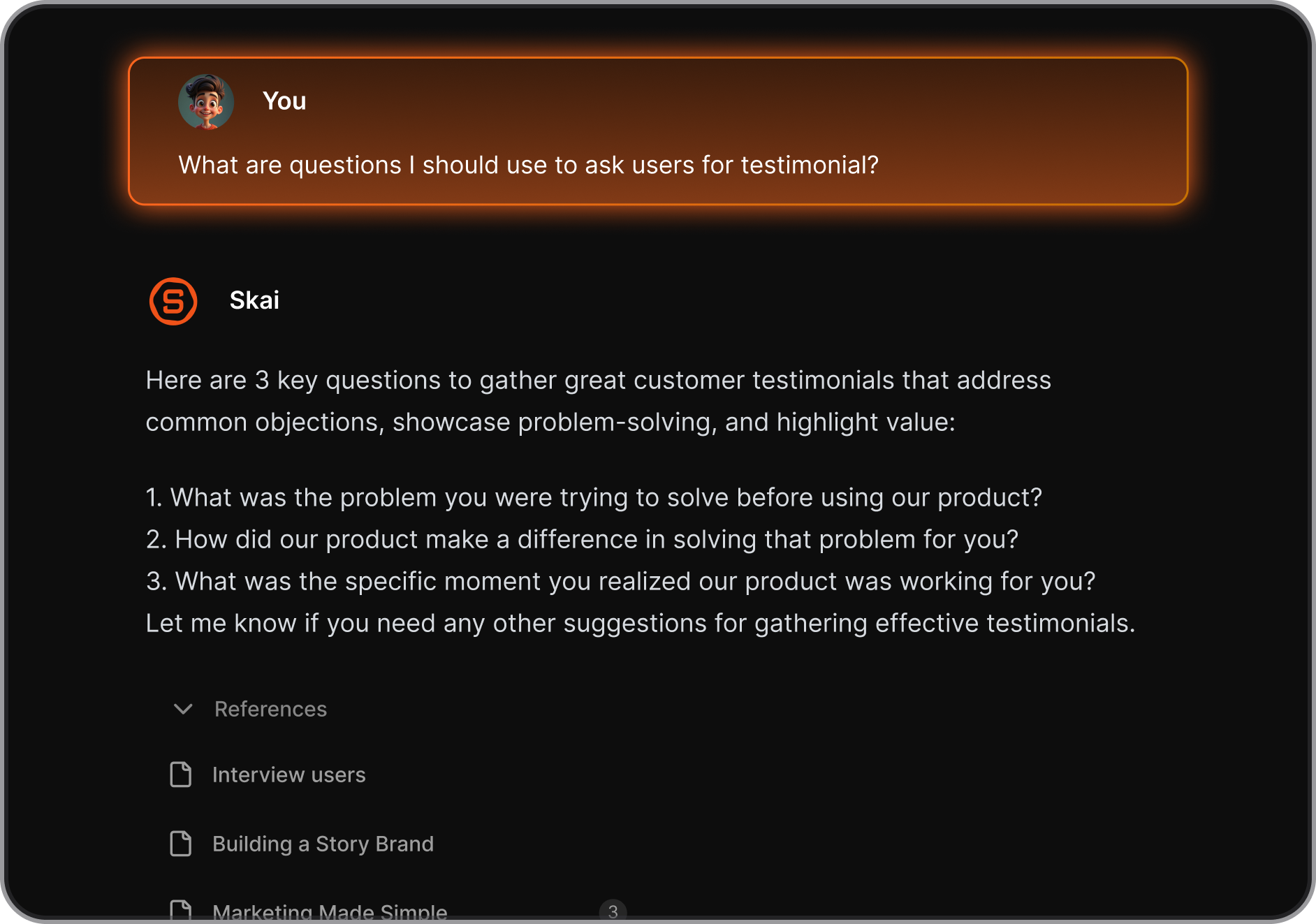
Saner.AI manages everything around the writing: the research pulled from ten different tabs, the note about a source that needs double-checking, the deadline buried three emails deep. It pulls notes, email, calendar, and files into one searchable workspace so a writer isn't rebuilding context every time they sit down to write.
Key features:
- AI task assistant that pulls action items and deadlines directly out of your brain dump, emails, and shows you a clear day plan
- Semantic search and chat that finds a buried fact or quote across every project without manual tagging
- Chrome extension and integrations with Gmail, Google Drive, Slack, and Calendar for capture without switching tabs
Pros:
- Cuts the time spent hunting for a note or source, which one Product Hunt reviewer said saved hours previously lost to manual organizing
- Genuinely useful for writers managing multiple projects or long-form pieces where research and drafts pile up fast
Cons:
- Still in active development, so some writers may want deeper native integrations
Pricing:
- Free — core note capture, task system, limited AI usage and storage
- Starter — $8/month (billed annually)
- Standard — $16/month (billed annually) or $20/month billed monthly, with unlimited AI chats and 100GB storage
Suitable for:
- Best for: freelance and content writers juggling several active projects who keep losing track of research and deadlines
- Best for: novelists and long-form writers who need one place to hold character notes, source material, and revision history
How to get started: Connect email and calendar first so Skai can start pulling tasks and deadlines automatically. Spend the first session dumping existing scattered notes into the Smart Inbox rather than trying to organize anything manually. It sorts them.

Stay on top of your work and life
3. Grammarly — Best for everyday grammar, clarity, and tone
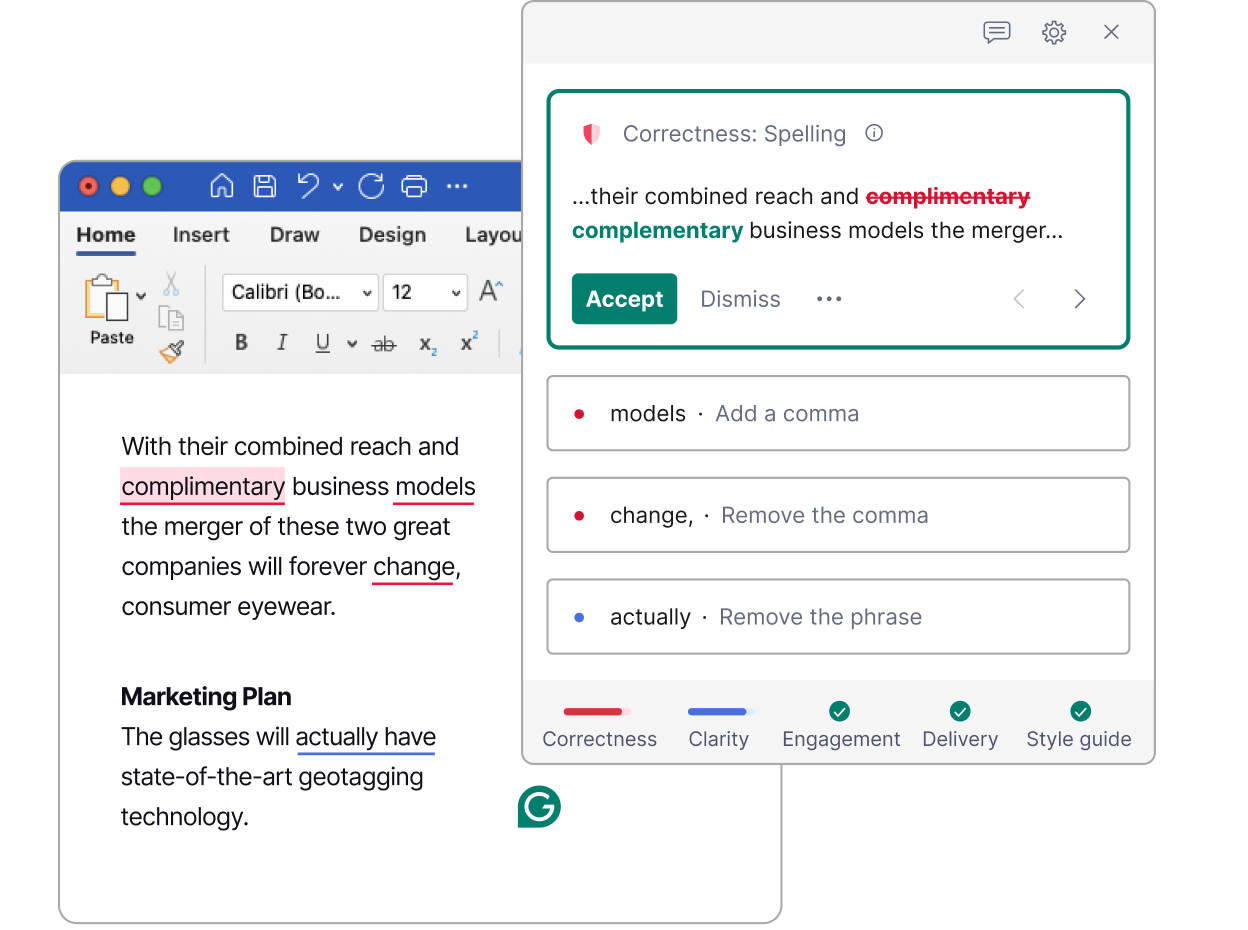
Grammarly is the tool most writers already have running in the background, catching typos and awkward phrasing before a piece even gets to a second draft. It works across nearly every app and browser, which makes it the default line-level editor for anything short of a full manuscript.
Key features:
- Real-time grammar, spelling, and punctuation checks as you type
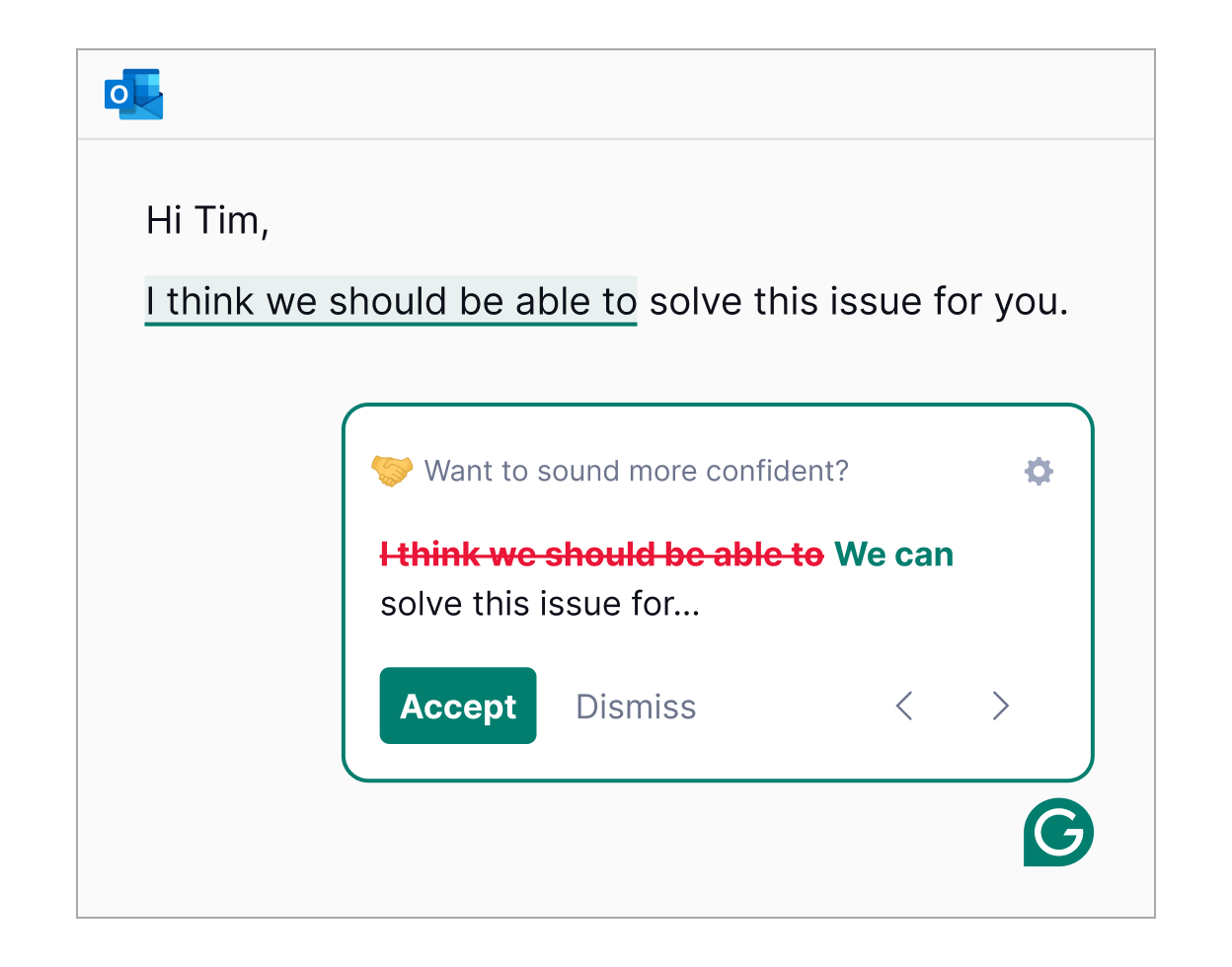
- Tone detection that flags when a draft reads too formal, too blunt, or off-brand
- AI rewriting for tone shifts, length changes, and full-sentence alternatives
- Plagiarism and AI-detection scan built into the Pro plan
Pros:
- Works everywhere, from Gmail to Google Docs to random text boxes on the web, with almost no lag
- Catches the bulk of surface-level errors reliably, which one G2 reviewer credits with cutting review and rewrite time roughly in half
Cons:
- Suggestions can flatten a writer's natural voice, especially in fiction, where GrammarlyGO rewrites are described by one reviewer as sounding generic and off-voice on G2
- Billing complaints are common; refunds are only issued when legally required, and surprise annual charges show up repeatedly in Trustpilot reviews
Pricing:
- Free — unlimited document length, basic grammar and spelling checks, 100 AI prompts/month
- Pro — $12/month (billed annually) or $30/month, with 2,000 AI prompts, plagiarism detection, and brand tone controls
- Enterprise — custom pricing, contact sales
Suitable for:
- Best for: freelancers and content writers who need fast, reliable line edits across multiple platforms
- Best for: non-native English writers who want consistent grammar support without a manual style guide
How to get started: Install the browser extension first, since that's where most day-to-day writing happens. Set the tone and formality goals once in account settings so suggestions match the type of writing being done, whether that's a client email or a blog draft.
4. ProWritingAid — Best for full-manuscript structural editing
Where Grammarly checks sentences, ProWritingAid analyzes the whole manuscript. Its 25+ reports cover pacing, sentence variety, overused words, and dialogue tags, catching patterns a writer would never spot line by line on their own.
Key features:
- Manuscript-level reports on readability, pacing, sticky sentences, repeated phrasing, and overused words
- Sparks AI assistant for rewrites, tone shifts, and chapter-level critique
- Native integration with Scrivener and Word, alongside browser and Google Docs support
- Virtual Beta Reader that flags where reader interest might drop across a full draft
Pros:
- The depth of feedback teaches writers to catch their own patterns over time, not just fix one draft, as one Capterra reviewer put it after switching from a competitor
- The lifetime plan removes recurring billing entirely, a rare option among writing tools
Cons:
- Performance slows noticeably on longer documents, and the free plan's 500-word check limit is too restrictive for manuscript-scale work
- No native AI-detection feature, and some reviewers report the tool getting flagged by AI checkers itself despite human-written input, per one Trustpilot review
Pricing:
- Free — basic grammar and style checks, capped at 500 words per check
- Premium — $10/month (billed annually) or $20-30/month depending on billing term
- Premium Lifetime — $399 one-time
Suitable for:
- Best for: novelists and long-form nonfiction writers doing a full structural edit pass before submission or publishing
- Best for: writers on a budget who want to avoid recurring subscriptions long-term
How to get started: Run the Manuscript Analysis report first on a completed draft rather than checking chapter by chapter, since the structural patterns only show up at full-document scale. Expect the first pass to take longer than Grammarly; the depth is the point.
5. Originality.ai — Best for AI detection and plagiarism verification
Originality.ai solves a problem specific to AI era: proving that submitted content is actually human-written, or catching when it isn't. It combines AI detection and plagiarism checking in a single scan, built for agencies and publishers verifying freelance work at volume.
Key features:
- Combined AI-detection and plagiarism scan that returns both results from one pass
- Full-site scan that crawls an entire domain to audit published pages at once
- Fact Checker that flags potentially unverifiable claims before publication
- Chrome extension and WordPress plugin for scanning inside existing workflows
Pros:
- The combined scan eliminates running two separate tools per submission, which one G2 reviewer said made pre-submission checks noticeably faster for client work
- Support response times are consistently praised across review platforms
Cons:
- False positives are a real risk, with independent testing putting the rate around 5% on the most aggressive detection model, and one Trustpilot reviewer recommending it be paired with human judgment rather than trusted alone
- No permanent free tier, and credits expire monthly on subscription plans without rollover
Pricing:
- Pay-As-You-Go — $30 one-time for 3,000 credits, expires after 2 years
- Pro — $12.95/month (billed annually) or $14.95/month, 2,000 monthly credits
- Enterprise — $179/month, 15,000 credits, API access, dedicated support
Suitable for:
- Best for: content agencies and publishers verifying freelance submissions before publication
- Best for: individual writers who need to confirm their own work won't get flagged before submitting to a client or platform
How to get started: Run one already-published, confirmed-human piece through the scanner first to see how the tool scores known-good writing before trusting it on anything ambiguous. Treat the AI-detection score as one signal, not a verdict.
Conclusion
The real split in this list isn't grammar tools versus fiction tools. It's tools that fix sentences versus the one that manages everything happening before a sentence gets written.
- Grammarly, Sudowrite, ProWritingAid, and Originality.ai each solve a narrow, real problem once a draft exists.
- Saner.AI solves the problem that causes writers to lose hours before they even open a draft: scattered research, buried deadlines, and no memory of what the last revision changed.
Pick based on where writing actually breaks down, and stack more than one if the budget allows. The five together cost less per month than a single freelance editing pass.
Stay on top of your work and life
FAQ
What is the best AI tool for freelance writers?
There's no single best tool, since freelance writers juggle drafting, editing, and project management at once. Saner.AI covers the organizational side (deadlines, client notes, research), while Grammarly handles line-level editing across every client document. Most freelancers end up running two or three tools rather than one.
What's the difference between Grammarly and ProWritingAid?
Grammarly checks sentences in real time across nearly every app, while ProWritingAid analyzes a full manuscript for structural patterns like pacing and repetition. Grammarly is faster for day-to-day writing; ProWritingAid goes deeper for long-form editing. Many writers who work on both short and long-form content use both.
Is Sudowrite worth it in 2026?
Yes, if fiction is the primary use case and writer's block or scene generation is a recurring problem. It's a weaker choice for non-fiction, marketing copy, or writers who want a full publishing pipeline, since it doesn't export to DOCX, PDF, or EPUB.
Does Originality.ai actually detect AI-generated content accurately?
No detector is fully accurate, and Originality.ai is no exception. Independent testing puts real-world false positive rates around 5% on its most aggressive model, so a single score shouldn't be treated as proof either way. It works best as one signal alongside editorial judgment, not a final verdict.
What should someone look for in an AI writing tool?
The main things worth checking are workflow fit, output quality on a second read (not just a first glance), how well it integrates with tools already in use, and whether independent reviews back up the vendor's own claims. Pricing transparency also matters, since credit-based and prompt-capped plans often cost more than the advertised starting price at real usage.
Can AI writing tools replace a human editor?
No. Every tool in this roundup, including the structural editors, catches patterns and flags issues, but none of them understand argument, intent, or whether a scene actually works emotionally the way a human editor does. They shorten the editing cycle; they don't replace it.
Is there a free AI writing tool for writers?
Yes. Grammarly's free tier covers basic grammar and spelling with unlimited document length, and Saner.AI's free plan covers note capture and light task management. Both are usable for casual writing, though serious manuscript or content work usually outgrows the free limits quickly.
How much does an AI writing stack cost per month?
A full stack covering organization, drafting, line editing, structural editing, and verification runs roughly $40 to $60 a month at the entry tier for each tool (Saner.AI Starter, Grammarly Pro, Sudowrite Hobby, ProWritingAid Premium, Originality.ai Pro). Most writers don't need all five running simultaneously; picking two or three based on where the actual bottleneck sits keeps the cost closer to $20 to $30.
Does using AI writing tools hurt search rankings or get content flagged?
Google has said publicly that it ranks content on quality and helpfulness, not on whether AI was involved in producing it. That said, content that reads as generic or unedited tends to underperform regardless of how it was written, which is part of why verification tools like Originality.ai and structural editors like ProWritingAid have become part of standard workflows.
What's the best AI tool for organizing a book-length writing project?
Saner.AI is built for this specifically: connecting research notes, chapter drafts, and deadlines in one searchable place instead of across scattered documents and tabs. ProWritingAid complements it for the actual manuscript-level editing pass once a draft is complete.
How do I get started with an AI writing tool if I've never used one?
Start with whichever tool fixes the most immediate bottleneck rather than trying to adopt a full stack at once. If the problem is scattered research and missed deadlines, start with Saner.AI; if it's clunky prose, start with Grammarly; if it's a stuck scene, start with Sudowrite. Add the others once the first tool is actually part of the daily routine.
Are AI detectors like Originality.ai reliable enough to use for hiring decisions?
Not on their own. False positive rates of roughly 5% mean a real chance of flagging genuinely human-written work, particularly from non-native English writers or heavily-edited drafts. Treat a flagged score as a reason to look closer, not as grounds for a decision by itself.
What percentage of writers actually use AI in their writing process?
Among book authors, the Authors Guild's December 2023 survey found 23% using generative AI somewhere in their process, mostly for grammar and brainstorming rather than prose generation. Adoption is faster among content marketers, where separate industry surveys report a majority already using AI tools in some part of the content workflow.
Stay on top of your writing