
We tested 30+ AI Tools with Memory, and here are the top 6 in 2026

We Tested the Best 6 AI Tools with Memory in 2026
When you give an AI a continuous memory, it stops behaving like a passive chatbot and starts acting like an actual colleague. However, the exact "type" of memory you need depends heavily on how you work. There is a sharp distinction in the market right now: mainstream LLMs excel at remembering concepts, stylistic preferences, and overarching instructions, whereas specialized, workflow-driven AI tools are built to remember your literal tasks, files, and cross-platform integrations.
In this article, we’ve evaluated the market's leading platforms to see how their memory architectures hold up under real-world workloads and where they face distinct trade-offs.
Quick guide: What are the best AI tools with memory right now?
2. Claude: Best for deep project context, utilizing project knowledge bases to maintain a cohesive voice and memory across extensive writing and coding tasks.
3. Gemini: Best for Google Workspace power users, offering native memory integration across your live Docs, Drive files, and Gmail.
4. Saner.AI: Best for scattered thinkers who need a "second brain" that remembers and links random notes, tags, and research into a unified memory space.
5. Perplexity: Best for research-heavy roles, utilizing a persistent "Collection" memory to remember your search preferences, source exclusions, and ongoing research goals.
1) Why do we need AI tools with memory?
A peer-reviewed study published in Scientific Reports (Nature) found that
Research published on arXiv found that
2) How we chose the best AI memory tools
To find the tools that truly understand the value of long-term context, we evaluated each platform based on the parameters that separate basic caching from actual intelligence:
- Context Retention Over Time: Can the app accurately recall details discussed weeks or months ago without experiencing "hallucinations"?
- Integration Memory: Does the AI remember data living inside other software tools (like Notion or Jira), or is its memory restricted to its own chat box?
- User Control and Privacy: How easily can you view, edit, or delete specific memories that the AI has stored about you or your business?
- Proactive Recall: Does the app intelligently surface relevant past information on its own, or do you have to explicitly prompt it to remember?
- File & Knowledge Base Management: How smoothly does it handle permanent uploads, documentation, and static data libraries without running out of context window space?
Now, let's dive in!
What are the best AI tools with memory?
The best AI tools with memory in 2026 are ChatGPT, Claude, Gemini, Saner.AI, Perplexity
🧠 Best AI Tools with Memory in 2026 — Comparison Table
| 🤖 Tool | 🎯 Best For | 🧠 Memory Capabilities | ⚙️ Key Features | 💰 Pricing (2026) |
|---|---|---|---|---|
| ChatGPT | Personal AI assistant & daily productivity | Persistent Memory remembers preferences, projects, writing style, and past conversations across chats | GPT-5 models, custom GPTs, voice mode, deep research, file analysis | Free; Plus $20/mo; Pro $200/mo |
| Claude | Long-form writing & research | Project Knowledge and conversation memory within projects; supports up to 1M-token context windows on eligible plans | Writing, document analysis, coding, artifacts, research workflows | Free; Pro $20/mo; Max plans available |
| Gemini | Google ecosystem users | Personalized memory and access to Google apps, emails, documents, and calendar (with permission) | Gmail, Docs, Drive, Workspace integration, multimodal AI | Free; Google AI Pro $19.99/mo |
| Saner.AI | Personal knowledge management | AI memory connects notes, tasks, meetings, and ideas into a searchable second brain | AI note-taking, task management, knowledge organization, natural language search | Free; Paid plans from ~$10/mo |
| Perplexity | Research and information retrieval | Stores research context in Spaces and remembers preferences across workflows | AI search, citations, Spaces, web browsing | Free; Pro $20/mo |
1. ChatGPT

ChatGPT is a conversational AI workspace by OpenAI that serves as a personalized digital assistant. It focuses heavily on memory continuity across different chat threads. The tool runs on the GPT-5 ecosystem, meaning it tracks your preferences, voice guidelines, and past workflows over time.
Key Feature
- ChatGPT actively tracks and implements user information across three distinct structures: explicit "saved memories," active "conversation memory," and an autonomous "reference chat history" that retroactively pulls relevant data from weeks-old threads.
- Personalization tab controls: The settings menu contains a designated workspace where you can review, edit, or delete the specific details the system has chosen to remember about your work.
Pros
- I appreciate being able to view the memory checklist in my settings to wipe out old details I do not need anymore.
- When I open a new topic to talk about, the system will automatically pull up small facts from a research thread I abandoned weeks ago.
Cons
- The AI sometimes falls into repetitive phrasing because it relies too heavily on my saved habits.
- I feel limited by the storage ceiling on saved items, which eventually forces me to delete older context.
- I dislike that my profile data is stuck inside the app, as I cannot export my memory settings to other writing tools.
Who is it for
- ChatGPT is best for developers, researchers, and writers who want an assistant that adapts to their voice, code guidelines, and ongoing habits over time.
- Can produce confident but incorrect answers
Pricing plan
| Plan | Price (approx) | What you get |
|---|---|---|
| Free | $0 | Basic access, limited usage, standard models |
| Plus | ~$20/month | Faster models, priority access, better context handling |
| Pro / higher tiers | Higher monthly pricing | Extended usage limits, advanced models, better memory and tools |
| Team / Enterprise | Custom | Collaboration features, admin controls, data privacy options |
How to get started
- Open your settings menu and select the personalization option.
- Turn on the memory toggle to let the AI log details automatically.
- Use the manage memory button to view or remove specific facts the system stores.
ChatGPT Reviews (source)
"Easy to set up and personalise, easy to use even for beginners, great at early stage idea planning and has fast response time. Paid use has a lot more value with photo generation and how much you can utilise it for."- Chelsea G.
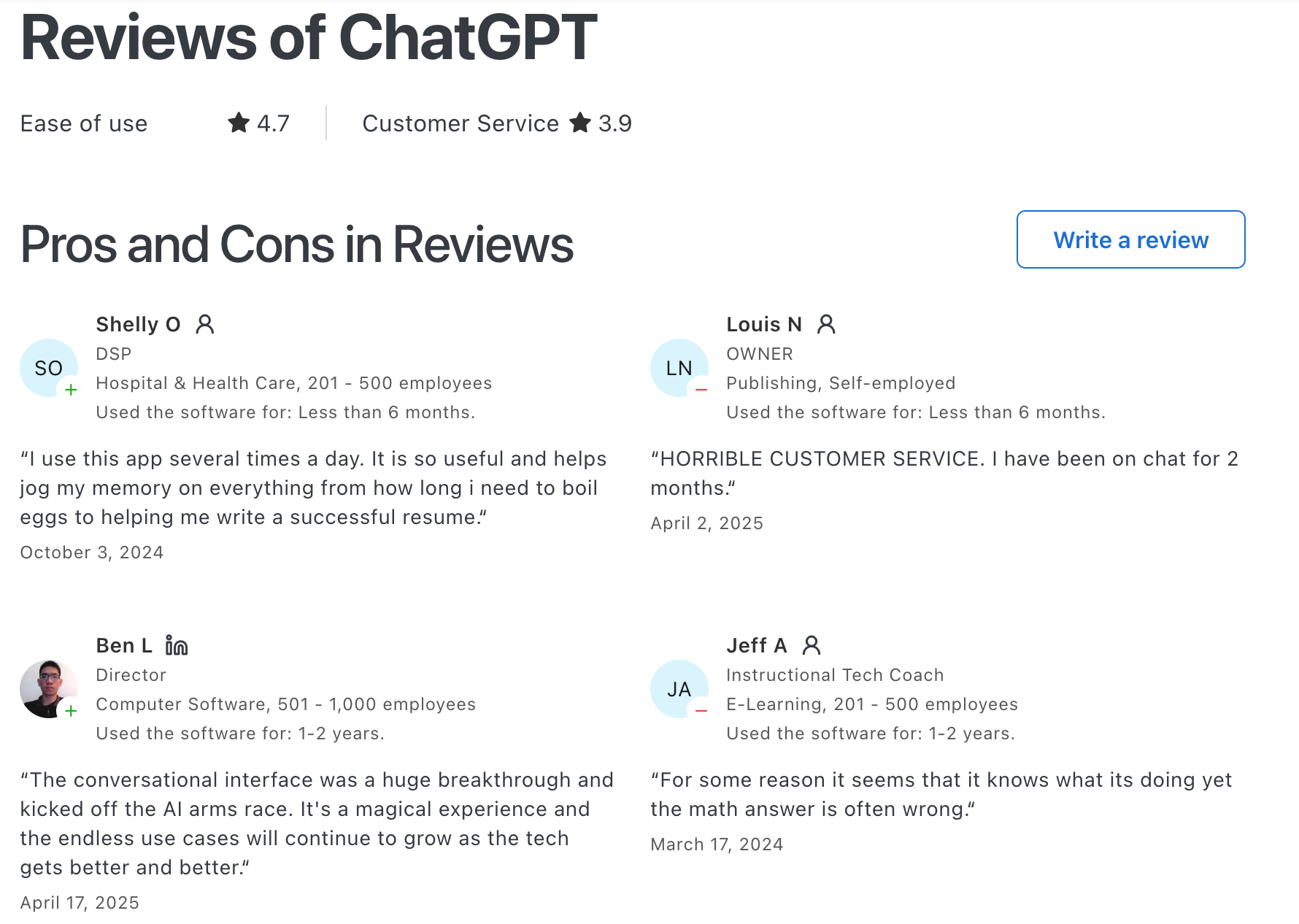
"Contrastive framing, bad faith arguments, and incoherent conversational pattern paired with condescending "preachy" tone." - Kelly E
2. Claude
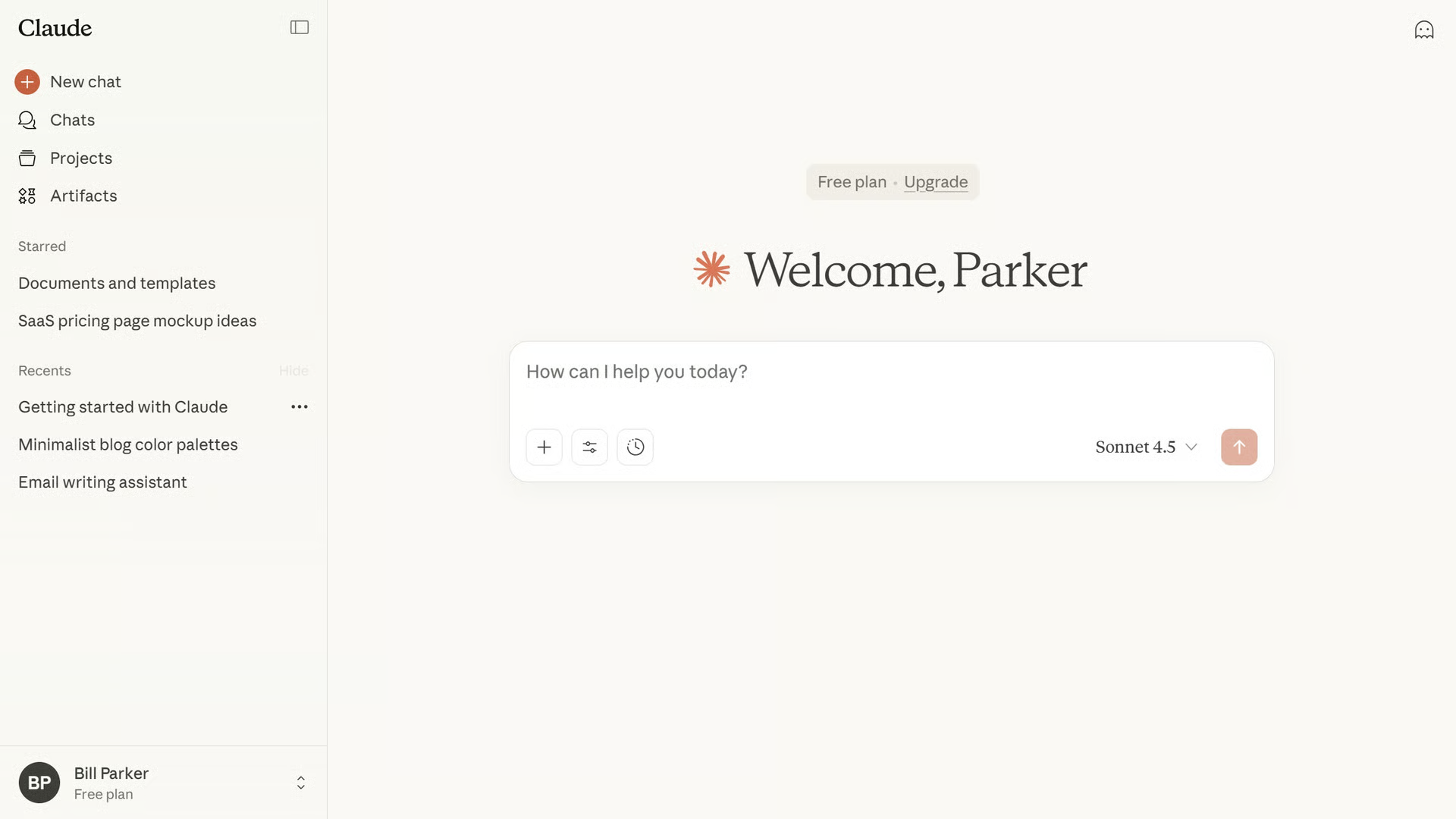
Claude is a reasoning-focused AI workspace built by Anthropic that prioritizes human-like communication and factual depth. Ranking in AI tools with memory, it excels at persistent project-level memory integration, allowing the assistant to build knowledge networks over weeks of interactions.
Key feature
- Auto memory synthesis: Claude constantly tracks and summarizes your chat history across separate days, building a 24-hour background context layer that applies to any new thread you open without manually copying instructions.
- Compartmentalized project memory: The system isolates its memory banks by project folders
- Explicit CLAUDE.md guidelines: Developers and teams can deploy a localized markdown document directly within their working directory to force Claude to permanently hold strict style conventions, file paths, and build rules.
Pros
- I appreciate how the project-based memory blocks keep my distinct writing campaigns separate so the AI never mixes up my clients' branding.
- The 1-million-token workspace allows me to drop massive data bundles into a chat without the assistant immediately forgetting the initial rule list.
- The chat display provides a clickable citation back to a completely different thread from last week to prove where it pulled a rule.
Cons
- I sometimes feel restricted by the tight daily message allowances on long-context tasks, which can halt my deep-focus writing cycles.
- I find it annoying that the auto-memory log takes up to a full day to update its general insight files across my standard chats.
- I dislike that the application lacks an automated background image generator, forcing me to shift to separate software platforms to handle visual mockups.
Pricing plan
| Plan | Price | What you get |
|---|---|---|
| Free | $0 | Access to Claude with usage limits |
| Pro | Around $20/month | Higher usage, priority access to Claude 4.8 models |
| Team | Per-seat pricing | Collaboration features and shared usage |
| Enterprise | Custom | Large-scale deployment and admin controls |
Who is it best for
- Claude is best for technical writers, software teams, and long-form researchers who require their AI assistant to remember massive structural rules
How to get started
- Enter your user dashboard settings and choose the Capabilities section.
- Toggle the Search past chats and memory button to turn on passive automated note-taking.
- Click on View and edit memory to add your own structural text instructions or remove facts Claude has saved.
Claude reviews (source)
"Claude is super smart, easy to work with, and great at staying on track even with complicated questions. It writes really well and feels thoughtful compared to some other chatbots."- Ashish Dubey
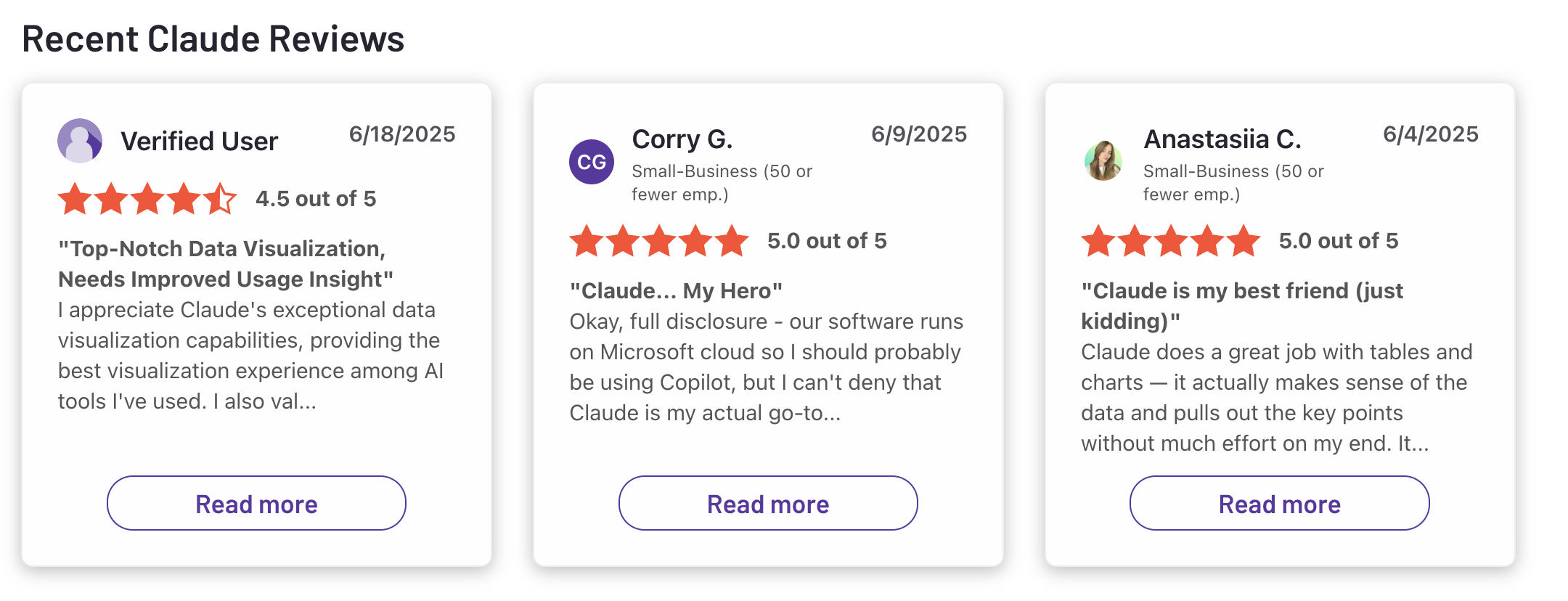
"I pay 20usd per motnh and have the possibility to work with it only for 30 minutes every 5 hours." - Pietro Preti
3. Saner.AI
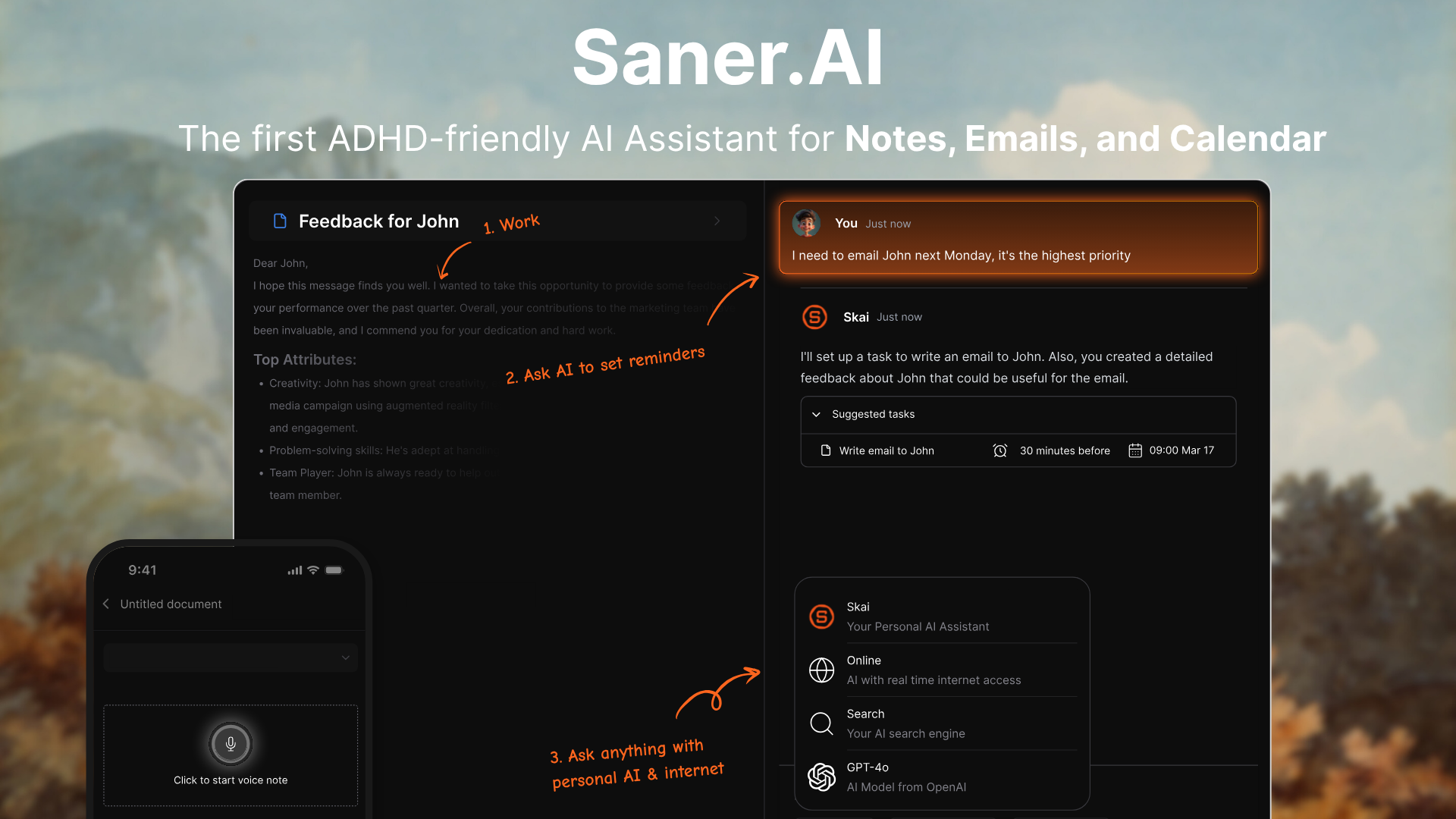
Saner.AI is an AI personal assistant and productivity workspace built specifically for people handling information overload or ADHD workflows. It behaves like a mix between a note app and a task manager, but with a memory layer sitting on top.
You can drop in meeting notes, random ideas, or links, and the system tries to surface them again when they become relevant. The core promise is simple: less time organizing, more time actually using your information.
Key feature
- AI memory capture: Saner.AI stores notes without forcing structure at the start. You just write, and it sorts things later based on meaning.
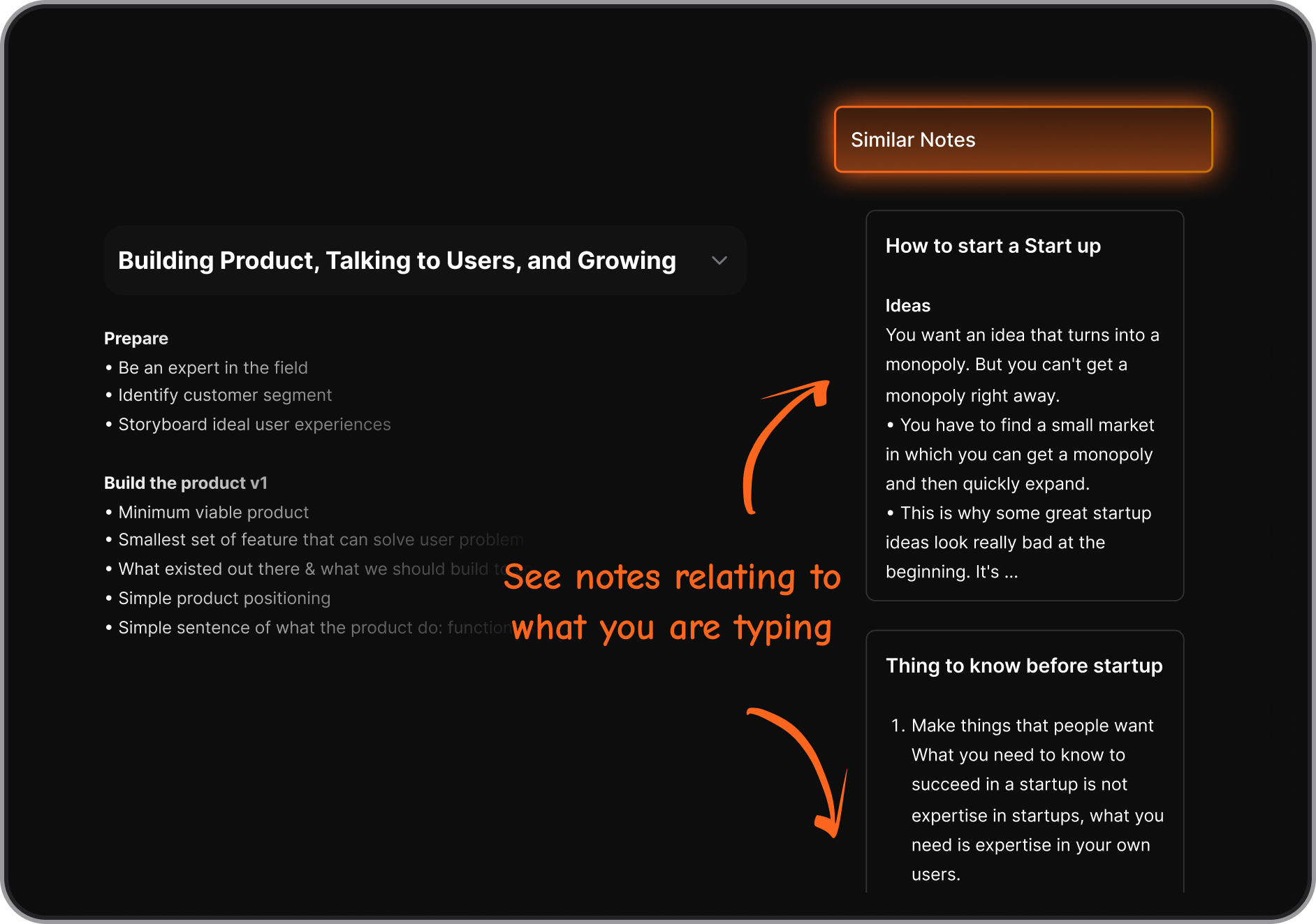
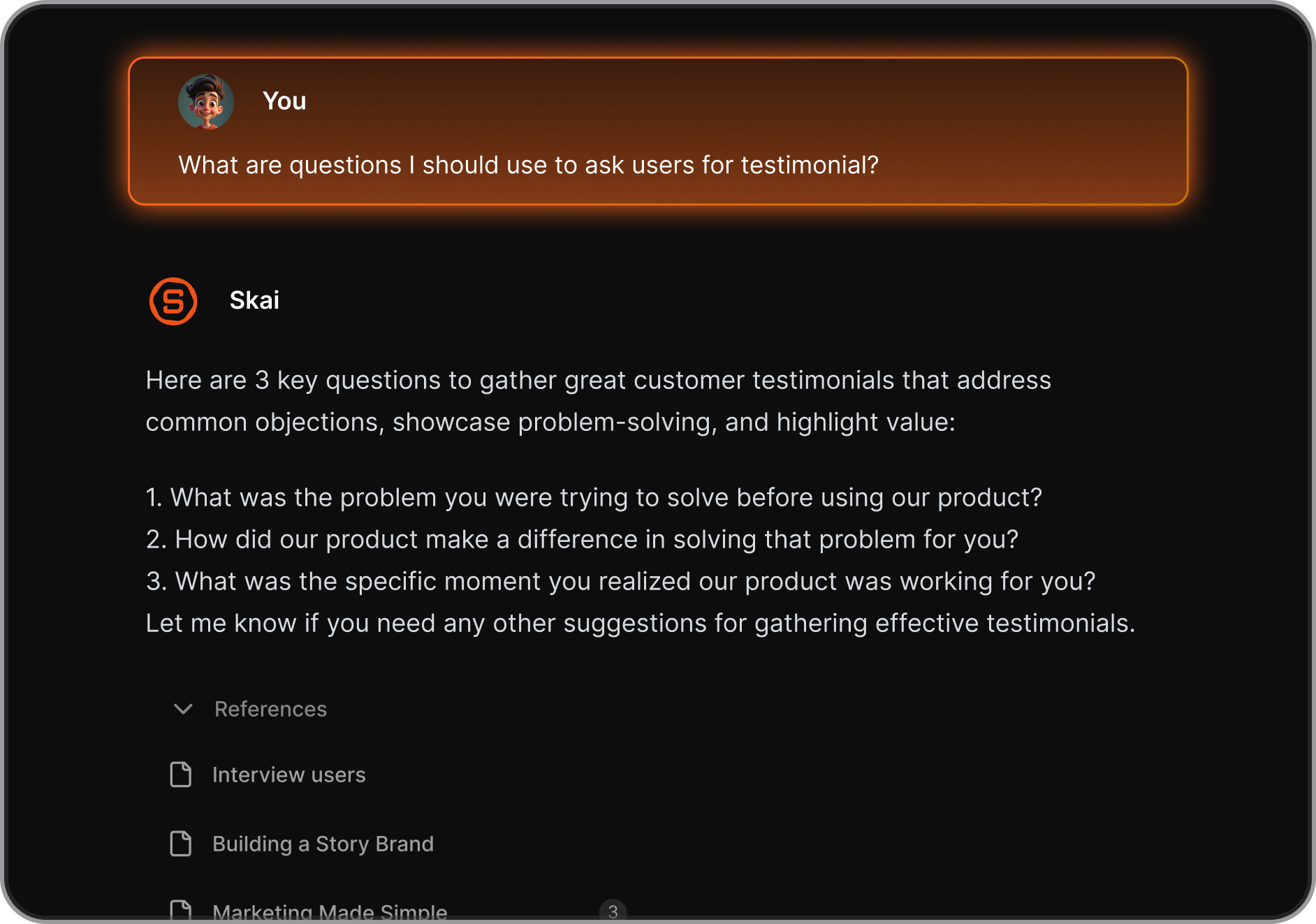
- Skai AI personal assistant: The built-in AI assistant, Skai, reads through your collected files and notes, connects related ideas across different notes so older inputs resurface when you write something similar later.
"I was impressed that saner.ai answers questions based on my own knowledge through Skai. At the same time, I think it would be great if I could save all the information I come across in saner.ai and use Skai as my personal secretary." — Verified Review
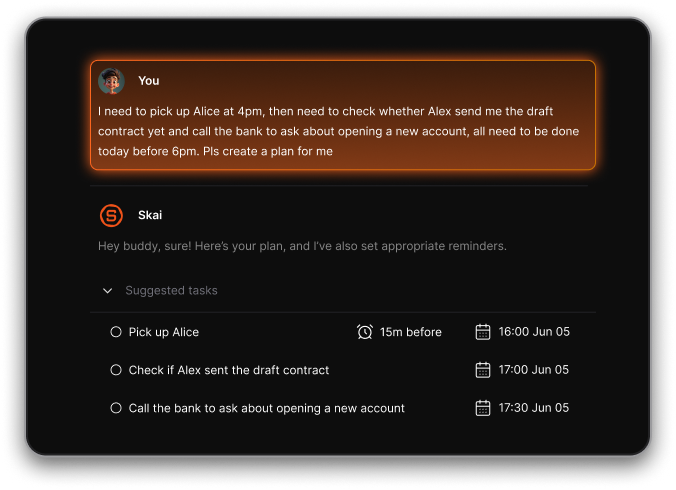
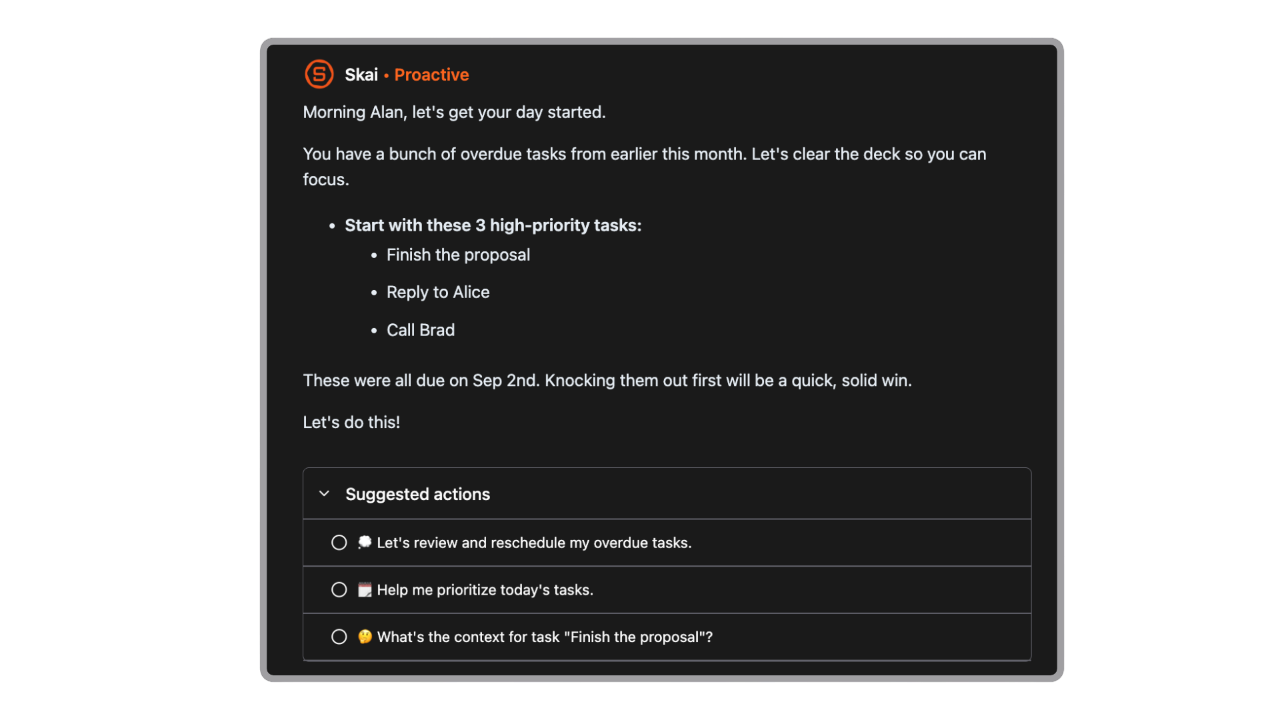
- Proactive planning and task extraction: The app scans your documents and emails to find assignments automatically, then suggests steps to complete them based on your history, and it can pull action items out of raw text.
"Really like how it proactively tells me what to do each morning. Appreciate the help of the team, they are really responsive with emails." — Verified Review
- Search that behaves like memory: Instead of keyword search, it tries to understand intent. You can type vague prompts like “that idea about onboarding emails” and it still tries to surface the right note.
Pros
- I like how the application connects my separate thoughts together without forcing me to maintain neat folders or tag hierarchies.
- The clean layout because it keeps me from getting distracted when I need to write down quick ideas.
- The system proactively builds a daily plan based on the tasks it uncovers inside my email inbox.
Cons
- Not ideal if you prefer strict folders or manual organization
Pricing plan
- Free and from $8/month
Who is it for
- Saner.AI is best for researchers, entrepreneurs, and knowledge workers with ADHD who need a quiet workspace to capture ideas quickly and link scattered documents together without heavy manual organizing.
How to get started
- Connect your primary communication apps like Google Drive or email to sync your current notes and files.
- Use the quick capture panel to drop your initial ideas and let the semantic assistant link them together.

Stay on top of your work and life effortlessly
4. Gemini
Gemini is Google's primary conversational AI platform, built directly into the Google Workspace environment. Ranked among the best AI tools with memory, it runs on the latest Gemini 3.1 architecture. The system specializes in analyzing vast, data-heavy files over a massive context window while logging persistent user instructions to build an ongoing project knowledge base.
Key feature
- Native Google Workspace grounding: Gemini hooks directly into your Gmail, Docs, Sheets, and Drive ecosystem, which allows it to reference your own files when permitted.
- Multi-million token context window: The flagship system handles large files and massive continuous projects easily, processing up to 2 million text and visual data units simultaneously.
- Cross-device memory via Google ecosystem: Because Gemini runs across Android and Google services, your chat context can follow you across devices when signed in.
Pros
- I like how effortlessly the assistant pulls relevant background files out of my cloud folders to clarify an ongoing project.
- The native multi-modal tools to scan full meeting transcripts alongside complex architectural diagrams.
Cons
- I sometimes notice the system mixing up context details and search history when I jump between separate text chats.
- I feel limited by occasional servers dropping out mid-conversation, leaving me locked out of my saved information.
- The memory system can slip into hallucinations on specialized tasks, giving me inaccurate script commands.
Who is it best for
- Gemini is best for data analysts, research students, and project managers who manage large quantities of cloud-stored information across Google ecosystems and need a tool that handles multi-page documents without dropping structural context.
Pricing plan
| Plan | Price | What you get |
|---|---|---|
| Gemini (Free) | $0 | Basic AI chat, limited access to advanced models |
| Gemini Advanced | $19.99/month (Google One AI Premium) | Access to advanced models, long context window, Workspace integration |
| Google One AI Premium bundle | Included in plan | Extra storage + Gemini Advanced features |
How to get started
- Log into the desktop app with your primary work account credentials.
- Open the sidebar settings menu to activate the workspace extensions panel.
- Check the specific cloud folders you want the model to analyze for its project memory base.
Google Gemini review (source)
"I feel like it's steps ahead of every other AI when used like a personal assistant. Schedule my calendar, open a Google Doc, write this outline or proposal. It does all that and more." — reviews
"It still feels like it's on rails at times in providing answers." — reviews
5. Perplexity
Perplexity is an AI conversational search engine that serves as a real-time research assistant. In 2026, it stands out for its cross-model context portability, combining continuous memory tracking with immediate web indexing.
Key feature
- Cross-model memory portability: Perplexity applies your saved history, user persona, and research preferences across every LLM option available on the platform, allowing you to switch between Claude, GPT-5, and Gemini without losing your active context.
- Transparent citation sourcing: Every response generated using your memory profile includes embedded, clickable footnotes tied to live databases, web pages, or private cloud connections to allow instant verification.
- Shared collection Spaces: This feature serves as an organized knowledge base where you can pre-load custom rules, file attachments, and multi-shot instructions to automate recurring research workflows.
Pros
- I can build a comprehensive research memory profile while switching between different foundational AI models.
- I appreciate the clear footnotes attached to every answer, which save me from digging through Google tabs to verify facts.
- I feel it helpful that the tool remembers my technical background and tailors its reading lists to my exact skill level.
Cons
- I sometimes dislike how the system generates shallow summaries when I ask it to analyze highly complex, multi-layered research data.
- There are daily limits on advanced searches, which can slow down intensive research sessions.
Who is it for?
- Perplexity is best for researchers, market analysts, and students who require a real-time search tool that retains their specific research parameters, industry background, and source preferences across multiple information-gathering sessions.
Pricing plan
| Plan | Price | What you get |
|---|---|---|
| Free | $0 | Basic AI search, limited usage, standard models |
| Pro | ~$20/month | Faster responses, advanced models, file upload, Copilot features |
| Enterprise | Custom | Team features, admin controls, higher security, API access |
How to get started
- Log into your profile page and navigate to the Account Settings area.
- Fill out your Profile fields with details about your industry, current role, and research preferences.
- Turn on the Memory toggle to let the assistant automatically track and recall your context across future web queries.
Perplexity Reviews (source)
"It halves my research time for academic papers. The academic focus mode is incredible for literature reviews." — PhD student, reviews
[Image: Perplexity reviews screenshot]
On the flip side:
"Perplexity has literally ZERO customer support." — Trustpilot, December 2025
Conclusion - Choosing the Best AI Tools with Memory in 2026
Memory has become one of the most important AI features in 2026. Whether you're researching with ChatGPT, working through long projects in Claude, using Gemini across Google's apps, finding answers in Perplexity, or managing your work inside Saner.AI, the goal is the same: keep context, reduce mental overhead, and help you pick up where you left off.
Each tool approaches memory differently. ChatGPT and Claude excel at long conversations and content creation. Gemini connects AI memory with your Google Workspace. Perplexity keeps research organized across sessions. Saner.AI focuses on building a growing knowledge base from your notes and conversations.
If your biggest challenge is information overload, though, I'd start with Saner.AI. Instead of acting like another chatbot, it works more like a personal AI workspace. You can quickly capture ideas, notes, tasks, and meeting insights, then let the AI organize and connect everything for you. The result is less time searching, less context switching, and fewer thoughts slipping through the cracks.
Stay on top of your work and life effortlessly
Frequently asked questions about AI tools with memory in 2026
1. What are AI tools with memory?
AI tools with memory can remember information from previous conversations, notes, files, or user preferences and use that context in future interactions. Instead of starting from scratch every time, they build on what they already know about your work, projects, and goals.
Popular examples include ChatGPT, Claude, Gemini, Saner.AI, Perplexity, and Dume.AI.
2. Why is memory important in AI assistants?
Memory helps AI assistants provide more relevant answers and reduce repetitive work. Rather than repeatedly explaining your projects, preferences, or workflows, the AI can recall past context and continue where you left off.
For professionals, this often means faster research, better task management, and more personalized assistance.
3. Which AI tool has the best memory in 2026?
The answer depends on what you need:
- ChatGPT is strong for persistent user memory and long-term personalization.
- Claude excels at handling large amounts of information thanks to its massive context window.
- Gemini works well inside the Google ecosystem.
- Saner.AI focuses on turning your notes, tasks, and conversations into actionable work.
- Perplexity combines research with saved context.
- Dume.AI is designed around building a personal knowledge base that grows over time.
4. What is the difference between AI memory and context window?
A context window is the amount of information an AI can process during a conversation.
Memory is information the AI retains and can reference across different conversations or sessions.
For example, Claude's large context window helps it process lengthy documents, while ChatGPT's memory feature can remember preferences and details across multiple chats.
5. Which AI tool is best for personal knowledge management?
For personal knowledge management, Saner.AI and Dume.AI are among the strongest options.
Saner.AI organizes notes, tasks, meetings, and reminders in one place, allowing users to retrieve information through natural language search. Dume.AI focuses on creating a searchable personal knowledge repository that improves as more information is added.
6. Can AI tools remember my notes and documents?
Yes, many AI tools with memory can store and reference notes, documents, and uploaded files.
Examples include:
- ChatGPT memory combined with uploaded knowledge
- Claude projects and document-based workflows
- Gemini integrated with Google Docs and Workspace
- Saner.AI note-based memory and semantic search
- Dume.AI knowledge-base memory
The exact memory capabilities vary by platform.
7. Which AI tool is best for productivity?
For general productivity:
- Saner.AI is designed specifically for managing notes, tasks, meetings, and reminders.
- ChatGPT works well for writing, brainstorming, and project planning.
- Gemini is useful for users already working inside Google Workspace.
- Claude is often preferred for long-form analysis and document-heavy work.
Many users combine multiple tools depending on their workflow.
8. What makes Saner.AI different from ChatGPT and Claude?
Saner.AI focuses on execution and personal organization.
Instead of primarily functioning as a chatbot, it connects your notes, tasks, reminders, and calendar-related workflows. Users can quickly capture ideas, search information using natural language, and convert notes into actionable tasks without building complicated systems.
This makes it particularly useful for people who struggle with information overload or fragmented productivity apps.
9. Which AI tool is best for ADHD users?
Many ADHD users prefer Saner.AI because it reduces the need for manual organization.
Features such as natural language note capture, dynamic reminders, semantic search, and task extraction help users keep track of ideas without worrying about folders, tags, or complex workflows.
ChatGPT can also help with planning and accountability, but it typically requires more manual setup.
10. Can AI tools with memory automatically organize information?
Yes.
Modern AI memory systems can:
- Categorize notes automatically
- Connect related ideas
- Surface relevant information when needed
- Suggest follow-up tasks
- Prioritize important items
Saner.AI places a particularly strong emphasis on organizing personal knowledge automatically.
11. Which AI assistant is best for research?
Perplexity is often the top choice for AI-powered research because it combines conversational answers with web citations and source discovery.
ChatGPT, Claude, and Gemini are also useful for analysis, but Perplexity is especially popular among users who need fact-checking and source-backed answers.
12. Is ChatGPT memory better than Gemini memory?
ChatGPT currently provides one of the most mature memory experiences for personalized conversations.
Gemini's memory capabilities are closely tied to Google services and can be valuable for users who rely heavily on Gmail, Google Docs, Google Calendar, and Google Drive.
The better choice depends on whether you want a standalone AI assistant or a Google-centric workflow.
13. Can AI tools with memory replace note-taking apps?
Not completely, but they are changing how people manage information.
Traditional note-taking apps focus on storing information. AI tools with memory help retrieve, organize, summarize, and connect information automatically.
Many professionals now use platforms like Saner.AI or Dume.AI as a combination of note-taking system, search engine, and AI assistant.
14. What is the best AI tool with memory for entrepreneurs?
Entrepreneurs often need an AI assistant that remembers ideas, meetings, customer feedback, and project details.
Popular choices include:
- Saner.AI for managing tasks, notes, and follow-ups
- ChatGPT for strategy and content creation
- Claude for analyzing large documents
- Perplexity for market research
- Gemini for teams using Google Workspace
The right choice depends on whether your biggest challenge is organization, research, writing, or collaboration.
15. Are AI tools with memory secure?
Most major AI platforms provide privacy controls that allow users to manage stored memories, delete information, or disable memory features.
Before storing sensitive business or personal information, review the privacy policies and data retention settings of the platform you choose.
Enterprise plans typically provide additional security, compliance, and administrative controls.
16. What is the best free AI tool with memory in 2026?
Several tools offer free access:
- ChatGPT Free provides access to core AI capabilities and selected memory features.
- Gemini Free integrates with Google's ecosystem.
- Perplexity Free includes AI-powered search and research.
- Saner.AI Free includes AI note organization, task management, and natural language search.
- Dume.AI offers free options for building a personal knowledge base.
If your goal is managing personal knowledge and tasks, Saner.AI is one of the most complete free options available today because it combines memory, note retrieval, task capture, and AI organization in a single workspace.
Stay on top of your work and life effortlessly



