AI in Daily Life: Practical Examples And Tools For Your Life in 2026

I didn’t realize how much friction there was in my daily life until I started paying attention to the small things. Writing emails that took longer than they should. Getting distracted mid-task. Forgetting things I just thought about five minutes ago. Even simple stuff like choosing what to eat or planning a route started to feel heavier than it needed to be.
AI didn’t suddenly “fix” my life. It just started filling those tiny gaps. One tool helped me write faster. Another kept my schedule from falling apart. A different one quietly handled directions, reminders, even small decisions I used to overthink.
That’s when I noticed something: AI isn’t one big tool you install once. It shows up differently depending on where your time goes, at work, at home, in your health, in how you learn.
So instead of looking for the “best AI tool,” I looked at my actual day. Where do I lose time? Where do I feel stuck? Where do things pile up?
In this guide, I’ll walk through the main parts of daily life and the one AI tool that actually makes each of them easier, from work and communication to navigation, home routines, health, and learning.
What Is AI in Daily Life?
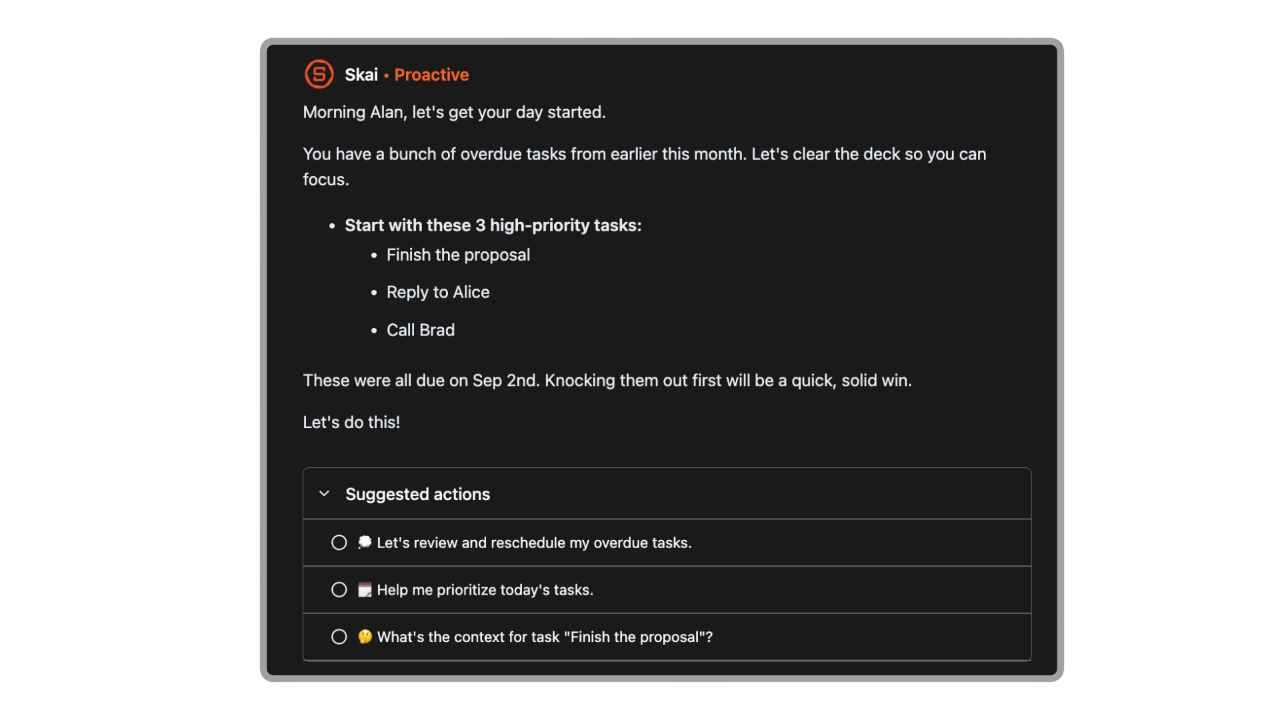
When we talk about “AI in daily life”, what we mean is technology that mimics some aspects of human thinking and decision-making - learning from data, detecting patterns, making predictions, and offering personalised experiences.
Rather than a robot doing all the work, most commonly, what happens is:
- It uses algorithms to recognise patterns (for example: you usually play music when you wake up, you drive home at 6pm, you watch short videos on Sunday nights).
- Then it predicts or recommends something: “Play this podcast”, “Take this route”, “Here’s what you might like to watch”.
- Over time, it adapts: the more you use it, the better the fit.
Key insights
- Different areas of life need different types of AI, there’s no single “all-in-one” tool that replaces everything
- The real value isn’t speed, it’s reducing how much you have to think about routine decisions
How I chose these AI tools
Here are a few criteria that cross my mind when choosing an AI for daily life
- Daily usefulness - Does it solve something I deal with every day, or at least every week?
- Low friction - If a tool takes effort to maintain, I won’t keep using it.
- Clear impact on time or mental load - Some tools save time. Others reduce the number of decisions you have to make. Both matter.
- Fits into existing habits - I looked for tools that work with how people already live, email, maps, notes, health tracking, instead of forcing a completely new system.
- Consistency over novelty - There are a lot of impressive AI demos. I picked tools I can still see myself using months later.
Examples of AI in Daily Life
and how to apply them to your life
A. AI at Work - Email, Task, Personal Knowledge Management
Tools like Saner.AI, Gemini, Calude, and Grammarly are leading examples of how AI supports knowledge workers today. Each serves a slightly different purpose, but together they create a smoother, more focused workflow.
Modern work can feel like juggling dozens of open tabs in the mind - messages, meetings, notes, and tasks all competing for attention. This is where Saner.AI becomes a practical personal assistant.
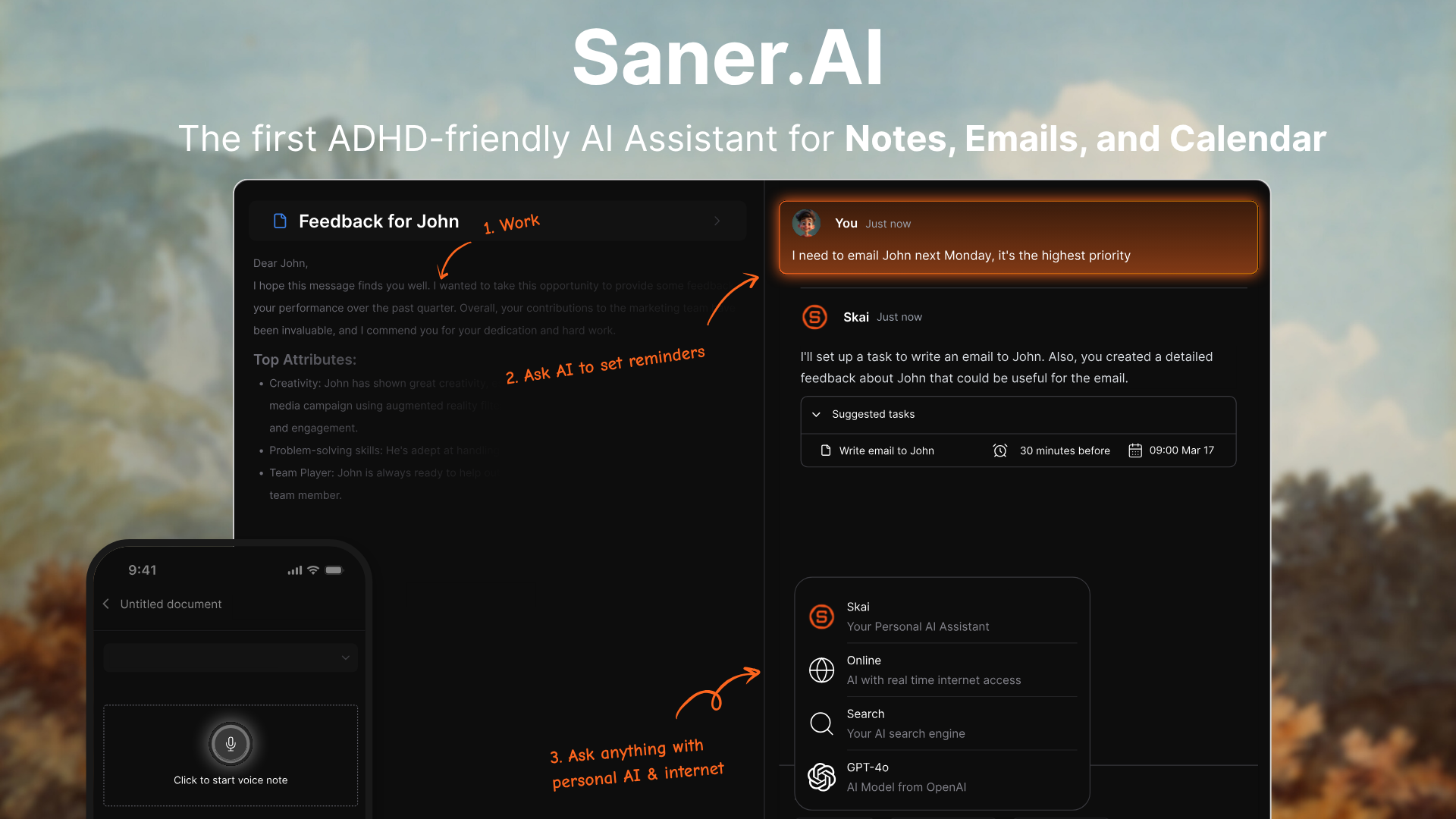
It pulls information from places like email, Drive, Slack, and calendar into one workspace, then uses its AI assistant, Skai, to help organize, recall, and act on that information.
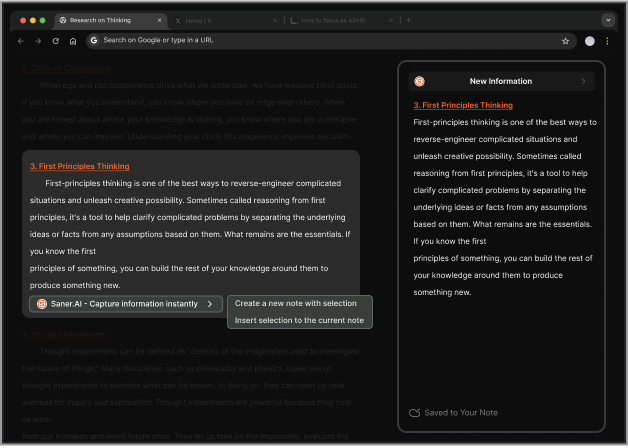
The app focuses on quick capture, semantic search, task extraction, and daily planning. Saner also has a Chrome extension for saving ideas while browsing, plus mobile apps for on-the-go capture.
Key feature
- Saner.AI is strongest when your thoughts are messy. You dump in notes, reminders, article snippets, or half-finished ideas, and the app is supposed to sort them into something usable instead of making you build a whole system first.
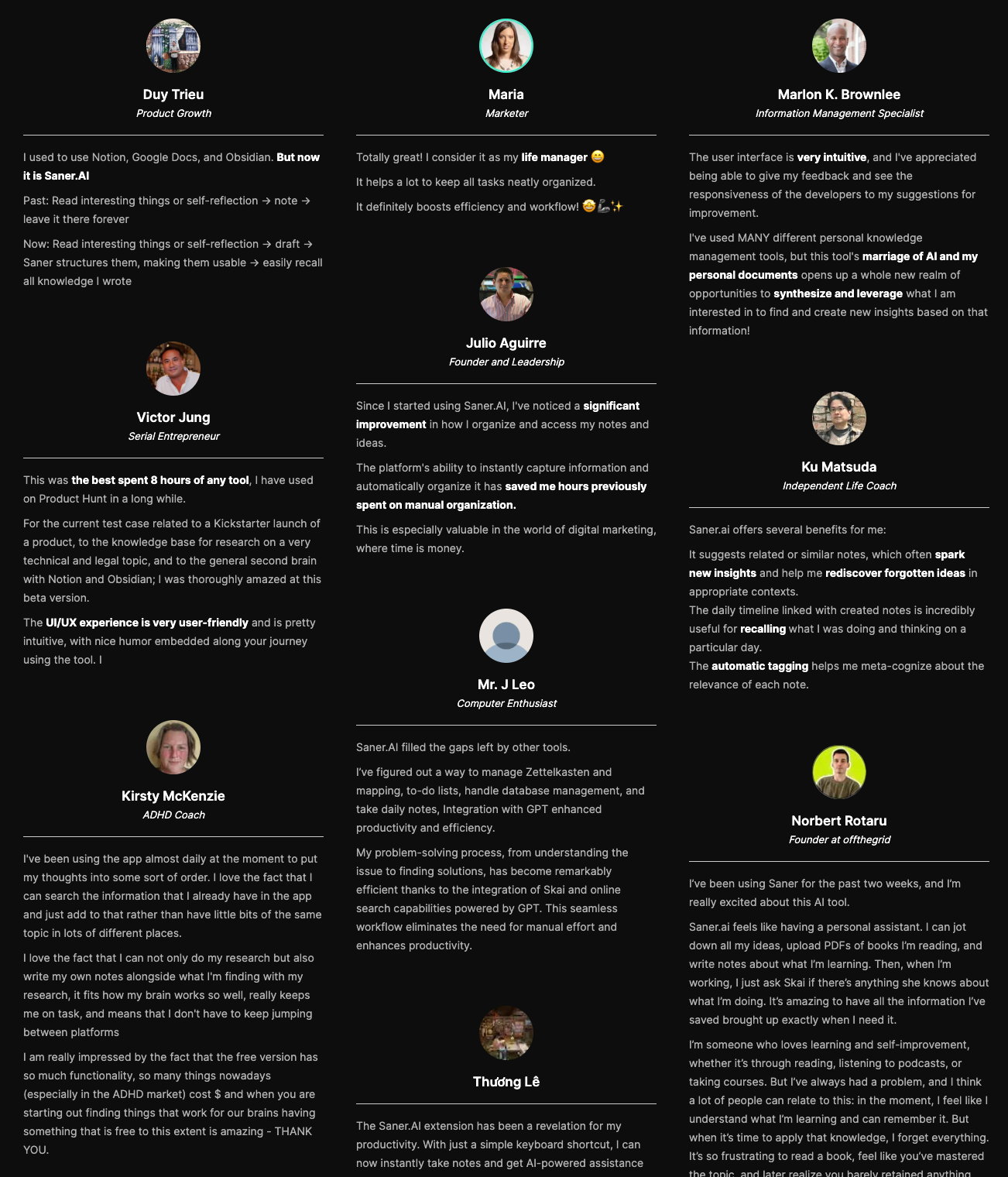
“Since I started using Saner.AI, I've noticed a significant improvement in how I organize and access my notes and ideas. The platform's ability to instantly capture information and automatically organize it has saved me hours previously spent on manual organization.” — verified review
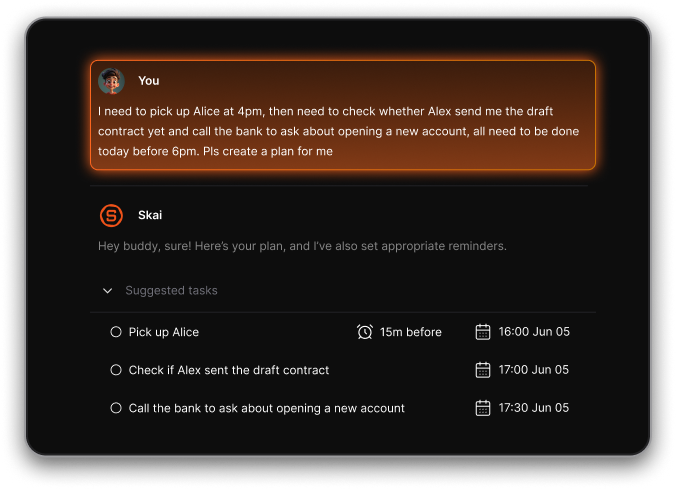
- A lot of AI tools can answer questions. Saner is more interesting because it is built to answer questions about your own information.
“I'm mostly looking forward to the personal AI aspect and semantic structure/search Saner.ai offers because it is something that still lacking in most other note-taking apps.” — verified review
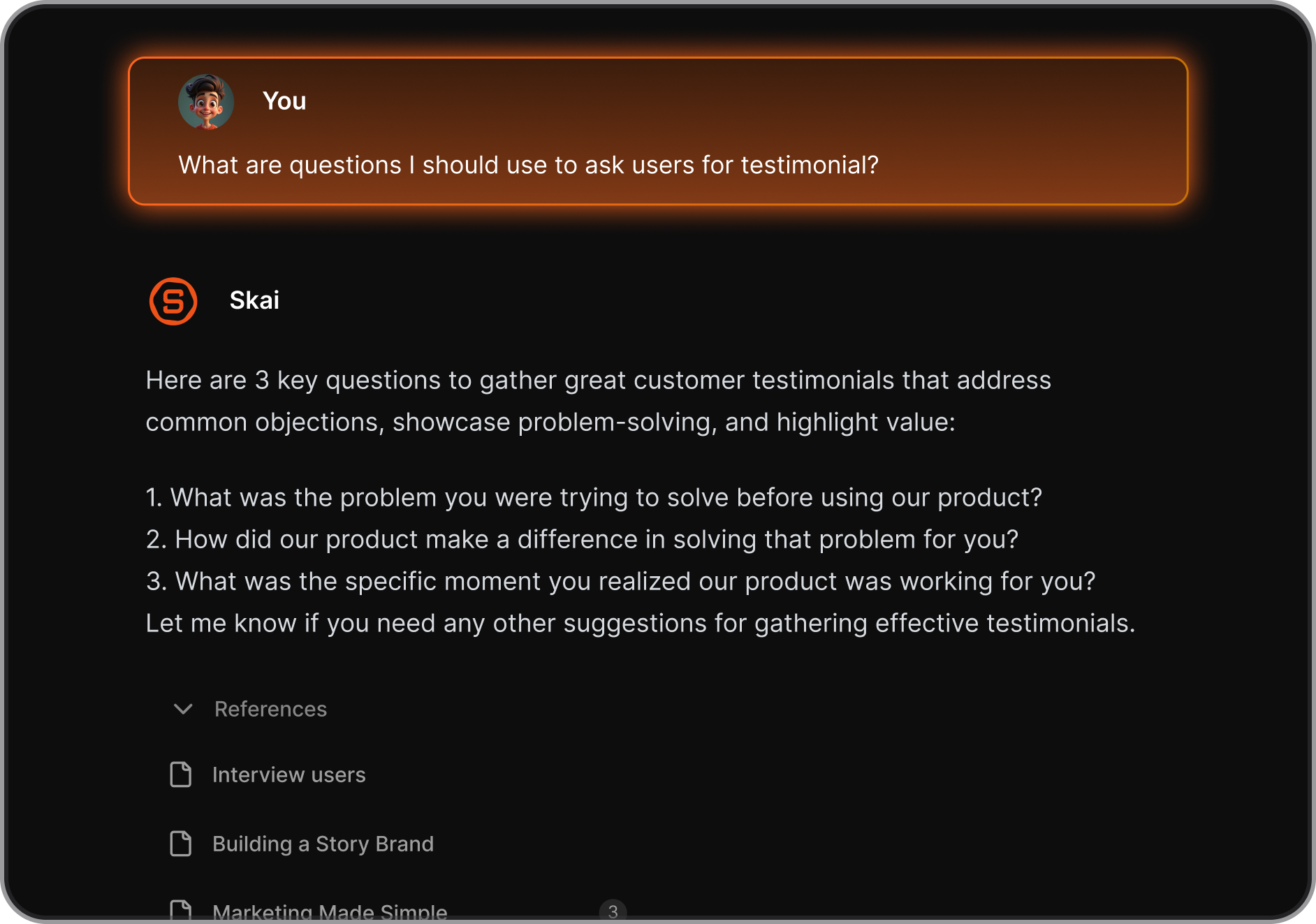
- The app says it can pull tasks from emails and documents, break them into smaller steps, remind you, and even suggest ways to finish them.

- The Chrome extension lets you save notes directly from the browser, use a side-panel note, apply auto-tags, and keep capturing without bouncing between tabs.
“I especially like the Chrome Extension. It's super handy, I can pull up a new note immediately alongside web articles, chatGPT,... It reduces the mental friction I have to suffer to note side by side on Mac” — verified review
Pros
- Strong fit for people who want quick capture and AI organization without setting up a rigid system.
- Saner’s product pages and app listings lean hard into ADHD support, distraction reduction, and a cleaner interface.
- “If you have ADHD or just an overloaded brain, Saner.AI feels like it was made for us.” - verified review
Cons
- The product looks more focused on personal productivity than deep team collaboration or complex company workflows.
Pricing plan:
- Free
- Paid plans start at $8 - $16/month
Saner.AI review

Stay on top of your work and life
2. AI in Navigation: The Travel Shortcut We All Rely On
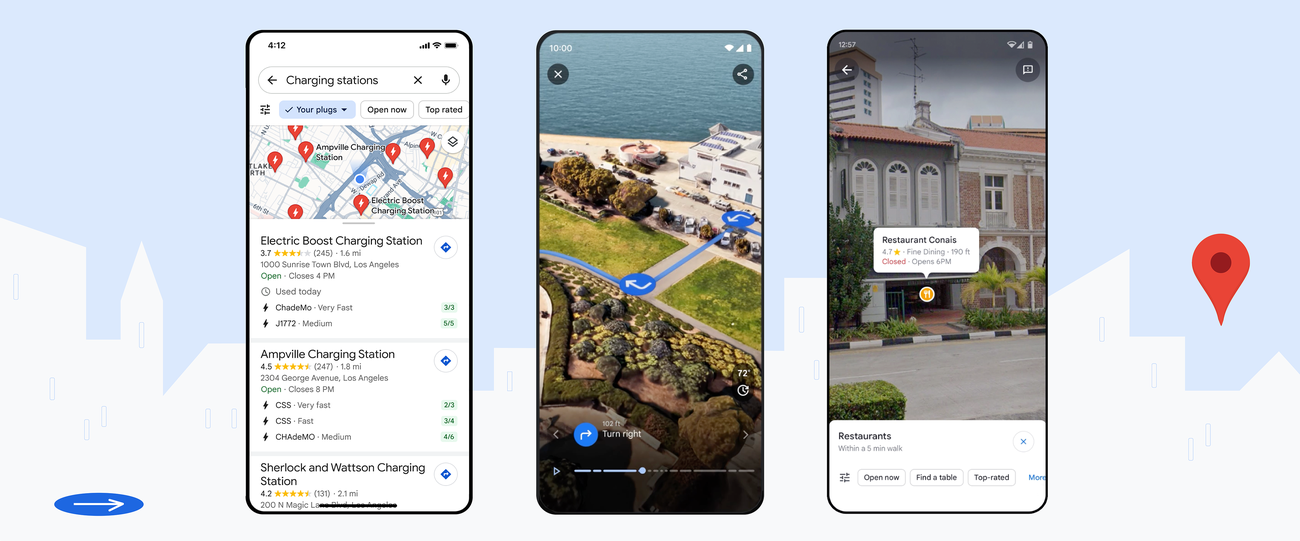
Google Maps is still one of the easiest AI-powered apps to justify in daily life because it does more than get you from A to B. It handles live traffic, turn-by-turn navigation, public transit, walking, cycling, offline maps, place discovery, and crowd data in one app.
In 2026, Google is also adding more Gemini-powered features like Ask Maps and conversational navigation. The app pulls from a huge place database and contributions from hundreds of millions of users each year, so it is useful both for commuting and for figuring out where to eat, park, or stop on the way.
Key feature
- Google Maps uses live traffic, turn-by-turn navigation, and automatic rerouting.
“The navigation is extremely accurate, traffic updates are very reliable, and it always helps me find the fastest route.” - verified review
- Google Maps is just as much a discovery app as a navigation app now. You can filter places by cuisine, hours, price, and rating, check photos and reviews, see how busy a place is, and ask quick questions about parking or menu items.
“I also love how easy it is to discover nearby restaurants, gas stations, shops, and important places with real customer reviews.” - verified review
- Maps is better than a lot of people give it credit for when the trip is messy, not clean. It lets you add stops, save places you want to visit later, preview parking and entrances, and check several transport modes in the same app.
“Some Innovating Features the App does include though is the Directions and how long you’re entire commute that day will take as it allows you to add your starting location then your destination after doing so you can add everywhere you want to stop in order.” - verified review
- You can preview parking and entrances with Street View, use Immersive View to understand landmarks and routes before you leave, and use Lens in Maps for walking directions layered onto the real world.
Pros
- Free for everyday users on mobile and web.
- Covers driving, walking, cycling, transit, ride-share, and offline maps in one app.
- Strong place discovery with reviews, photos, busy times, filters, and local business data.
- In 2026, Google is also rolling out Ask Maps and Gemini-based navigation features, which make the app more conversational.
- “The interface of Google Maps was very easy to navigate and understand. Lots of information was available about your destination and the road conditions.” - verified review
Cons
- Route suggestions can still feel risky or impractical in some cities and traffic conditions.
- Some features are not available in every country or city.
- “Misleading Exits/Transition. when navigating with Google maps, I don't know what has happened recently within the last few months, but the normal routes I would usually take have been changed to some wonky routes...” - verified review
Pricing plan
- Google Maps is free. There is no paid personal plan for navigation, place search, Street View, or offline maps in the consumer app.
- If you are a business or developer building with Google Maps Platform, that is a separate product with pay-as-you-go pricing and subscription options. Google currently lists plans such as Starter at US$100 per month, and says new customers get a US$300 trial credit.
Google Maps review (source)

3. AI in My Home: The Quiet Helper

I’d list it here because Alexa is one of the few AI tools that quietly handles the boring parts of a day: alarms, reminders, timers, shopping lists, music, routines, smart-home controls, and quick answers without making you open another app.
Key feature
- Alexa works best when it removes tiny bits of friction all day long, setting timers, reminders, alarms, and shopping lists without needing a screen.
“Set reminders to take my medication, wake up alarms, asking all sorts of questions I ask out of curiosity, goodnight routine telling me what the weather will be the next day, asking to play music/songs that make me happy...” – verified review
- A lot of Alexa’s appeal is still tied to Echo speakers. People buy into Alexa for voice control, then end up using it constantly for music, casual questions, alarms, and household convenience.
- Alexa app lets users manage devices, control playback, check reminders and timers, and even use hands-free voice when the app is open.
Pros
- Alexa is tied to routines, sensors, device controls, and home automation through the Alexa app
- Hands-free control
Cons
- The app experience gets real criticism for lag, poor navigation, and too much friction in settings or routines.
- Voice understanding and responsiveness are sometimes glitchy.
- A lot of Alexa’s best real-life value depends on owning compatible hardware like Echo devices.
Pricing
- Free - Limited Alexa+ experience on Alexa.com and in the Alexa app.
- Included with Prime - Full Alexa+ access on compatible devices is included for Amazon Prime members.
- Paid plan - Alexa+ Standard costs $19.99/month if you want the full upgraded experience without Prime
4. AI for Health: From Data to Insights
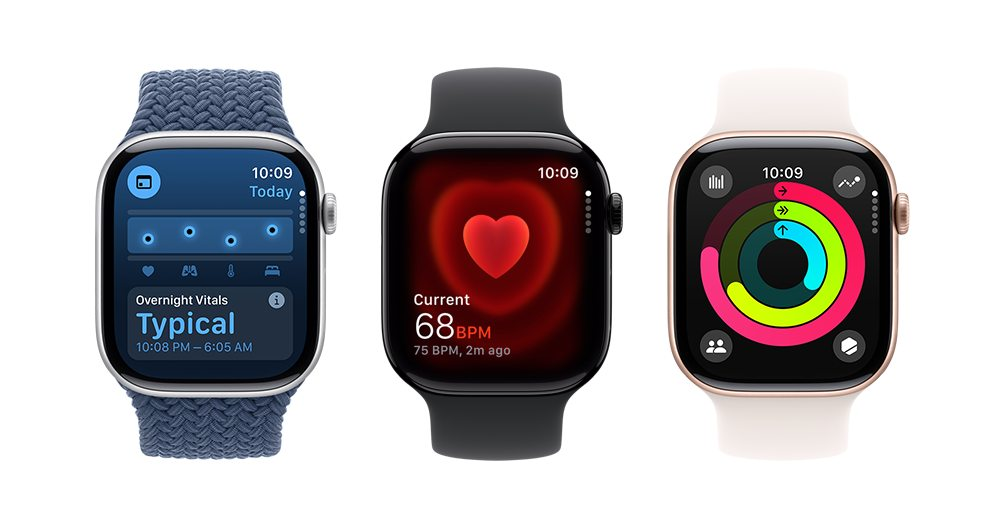
Modern wearables like the Apple Watch, Fitbit, Oura Ring, and WHOOP are more than fitness trackers - they’re AI-powered health translators. They collect signals like heart rate, sleep stages, and movement, then use machine learning to help you understand what your body is trying to say.
I’d mention WHOOP in a “best AI in daily life” post because instead of acting like a smartwatch, it stays focused on continuous tracking and turns that data into prompts about strain, rest, healthspan, and performance. That makes it feel more like a quiet system running in the background than a gadget begging for attention.
Key feature
- WHOOP tells you how hard to push, when to back off, and how your sleep and recovery are affecting performance.
“Love the app and what WHOOP does for my training, it's been a game changer.” – verified review
- WHOOP makes patterns easier to spot. Sleep, alcohol, training load, recovery trends, and daily habits are all tied together in a way that can push people to change what they do.
"The detailed data on recovery impact has helped my sleep, and the new addition of Whoop Labs has helped me get a full picture of my healthspan." - verified review
- WHOOP has expanded beyond athlete-style recovery scores. Its newer memberships pitch health, performance, and longevity, which makes it easier to position as an everyday wellness tool instead of a niche sports tracker.
"I use the AI coaching/feedback almost daily - certainly post workouts - and find it quite helpful. Also, the recovery data has provided me with a metric-based guideline to improve sleep - preps me for the next workout" - verified review
- Some people do not want another screen on their wrist. WHOOP keeps the wearable side minimal and pushes the insight layer into the app, which can feel cleaner than smartwatch-first products.
“I love how this app. Gives me the data I need to improve my health without the distraction of an Apple Watch.” – verified review
Pros
- Gives coaching around sleep, strain, and recovery instead of only raw tracking.
- Strong for people who want to build better habits from real body data.
- Screenless design is a real plus if you do not want smartwatch distractions.
- Newer plans now include more health and longevity positioning, not just athletic performance.
Cons
- Pricing is much steeper than a typical app subscription because WHOOP is sold as a membership system.
- The app can feel dense, especially for new users.
- It makes the most sense if you care about recovery, training, sleep, or performance. Casual users may not get the same value.
- Many basic actions cannot be completed within the app and require visiting the website instead, which defeats the purpose of having an app in the first place.
Pricing
- WHOOP One: $199/year
- WHOOP Peak: $239/year
- WHOOP Life: $359/year
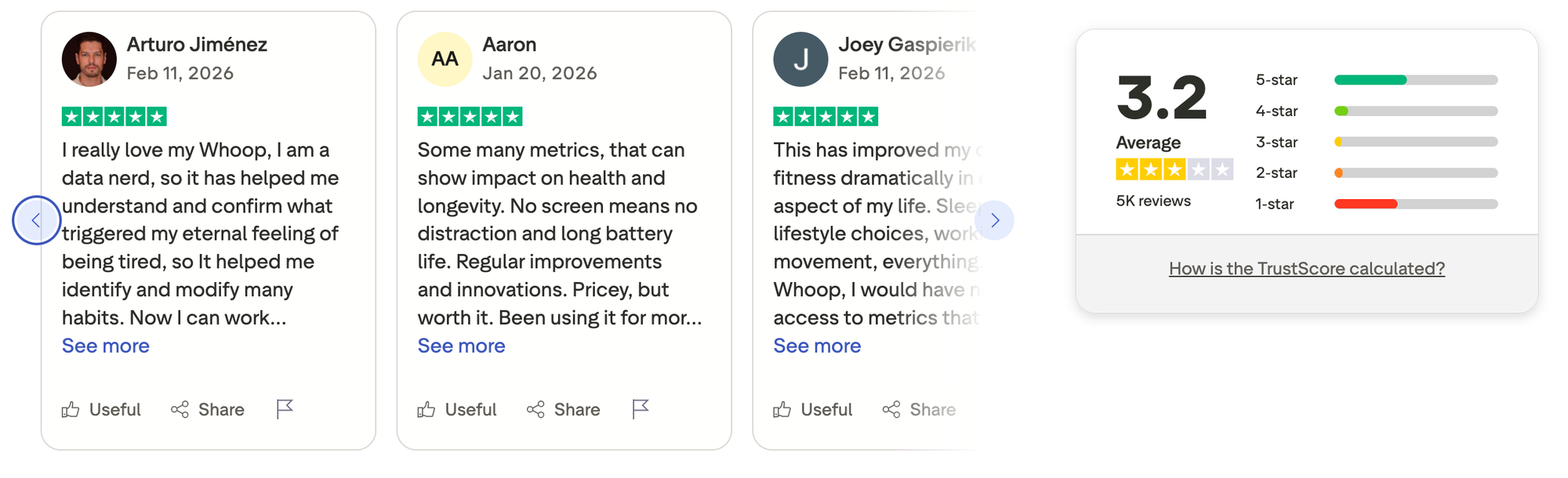
WHOOP reviews (source)
5. AI for Learning: My 24/7 Teacher
Artificial intelligence has quietly become one of the best learning companions you can have. Tools like ChatGPT, Perplexity, and Gemini act like patient teachers who can explain anything - anytime you’re curious.

If to pick one, Gemini is one of the AI tools I’d actually mention for learning in daily life because it feels built for the messy reality of how people study now. Sometimes you need help understanding a topic, sometimes you need a quiz, sometimes you need to turn a pile of notes into something usable before your brain checks out.
Google has pushed Gemini further in that direction with Guided Learning, quiz generation, Deep Research, Canvas, and tight links to Docs, Gmail, and NotebookLM. So this is not just a chatbot for random questions. It can act more like a study partner that helps you break things down, test yourself, and keep moving.
Key feature
- Gemini's Guided Learning is meant to help people build understanding instead of just grabbing the answer, and that feels more useful for students, self-learners, and anyone trying to actually retain something.
- Gemini can generate quizzes, help with SAT and JEE Main prep, and turn uploaded materials into practice tools.
- One of Gemini’s better everyday-learning features is that you can upload notes, slides, and other files, then ask it to explain them, build guides, or walk through problems.
- Gemini is also a tool for brainstorming, outlining, refining arguments, and getting through first drafts.
Pros
- Guided Learning is built for understanding, not just answer-spitting.
- Strong for study workflows like quizzes, uploaded notes, summaries, and draft writing.
- The free tier is useful enough to try before paying.
- "I use most of the tools in Google Suite Drive, email, Workspace, map, calendar, etc. Gemini integrates seamlessly with all of them. It is helping create drafts and emails for email marketing." - verified review
Cons
- It feels slower and less polished for deep, text-heavy study and professional research.
- A lot of the stronger learning features sit behind paid plans or higher usage limits.
- High chance of hallucination for long conversation threads
- Its value drops if you do not use Google’s ecosystem much.
Pricing plan
- Free
- Paid plans start at $7.99/month
- Student plan supported
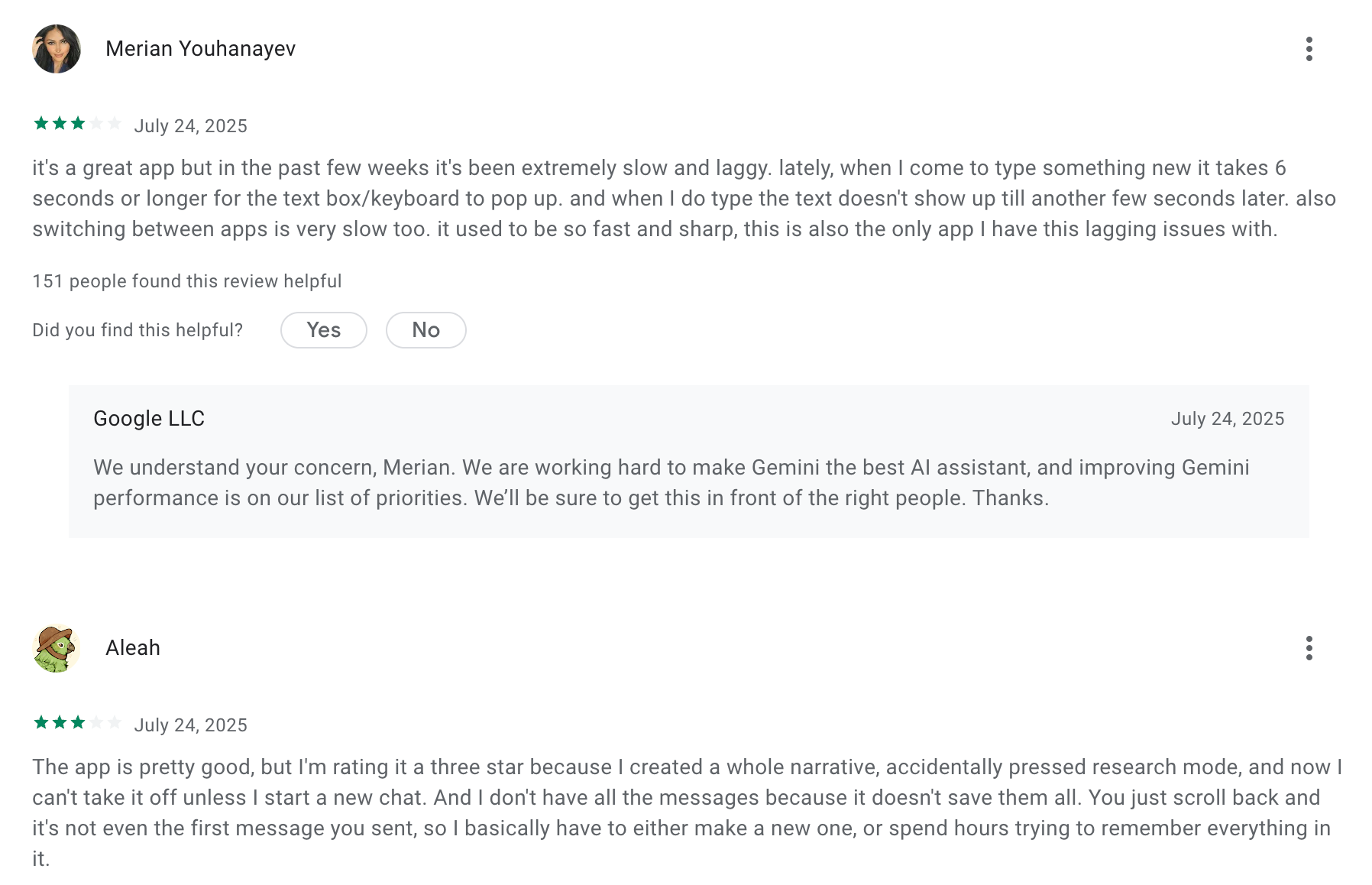
Gemini reviews (source)
Final Thoughts: Living Smarter With AI
AI is no longer a futuristic concept - it’s the quiet force behind how we plan, learn, and make decisions every day.
From asking Gemini to explain an idea, to letting Google Maps guide your route, or using Saner.AI to organize your thoughts into actions, artificial intelligence has become a personal co-pilot for modern life.
What makes AI powerful isn’t just automation - it’s awareness. The best tools learn from how you think and help you focus on what truly matters.
Whether you’re an overwhelmed professional, a lifelong learner, or simply curious about working smarter, embracing AI isn’t about doing less - it’s about doing better with less effort.
👉 Start small. Use one tool that genuinely removes friction from your day.
Because the real promise of AI in daily life isn’t more technology.
It’s more time, clarity, and control over the things that make life meaningful.
The easiest way to use AI in your daily life
FAQ: AI in Daily Life
1. What does “AI in daily life” mean?
AI in daily life refers to how artificial intelligence quietly supports your everyday routines - from how you plan your day to how you commute, shop, or learn.
You already use AI more than you think. When you ask Alexa for weather updates, follow Google Maps directions, or chat with tools like ChatGPT, Gemini, or Saner.AI, you’re using AI that understands, predicts, and simplifies human behavior.
AI in daily life is less about robots and more about making life smoother - helping you think, plan, and act faster with less effort.
2. What are some real examples of AI in daily life?
Here are common, practical examples:
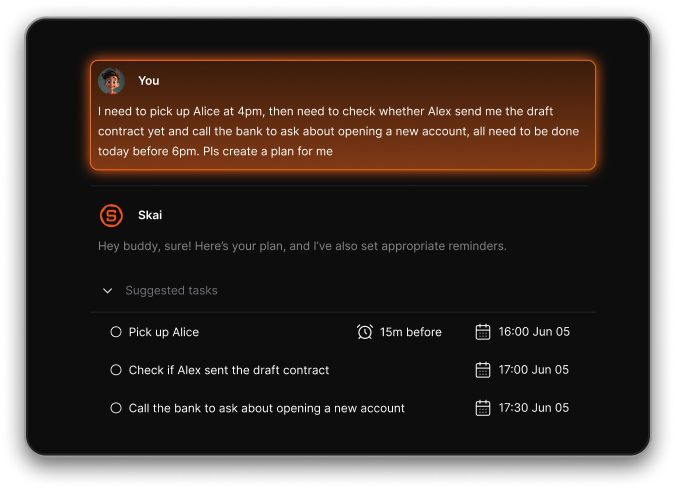
- Saner.AI – Turns your messy notes, emails, and to-dos into clear actions.
- ChatGPT / Claude / Gemini – Explains complex ideas, summarizes long texts, or brainstorms new concepts.
- Perplexity – Gives verified, research-based answers with cited sources.
- Alexa / Google Assistant – Handles quick commands like setting alarms or controlling smart devices.
- Google Maps – Uses AI to predict traffic, suggest routes, and estimate arrival times.
AI is now your planner, writer, navigator, and even conversation partner - all working in the background to save mental energy.
3. How can I start using AI in my everyday routine?
Start small.
You don’t need to overhaul your life - just add one or two AI tools where you already struggle or waste time:
- Use Saner.AI to summarize your meeting notes or remind you of key follow-ups.
- Ask ChatGPT to explain difficult topics or draft your next email.
- Let Google Maps plan your fastest route.
- Use Alexa to manage reminders or control your home.
Once you get comfortable, you’ll naturally find new ways AI can make your day flow smoother.
4. What are the benefits of using AI in daily life?
AI simplifies decision-making, saves time, and reduces stress.
Key benefits include:
- Less context switching – Tools like Saner.AI combine notes, tasks, and reminders in one place.
- Faster learning – ChatGPT, Gemini, or Claude explain anything instantly.
- Smarter organization – AI calendars and assistants remind you before you forget.
- Personalized help – AI learns your habits and adapts to your goals.
- Informed decisions – Perplexity and Gemini back up answers with trusted data.
AI makes your workflow - and even your life - more focused and less overwhelming.
5. What are the most common ways people use AI daily?
AI shows up in small moments throughout your day:
- Morning: Ask Alexa for weather or reminders.
- Work hours: Use Saner.AI to organize notes and tasks.
- Commute: Follow Google Maps for traffic updates.
- Learning: Use ChatGPT or Gemini to summarize or teach new topics.
- Evening: Ask Perplexity for trip plans or restaurant suggestions.
It’s not about replacing effort - it’s about optimizing your energy for what really matters.
6. Which AI tool is best for productivity and focus?
If your goal is to stay organized, Saner.AI stands out.
It helps you turn scattered thoughts into clear next steps, syncs your notes with tasks and calendar, and gently reminds you of what matters - especially helpful for ADHD-prone or easily overwhelmed users.
Other good options:
- ChatGPT / Gemini: Great for writing and brainstorming ideas.
- Claude: Ideal for reading long documents and summarizing them clearly.
- Perplexity: Reliable for fact-checked research.
Together, they cover almost every part of your daily digital life.
7. How is AI changing the way we learn?
AI has become a 24/7 teacher.
You can ask ChatGPT, Claude, or Gemini to:
- Explain any topic in simple terms.
- Summarize a long paper in seconds.
- Generate examples to help you understand faster.
It turns curiosity into progress, helping students, professionals, and lifelong learners grasp complex ideas without needing to search endlessly through static web pages.
8. Does AI make people lazy?
Not really - AI doesn’t remove effort; it removes friction.
It saves time on repetitive, low-value tasks so you can focus on creative or strategic work.
When used right, it makes you more capable, not less active.
For example:
- Saner.AI reminds you what to do next.
- ChatGPT helps you write faster.
- Google Maps finds better routes.
You still make the decisions - AI just helps you reach them faster.
9. Is AI replacing human jobs?
AI is automating tasks, not people.
It handles repetitive or data-heavy work, while humans focus on creativity, empathy, and decision-making.
Professionals who learn to collaborate with AI - rather than compete - are seeing major productivity gains.
Using AI tools daily can actually future-proof your career.
10. Can AI help with mental overload or ADHD?
Yes. Tools like Saner.AI are built specifically for that.
They reduce mental clutter by organizing your thoughts, notes, and tasks automatically.
Instead of juggling 20 tabs, you can simply ask, “What should I focus on next?”
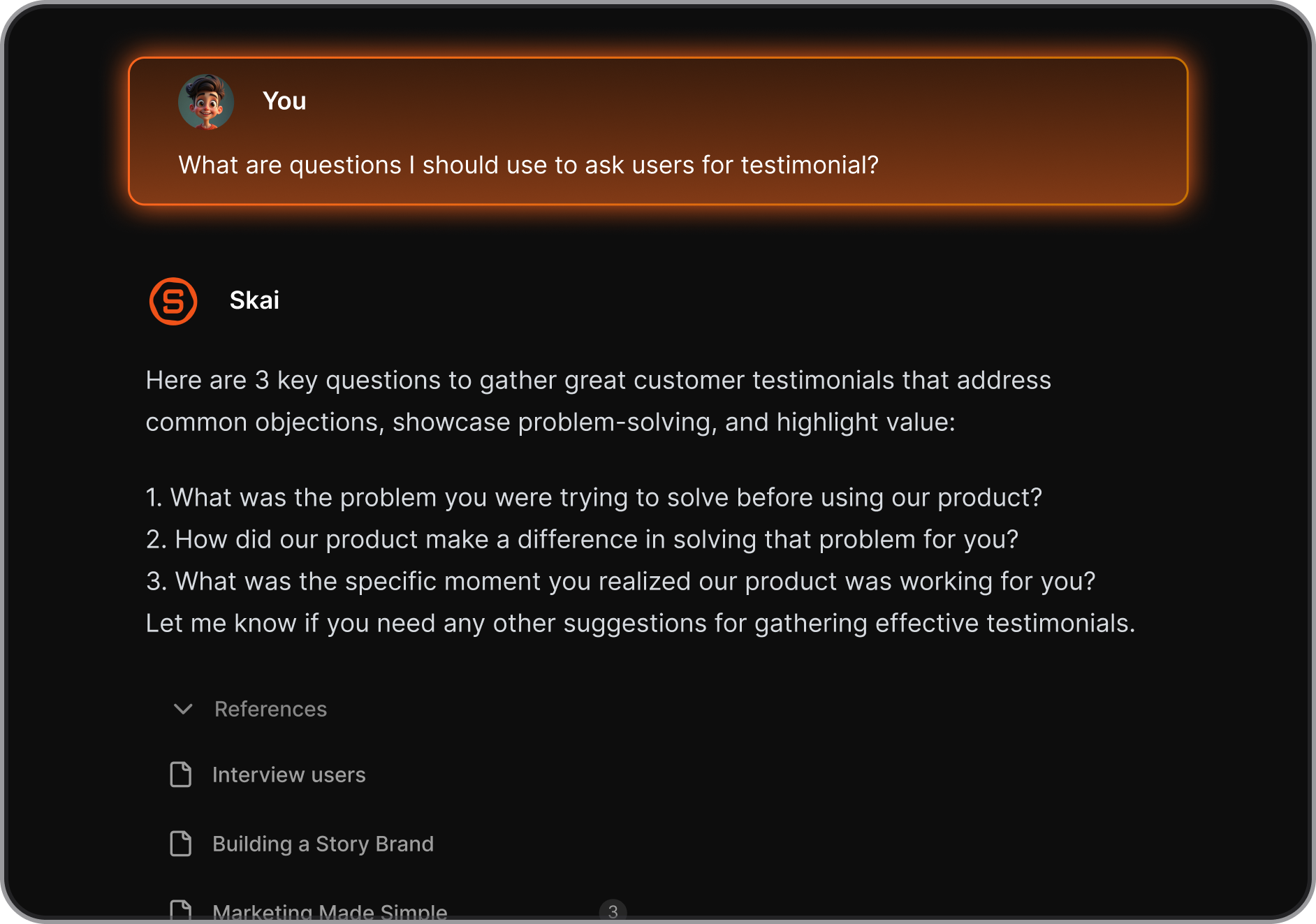
For ADHD-prone users, that means less chaos, more clarity.
11. What’s the future of AI in daily life?
AI is quickly evolving from a tool you use to a teammate that anticipates your needs.
Soon, AI will:
- Plan your day automatically based on energy and deadlines.
- Filter your messages to show what truly matters.
- Integrate across apps so you never lose track of information.
Saner.AI and other proactive AI tools are already leading this shift - from reactive chatbots to intelligent life organizers.
12. Which AI tools should I start with?
Here’s a simple setup for most people:
| Need | Best AI Tool | Why it helps |
|---|---|---|
| Daily planning | Saner.AI | Centralizes notes, tasks, and calendar |
| Writing & learning | ChatGPT / Claude | Explains, summarizes, and drafts |
| Fast answers | Perplexity / Gemini | Gives verified, research-based info |
| Navigation | Google Maps | Real-time, AI-driven routes |
| Voice commands | Alexa / Google Assistant | Control tasks hands-free |
Start with one or two, integrate them into your workflow, and build from there.
13. How do I choose the right AI tools for my lifestyle?
Ask yourself:
- Do I want to save time or learn faster?
- Do I prefer chatting or clicking through menus?
- Do I want something all-in-one or focused on one task?
If you need an everyday workspace that understands your brain, Saner.AI is a great start.
If you just want information fast, Perplexity or Gemini work best.
For creative or conversational tasks, ChatGPT or Claude are excellent.
Stay on top of your work and life