
Note-Taking Methods Guide: PARA, Zettelkasten & More (2026)


I used to think my problem was that I hadn’t found the perfect note-taking system yet. I spent months building a complex Zettelkasten setup, only to abandon it when the linking felt like a chore.
Then I migrated everything to PARA because a podcast convinced me it would organize my digital life, but my folders just became digital junk drawers. You read the articles, watch the setup videos, and end up with notes scattered across three different apps, none of which actually help you think.
The market is flooded with productivity frameworks that promise to cure your mental chaos, but they usually just add setup friction.
This guide looks at what PARA, Zettelkasten, and the other major systems actually do well, so you can choose one based on how your brain works
What is a note-taking method?

A note-taking method is a structured system you use to capture, organize, and retrieve information. Different methods serve different goals—some help you study for an exam, while others map out a massive project—but the right setup acts as an external brain, keeping your focus steady when your mind starts racing.
Why most people's notes never get used again
You read an interesting article, find a great quote, and meticulously save it into a new note. You feel a brief flash of productivity, close the tab, and then completely forget it exists.
This is the capture-but-never-retrieve problem, and it is a massive trap when your brain is wired for novelty. For a lot of us, the actual act of saving something gives us a quick hit of dopamine.
The brain marks the task as finished because the information is "safe." But a digital notebook filled with random thoughts you will never look at again is not a tool; it is just digital clutter.
When you struggle to focus or keep track of your thoughts, a giant pile of unorganized notes ends up feeling like a heavy mental burden instead of a resource. How you choose to organize your thoughts actually determines whether your past insights can help you later, or if they just disappear into a digital graveyard.
Note-taking methods deep dive
| Method | Best for | Effort | Works with AI? |
|---|---|---|---|
| PARA | Organizing digital notes by projects, responsibilities, resources, and archives | Medium | Yes — AI can help sort, summarize, and retrieve notes |
| Zettelkasten | Research, writing, idea development, and long-term knowledge building | High | Yes — but human judgment is still important for linking ideas |
| Cornell | Lectures, meetings, studying, and active recall | Low | Yes — AI can generate summaries, questions, and review prompts |
| Outline | Structured notes, classes, documentation, and step-by-step topics | Low | Yes — AI works well with hierarchical formats |
| Mind Mapping | Brainstorming, visual thinking, planning, and connecting ideas | Medium | Yes — AI can suggest branches, themes, and relationships |
| BASB/CODE | Personal knowledge management, content creation, and building a “second brain” | Medium | Yes — AI can support capture, organization, distillation, and reuse |
| GTD | Task management, productivity, reminders, and action-based workflows | Medium | Yes — AI can extract tasks, prioritize actions, and create follow-ups |
1. The PARA method
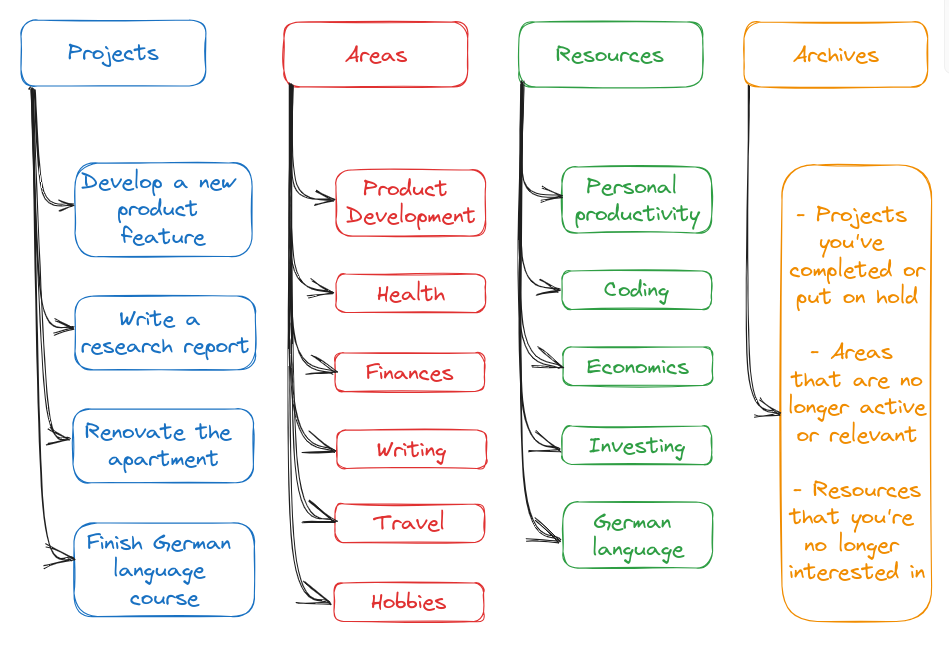
The PARA method is a universal framework for organizing digital information by actionability rather than topic. Developed by productivity expert Tiago Forte as a core pillar of the "Building a Second Brain" methodology, it routes notes, files, and tasks into four specific categories.
In 2026, it excels at managing digital clutter by creating clean boundaries for AI semantic search tools to pull relevant data without scanning stale or irrelevant files.
How it works
Unlike traditional hierarchical folder structures that group files by static subjects like "Finance" or "Health," the PARA method prioritizes production by dividing your digital workspace into four distinct folders based on time horizons and deadlines:
- Projects: This folder contains active, short-term efforts with a concrete goal and a specific deadline, such as a website redesign or client proposal.
- Areas: This section holds ongoing, long-term responsibilities that do not have an end date but require continuous upkeep, like health routines, financial tracking, or product management.
- Resources: This is a reference library for topics you are actively exploring or interested in, containing research papers, code snippets, or design inspiration you might use later.
- Archives: This holds inactive items from the other three categories, storing completed projects or cold resources out of sight so they do not clutter daily searches.
Pros
- I like that the system works across almost any application, from Obsidian and Notion to standard desktop folders.
- I appreciate how focusing on upcoming deadlines stops me from over-organizing notes I will never open again.
- I feel it helpful when using AI search tools because keeping my active projects separate from old archives prevents the AI from generating outdated context.
- I enjoy that it gives me clear, small milestones as completed project folders get moved to the archive section.
Cons
- I sometimes feel frustrated when an item sits right on the line between an ongoing Area and a passive Resource, making it hard to decide where to drop it.
- I notice that manually sorting folders can become tedious if I do not stay on top of my weekly digital maintenance.
- I find that the system struggles with raw ideation compared to connection-heavy frameworks like Zettelkasten, which prioritizes immediate execution over linking separate thoughts.
Who is it best for
- The PARA method is best for project managers, digital creators, and knowledge workers who handle massive amounts of incoming files and need an actionable system that focuses on completing current real-world goals rather than hoarding academic research.
2. Zettelkasten
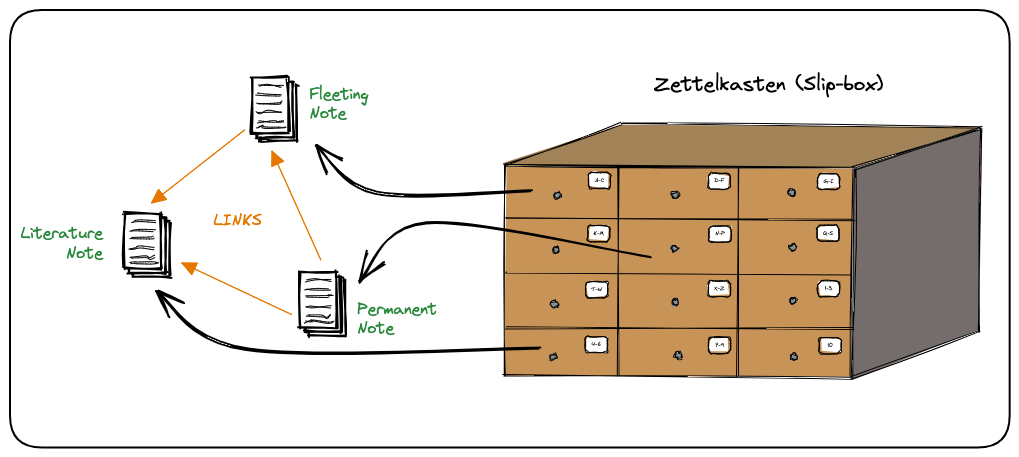
Zettelkasten is a decentralized note-taking method developed by German sociologist Niklas Luhmann that organizes information through a network of small, interconnected files. In a comparison with folder-heavy setups like PARA, this method avoids strict structural categories and instead builds relationships between ideas across different topics.
How it works
The method relies on creating short notes that contain only one distinct idea per page. Each note receives a unique index number or identifier, which allows you to link it directly to other relevant notes regardless of their original subject matter.
When you create a new entry, you review your existing files to find related concepts and insert direct links between them. Over time, these tracking pathways form clusters of ideas that help you retrieve text based on context rather than a fixed hierarchical folder tree.
Pros
- I like that I can discover old, forgotten ideas when following a chain of connected notes through my system.
- I appreciate not having to decide which folder a new piece of information belongs to when I am writing it down.
- I feel it is helpful to see a visual map of my thoughts growing without being restricted by a rigid corporate filing structure.
Cons
- I sometimes notice that the process of manually assigning links and tags takes up more time than actual creative writing.
- I feel overwhelmed when a simple search brings up hundreds of loose notes that require sorting to make sense.
- I find it difficult to apply this method to quick, action-oriented daily tasks or collaborative project management.
Who is it best for
- This method fits academic researchers, long-form writers, and software developers who need to manage massive amounts of reference text and discover non-linear relationships between complex concepts over long periods.
3. Cornell Method
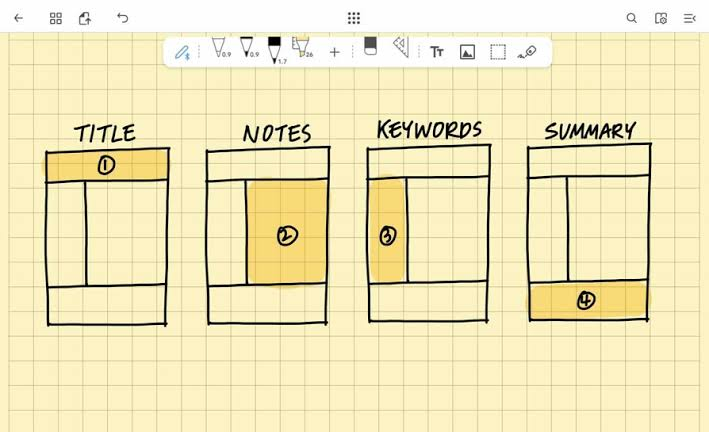
The Cornell Method is a systematic framework for structuring notes to prioritize active review over passive transcription. Developed at Cornell University, it partitions a page into distinct zones to separate raw lecture facts from self-testing prompts and high-level summaries. This setup helps you compress information in real time, making it highly effective for identifying knowledge gaps before exams or presentations. It is an ideal layout for demanding technical subjects or dense research literature where memorization alone is not enough.
How it works
The system relies on a specific page layout and a multi-step review process known as the 5 Rs: Record, Reduce, Recite, Reflect, and Review.
- The Page Layout: Divide the page into three distinct sections. Draw a vertical line about 2.5 inches from the left edge to create a narrow "Cue Column," leaving the wider right side as the "Notes Column". Leave a 2-inch horizontal box at the very bottom of the page for the "Summary Section".
- Record: During a lecture or meeting, write down the core concepts, main facts, and supporting details in the large Notes Column on the right. Use short sentences, common abbreviations, and bullet points to keep up with the speaker.
- Reduce: Soon after the session concludes, read through your raw notes and extract key terms or formulate potential test questions. Write these minimal prompts directly across in the left-hand Cue Column.
- Recite and Reflect: Cover the right-hand Notes Column completely. Look only at the questions or keywords in the Cue Column and state the facts aloud in your own words to practice active retrieval. Connect this information with what you already know.
- Summarize: In the bottom section, write a brief two-to-four-sentence overview of the page in your own words. This forces your brain to synthesize the core message of the material.
Pros
- I appreciate how the built-in cue column acts as an immediate flashcard system without requiring me to buy separate apps.
- I find it helpful that the bottom summary box forces me to explain the core topic in my own words, making it obvious when I do not understand something.
- I like that the rigid layout stops me from writing down useless filler text because space is intentionally limited.
- I enjoy how organized my study sessions feel when I can flip through pages and scan just the keywords to find what I need.
Cons
- I dislike the amount of prep time needed to draw tables or set up templates if my app does not have a native Cornell format.
- I feel frustrated when a fast lecturer jumps around between topics, as the strict linear layout makes it hard to reorganize points later.
- I sometimes notice that the system feels redundant for creative brainstorming or highly visual topics like mind mapping.
Who is it best for
- The Cornell Method is best for students preparing for exam structures like the IB or board certifications, researchers managing literature reviews, and professionals who need to convert direct meeting minutes into actionable summary reports.
4. The Outline Method
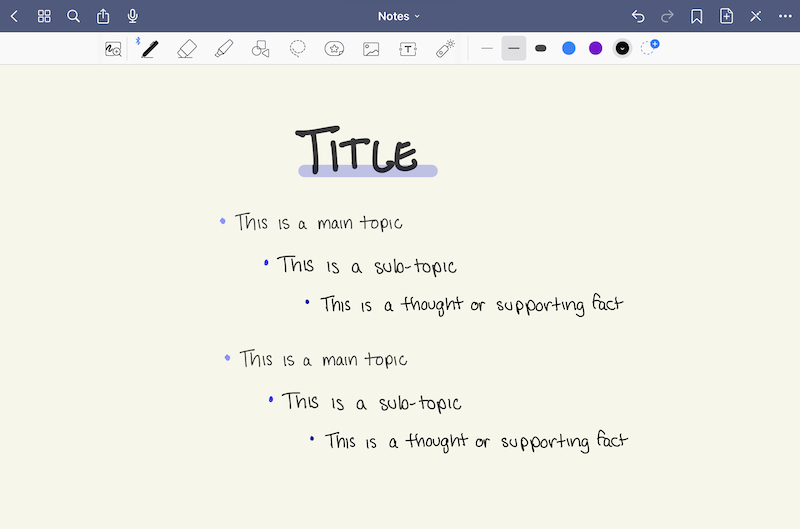
The Outline Method is a structural note-taking framework designed to organize information into clear, linear hierarchies using bullet points, indented sub-points, and nested lists. It cuts down on formatting time during live sessions, allowing users to build a structured overview of complex topics without needing immediate post-session reorganization.
How it works
The system relies entirely on progressive indentation to establish a clean parent-child relationship between your ideas.
- Main Topics (Far Left): You place the primary theme or overarching chapter title at the left margin, acting as the foundation for the section.
- Sub-topics (First Indentation): You indent one tab stop to the right to add a sub-topic, capturing specific angles or breakdowns of the main subject.
- Supporting Details (Second Indentation): You press tab once more to list specific examples, definitions, data points, or raw quotes underneath that sub-topic.
Pros
- I like that I can capture fast-paced lectures or presentations sequentially without worrying about layout design.
- I appreciate how easy it is to skim my final documents, as the indentation handles the hierarchy for me.
- I feel it helpful when turning my notes into study material, as each nested block naturally converts into flashcard prompts.
- I enjoy using it digitally because I can toggle parent bullets to expand or collapse entire walls of text instantly.
Cons
- I sometimes feel restricted when a speaker constantly shifts between random topics, which ruins the linear layout.
- I struggle to use this method for technical courses that require drawing complex diagrams, chemical equations, or mathematical proofs.
- I find that it lacks the flexible cross-linking power of modern database setups, keeping my information trapped in isolated pages.
Who is it best for
- The Outline Method is best for corporate professionals, students, and technical writers who attend highly structured lectures, standard team syncs, or formal briefings where information is already delivered in a predictable sequence.
5. Mind Mapping
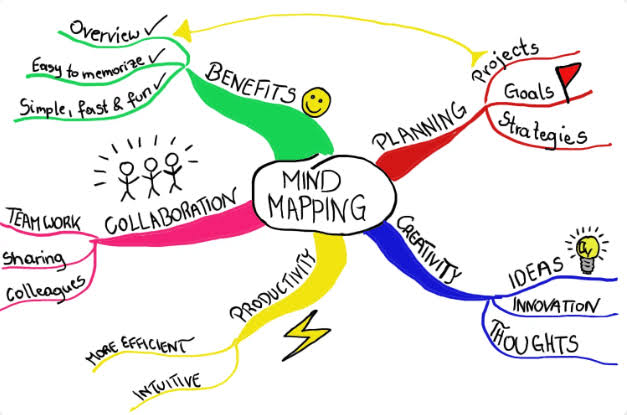
Mind mapping is a visual note-taking technique that structures thoughts around a single central concept. It converts complex text summaries into a spider-like diagram with branches representing subtopics and specific relationships.
How it works
The method begins with one central idea written in the middle of a blank page or canvas. Related subtopics extend outward as main branches, which then divide into smaller details or action points. Lines or arrows link these nodes to display structural relationships, while colors and symbols group matching themes together.
Pros
- I like that I can see the entire outline of a project on a single screen without scrolling through pages of notes.
- I appreciate how easy it is to add new ideas to any part of the diagram without rewriting the rest of my document.
- I feel it helpful that colors let me categorize separate themes instantly.
Cons
- I sometimes find that large maps become disorganized and messy when a topic contains too many details.
- I dislike trying to review a massive diagram on a mobile phone screen because zooming in hides the rest of the context.
Who is it best for
- This method is best for visual learners, project managers, research teams, and students who need to analyze multi-layered subjects or map complex dependencies rather than logging chronological daily records.
A smarter tool for note-taking
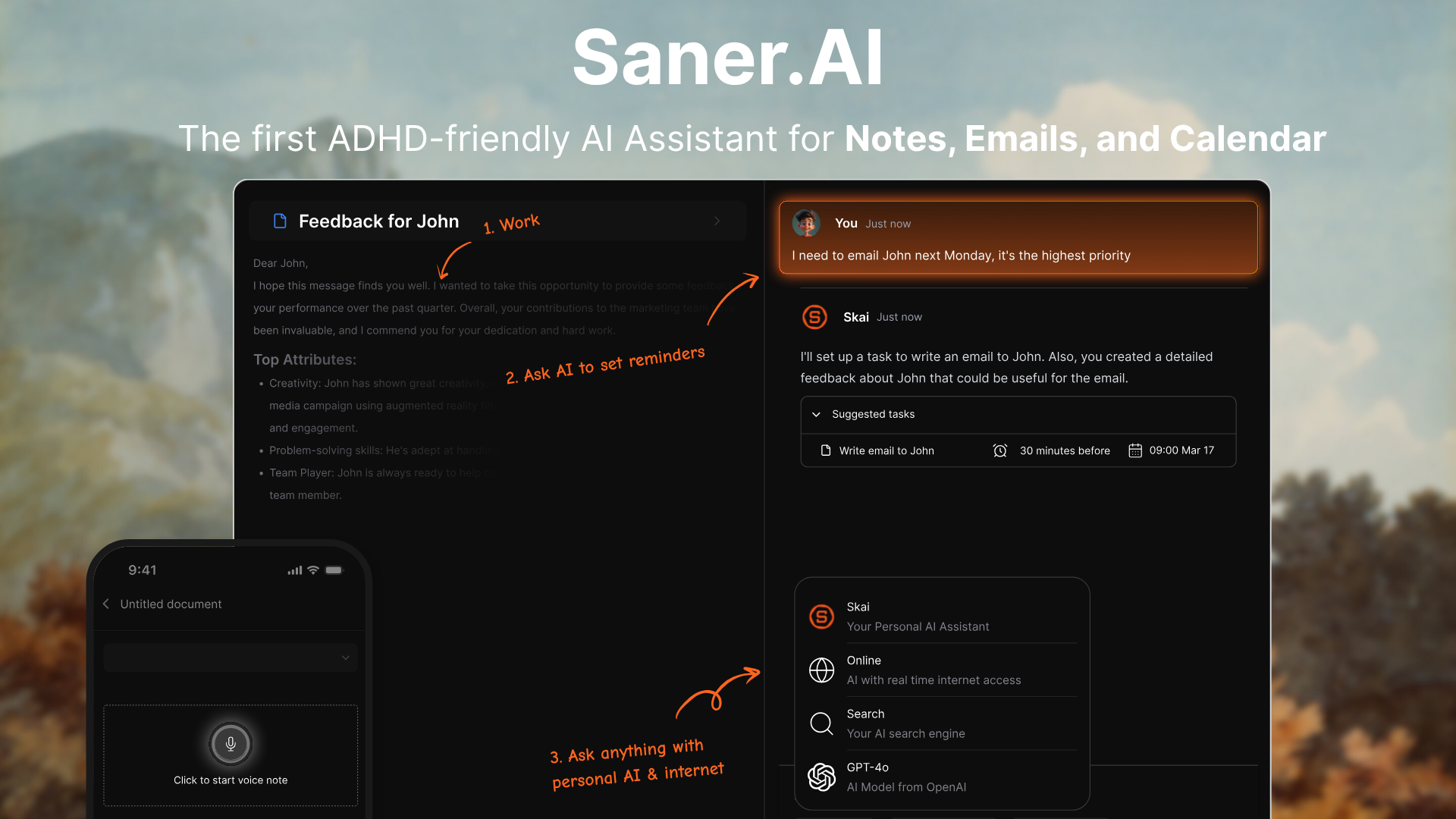
Saner.AI is an AI personal knowledge management overlay designed to sit directly on top of your existing note-taking methods. Whether you use Tiago Forte’s PARA framework or a networked Zettelkasten slip-box, this application acts as the collection and retrieval layer.
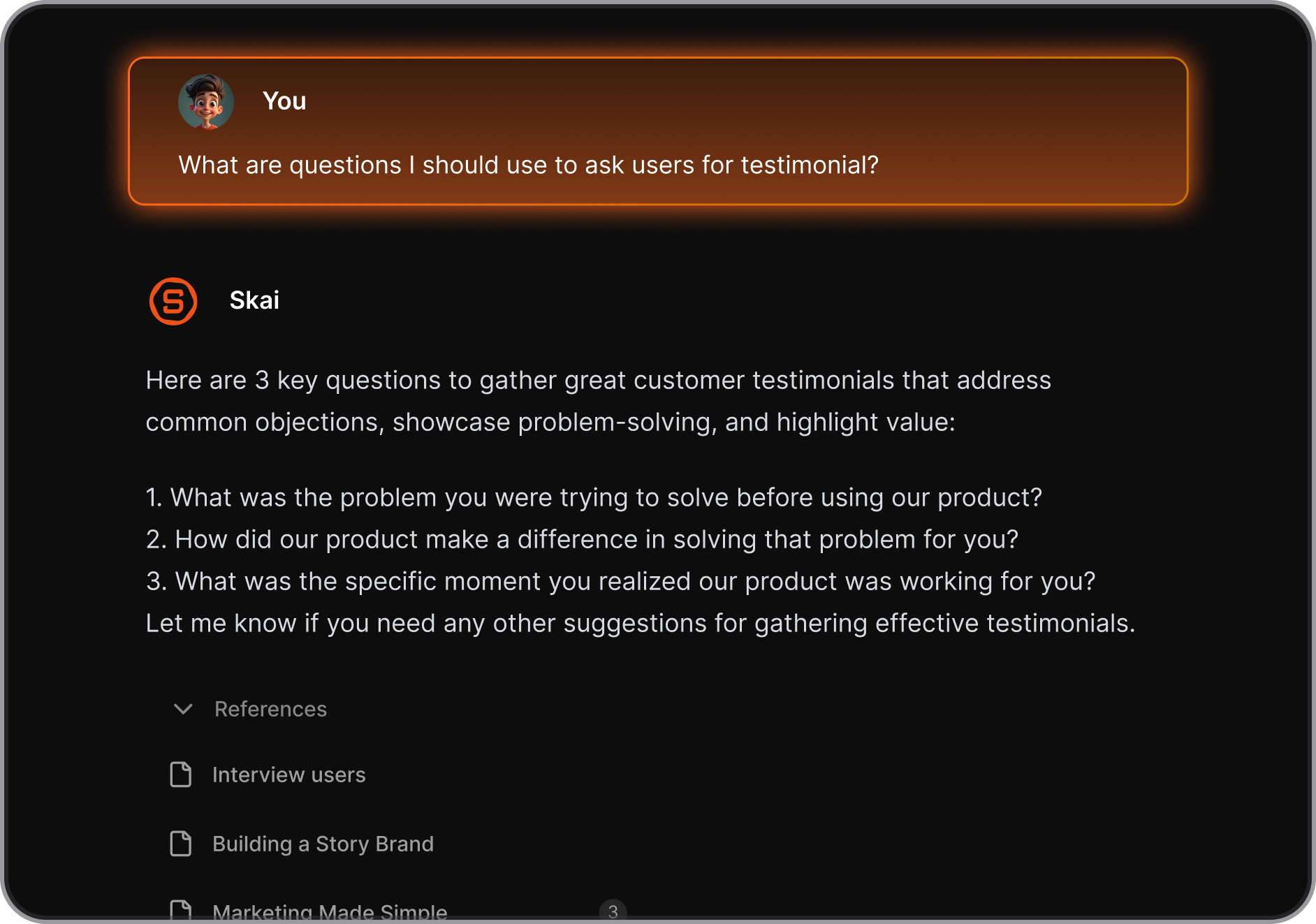
Instead of forcing you to choose between rigid folder systems or a complex web of backlinks, it uses an AI assistant named Skai to read, connect, and retrieve your captured information.
Key feature
- Agnostic methodology integration
Saner.AI functions as a flexible processing layer that adapts to your preferred organization strategy rather than forcing a new one. PARA users can dump items into a central inbox while the system helps sort them, and Zettelkasten enthusiasts can rely on the tool to identify semantic connections across atomic notes automatically.
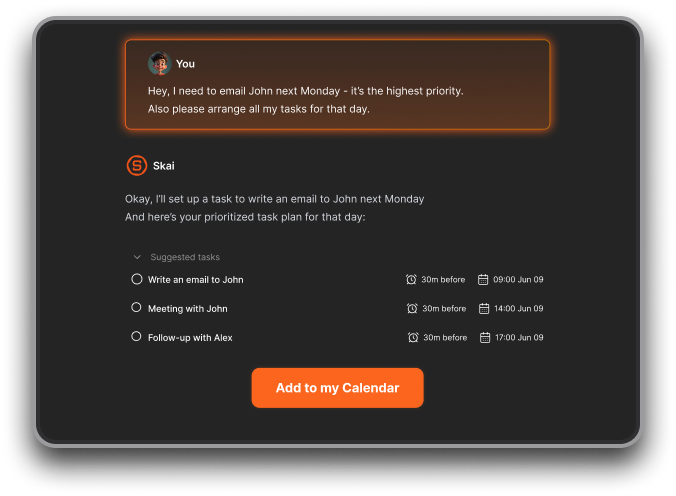
- Proactive daily planning
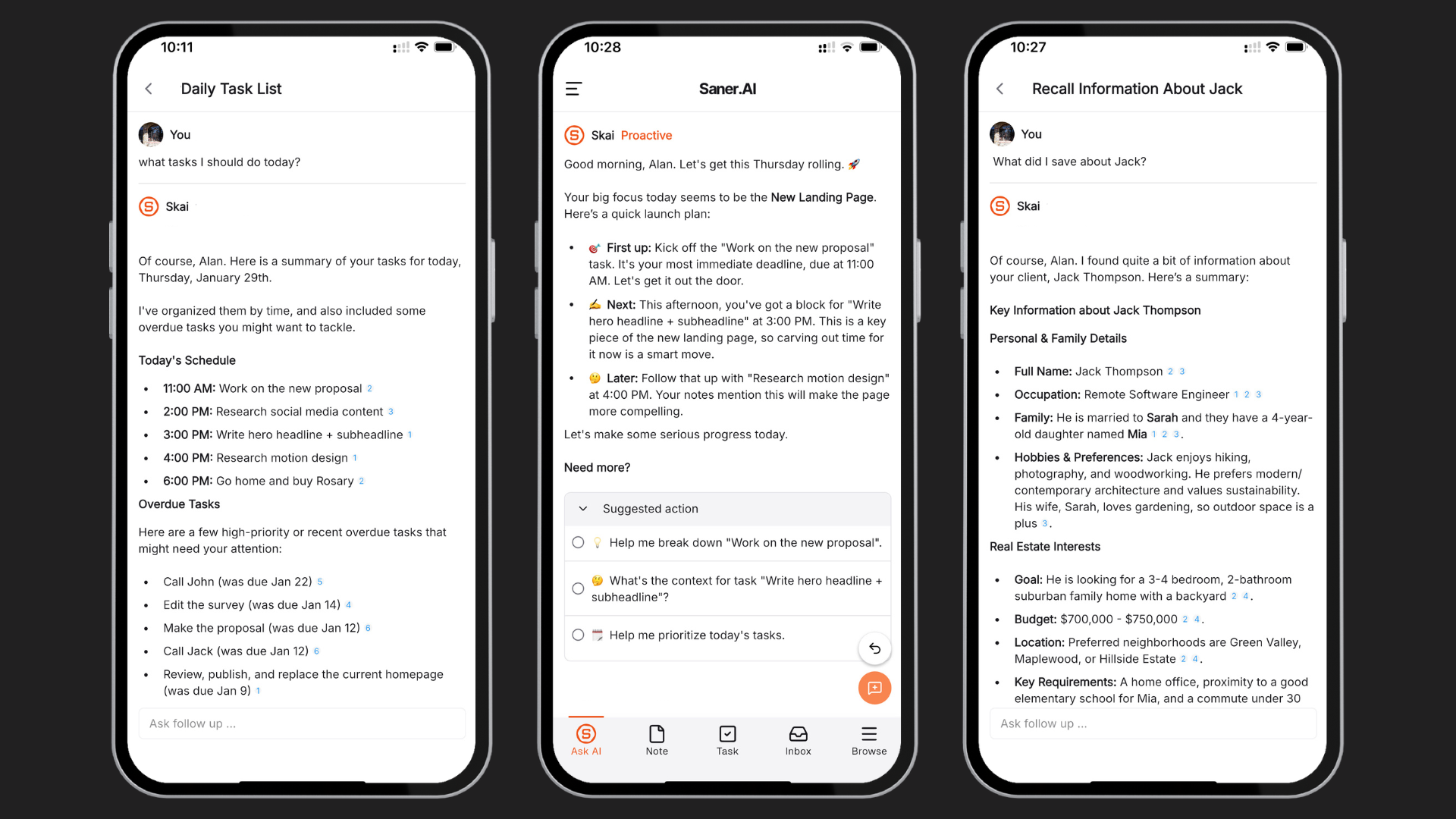
The platform scans your accumulated notes, inbox captures, and upcoming calendar schedules to generate a unified focus list each morning.
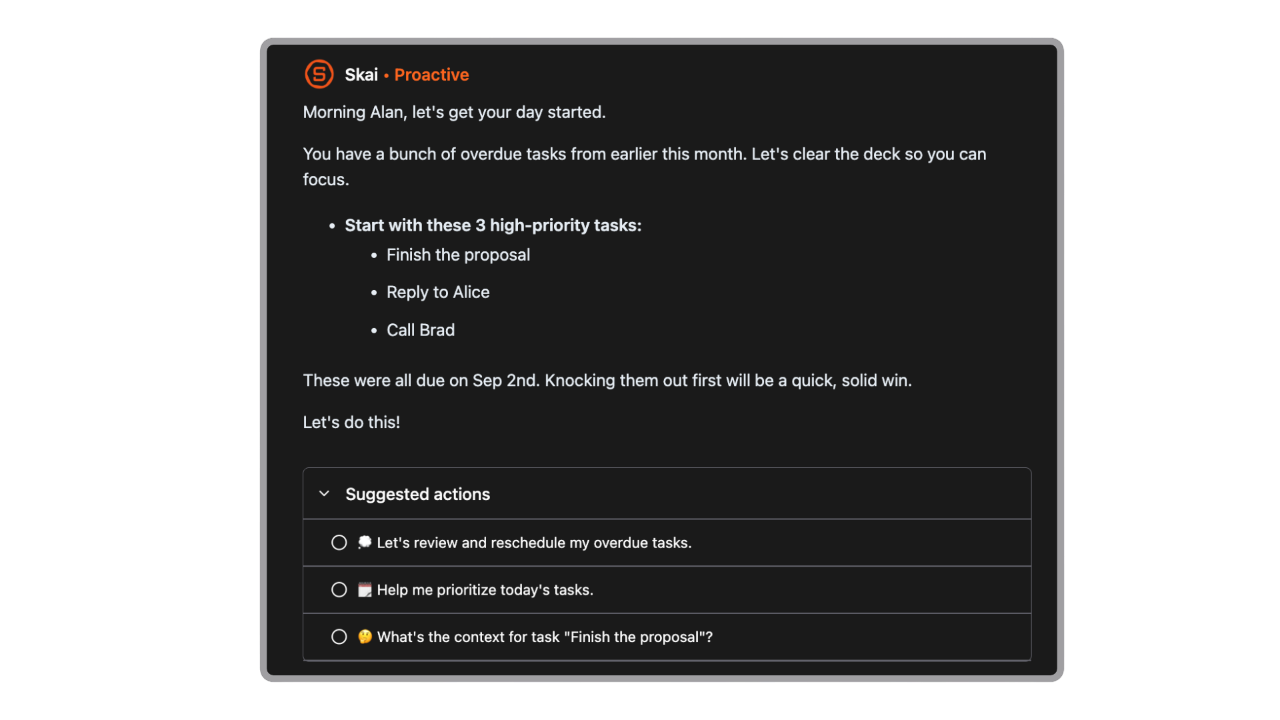
- Natural language semantic retrieval
You can type a vague phrase describing a concept you read weeks ago, and the AI will pull the exact note forward from your digital archives.
Pros
- I appreciate being able to clip text fragments, web links, and PDF files via the browser extension without stopping my active reading flow.
- I like that I can write unorganized notes and let the system find the underlying connections to my older projects.
- I enjoy the minimalist workspace design because it prevents visual overwhelm when I am trying to focus on writing.
Cons
- Not suitable for big team project management.
Who is it best for
- Saner.AI is best for researchers, solo operators, and individuals managing ADHD who find manual database maintenance difficult.
- It fits users who want the structural benefits of a Second Brain or Zettelkasten without spending hours tagging, linking, and filing notes every week.
Pricing
- Free
- Starter: $8/mo ($6/mo billed annually)
- Standard: $16/mo ($12/mo billed annually)
Saner.AI reviews
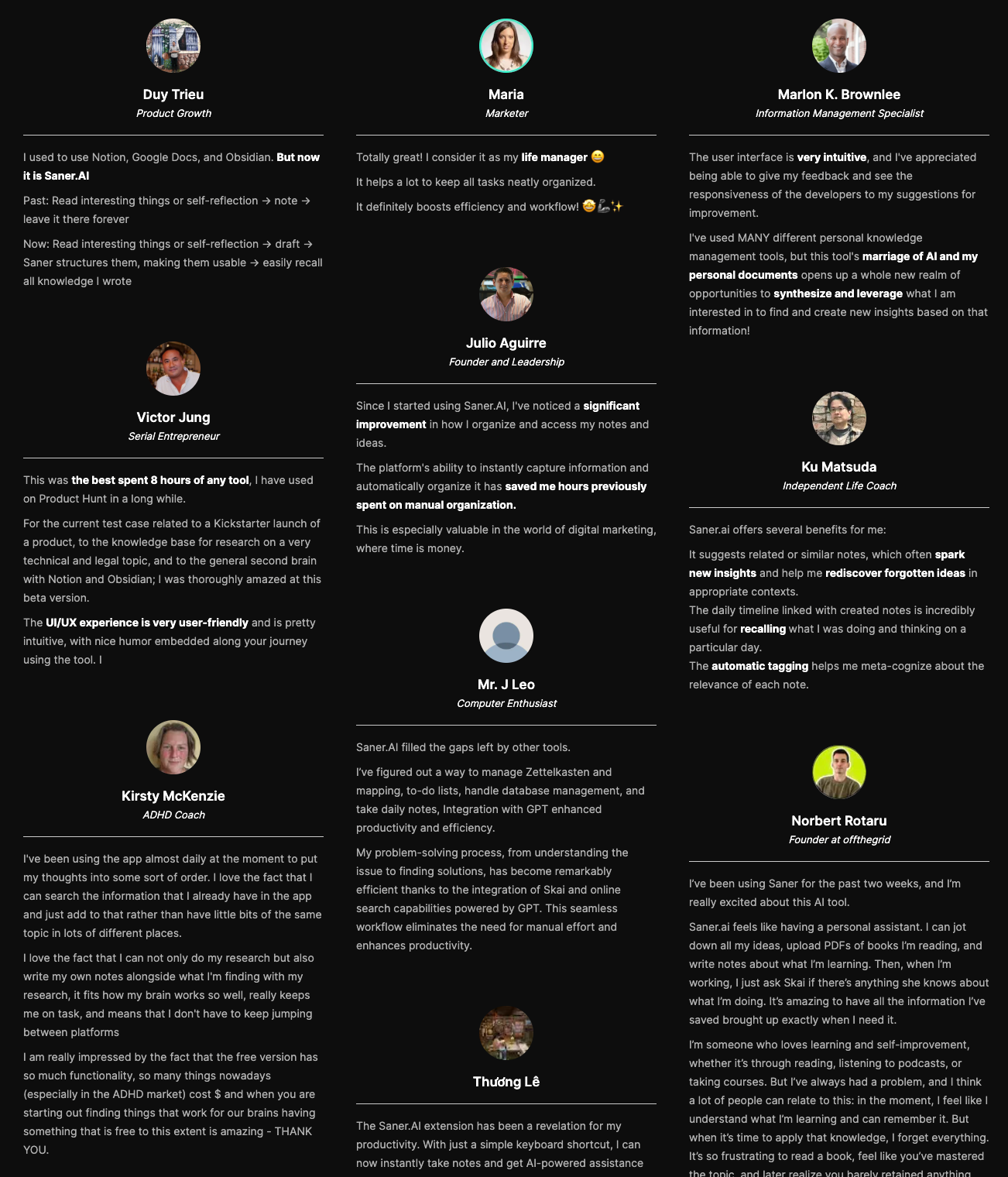
"I've used MANY different personal knowledge management tools, but this tool's marriage of AI and my personal documents opens up a whole new realm of opportunities to synthesize and leverage what I am interested in to find and create new insights based on that information!" —Verified Review
"Instead of searching through folders, I can simply ask questions and the Skai - AI assistant retrieves relevant information instantly." — Verfied Review
How to get started
- Step 1: Create an account on the official platform and install the companion browser extension.
- Step 2: Import your existing reference material or start typing unformatted thoughts directly into the daily timeline.
- Step 3: Use the chat panel to ask the assistant to cluster your items into a PARA layout or find hidden themes across your entries.
Conclusion: The method that works for your brain
There is no single correct way to keep track of your thoughts. If a method feels like a chore, you will probably stop doing it after a week, and that is completely fine. The goal is just to find a setup that takes the pressure off your working memory.
If you want a system that does some of the heavy lifting for you, Saner.AI is a solid option to look at. It acts like a digital second brain, using AI to organize your notes automatically so you do not have to spend hours setting up complex folders or tags. You can just dump your thoughts into it and let the tool surface them when you actually need them. It is worth trying if you are tired of losing track of your own ideas.

Stay on top of your work and life
Frequently asked questions - Note-taking methods
1. What is the easiest note-taking method for ADHD?
The easiest method is the one you actually use, but most people with ADHD find the Boxing Method or mind mapping works best. Linear text feels like a chore. Visual methods let you dump ideas anywhere on the page and group them later. If that still feels like too much work, just voice-record your thoughts and use a basic transcription tool.
2. Is the Zettelkasten method worth it if you have ADHD?
Probably not.
Zettelkasten requires meticulous upkeep, strict tagging, and constant filing. For an ADHD brain, that overhead is a motivation killer. You spend all your energy managing the system instead of learning. Unless you genuinely enjoy hyper-focusing on organizing metadata, stick to something with fewer rules.
3. Can I combine different note-taking methods?
Yes, and you should change them whenever you get bored. Switching from digital notebooks to a physical sketchbook isn't failing; it's just keeping your brain awake. You might use the Cornell method for a structured work meeting, but swap to rapid bullet journaling for daily tasks. Do whatever keeps you engaged.
4. What is the PARA method?
PARA stands for Projects, Areas, Resources, and Archives. It is an organizing system created by Tiago Forte. Instead of sorting notes by broad topics, you organize them by how soon you need to act on them. It is helpful for ADHD because it hides old, distracting clutter in the "Archive" folder so you can focus on what matters right now.
5. Does AI replace the need for note-taking?
AI can summarize long text or clean up a messy audio transcript, but it cannot do the actual thinking for you. The act of writing something down—even if you never read it again—is how your brain processes and retains information. Use AI to format or clean up your notes, not to replace your focus.
6. How do I stop forgetting that my digital notes exist?
Digital notes disappear the moment you close the app. To fix this, use widgets to keep your main notebook permanently open on your phone home screen. If you use a computer, set your note app to launch automatically when you turn the machine on. If it is out of sight, it is out of mind.
7. Why do I keep abandoning my note-taking systems?
You abandon them because the novelty wore off, which is completely normal for ADHD. When a system stops working, it doesn't mean you are broken. It just means your brain needs a new stimulus. Keep a few different formats in rotation—like switching from Notion to a paper pocket notebook—and swap them out when you get stuck.
8. Should I use paper or digital notebooks?
Paper is better for focus because an iPad or laptop is full of distracting notifications. However, paper is easy to lose, and you can't search it. A good compromise is using a cheap paper notebook for messy daily brain dumps, then moving only the essential tasks into a digital calendar or app.
9. What is the Cornell note-taking method?
The Cornell method splits your page into three sections: a main column for notes, a left margin for keywords or questions, and a summary at the bottom. It forces you to interact with your notes twice. The structure is rigid, which some people find comforting, while others find it too restrictive.
10. How do I handle a massive backlog of unorganized notes?
Do not try to clean it up. A massive backlog is a trap that leads to overwhelm. Create a folder called "Old Notes Heap," drag everything into it, and start fresh today. You can use the search bar later if you ever need to find something specific from the past.
11. What is the Boxing Method?
The Boxing Method involves drawing literal boxes around different topics on your page. If the conversation shifts from budget to marketing, you start a new box. It gives your eyes a visual anchor and keeps your notes from turning into a giant, intimidating wall of text.
12. How do I take notes during a fast-paced conversation?
Don't try to write full sentences. Write down single keywords, draw arrows to connect ideas, or use shorthand. If you are worried about missing details, use an audio recorder while you scribble. You can always use the recording to fill in the blanks later if you need to.
13. What is mind mapping?
A mind map starts with one central idea in the middle of the page, with related thoughts branching outward like tree roots. It mimics the non-linear way an ADHD brain works. It lets you jump around from topic to topic without breaking the structure of the page.
14. Is bullet journaling good for ADHD?
The original bullet journal system, which uses simple dots and dashes for rapid logging, is excellent for ADHD. However, the internet has turned it into an art project. Avoid the complex layouts, colored markers, and mood trackers you see on social media. Keep it ugly and functional.
15. How long should my notes be?
Keep them as short as possible. Long notes are exhausting to write and impossible to review later. Use sentence fragments, abbreviations, and symbols. If an idea takes more than two sentences to explain, see if you can break it down into a few simple bullet points instead.
Stay on top of your notes effortlessly



