
How to Plan Your Day with ADHD Step-by-step (2026 Guide)

How to Plan Your Day with ADHD
I sat at my kitchen table last night and built the most beautiful daily schedule. It had color-coded blocks, designated breaks, and an ambitious 8:00 AM start time for my biggest project. I went to bed feeling like an absolute productivity champion. By 9:15 AM today, I was staring at a pile of unwashed coffee mugs, three open tabs of random Wikipedia articles, and a completely untouched to-do list.
If your mornings regularly fall apart like this, you know how crushing that immediate sense of failure feels. But it is not a willpower problem. It is a brain wiring problem. When you have ADHD, standard time management advice actually works against your nervous system. I had to stop forcing myself into neurotypical schedules that left me feeling burned out and defeated.
Let's look at how to build a daily plan that accommodates your ADHD brain instead of fighting it.
1. Why is planning so hard with ADHD?

Planning fails because ADHD changes how your brain manages tasks. Executive dysfunction makes it hard to choose where to start, and a short working memory means you easily lose track of your goals. Time blindness also skews your perception, making hours vanish in what felt like minutes. Your brain simply processes schedules differently than standard planners expect.
2. What's Actually Happening in Your Brain When You Try to Plan
Planning feels simple on paper: write down what needs doing, assign it a time, follow through. For most people, that loop works. For ADHD brains, it breaks in three very specific places, and none of them have anything to do with effort or intelligence.
"ADHD is a disorder of doing what you know. It's not a disorder of not knowing what to do." — Dr. Russell Barkley
A. Your working memory is a small whiteboard, not a filing cabinet.

Working memory is the mental workspace that holds information while you use it, recalling instructions, following through with tasks, and keeping a plan in mind while you act on it. In ADHD, that workspace is smaller and empties faster.
B. Your internal clock runs differently.

"To put it simply, you and other adults with ADHD are blind to time." — Russell A. Barkley
In ADHD, this circuit is disrupted. While a typical brain can sense a deadline three weeks away and begin organizing toward it, an ADHD brain may not feel the weight of that deadline until it is hours away. That's not procrastination. That's time blindness.
👉 For a deeper look at this, see our full guide → [What Is Time Blindness in ADHD?]
C. Your brain needs a dopamine reason to start.

Task initiation, the ability to simply begin, is one of the most commonly impaired executive functions in ADHD.
This is why a task can feel genuinely impossible at 2pm and suddenly doable at 11pm when the deadline is real. It's not mood. It's brain chemistry.
Together, these three friction points, a leaky working memory, a disrupted time sense, and a dopamine-dependent ignition system, explain why standard day-planning advice so often fails people with ADHD.
Most standard planners assume you can rely on executive functioning skills that ADHD directly impairs. When a rigid calendar fails, it isn't a personal failure; it is a design mismatch.
To build a system that works, you have to throw out neurotypical rules and create a flexible routine built around dopamine, working memory supports, and instant forgiveness for off-days.
3. Why your planner keeps failing you (and why that's not your fault)

Standard planners fail ADHD brains for a few concrete reasons:
- They rely on rigid time slots. Mapping your day hour by hour feels restrictive and traps you. The moment an unexpected task throws off your morning schedule, the momentum for the entire day vanishes.
- They lack a dopamine hook. ADHD brains require novelty and interest to get moving. A stark, black-and-white grid offers zero stimulation, making the actual act of opening the planner feel like a chore.
- They assume your working memory functions perfectly. Out of sight truly means out of mind. If your schedule requires you to flip through multiple pages or tabs to remember what to do next, your brain will simply look at something else.
- They punish you for missed days. Seeing a string of blank, unused pages from last week feels like a visual reprimand. It creates guilt, and that guilt makes you want to avoid looking at the notebook entirely.
Understanding this shift changes everything. You don't need more discipline; you just need tools designed for how your brain actually processes the world.
4. What makes a planning system ADHD-friendly
If you have ADHD, or strongly suspect you do, trying to force your life into those rigid layouts feels like wearing shoes on the wrong feet. It works for five minutes, and then it just hurts. An ADHD-friendly system needs to work with how your brain actually handles focus and energy.
- First, it has to be visual and external. If your tasks are buried inside a closed notebook or a hidden app tab, they basically cease to exist. You need your day staring back at you.
- Second, it must be flexible and low-friction. The moment a system takes more than two minutes to set up, or requires you to log a dozen details, you will abandon it. It needs to be easy to start and incredibly forgiving when you miss a few days.
- Finally, it needs to be dopamine-aware. Your brain runs on novelty and interest, not abstract deadlines. If switching from a digital checklist to a legal pad gives you a tiny spark of motivation, do it. The best system is simply whichever one you feel like using today.
How to plan your day with ADHD: a step-by-step system
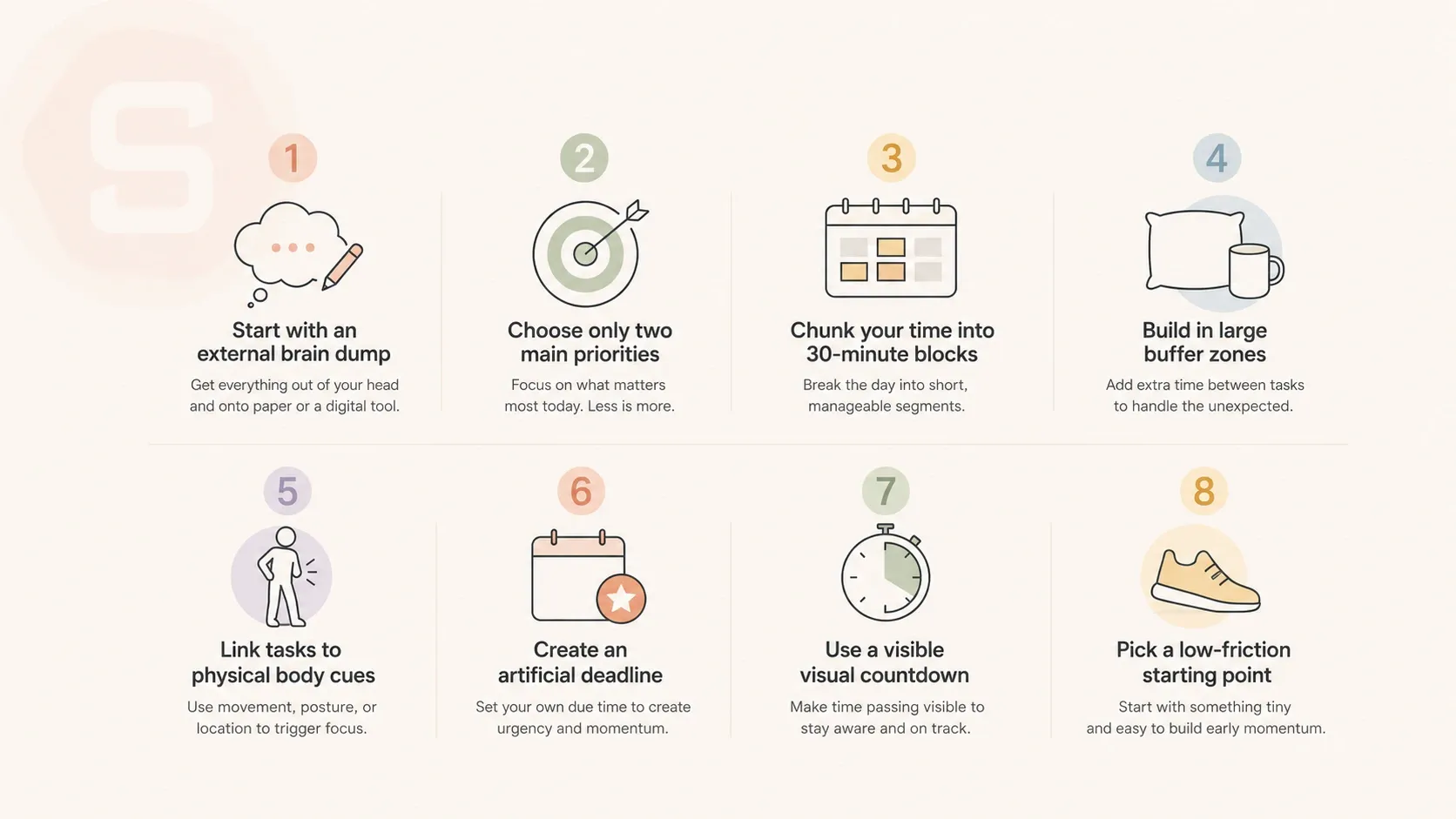
1. Start with an external brain dump
Your working memory needs an escape valve. Get a blank piece of paper and write down everything swirling in your head. Do not organize it yet. Write down the big work projects, the random text you forgot to reply to, and the dishes sitting in the sink.
I do this every morning because if a task stays inside my head, it turns into a heavy fog that blocks me from doing anything else. Seeing the messy reality on paper is better than letting it float around in your skull.
2. Choose only two main priorities
Standard productivity advice tells you to pick a long list of goals. That is usually a recipe for total decision paralysis. Pick two things that absolutely must happen today. If you finish those two, you can look at the rest of your list later. If you try to target too many goals at once, your focus splits and you end up staring at a wall for an hour. I used to feel guilty about only picking two things, but it actually helps me get more done.
3. Chunk your time into 30-minute blocks
Looking at an open eight-hour day feels completely intimidating. It helps to break the afternoon or morning into shorter segments. Work on a single task for thirty minutes, then change your posture. Do not try to maintain focus for hours at a time. I find that setting a physical timer on my desk keeps me tethered to the current moment. When the timer goes off, stop and breathe.
4. Build in large buffer zones
Transitioning between tasks is difficult when your brain lacks dopamine. If a meeting ends at noon, do not schedule your next focus session for exactly noon. Give yourself twenty minutes to walk around, drink water, or stare out the window. People often talk about time blindness, but it is really just how our brains reset before starting something new. You need that blank space to switch gears.
5. Link tasks to physical body cues
Time-based reminders like a calendar alarm at two o'clock rarely work for me. I usually click the dismiss button and forget about it entirely. Tie your tasks to regular physical routines instead. Write your daily log right after you pour your first cup of coffee. Check your email immediately after you finish lunch. Using existing physical habits creates a natural trigger that does not rely on an annoying alarm.
6. Create an artificial deadline
Procrastination is often just a coping mechanism for a lack of stimulation. ADHD brains need urgency to get moving. Create a small bit of stakes for yourself. Tell a coworker you will send over a draft by noon, or set a kitchen timer and try to finish a report before the laundry machine finishes its cycle. The goal is to make the task a little bit interesting to trigger your focus.
7. Use a visible visual countdown
Digital timers that hide in a browser tab do not work because out of sight means out of mind. Use a physical clock or a visual timer that shows the time ticking away as a colored disc. Seeing the time physically disappear helps your brain understand the passage of hours. It makes time concrete instead of abstract, which is exactly what an ADHD brain needs to stay on track.
8. Pick a low-friction starting point
Task initiation is the hardest part of the day. If the first step on your list is to write an entire article, you will probably avoid it for hours. Make the first step incredibly small. Your goal should be to open the document and write one sentence. Once you clear that initial hurdle, momentum usually takes over and keeps you moving forward.
A planning tool built for how the ADHD brain actually works
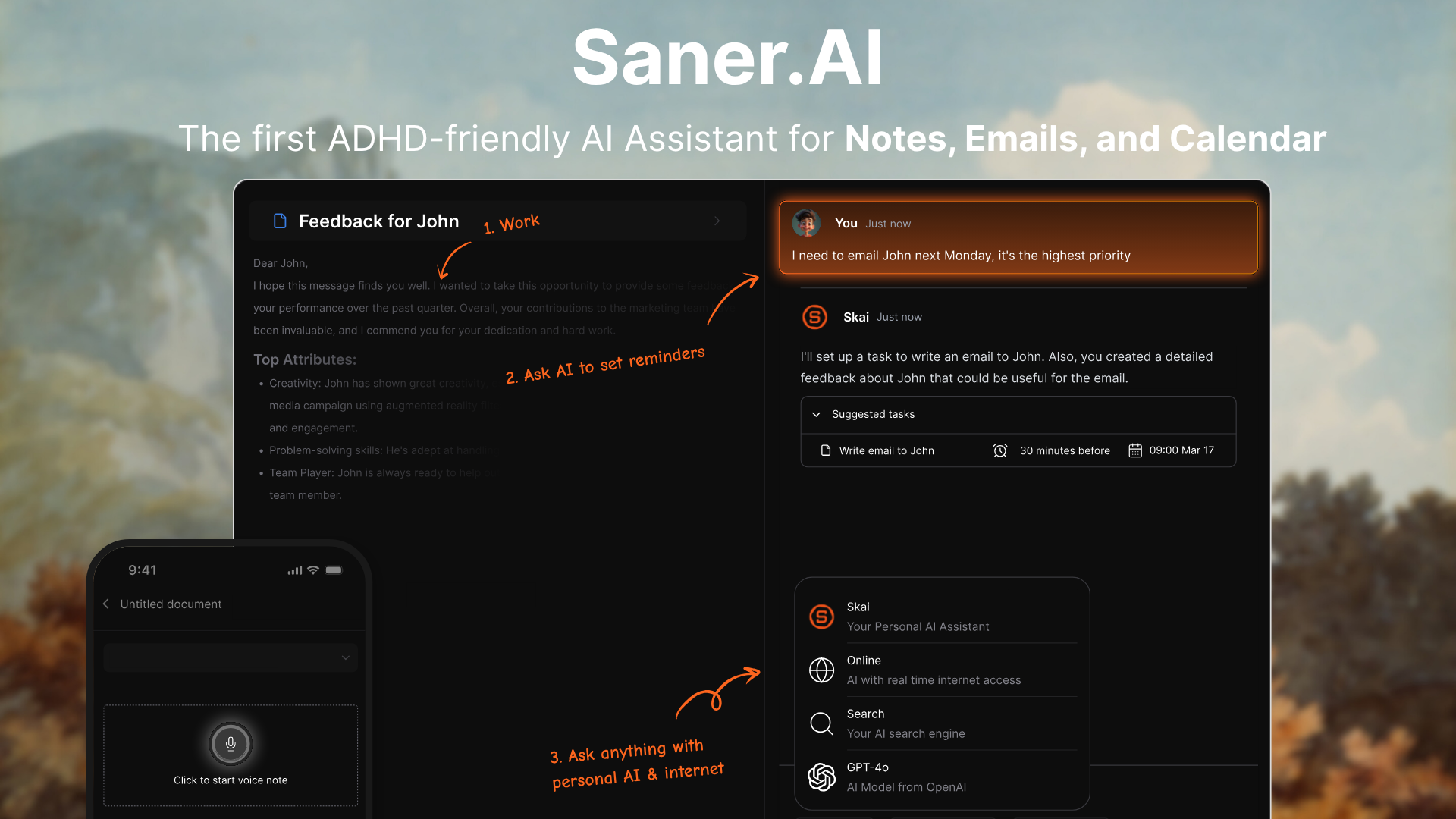
Saner.AI is an AI personal assistant designed for people with ADHD who get overwhelmed by scattered thoughts and multi-step setup rules. The software acts as an automated second brain that captures messy ideas and organizes them without requiring you to build tags or folder networks manually. It works best at turning unfocused daily thoughts into realistic schedules, reducing the mental fatigue that often causes task paralysis.
Key feature
- Brain dump into automatic tasks
I tested writing down a disorganized jumble of ideas in the main window, and the built-in assistant, Skai, pulled out action steps. You do not have to format anything before typing, as the tool parses the text into a clean checklist.
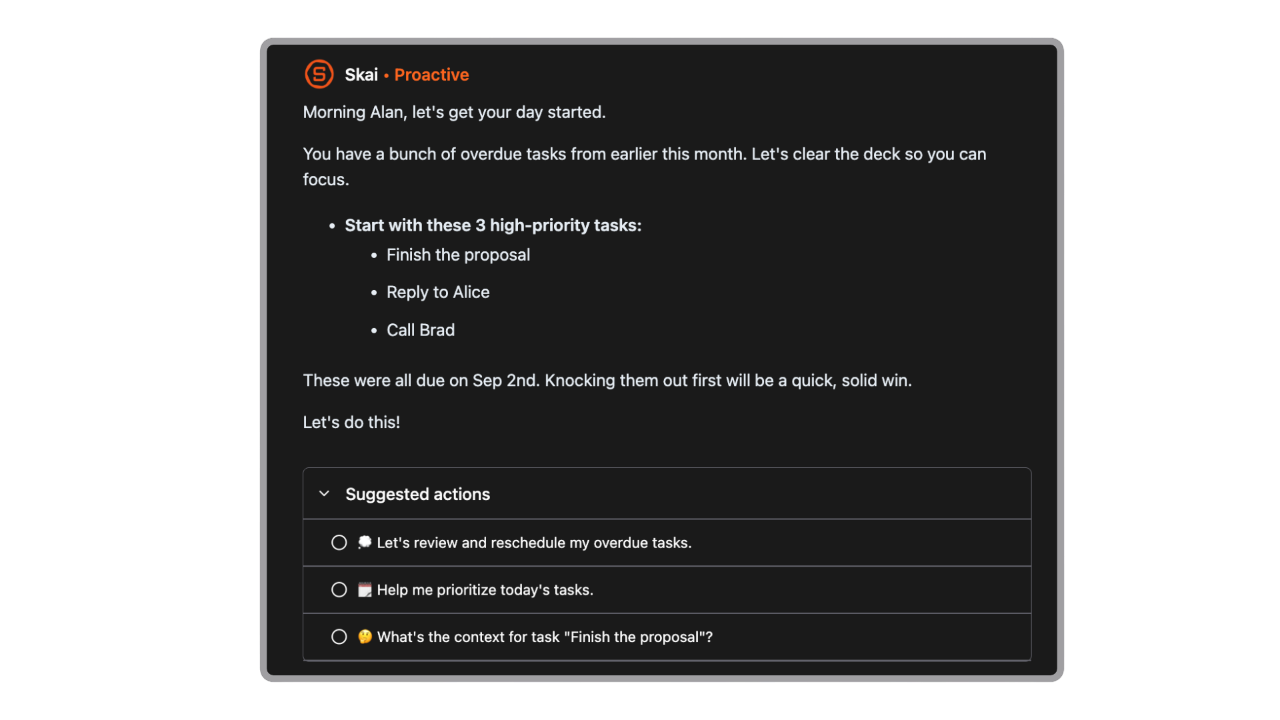
- Proactive daily planning
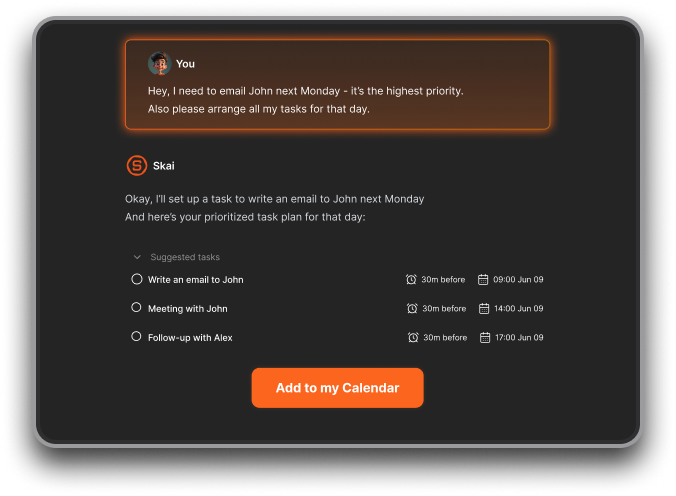
I tried connecting my calendar to the timeline view, which lays out tasks and meetings together to combat time blindness. The assistant suggests an automated schedule each morning based on what you have saved in your notes.
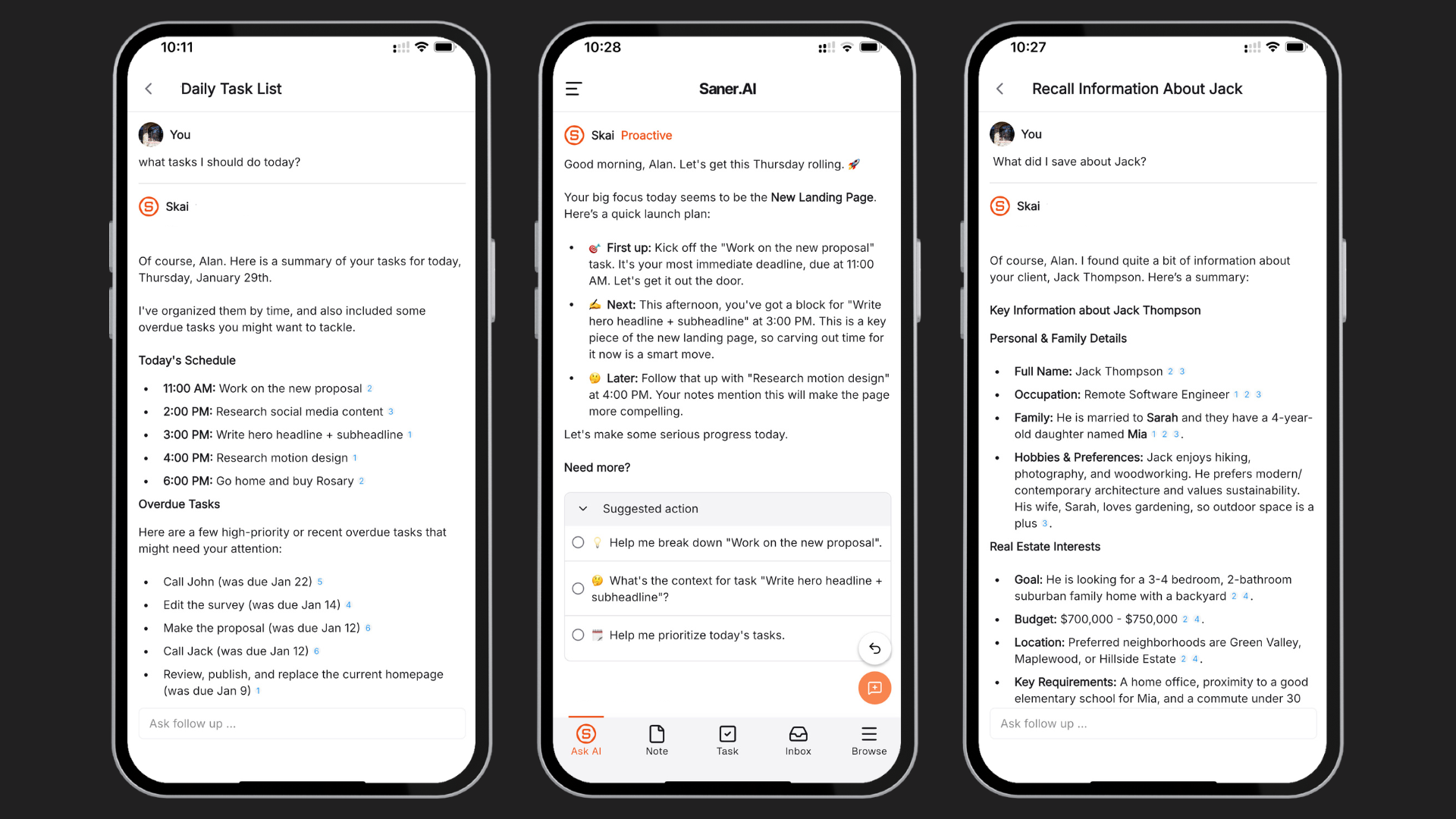
- Semantic knowledge retrieval
I like that I can ask the chatbot direct questions about my saved files instead of hunting through folders. The search looks for the actual meaning behind your query rather than strict keyword matches.

- Dynamic reminder
Every notification from a task will be made with a different message. I very much appreciate this feature, cause not knowing beforehand what you are gonna do makes the task less boring, and you are less resentful.
Pros
- I like that I can dump random thoughts into the app on my phone and let the AI sort out the organization later.
- I appreciate the minimal interface because it does not trigger visual distraction when I am trying to focus.
- I feel it is helpful that the system extracts schedule dates directly from my casual sentences.
Cons
- It's not a team-wise project manager app
Who is it best for
- Saner.AI is best for people with ADHD and knowledge workers who need a frictionless note-taking tool that structures messy thoughts into a daily schedule without forcing them to maintain complex databases.
Pricing list
- Free Plan: $0 per month.
- Starter Plan: $12 per month (or $8 per month billed annually).
How to get started
- Step 1: Download the mobile application or open the web interface to create a free account.
- Step 2: Open a daily note, write down a loose list of your thoughts, and let the assistant convert them into tasks.
Saner.AI reviews
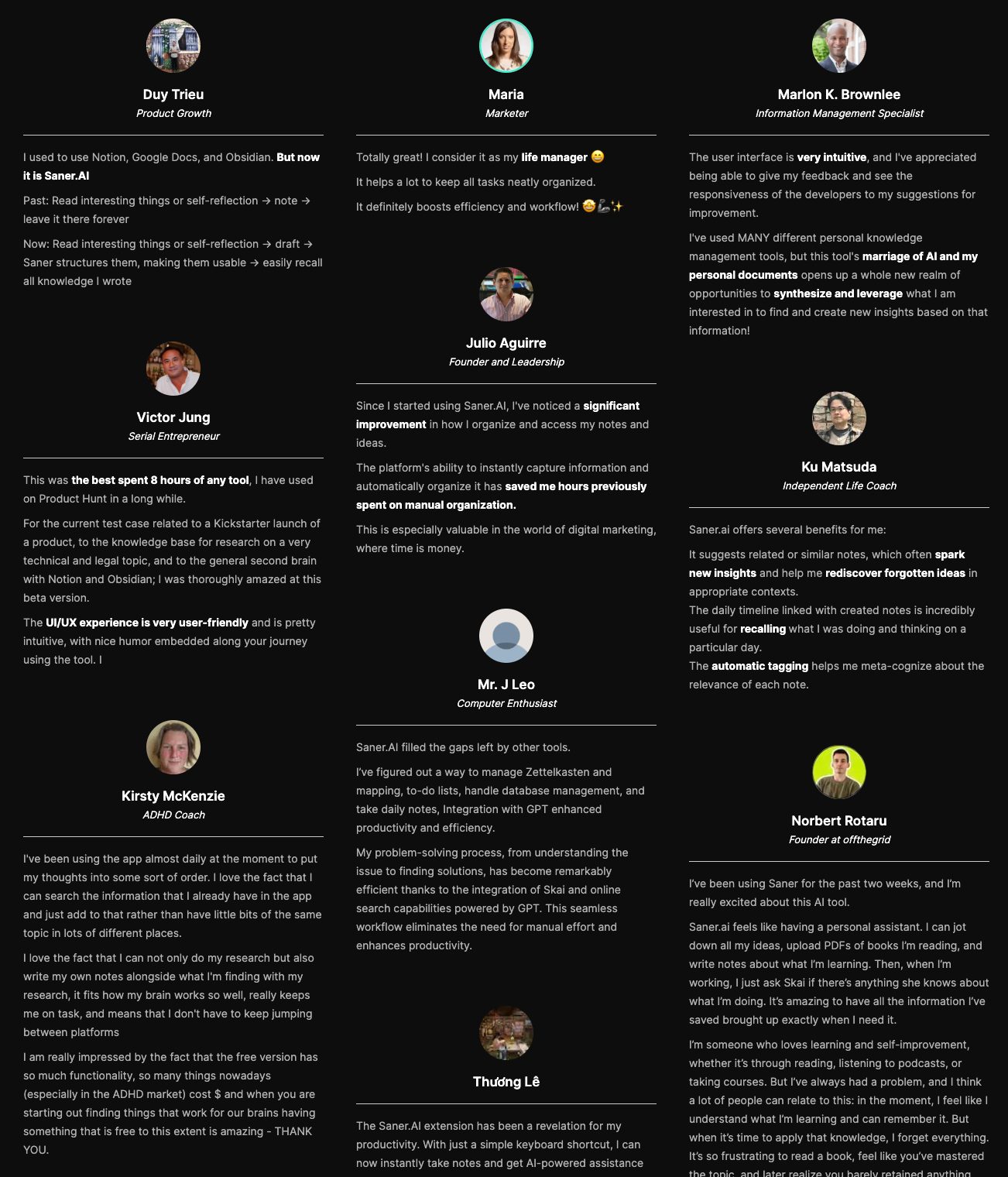
"I was impressed that saner.ai answers questions based on my own knowledge through Skai." — Verfied Review
"Really like how it proactively tells me what to do each morning. Appreciate the help of the team, they are really responsive with emails." — Verfied Review
"Skai (the AI) instantly parses it into a clean to-do list, suggests realistic due dates if I don't specify, and asks for confirmation on timings. One tap, and everything's added to my tasks." — Verified Review

Stay on top of your work and life
Conclusion: Planning your day with ADHD
Planning your day when you have ADHD is rarely a straight line. Some days you will follow your schedule perfectly, and other days your brain just will not cooperate.
I know how frustrating it is to look at a beautifully planned calendar and realize you spent the last three hours reading about deep-sea creatures instead. That is completely normal, and you do not need to feel guilty about it. Managing your day is simply about finding a few small habits that make tomorrow a little bit easier to handle. You do not have to figure it all out today.
If you want a tool that actually gets how your mind works without forcing you into rigid systems, you might want to try Saner.AI. It organizes your thoughts and tasks in a way that feels natural, so you can spend less energy fighting your notes.
Stay on top of your work and life
How to Plan Your Day with ADHD: Frequently Asked Questions
1. Can ADHD adults follow routines?
Yes, but they need to be flexible. Rigid, minute-by-minute schedules rarely work because they feel like a trap. Instead, try building a routine around sequences of events—like brushing your teeth right after your coffee brews. It also helps to change up where or how you do things when the routine starts feeling boring.
2. What time should someone with ADHD wake up?
There is no perfect universal time, so do not force yourself into a 5:00 AM club if your brain resists it. Many people with ADHD are naturally night owls due to delayed circadian rhythms. The best time to wake up is a consistent hour that allows you to get seven to eight hours of sleep without forcing your brain to mask extreme fatigue.
3. Is time-blocking good for ADHD?
It can be, but traditional hourly time-blocking often backfires. When a task overruns its block, it can cause a mental block that ruins the rest of your day. A better approach is "time-theming." Dedicate a loose two-hour block to a general category, like admin tasks or creative work, rather than assigning a specific minute to a single chore.
4. How do I stop overestimating how much I can do in a day?
Time blindness makes us think we can conquer the world in an afternoon. To counter this, pick your top two tasks for the day and treat everything else as a bonus. If you think a task will take thirty minutes, write down an hour. Giving your schedule breathing room keeps you from feeling defeated by mid-afternoon.
5. Why do I struggle to start tasks even when I have a plan?
This is executive dysfunction, not laziness. The transition from resting to working requires a lot of mental activation energy. You can bypass this hurdle by making the first step ridiculously small. Do not write "clean the kitchen" on your list; write "put three forks in the dishwasher." Starting is the hardest part.
6. How do I handle sudden distractions during the day?
Distractions are inevitable, so you need a way to park them. Keep a "brain dump" notepad next to your workspace. When you get a sudden urge to research a random topic or buy something online, write it down immediately to get it out of your head. You can check the list later during a scheduled break.
7. What is the best type of planner for an ADHD brain?
The best planner is whichever one you actually look at. Digital tools with intrusive alarms work well for some, while others need a physical notebook that stays open on their desk. If a planner is closed, its contents cease to exist for an ADHD mind. Pick a simple system and avoid overly complex setups.
8. How do I plan my day when I feel completely overwhelmed?
When your brain freezes from choices, stop trying to organize a whole day. Take a piece of paper and write down just one thing you need to do next. Do that one task, then write down the next one. Breaking the day down into single, isolated steps stops the paralyzing mental traffic jam.
9. Should I plan my day the night before or in the morning?
Test both to see which lowers your anxiety. Planning the night before can clear your head so you sleep better, knowing exactly what to do when you wake up. However, if looking at a list at night keeps you awake worrying, spend ten minutes with your coffee in the morning making your daily plan instead.
10. What do I do when I completely abandon my planning system?
Expect to abandon your system eventually, and do not beat yourself up when it happens. ADHD brains crave novelty, so a system that worked for a month might suddenly stop working. This is normal. Simply reset the system, strip it back to the basics, or try a different colored notebook to make it feel fresh again.
11. How can I make boring daily tasks more engaging?
Pair the boring task with a high-dopamine stimulus, a strategy often called temptation bundling. Only listen to your favorite podcast while folding laundry, or play an upbeat playlist while washing dishes. You can also use a timer to challenge yourself to finish a chore in under ten minutes to turn it into a game.
12. How do I manage energy slumps throughout the day?
Stop fighting the slump with more caffeine and work with your body instead. ADHD energy fluctuates wildly. Track your patterns for a few days to find your peak focus windows. Save your high-effort tasks for those high-energy windows, and use your low-energy slumps for brainless tasks like deleting emails or organizing your desk.
13. Is it better to use a digital planner or a paper planner?
Both have distinct pros and cons. Digital planners have alarms that prevent you from losing track of time, but they also live inside phones filled with distractions. Paper planners offer a tactile experience and visual permanence, but they cannot send you reminders. Many people find success using a hybrid approach that combines both.
14. How do I stop hyperfocusing on the wrong task?
Hyperfocus is a powerful tool, but it frequently glues us to irrelevant projects. Set a loud, annoying alarm in another room before you start a task. When the alarm goes off, it forces you to physically stand up and break the trance, giving you a conscious moment to evaluate if you are still working on the right thing.
15. What is the ideal number of items on an ADHD to-do list?
Keep your daily list to three items max. A massive list of twenty items causes choice paralysis, which leads to doing nothing at all. If you have more than three tasks, keep them on a separate master list hidden out of sight. Transfer only your top three items to your daily view.
Stay on top of your work and life



