
Best ADHD timer (apps and physical) in 2026


We tested the Best ADHD timer apps and physical timer
The best ADHD timer is one that makes time visible, not just countable. For an ADHD brain, time is not a linear sequence of minutes and hours; it usually comes in only two zones: "now" and "not now." This quirk is often called time blindness.
It is the reason you can sit down to check your email at 9:00 AM, blink, and realize it is suddenly 2:00 PM and you forgot to eat lunch. When you cannot naturally sense the passage of time, a standard digital timer on your phone is practically useless.
1. Why ADHD brains need a different timer

Because of this, conventional productivity advice usually fails. Techniques like time-blocking or standard Pomodoro timers assume your brain perceives time linearly and can easily hold future tasks in its working memory.
When you set a standard 25-minute Pomodoro timer, one of two things usually happens:
- The alarm goes off right when you finally find your focus, forcibly breaking your hyperfocus and ruining your momentum.
- The ticking clock creates a wave of anxiety, causing you to spend the entire 25 minutes staring at the countdown instead of doing the actual work.
Traditional timers treat time as an abstract number. For an ADHD brain to actually register time, the tool needs to make time visual, flexible, and impossible to ignore.
2. Quick guide: What are the best ADHD timer apps right now?
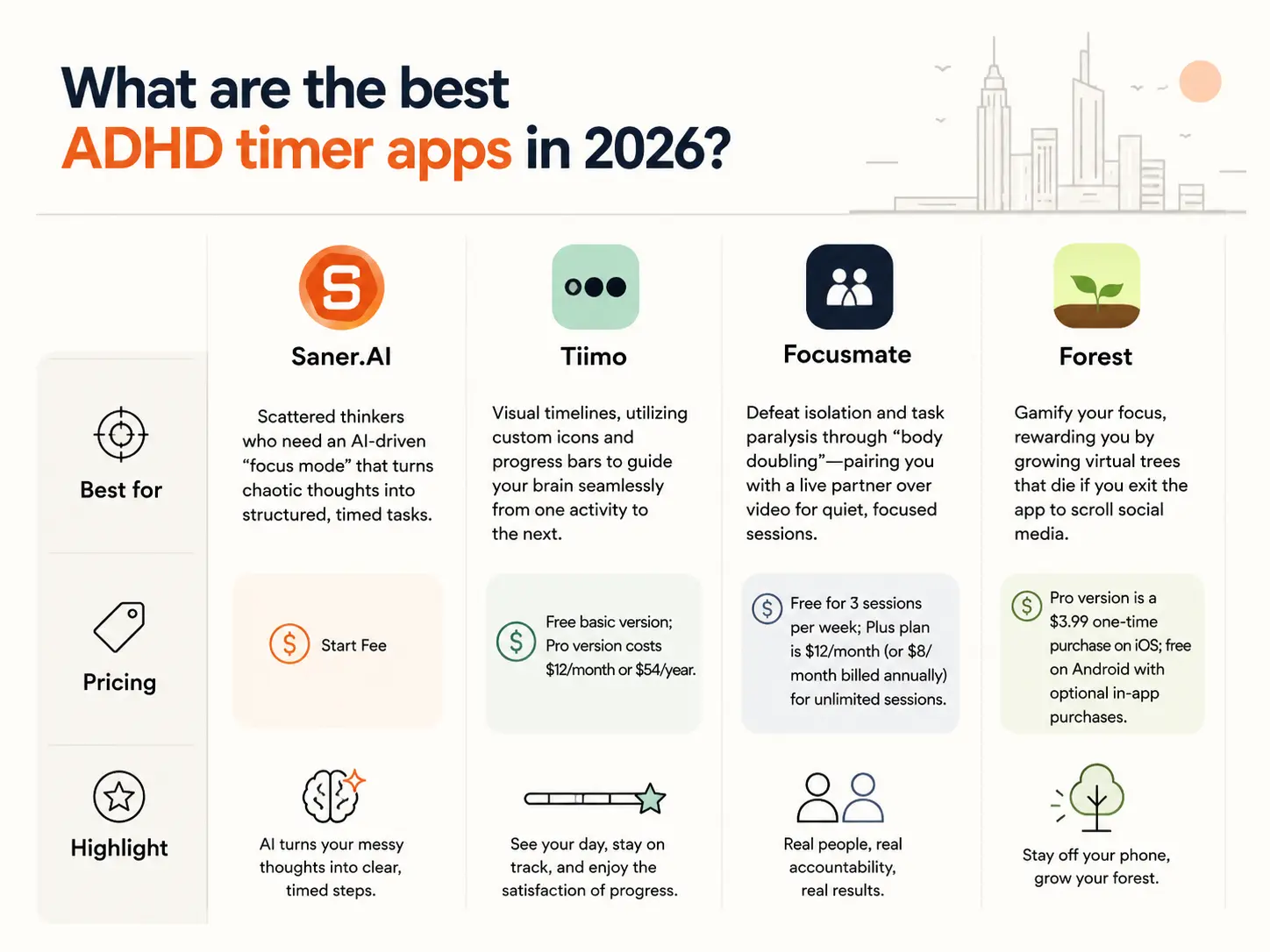
2. Tiimo: Best for visual timelines, utilizing custom icons and progress bars to guide your brain seamlessly from one activity to the next.
3. Focusmate: Best for defeating isolation and task paralysis through "body doubling"—pairing you with a live partner over video for quiet, focused sessions.
4. Forest: Best for gamifying your focus, rewarding you by growing virtual trees that die if you exit the app to scroll social media.
3. How we chose the best ADHD timers
Not all timers are created equal when it comes to ADHD productivity. We tested and evaluated each platform based on metrics that matter to the neurodivergent community:
- Visual Time Tracking: Does it represent the passage of time using shapes, colors, or progress bars instead of just digital numbers?
- Low-Friction Starting: Can you activate the timer in under three seconds before your brain changes its mind?
- Accountability & Gamification: Does it leverage external motivators (like human presence or game rewards) to generate dopamine?
- Anxiety Reductions: Does the alarm sound or visual interface induce a panic state, or does it transition you gently?
- Anti-Side-Quest Design: Does the tool include built-in features to block distractions and keep you in your active workspace?
Physical timer
1. Time Timer

The Time Timer is the classic visual countdown tool that actually shows you time passing. Instead of numbers counting down, it uses a bright red disk that disappears as the minutes tick away. It does not tick, so you will not get distracted by constant background noise, and you can choose whether it makes an alert sound when time runs out.
Sizes available
- MOD: A small, compact desktop version with a protective silicone case.
- PLUS: A rugged option equipped with a built-in carrying handle.
- Watch: A wearable version so you can take the visual disk on the go.
- Wall clock: A large format designed to be seen clearly from across a room.
Why ADHD brains love it
- ADHD brains often struggle with time blindness. The feeling that time is either an infinite expanse or a sudden panic. The shrinking red disk makes time visible. You do not have to do the mental math of subtracting numbers; you can just glance over and see exactly how much time you have left.
Pros and cons
- Pros: Completely silent operation, highly intuitive visual feedback, and durable builds.
- Cons: The standalone models can take up valuable desk space, and you have to remember to manually wind them up before every task.
Price range
- Prices generally range from $20 to $50, depending on the model and size you choose.
Who is it best for
- This model is highly versatile and works exceptionally well for both young kids and adults. It is also an excellent tool for teachers managing a classroom full of students.
Where to buy
- You can buy it directly from the official Time Timer website or find it on Amazon.
2. Miracle TimeCube
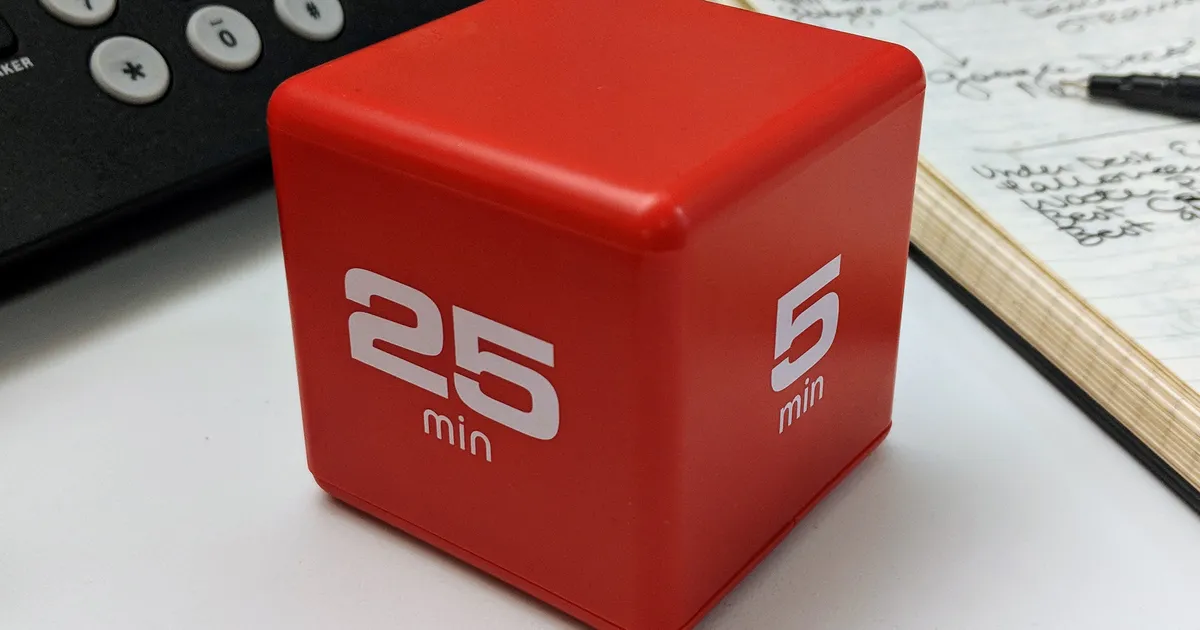
The Miracle TimeCube is a gravity-activated tracking tool shaped like a die. Each side of the cube has a preset minute duration printed on it. To start tracking your time, you simply flip the cube so the number you want faces upward. This model comes as a standard 3-inch desktop cube.
Why ADHD brains love it
- It completely eliminates the friction of setting a traditional clock. There are no buttons to press, no apps to open, and no digital menus to scroll through. If you need to focus for fifteen minutes, you just flip the fifteen-minute side up, and it immediately begins counting down.
Pros and cons
- Pros: incredibly fast to start and simple to use.
- Cons: You are strictly limited to the four pre-set times printed on your specific cube, and the loud alarm can be jarring if you are deep in a zone.
Price range
- Most versions cost between $15 and $25.
Who is it best for
- It is perfect for adults who need a quick way to practice the Pomodoro technique or track brief work intervals without getting sucked into phone notifications.
3. Datexx Cube Timer
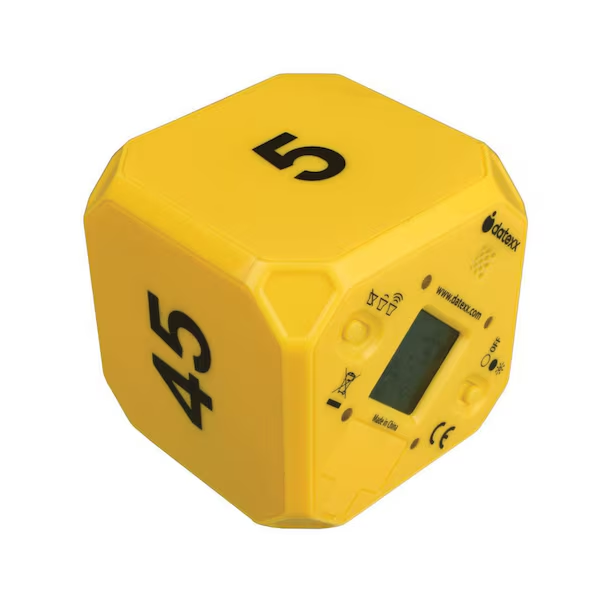
The Datexx Cube Timer uses a similar gravity-flipping mechanic as the TimeCube, but it includes a small digital display that shows you the exact minutes and seconds remaining. It also features a physical toggle switch to adjust your volume or turn the sound off completely. This model is available in a standard compact desktop size.
Why ADHD brains love it
- It gives you the immediate, low-friction start of a flip cube while letting you see the exact remaining time if you need that extra bit of urgency to keep you on task. The ability to control the volume is a massive relief if loud alarms trigger your anxiety.
Pros and cons
- Pros: Features built-in volume control, a clear digital readout, and a highly responsive design.
- Cons: The build quality can feel a bit plasticky, and the small screen can be difficult to read from a distance.
Price range
- Expect to pay between $18 and $28.
Who is it best for
- This unit is ideal for college students or remote workers who need a quick, quiet desk tool that will not disrupt a shared office or library space.
4. Sand Hourglass

The sand hourglass is a classic, low-tech way to measure time without any electronics. Sand flows from the top glass bulb to the bottom bulb at a steady, silent pace until the top half is completely empty.
Hourglasses come in a wide variety of sizes, usually categorized by their duration, ranging from tiny 1-minute versions to large 60-minute display pieces.
Why ADHD brains love it
- It is entirely analog, meaning there are zero digital distractions, no low-battery warnings, and no alarms. The fluid, continuous motion of the falling sand is incredibly soothing to watch, which can actually help lower your stress levels when you are trying to initiate a tough task.
Pros and cons
- Pros: Entirely silent, requires no batteries, and serves as an attractive piece of desk decor.
- Cons: There is no auditory alert to tell you when your time is up, so you can easily hyperfocus right past the end of the session.
Price range
- Prices vary wildly based on materials, ranging from $10 for plastic versions to $40 or more for glass and wood designs.
Who is it best for
- This option is best for creative professionals or anyone who is highly sensitive to noise and wants a gentle, visual cue rather than a strict deadline.
App-Based Timers
Best ADHD app-based timers are Saner.AI, Focusmate, Tiimo, and Forest
1. Forest
Forest is a focus timer that turns your work blocks into a mobile game. Instead of staring at a standard countdown clock, you plant a virtual seed that grows into a tree as long as you stay away from your phone. If you leave the app to check social media or respond to a text, the tree dies.
Why is it on the list
ADHD brains often ignore standard alarms because there are no immediate consequences to breaking focus. With Forest, the loss aversion of seeing a pixelated tree wither is surprisingly effective at stopping impulsive phone checking.
I tried using it during an afternoon slump when my attention was completely shattered. Every time I reached for my phone out of habit, the warning screen reminded me that I was mid-session.
Pros and cons
The app is great for task initiation because committing to a twenty-minute window feels easy when you are just trying to grow a plant. It also connects to the real world, allowing you to spend accumulated in-app coins to have actual trees planted through the organization Trees for the Future.
On the downside, Forest only helps if your phone is your main source of distraction. If you work on a computer and tend to open thirty browser tabs, the mobile app cannot stop you. It also lacks any built-in task manager or calendar, meaning you have to pair it with a separate planner to track what you are actually supposed to be working on.
Pricing
- The Android version is free with ads and limited features. The iOS app requires a one-time purchase of $3.99, which unlocks the full tree catalog, advanced statistics, and real-world tree planting.
2. Focusmate
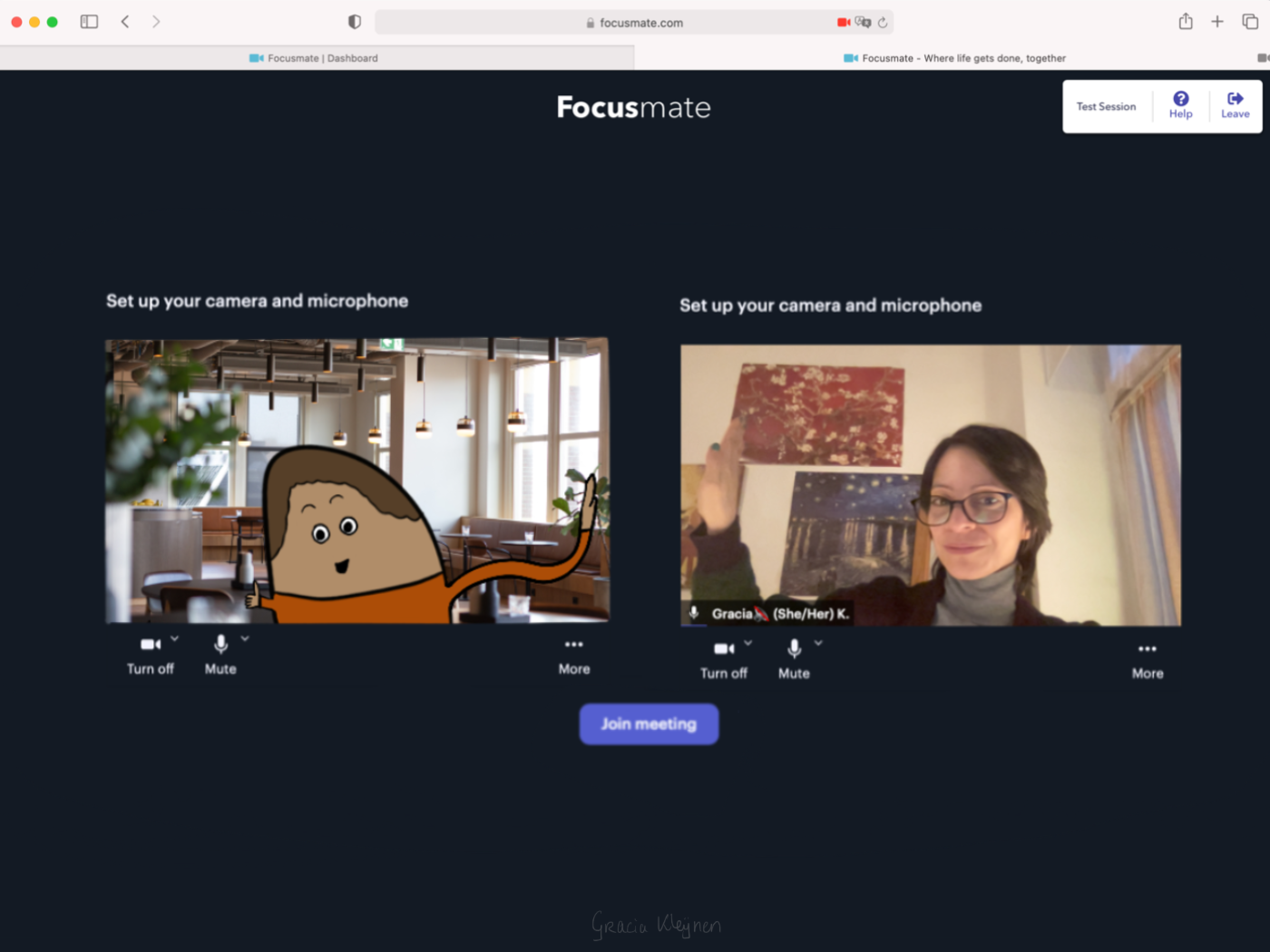
Focusmate pairs you with another person over video for a timed work session. You book a 25, 50, or 75-minute block, tell your partner what you plan to accomplish, and keep your camera on while you work silently. It uses a concept called body doubling, which provides an external anchor to keep your mind from drifting.
Why is it on the list
Focusmate works because it turns a standard timer into a human commitment. I tried using it on a Tuesday morning when I was severely avoiding a tedious spreadsheet. Knowing someone else was sitting there, actively watching to see if I stayed at my desk, stopped me from picking up my phone or opening a new tab.
For an ADHD brain that struggles with self-imposed deadlines, having another person share that time block creates the pressure needed to actually begin.
Pros and cons
- The 1:1 setup creates immediate social accountability. There is a quiet mode if you are working in a library, and you can save your favorite partners to work with them again later.
- Having your camera on for an hour can feel exhausting if you deal with social anxiety. You are also dependent on another person showing up, and a last-minute cancellation can ruin your momentum.
Pricing
- Free: 3 sessions per week
- Plus: $8 a month billed annually, or $12 a month billed monthly
3. Tiimo
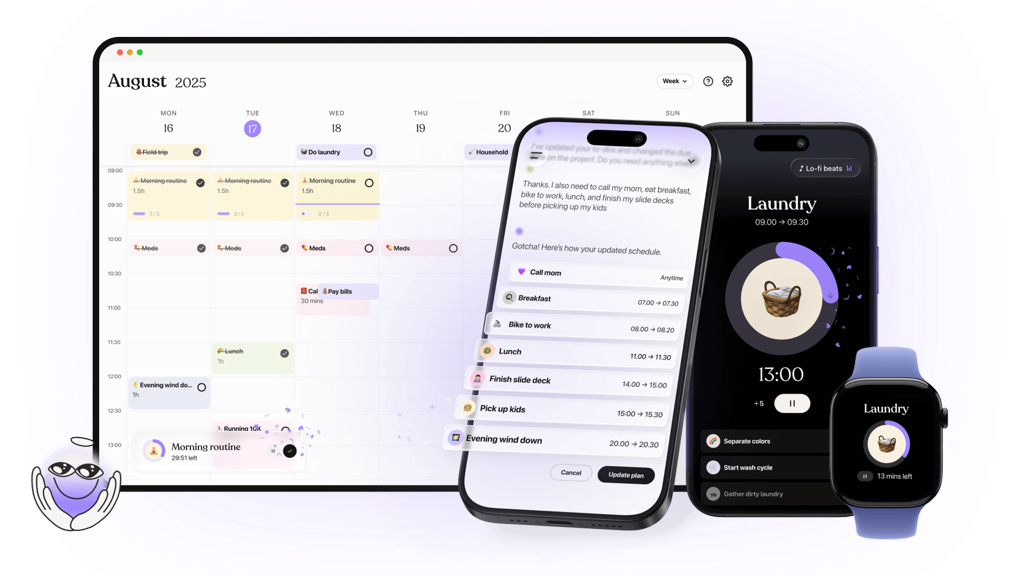
Tiimo is a visual daily planner and scheduler built specifically for neurodivergent brains. Instead of relying on abstract numbers or text-heavy lists, it translates your day into an interactive timeline.
Why is it on the list
When I tried testing the app for a deep work session, I found that the visual wheel design completely changes how you interact with a deadline. Instead of checking a digital clock and panicking over the exact numbers, you can glance at the wheel or your lock screen widget to instantly see how much of the "time block" has emptied.
Pros and Cons
- Pros: The interface is incredibly customizable with thousands of color schemes and icons, making daily planning feel rewarding rather than clinical. It supports Live Activities and Apple Watch syncing, meaning your current countdown stays visible even when you wander away from the main app.
- Cons: While the Android version was recently rebuilt from scratch to fix stability issues, it still lacks complete parity with the iOS version regarding native Google Calendar syncing. The recurring task feature is also somewhat rigid, meaning you cannot easily set custom intervals for chores that need to happen outside of standard daily or weekly cycles.
Pricing
- Free Tier: Access to the basic visual planner, one user profile, and limited AI features.
- Premium Pro: $6/month or around $35/year (unlocks full calendar syncing, unlimited AI Co-Planner use, and extensive visual customization).
4. Saner.AI
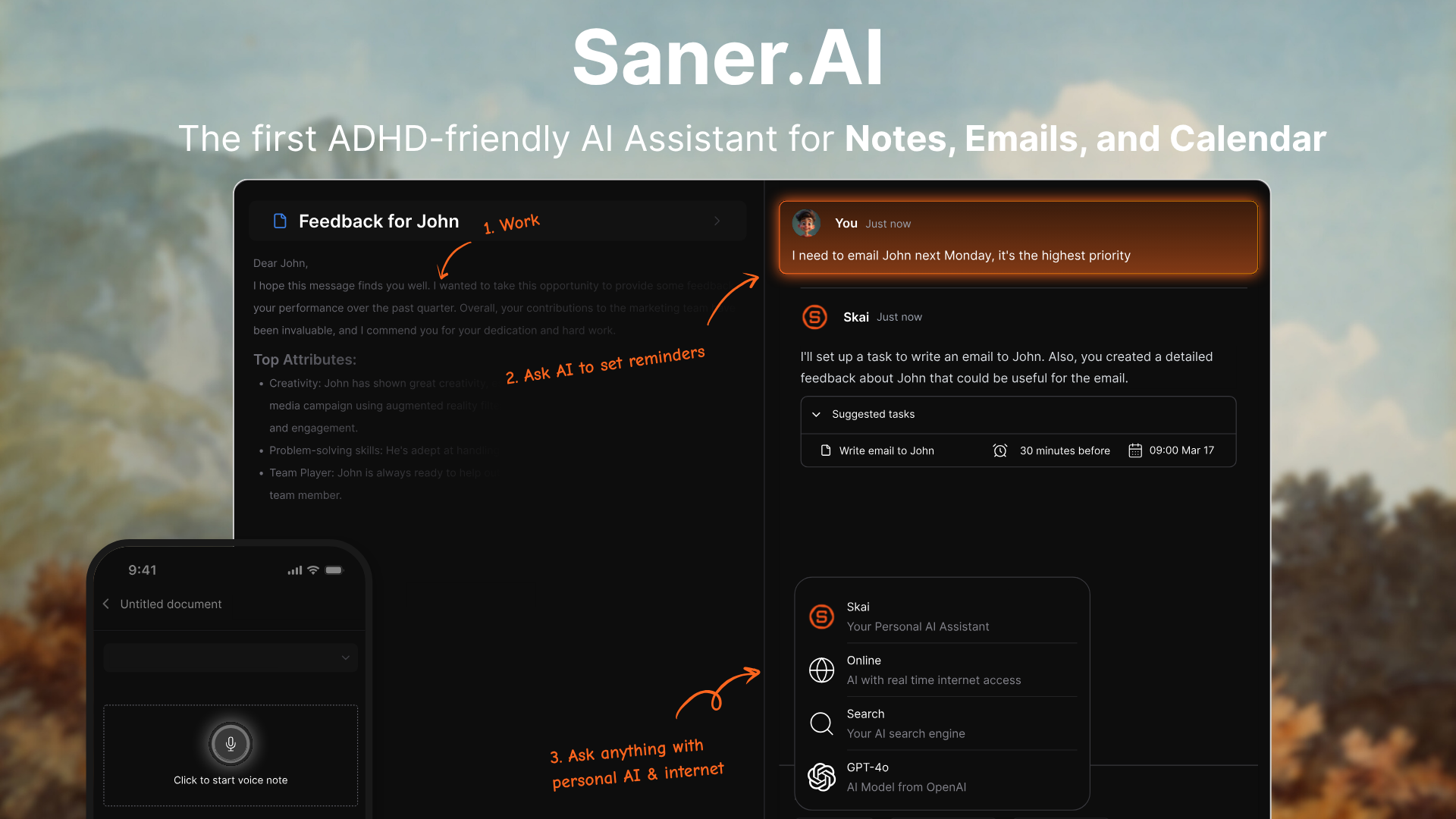
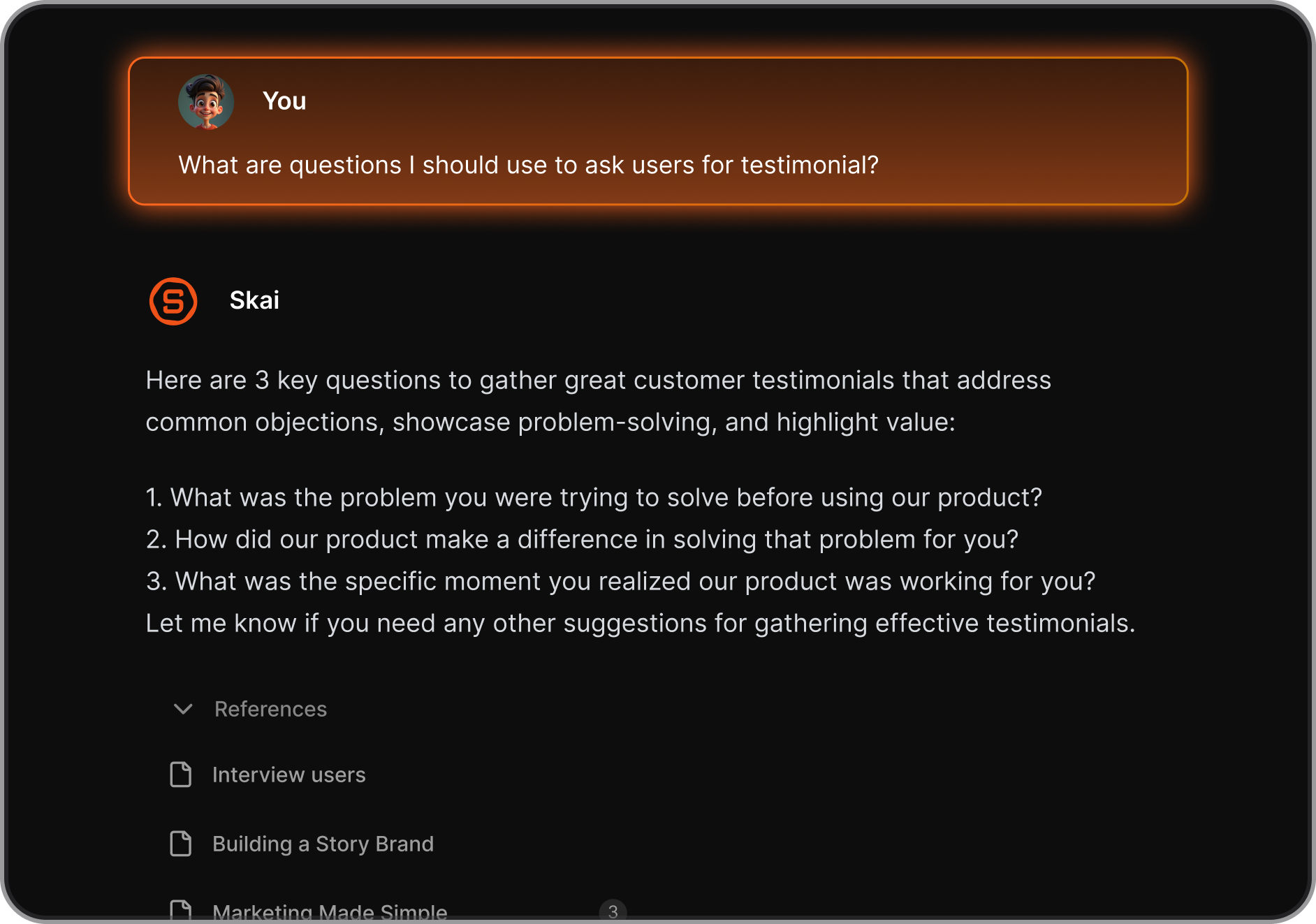
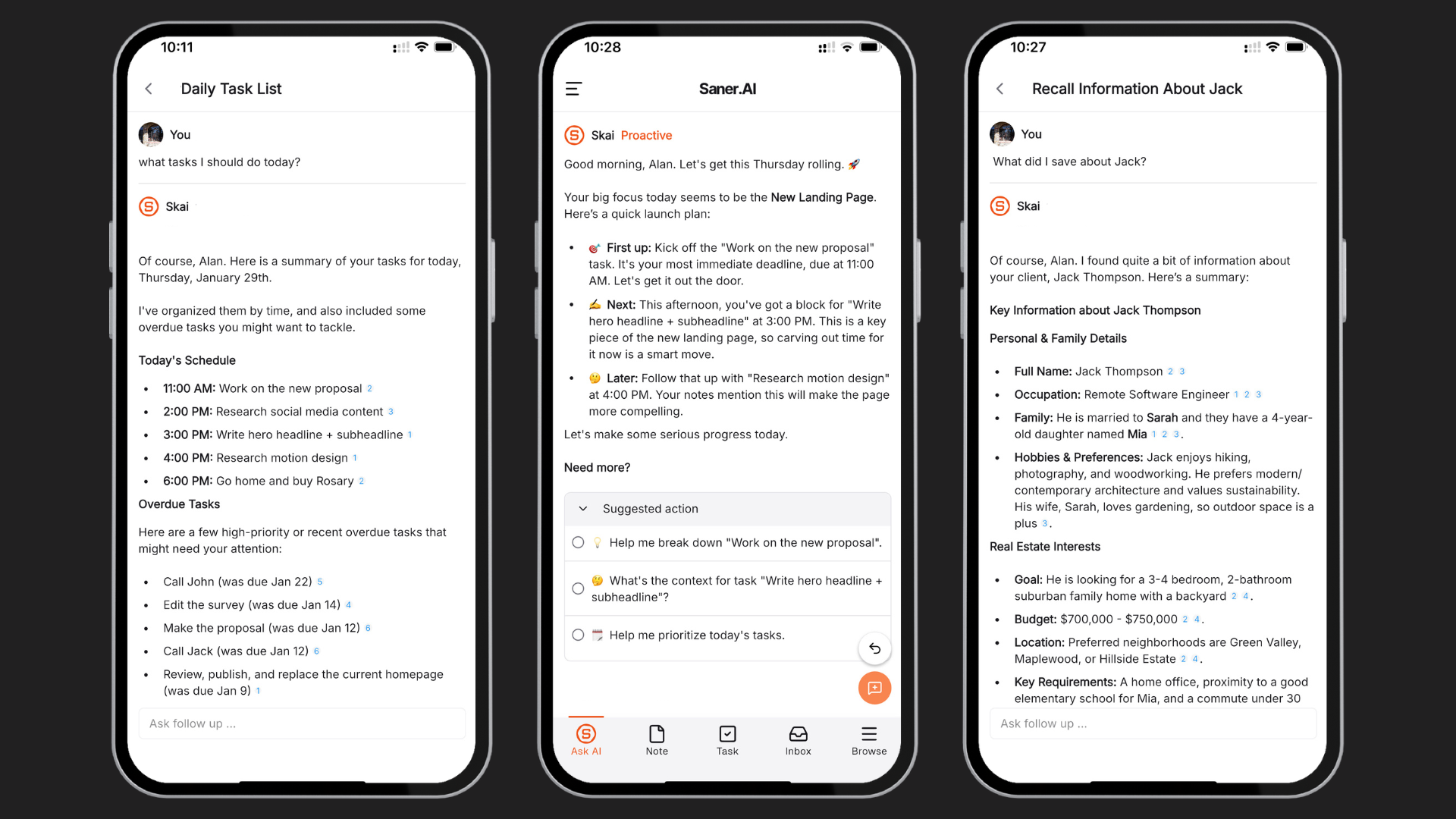
Saner.AI is a specialized AI productivity workspace designed specifically for individuals managing ADHD. It serves as a centralized application that captures notes, tracks emails, and handles calendar events to prevent cognitive overload. The platform operates an AI assistant to combat forgetfulness and eliminate the constant distraction of bouncing between tabs.
Key feature
- Skai task assistant
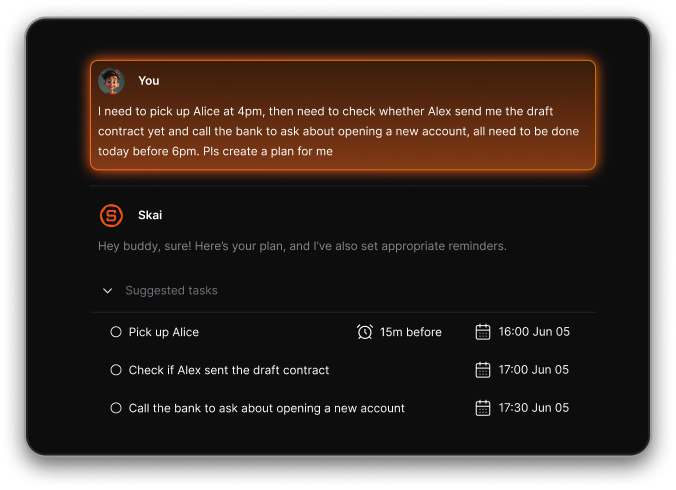
This feature converts messy thoughts, text documents, or unread emails into concrete items on a schedule. I like how it reviews a text file and extracts clear action points without requiring manual data sorting.
- Centralized inbox capture
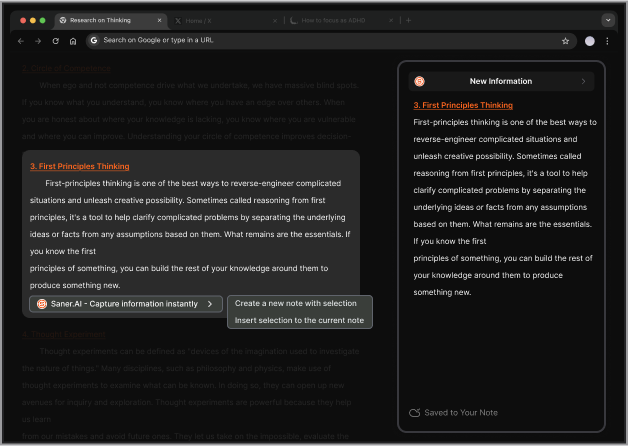
The platform acts as a drop zone for all incoming notes, web clips, and files. I found this feature highly beneficial because it minimizes the friction of switching between separate workflow applications.
- Interactive knowledge graph search
This function replaces standard folders with semantic search, letting you locate specific information by asking questions in plain English. I tested this with complex project files and appreciated getting quick, structured summaries of past ideas.
Pros
- I appreciate how the interface stays clean and avoids the typical visual clutter that worsens my distractibility.
- The system handles automatic tagging, which saves me from the stress of building rigid folder structures.
- I feel it helpful that the browser extension lets me save important facts without breaking my current work momentum.
Cons
- Saner.AI is the gold standard for personal task management, not for large team project management.
Who is it best for
- Saner.AI is best for professionals, researchers, and students with ADHD who struggle with focus fragmentation, information overload, and the stress of managing scattered schedules across disconnected programs.
Pricing plan
- Free
- Starter: $8/mo (30 AI messages per day, 1,000 notes, 5GB storage, and reasoning mode access)
- Standard: $16/mo (Unlimited AI messages, unlimited notes, 100GB storage, and full priority support)
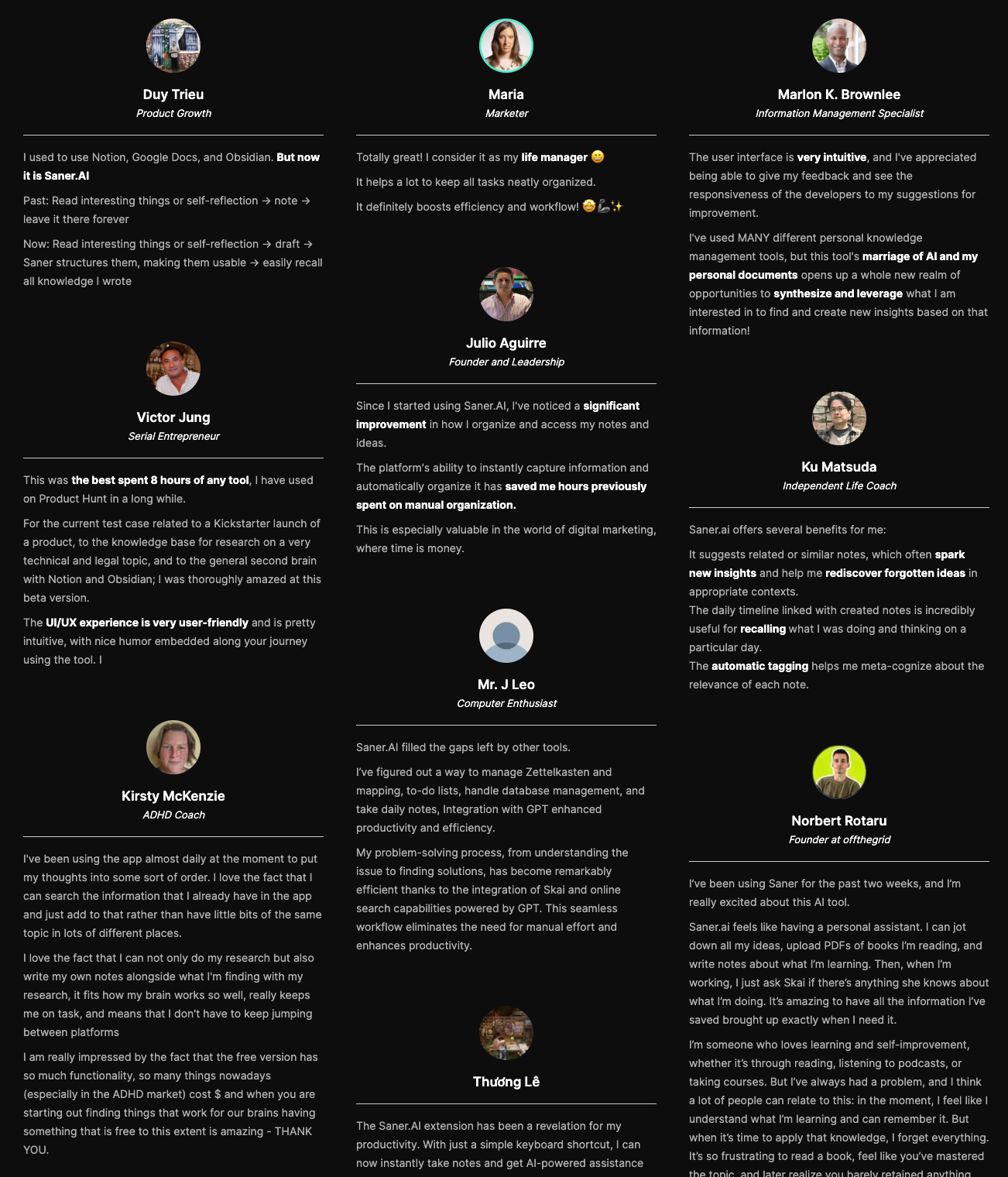
Saner.AI reviews

Stay on top of your work and life
Conclusion - What's the best ADHD timer?
Finding a tool that works means accepting that you might need to rotate your options regularly. Some days, a physical visual timer with a bright red disc that slowly disappears gives your brain the concrete boundary it needs to stay anchored to the present moment.
Other days, a simple phone application that sounds an alarm or an interactive desktop tool is the only thing that keeps you from wandering away from your work. I constantly alternate between a physical clock on my desk and digital tracking apps because my brain eventually gets used to one method and begins to completely ignore it.
On the other hand, if you want a digital tool that handles your scattered thoughts without forcing you into a rigid system, Saner.AI is worth looking at. It is an application designed to hold your notes, tasks, and random ideas in a single spot so you do not have to rely entirely on your working memory or keep fifty browser tabs open just to remember what you were doing ten minutes ago.
It will not magically eliminate your distractions, but it gives your mind a quiet space to unload information when you feel overwhelmed by too many tasks at once.
Stay on top of your work and time
FAQ - Best ADHD Timer
1. What is the best timer for ADHD kids?
The Time Timer is the most reliable option for children with ADHD because it uses a disappearing red disk to show exactly how much time is left without requiring them to read a digital clock.
This visual breakdown helps kids see time ticking away, which takes the anxiety out of transitions between playtime and homework. If your kid gets stressed out by loud alarms, you can set this one to silent or a gentle beep.
2. Is the Time Timer worth it?
Yes, the Time Timer is worth buying because it translates an abstract concept into a physical, visual cue that directly treats time blindness. While you can find cheap digital kitchen countdowns anywhere, they only show changing numbers, which fails to register urgency for an ADHD brain.
3. Do Pomodoro timers work for ADHD?
Pomodoro timers work well for some people with ADHD, but the standard 25-minute chunk is often too long or too rigid to maintain focus. If you find yourself staring at the wall waiting for the break, change the intervals to 10 or 15 minutes instead. The strategy succeeds only when you adapt the intervals to your energy levels rather than forcing yourself to follow the traditional rulebook.
4. What is time blindness in ADHD?
Time blindness is an executive dysfunction that makes it incredibly difficult to gauge how much time has passed, how long a task will take, or when a future event will occur. To an ADHD brain, time usually exists in only two zones: "now" and "not now." This makes it easy to accidentally spend four hours researching a random hobby while firmly believing only twenty minutes went by.
5. How do visual timers help with ADHD?
Visual timers help by turning an invisible, abstract concept into a concrete shape that shrinks as the minutes pass. When you can see a physical color block disappearing, your brain registers the passage of time without needing to calculate numbers. This constant visual cue creates a gentle sense of urgency that keeps you from drifting off into unrelated tasks.
6. Why do digital phone timers fail for ADHD?
Phone timers fail because opening your smartphone to check the clock exposes you to notifications, texts, and social media apps that trigger instant distraction. What starts as a quick glance to see how many minutes you have left usually turns into a half-hour scroll session. A standalone, single-purpose clock keeps your attention on your work instead of tempting you with your phone.
7. What features should I look for in an ADHD timer?
You need to choose a timer that offers an immediate visual representation of time, adjustable alarm volumes, and a simple interface with zero setup steps. Avoid clocks that require navigating complicated digital menus or apps to start a countdown. The ideal device lets you turn a dial or press one button to start working immediately before you lose your motivation.
8. Is an auditory or a silent timer better for ADHD?
A silent countdown paired with a distinct, short alarm works best because ticking noises often cause sensory overload or major distractions. While some people need a loud buzz to snap them out of a hyperfocus loop, constant ticking while working usually breaks concentration. Look for a device that stays completely quiet until your session ends.
9. How do you stop hyperfocusing using a timer?
You can break a hyperfocus episode by placing a loud alarm across the room, forcing you to physically get out of your chair to turn it off. If the device sits right next to your hand, you will likely hit stop automatically and plunge right back into your task. Physical movement breaks the mental loop and gives you a chance to check your actual physical needs.
10. Can a countdown timer reduce ADHD transition anxiety?
A countdown clock reduces transition anxiety by providing a continuous warning that a task is ending, which gives your brain time to prepare for the switch. Sudden interruptions often trigger irritation or resistance when you have ADHD. Seeing a visual gauge disappear helps you mentally wrap up what you are doing so moving to the next chore feels less jarring.
11. What is the best free timer app for ADHD?
The best free app is the default clock application pre-installed on your phone or laptop because it requires zero setup and contains no ads or community features to distract you. While specialized productivity apps look appealing, they often encourage you to spend hours tweaking settings instead of working. Keep it simple and use the basic countdown already on your device.
12. How do you use a timer for ADHD chore paralysis?
You can beat task paralysis by setting a clock for a tiny, non-threatening window, like five or ten minutes and promising yourself you can stop when it rings. Starting a messy task feels impossible when your brain thinks you have to clean the whole house. Racing against a short clock lowers the stakes and helps you build the initial momentum needed to clear the hurdle.
13. Do smartwatches make good ADHD timers?
Smartwatches work well for tracking time because the vibrating alarm alerts you to transitions without disrupting the entire room. The downside is that they lack a persistent visual display that stays open in your peripheral vision while you work. Use a watch if you need discreet reminders throughout the day, but rely on a desk clock when you need to focus on a specific project.
14. How do you stick to using a timer consistently?
You can build a consistent habit by leaving your timer out in the open where you always see it, rather than hiding it away in a desk drawer. Out of sight truly means out of mind when you have ADHD. Tie the act of setting your clock to an existing daily habit, like brewing your morning coffee or opening your laptop at work.
Stay on top of your work and life



