
How to Turn Notes into Tasks: A Step-by-Step Workflow (2026)


It is incredibly frustrating to feel like you are writing everything down but never actually getting anything done. The real problem is that taking notes is only half the battle, and most people lack a clear system to turn those thoughts into real momentum. I used to think hoarding digital notebooks meant I was being productive, but it just created a digital junk drawer that stressed me out every time I opened it.
You do not need a more complicated setup or a newer app to fix this. You just need a practical, step-by-step workflow that converts your raw thoughts into actual, trackable tasks. Here is how to clean up the mess and build a system that keeps you moving forward.
1) What does it mean to turn notes into tasks?

Most notes die because they are just a chaotic dump of thoughts with no clear next steps. Turning notes into tasks means closing the gap between writing something down and actually doing it. You do this by translating vague, messy scribbles into specific, one-step actions that your brain can handle without feeling overwhelmed.
2) Why most notes never become actions
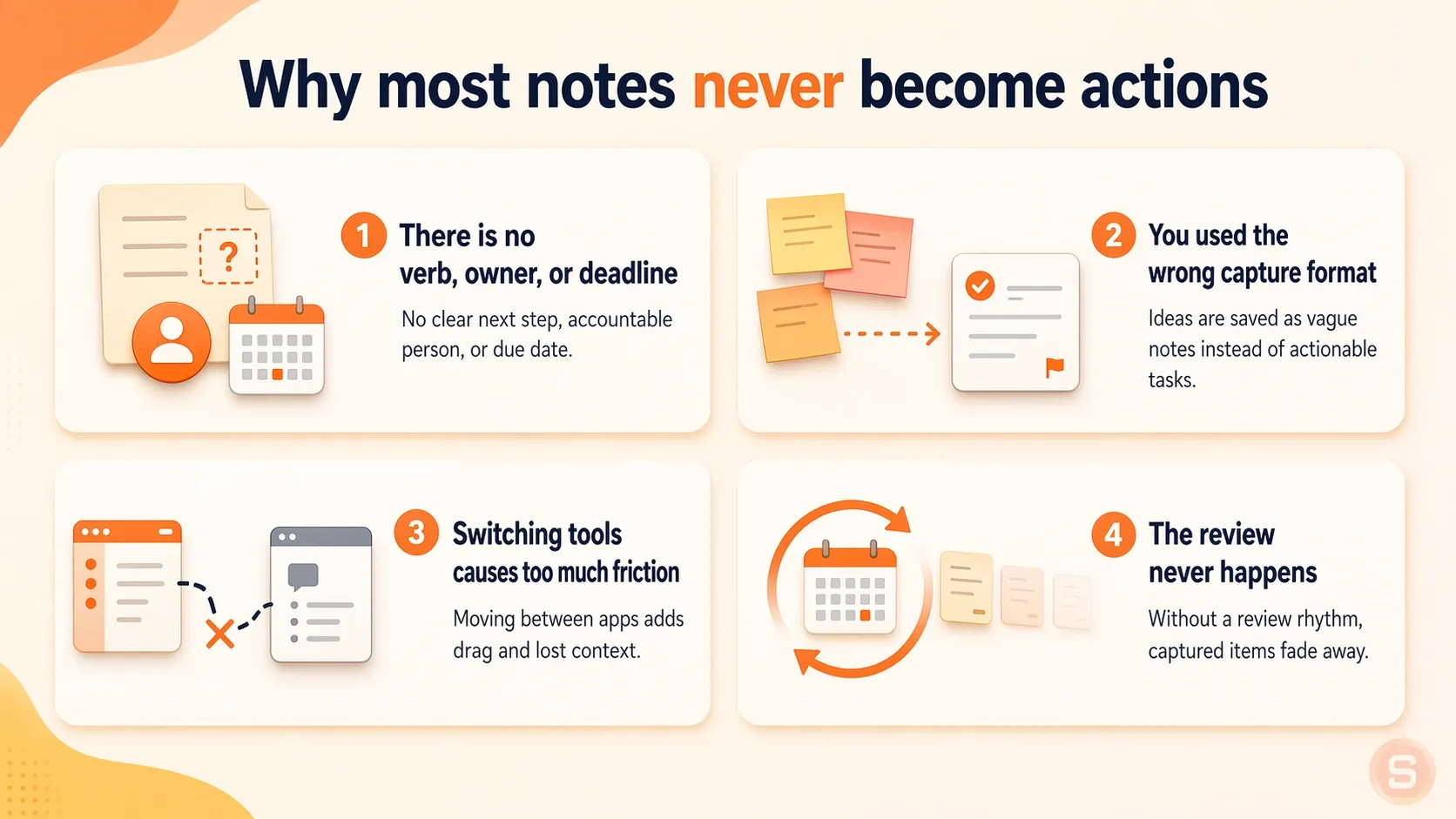
1. There is no verb, owner, or deadline
When you write "Car service" or "Taxes," you are recording a topic, not a task. Without a clear action verb, a specific person responsible, or a hard deadline, your brain has to work too hard to figure out the next step. If a note requires you to think about what to do next, you will likely avoid it.
2. You used the wrong capture format
If you try to write a long, detailed plan while you are running out the door, you will give up halfway through. On the flip side, leaving a cryptic two-word voice memo means you will have no idea what you meant when you listen to it later. If the way you capture the thought does not match your energy or environment, the note dies right there.
3. Switching tools causes too much friction
If you take a note in one app, but your actual to-do list lives in a different app or a physical notebook, you have to manually copy it over. That extra step is a major source of friction. It takes just enough effort that you end up opening a social media app instead of moving the note.
4. The review never happens
A note only works if you actually look at it again. When you do not have a set time to review what you wrote down, your notes just pile up in a digital graveyard. Out of sight truly means out of mind, and the note becomes useless clutter.
How to turn notes into tasks: A 5-step system
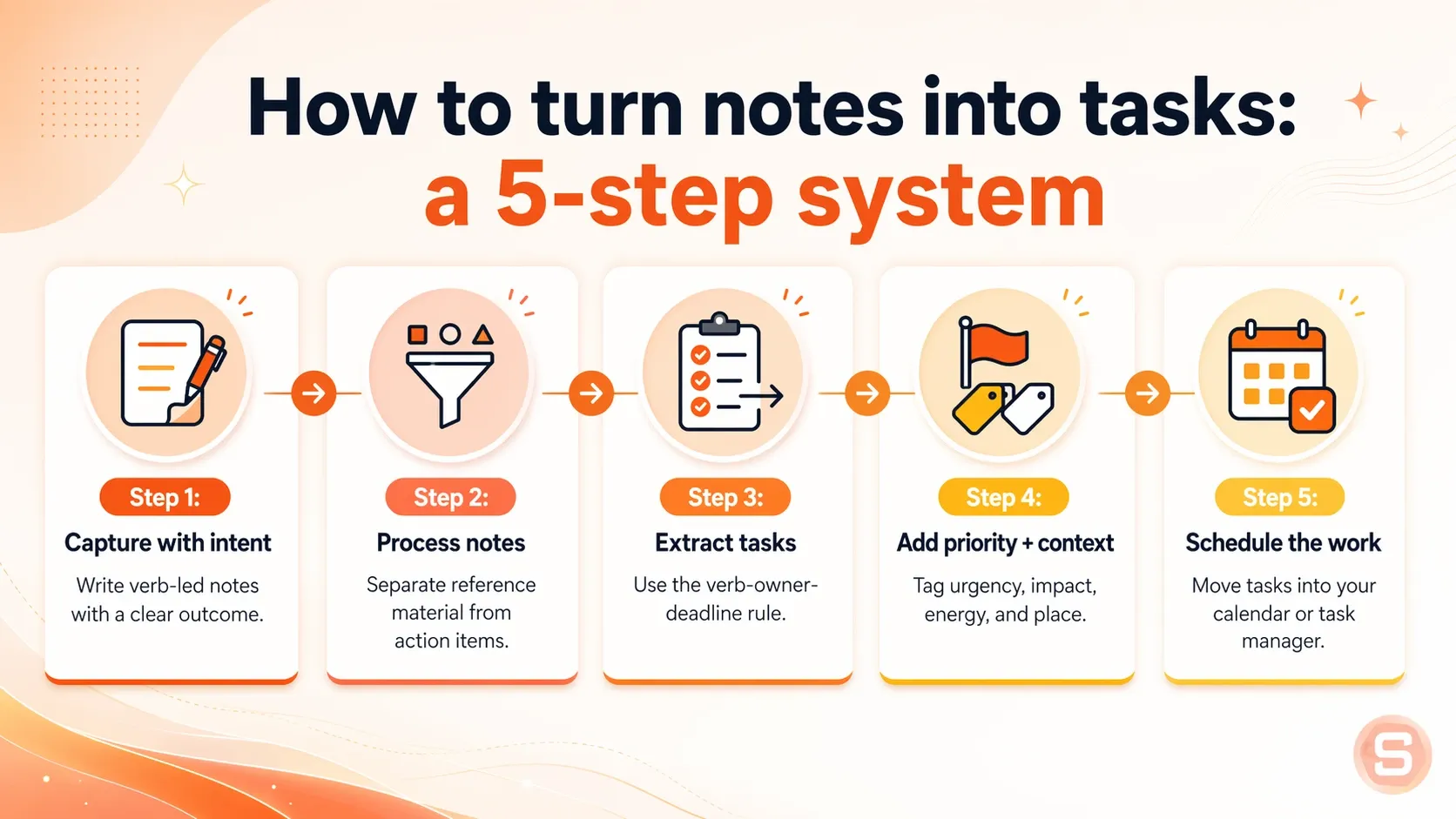
Step 1: Capture with intent (verb-led notes)
When you write a note, start with an action word instead of just a topic. Jotting down "taxes" or "car" gives your brain too much room to stall out later. If you write "call mechanic about the brakes," you already know exactly what to do when you look at it.
Example: Write "Draft the introduction for the marketing deck" instead of just writing "Deck."
Step 2: Process - separate reference vs action
Your notes contain two types of information: things you need to do and things you just need to remember. Sort through your pages and pull the action items away from the random thoughts or project background. Keeping your reading lists and meeting thoughts separate from your to-do items prevents your brain from getting overwhelmed by a wall of text.
Example: Keep a link to the project brief in a reference folder, but put the actual assignment on your task sheet.
Step 3: Extract tasks using the verb-owner-deadline rule
Every single task needs three pieces of information to actually get done: what needs to happen, who is responsible, and when it is due. If any of these pieces are missing, the task usually gets ignored. Writing down "Send the updated budget to Sarah by Thursday" leaves no room for confusion or procrastination.
Example: Instead of "Follow up on budget," write "Email Sarah the revised budget spreadsheet by Thursday at 5 PM."
Step 4: Assign priority + context
Do not just rank your tasks by importance; group them by the energy or tools they require. If you are exhausted at the end of the day, you can quickly check your "low energy" list and knock out quick chores. This keeps you moving forward even when you do not have the focus for deep, heavy work.
Example: Label a task as "High Focus / Computer" so you know to tackle it when your energy is highest in the morning.
Step 5: Schedule into your calendar or task manager
An unassigned task is just a wish that will probably get forgotten. Block out a specific time on your calendar for the task, or drop it directly into your digital tracker with an alert. If you do not give the task a clear home in your day, it will easily get buried under new notes.
Example: Block out 10:00 AM to 10:30 AM on Tuesday specifically to review and send out the weekly team updates.
How AI can turn notes into tasks for you automatically
Imagine finishing a meeting, a brainstorm, or a late-night voice note — and waking up to find your tasks already waiting for you, pulled automatically from everything you wrote.
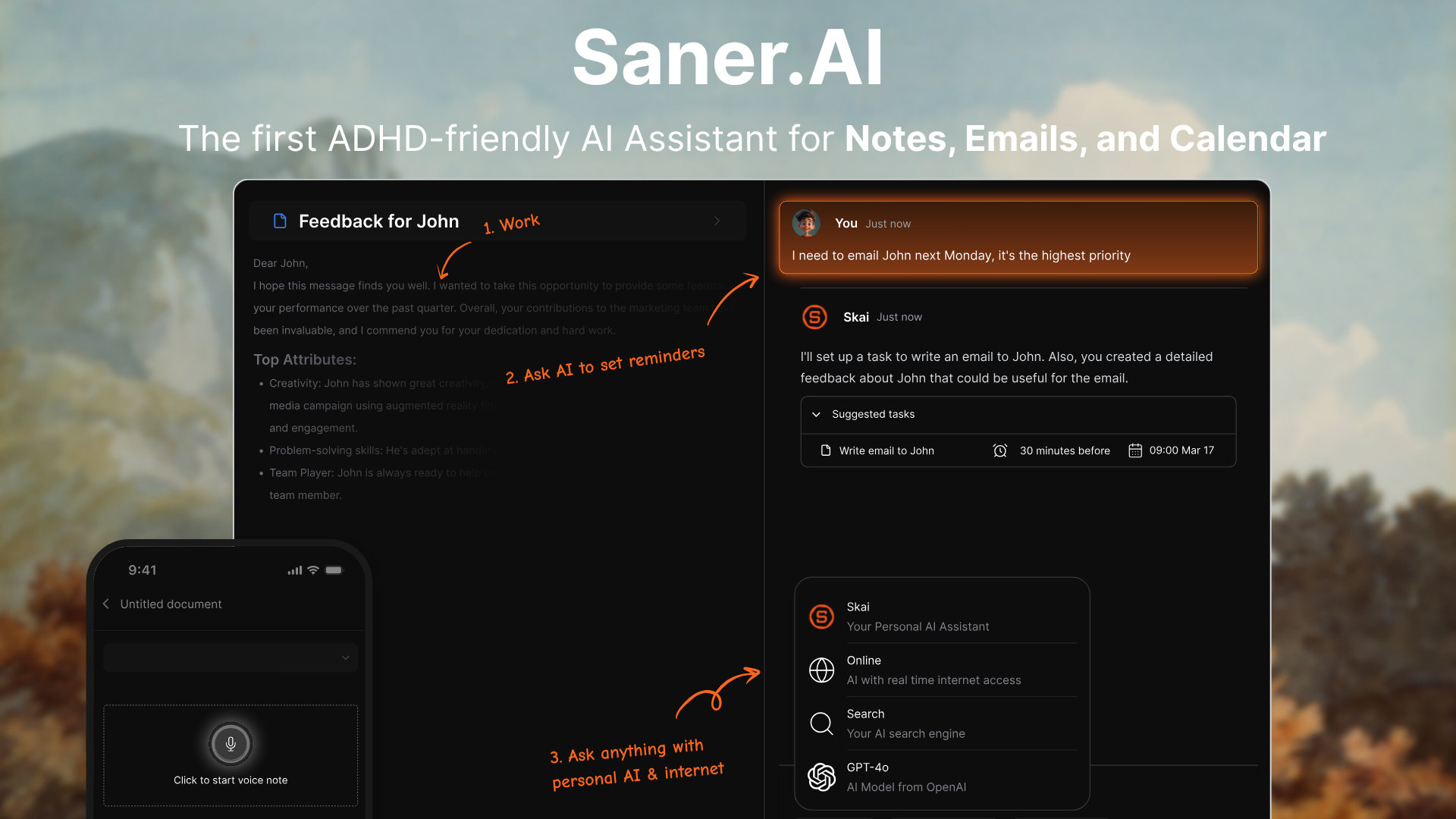
That's not a productivity fantasy. That's Saner.AI. Its AI engine reads your notes as you capture them and extracts the actions embedded inside - no step two, no step three, no manual processing required. The whole workflow you just learned? Saner.AI runs it for you in the background, invisibly, every time.
Key feature
- Auto-extracts tasks from notes
The system automatically scans written notes and pulls actionable checkboxes into a separate dashboard. I tried pasting a messy transcript from an hour-long call, and the tool immediately picked out the due dates and responsibilities.
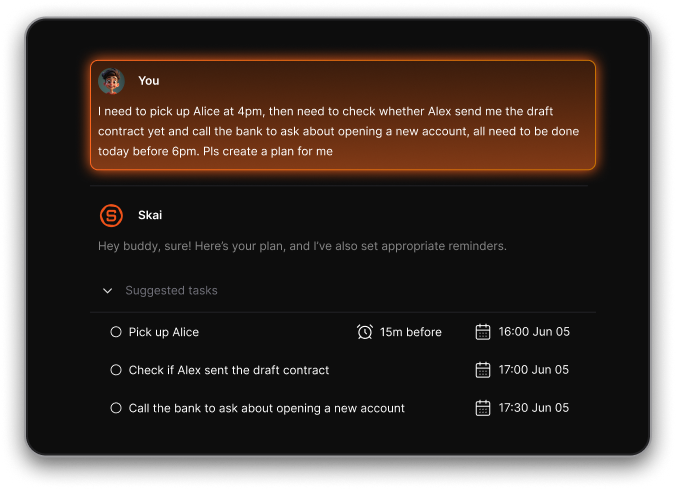
- Assigns context
The software attaches background information to your to-do items by linking them to the source documents. I used this option when managing a client research document, and I liked how it kept the original files pinned to the actual task line.

- Integrates calendar
The platform syncs with calendar networks to drop action items into available time slots. I noticed that when my schedule shifted, the app let me drag items onto my calendar to plan my work window easily.
Pros
- I like that the search tool finds old pages even when I only remember a vague description of what I wrote.
- I appreciate how it saves time in the morning by setting my priorities before I sit down to plan my day.
- I feel it helpful that the browser extension lets me save text from the web right into my main archive.
- I enjoy using the voice transcription tool to dictate brief ideas while I am away from my desk.
Cons
- Saner.AI works best for personal task management. There is no collaboration feature on this app.
Pricing
- Free Plan
- Starter Plan: $8/mo
- Standard Plan: $16/mo
How to get started
- Step 1: Link your active digital calendar account under the workspace settings dashboard.
- Step 2: Paste your text notes into a fresh document canvas.
- Step 3: Use the assistant button to locate, label, and schedule the task checklist.
Saner.AI reviews
Conclusion
Turning messy notes into real, done tasks isn't about finding a perfect system. It's about building a predictable routine that works even when your brain doesn't want to cooperate. If you want to keep this going, just stick to the five steps we covered: capture your notes with clear verbs, separate your reference material from actual actions, extract tasks using the verb-owner-deadline rule, assign your priority, and schedule everything directly into your calendar.
I know this feels like a lot of steps when you are already overwhelmed, but you don't have to get it right every single day. Just pick one small note today and try to pull a single task out of it.
If you want to look at other ways to keep your focus, you might want to read our guide on the best ADHD apps for organizing your day. We also have a breakdown of different note-taking methods, a pillar if you want to find a better way to write things down in the first place, alongside a look at an AI productivity apps roundup to see if any new software can handle the heavy lifting for you.

Stay on top of your work and life
Frequently Asked Questions
1. How do I convert notes to tasks?
You open your text file and pull out anything requiring action. Put an action verb at the start of each line, like "Call the doctor" instead of just writing "Doctor." I find it helps to do this immediately after a meeting before the context vanishes from your mind. If you leave it for tomorrow, the note becomes a mystery.
2. Can AI do this?
AI can pull tasks from your messy brain dumps, but it often invents extra work you did not ask for. I use AI to clean up transcripts of my voice notes. You still have to review the final list yourself, or you will end up with twenty automated tasks that you never intend to finish.
3. GTD vs tasks?
Getting Things Done requires too much maintenance for an ADHD brain. The multi-step system usually falls apart during the weekly review phase. Simple task lists work better. You only need to know what you are doing today and what can wait until next week. Anything more complex becomes a chore.
4. Why do my notes always get buried?
Notes disappear because out of sight means out of mind. When you close a notebook or an app, that data ceases to exist to your brain. You can fix this by keeping your current task list open on a second screen or writing it on a physical whiteboard.
5. How do I avoid getting overwhelmed by a long task list?
Hide everything except your top two items. A long list triggers paralysis, so you end up doing nothing at all. I pick two things to finish before noon. If I finish them, I pick two more. This approach protects your focus and keeps you from quitting early.
6. Should I rewrite my notes to make them clearer?
Rewriting is usually a trap that feels like work but produces nothing. Instead of rewriting the whole note, just extract the actual items you need to do. Leave the messy background information alone. You only need a clear instruction for your future self, not a perfect essay.
7. How can I remember to check my task list?
Tie the habit to something you already do every single day. Open your list when your morning coffee is brewing. Put the app icon directly in the center of your phone screen. Or simply use Saner.AI, it proactively checks in with you in the morning with an optimized schedule so you can get started right away
8. Is it better to use paper or digital notes for ADHD?
Paper is excellent for daily focus because it has no internet distractions. Digital tools are better for storage because you can search them later.
9. How do I sort tasks when everything feels urgent?
Pick the task that causes the most anxiety and do that first. When you have ADHD, emotional weight usually dictates urgency anyway. Do not try to use complex matrix systems to score your chores. Just pick the one heavy item that is keeping you from sleeping.
10. What do I do when a task feels too big to start?
Break it down until the first step feels ridiculously easy. If you need to clean the kitchen, your first task should be moving one cup to the sink. Starting is the hardest part for our brains. A tiny step lowers the barrier so you can build momentum.
11. How often should I clean out my old notes?
Do it once a month or avoid it completely. Weekly cleanups take too much energy and usually turn into a distraction. If a note is older than thirty days and has no tasks attached, archive it. You can search for it later if you genuinely need it.
12. Why do traditional task management systems fail for ADHD?
Most systems are built for linear thinkers who can follow strict rules every day. ADHD brains thrive on novelty and flexibility. When a system asks for perfect categorization, it creates friction. As soon as a system feels like heavy administrative work, we abandon it.
Stay on top of your work and life