
We Tested the Best 6 AI for IT Managers
The best AI for IT managers are Service Now, Atera, Saner.AI, Copilot, ChatGPT

6 Best AI Tools for IT Managers in 2026
Every IT Manager with ADHD knows this feeling: Your brain is a Chrome browser with 147 tabs open, and let's be honest - traditional "stay organized" advice is a joke:
"Just use a to-do list!"
"Write everything down!"
"Check your calendar!"
Here's the real problem, your brain is juggling:
• 14 Slack channels blowing up
• 27 incident reports needing review
• 3 network optimization projects
• That one critical email from last week (where did it go?)
• Oh, and your team needs those security updates... yesterday
And then someone asks: "Hey, what did we decide about the cloud migration in last Thursday's meeting?"
brain.exe has stopped working
We spent weeks researching and testing AI tools used by IT managers across ITSM, knowledge management, meeting intelligence, task orchestration, and daily planning. Along the way, one thing stood out: the tools that actually help aren't always the biggest names in IT. Some of the most useful ones come from adjacent categories - AI assistants and planning tools that deal with the human side of IT management rather than just the infrastructure.
Key takeaways:
- Most "AI for IT" tools focus on infrastructure and incident response. The gap is in helping IT managers handle their own work - meetings, priorities, documentation, and decision-making.
- ServiceNow and Microsoft Copilot are the enterprise defaults, but neither is plug-and-play for mid-sized teams without dedicated implementation resources.
- Smaller, more focused tools often deliver faster value - especially for day-to-day planning, meeting follow-up, and knowledge capture.
Quick guide — Best AI for IT managers:
- ServiceNow — best for enterprise-scale ITSM with AI-powered ticket management
- Atera — best for MSPs and IT teams wanting all-in-one RMM with agentic AI
- Microsoft Copilot — best for IT teams already deep in the Microsoft 365 ecosystem
- Notion AI — best for building and maintaining an internal IT knowledge base
- Otter.ai — best for capturing and distributing IT meeting notes automatically
- ChatGPT — best general-purpose AI for scripting, documentation, and ad hoc problem-solving
- Saner.AI — best for IT managers who need to manage their own time, tasks, and information overload
How we chose these AI?
IT management involves at least three distinct types of work: infrastructure operations, team coordination, and personal knowledge management. Most roundups only cover the first. We looked at all three, because IT managers don't just run systems - they run projects, lead teams, handle vendor relationships, and attend a lot of meetings.
Our criteria:
- AI that actually does something — not just autocomplete or keyword search
- Genuine integration with how IT teams work (ticketing systems, monitoring tools, calendars, email)
- Transparent or accessible pricing — especially important for mid-market teams
- Real user reviews from G2, Capterra, Reddit, and similar platforms
- Measurable impact on common IT manager pain points: ticket backlog, documentation lag, alert noise, and context switching
What are the best AI for IT managers?
The best AI for IT managers are Service Now, Atera, Saner.AI, Copilot, ChatGPT
Comparison table - Best AI for IT managers
| Tool | Primary use | AI capability | Best for | Starting price |
|---|---|---|---|---|
| ServiceNow | ITSM / incident management | AI ticket routing, virtual agent, predictive intelligence | Enterprise IT operations | Custom pricing |
| Atera | RMM + helpdesk | Agentic AI (Robin + Copilot), autonomous issue resolution | MSPs and IT departments | $139/tech/month |
| Microsoft Copilot | Productivity suite | Document/meeting AI, M365 integration | Microsoft-first IT orgs | $30/user/month (M365 add-on) |
| Otter.ai | Meeting intelligence | Auto-transcription, summaries, action item detection | Team standups and vendor calls | Free; Pro from $8.33/user/month |
| ChatGPT | General AI assistant | Code generation, documentation, research, planning | Scripting, writing, ad hoc problem-solving | Free; Plus $20/month |
| Saner.AI | Task + knowledge management | Proactive daily planning (Skai), brain dump to task list, connected inbox | IT managers managing personal workload across tools | Free; paid from $8/month |
1. ServiceNow
ServiceNow has been the enterprise ITSM standard for years, and its AI features have matured considerably. The platform's Now Assist layer brings generative AI into ticket summarization, knowledge article creation, and virtual agent conversations. Its predictive intelligence module routes incidents automatically based on historical patterns
Key features:
- AI incident routing and categorization. One reviewer noted that the change management features make it easy to track and approve changes consistently — reviews
- Virtual Agent with natural language understanding. Users can interact via conversational AI to get answers from the knowledge base, check ticket status, or escalate to live support. — reviews
- Now Assist generative AI. Built into case management, IT operations, and HR, it drafts knowledge articles, summarizes incidents, and generates resolution recommendations from historical data. — reviews
- Full ITSM lifecycle coverage. From incident detection to post-mortem documentation, ServiceNow handles the entire process inside one platform, including asset management and change advisory workflows.
Pros:
- Handles complex IT environments at enterprise scale with strong ITIL alignment — reviews
- Third-party integrations are genuinely useful. One user called them "a minute job" to set up — reviews
- Reporting and dashboards give IT managers visibility across incidents, changes, and assets simultaneously.
Cons:
- Configuration complexity is real. The platform can be complex to manage, especially in Change Management, where configurations can become cumbersome, and it can be expensive to implement and maintain — reviews
- Implementation costs range from $50,000 to $500,000, making it out of reach for many mid-sized teams — reviews
- Steep learning curve. Approximately 30–40% of users report difficulties with reviews,
Pricing: Custom enterprise pricing. No published starting rate.
Reviews:
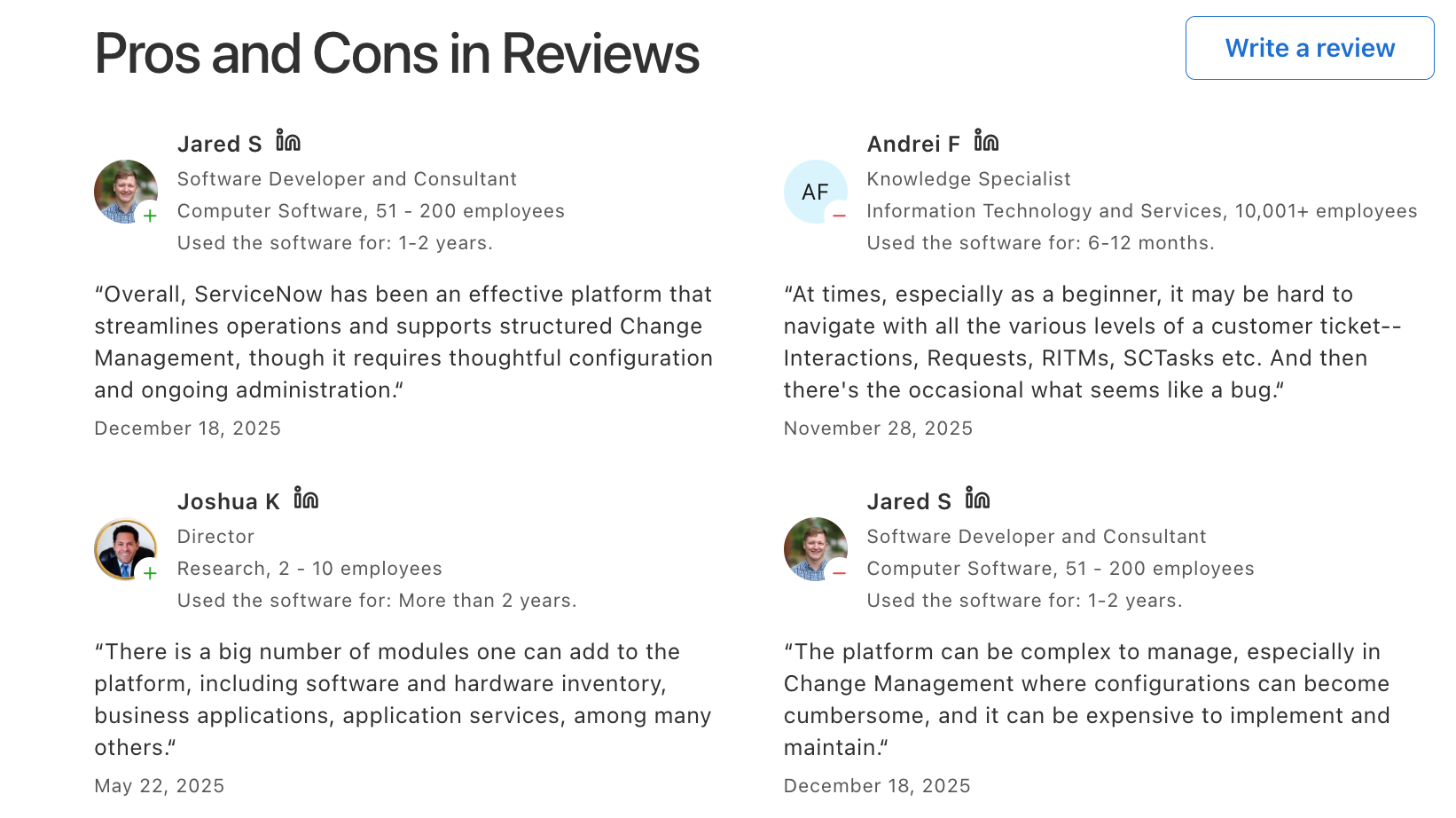
- Users on Capterra and G2 consistently rate ServiceNow highly for customizability and depth of features, but note the steep learning curve and cost as the two most common friction points.
- One Capterra user with financial services experience described it as costly for SMEs and mentioned notification overload from Outlook integration — reviews
Who is it best for:
- Large enterprise IT teams with dedicated ITSM administrators, implementation budgets, and complex multi-department service delivery requirements. Not the right fit for teams under 100 people or without an existing ServiceNow ecosystem.
How to start:
- Request a demo via ServiceNow's website. Enterprise procurement typically involves a proof-of-concept engagement before licensing is finalized.
2. Atera
Atera takes a different approach to AI in IT management. Rather than building AI into a single module, the platform describes itself as the first fully agentic AI platform for IT, meaning AI handles end-to-end tasks rather than just assisting humans in completing them.
Key features:
- IT Autopilot (Robin). This end-user-facing AI agent handles first-line support requests across email, chat, Slack, and Teams without technician involvement. One user on G2 reported resolving issues 70% faster after adopting Atera's AI — reviews
- AI Copilot for technicians. This tool works alongside IT staff to summarize tickets, generate scripts from plain-language instructions, troubleshoot devices, and respond to open tickets automatically. — reviews
- Per-technician pricing model. Unlike most RMM tools that charge per endpoint, Atera charges per technician regardless of how many devices are managed. One G2 reviewer noted: "You pay for a technician but not for machines, which means I can manage our company with a single license" — reviews
- All-in-one RMM + helpdesk + PSA. Remote monitoring, patch management, ticketing, and billing are handled in a single platform rather than requiring separate subscriptions. One Capterra reviewer said Atera "integrates critical IT management tools into a single, unified platform" — reviews
Pros:
- Rated #1 AIOps tool by G2 with 4.6/5 across 900+ reviews — reviews
- Onboarding is fast. Most new technicians are operational within an hour.
- Patch management covers Windows, Mac, Linux, and third-party apps. One CEO-level reviewer praised the cross-platform patch management as "very good" — reviews
Cons:
- Customization is limited for organizations with very specific reporting or workflow requirements — reviews
- Some reviewers flagged that the platform uses a lot of CPU resources and doesn't assist with managing cloud SaaS workloads or end-user licensing — reviews
- The interface can take up to 30 seconds to load and doesn't render well on iPads — reviews
Pricing:
- Pro plan from $139/technician/month billed monthly ($129 annually). Growth plan from $189/technician/month. Superpower plan (enterprise) requires a custom quote. 30-day free trial available.
Reviews:
- Atera holds 4.6/5 on both G2 and Capterra. One ESG analyst on Capterra described how Atera centralized IT asset data, support tickets, and system activity in one place, making it easier to prepare reports and track compliance tasks — and noted that the automation features cut down manual work — reviews
Who is it best for:
- MSPs managing multiple clients and IT departments that want to reduce first-line support volume without hiring more staff. Teams that need predictable pricing as they scale endpoint count.
How to start:
- Sign up for a free 30-day trial at atera.com. No credit card required.
3. Microsoft Copilot
For IT teams living inside Microsoft 365, Copilot is the closest thing to an AI layer that's already there. It integrates directly into Teams, Outlook, Word, Excel, and SharePoint - which means no new tools to buy, no new logins to manage, and no adoption curve if staff already use M365 daily.
Key features:
- Meeting summaries and action items in Teams. Copilot captures what was discussed, identifies decisions, and surfaces action items from any Teams meeting.
- Document drafting and summarization in Word and Outlook.
- Data analysis in Excel. IT managers handling infrastructure cost analysis, SLA reporting, or vendor comparisons can prompt Copilot in plain English to build formulas, summarize trends, and generate visualizations without writing a single formula manually.
Pros:
- Deep integration with Microsoft 365 means no separate installation or account — reviews
- Works smoothly across Microsoft products and understands natural language well — reviews
- Effective for meeting notes, document generation, and reducing email processing time.
Cons:
- Limited availability and high cost for organizations not on the right M365 tier. One reviewer flagged high cost and dependency on the Microsoft ecosystem as drawbacks — reviews
- Responses can be less adaptable than tools like ChatGPT for nuanced or complex technical questions — reviews
- Context input limit: one reviewer was frustrated by the 10,240 character input cap — reviews
Pricing:
- $30/user/month as an add-on to Microsoft 365 E3 or E5. Some consumer features available free via Bing/Edge integration.
Reviews:
- Copilot holds 4.6/5 on Capterra. Most positive reviews emphasize the M365 integration and productivity boost for meeting notes and document tasks. Negative reviews cluster around cost, occasional inaccuracies, and performance slowdowns — reviews
Who is it best for:
- IT organizations already standardized on Microsoft 365, where Copilot becomes an add-on rather than a new system. Less compelling for teams running primarily on Google Workspace or open-source tooling.
How to start:
- Requires Microsoft 365 E3 or E5 license. Add the Copilot license through the Microsoft 365 admin center.
4. Otter.ai
IT managers spend a lot of time in meetings: standups, vendor reviews, change advisory board sessions, post-mortems, one-on-ones. Otter.ai joins those calls and produces a transcript, summary, and action item list automatically.
Key features:
- Automatic transcription across Zoom, Teams, and Google Meet. OtterBot joins scheduled meetings and generates a live transcript as the conversation happens. Users can share notes with participants post-meeting
- AI meeting summaries and action items. After the meeting, Otter generates a structured summary with key topics and assigned next steps
- Keyword searchable conversation archive. Every meeting is searchable by keyword
- Otter AI Chat. Users can ask the AI questions about past meetings ("what did we decide about the network upgrade?") and get answers based on the transcript, functioning like a searchable conversation memory
Pros:
- Eliminates the admin burden of meeting minutes for most regular IT meetings — reviews
- Easy to set up with calendar sync. Works reliably on major video platforms.
- Users report strong results for basic meeting capture and the ability to upload previously recorded audio — reviews
Cons:
- Transcription accuracy is inconsistent — especially with technical terminology, strong accents, or background noise. Users report accuracy topping out around 85% even in clean environments — reviews
- Speaker identification is a persistent complaint.
- Action item detection is unreliable for complex or fast-paced discussions — reviews
Pricing: Free plan (300 min/month). Pro from $8.33/user/month (billed annually). Business from $20/user/month.
Reviews: Average rating of around 4.4/5 across platforms. Positive reviews emphasize time saved on note-taking and the convenience of searchable transcripts.
Who is it best for: IT managers who run a high volume of meetings and want basic capture and searchability without a steep setup process. A good starting point, but teams with complex meeting formats or strict data privacy requirements should evaluate carefully.
How to start: Free account at otter.ai. OtterBot connects to your Google or Microsoft calendar automatically.
5. ChatGPT
No list of AI tools for IT managers is complete without ChatGPT. For many IT professionals, it's already the default AI layer they reach for when they need something written, explained, or built quickly.
Key features:
- Script generation and code assistance. IT managers without full dev experience use ChatGPT to write PowerShell, Bash, and Python scripts for automation, system checks, and reporting. — reviews
- Documentation and runbook drafting. — reviews
- Deep research. For vendor comparisons, emerging security threats, or technology evaluations, ChatGPT's Deep Research feature is described by one Capterra reviewer as "the best deep research on the market so far" compared to Perplexity, Gemini, and Mistral — reviews
- Data analysis via file upload. Upload a CSV of incident logs, SLA data, or asset inventory and ask ChatGPT to analyze trends, flag anomalies, and generate visualizations in plain English
Pros:
- Free tier offers genuine utility for most day-to-day IT tasks — reviews
- Versatile across scripting, documentation, research, and communication tasks simultaneously — reviews
- Custom GPTs allow IT teams to build specialized assistants tuned to their internal documentation or standard processes.
Cons:
- Outputs require fact-checking. Hallucinations are a real risk for technical content — reviews
- Programming quality is described by some reviewers as subpar compared to dedicated coding tools for complex DevOps tasks — reviews
- No native integration with ITSM platforms. Everything is copy-paste unless you build a custom integration via the API.
Pricing: Free plan available. Plus plan $20/month. Team plan $25/user/month. Enterprise pricing custom.
Reviews: The main criticism is inconsistency on niche technical prompts and the effort required to verify outputs — reviews
Who is it best for: IT managers who need a general-purpose AI tool for scripting, writing, research, and problem-solving that isn't covered by their specialized platforms.
How to start: Free at chat.openai.com. The Plus plan is worth testing for two weeks to evaluate whether GPT-4o access meaningfully improves output quality for your specific use cases.
6. Saner.AI
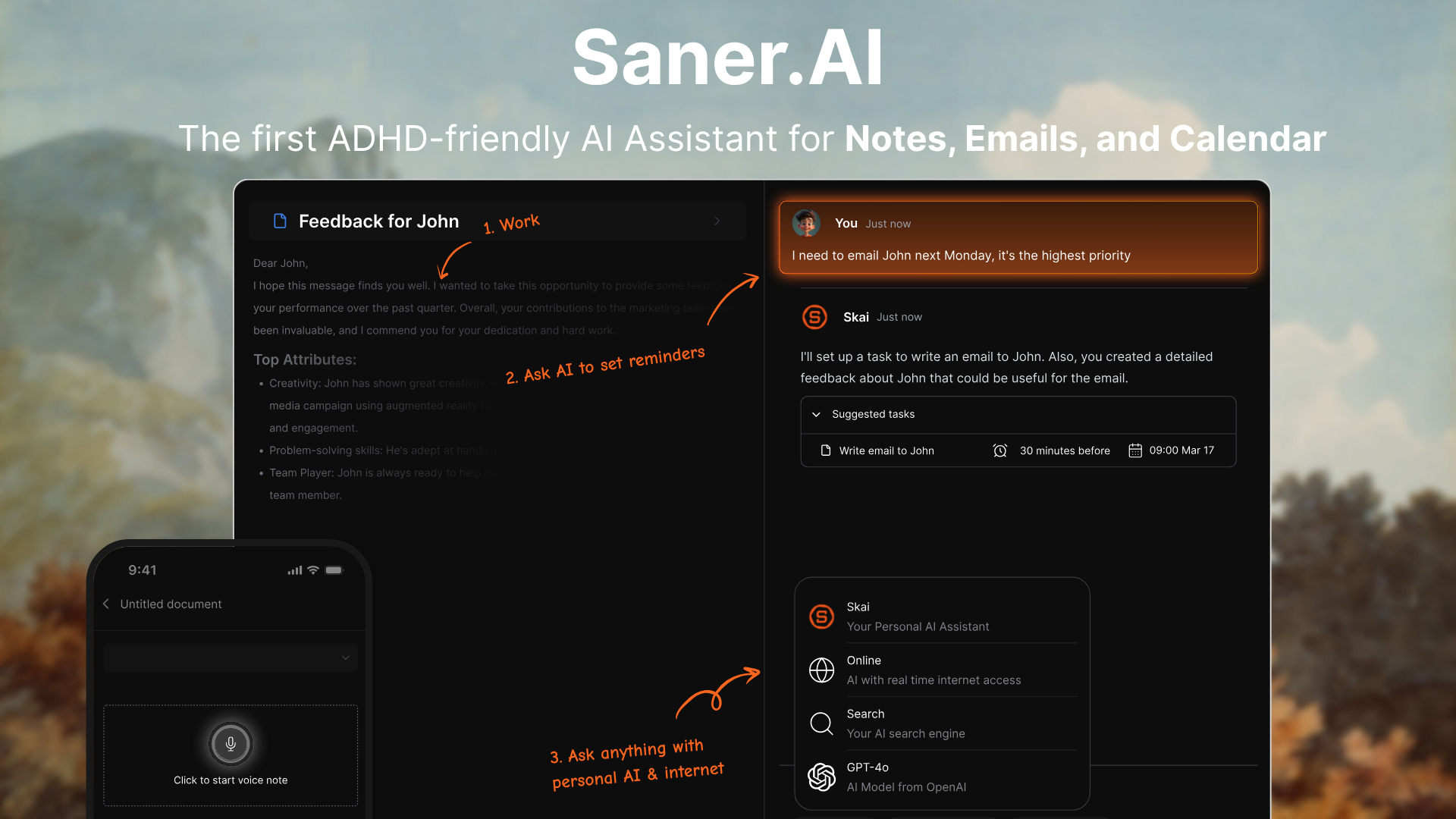
Every tool on this list solves an operational IT problem. Saner.ai solves a different one: the IT manager themselves is drowning. Tickets, Slack threads, email, calendar invites, meeting notes, and mental notes all compete for attention simultaneously. Saner.AI is built to manage your workload.
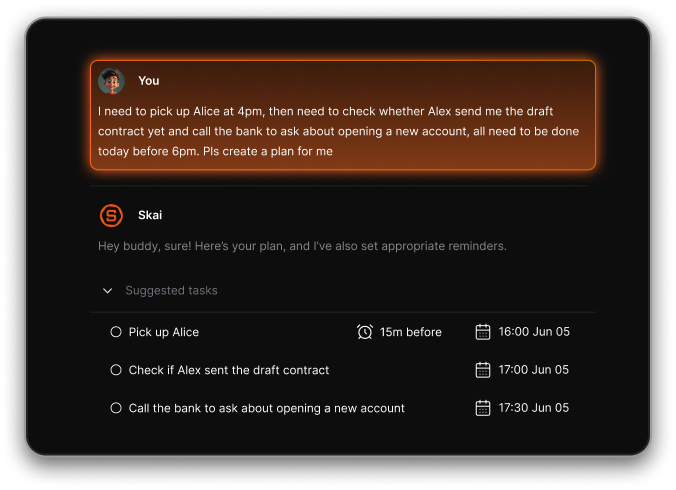
The platform's AI assistant proactively scans your connected inbox, calendar, notes, and tasks each morning and proposes an optimal plan for the day. This isn't passive task storage - it's closer to having a chief of staff who reads everything you've got pending and tells you what to focus on first.
Key features:
- Proactive daily planning by Skai. Every morning, Skai scans your inbox, notes, tasks, and calendar to propose an optimized daily plan. For IT managers juggling reactive and proactive work simultaneously, this daily reset helps avoid the common trap of spending all day in the ticket queue without touching strategic work — reviews
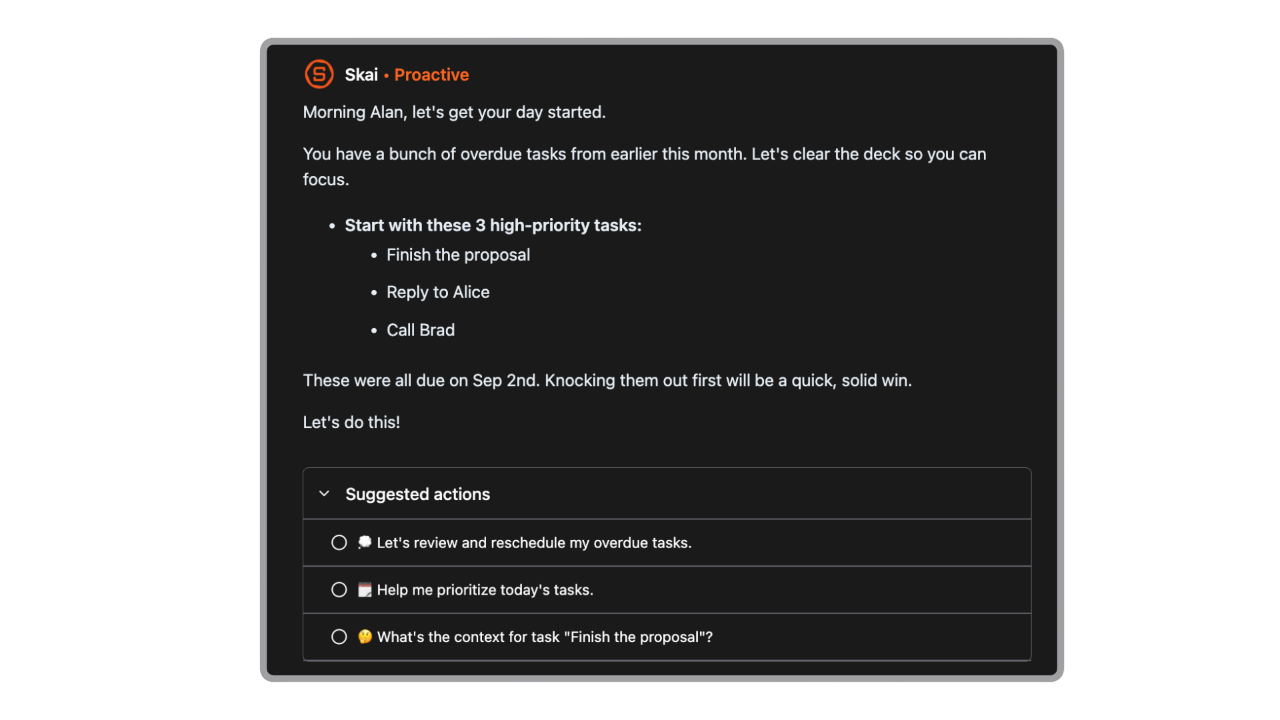
- Brain dump to task list. IT managers often have half-formed thoughts mid-meeting or while troubleshooting. saner.ai's universal task assistant pulls tasks from emails, documents, and unstructured notes automatically, turning chaotic input into structured to-dos — reviews
- Connected inbox and cross-app knowledge search. saner.ai integrates with Gmail, Google Drive, Slack, and calendar. Everything becomes searchable in one place, which matters for IT managers constantly switching between communication channels — reviews
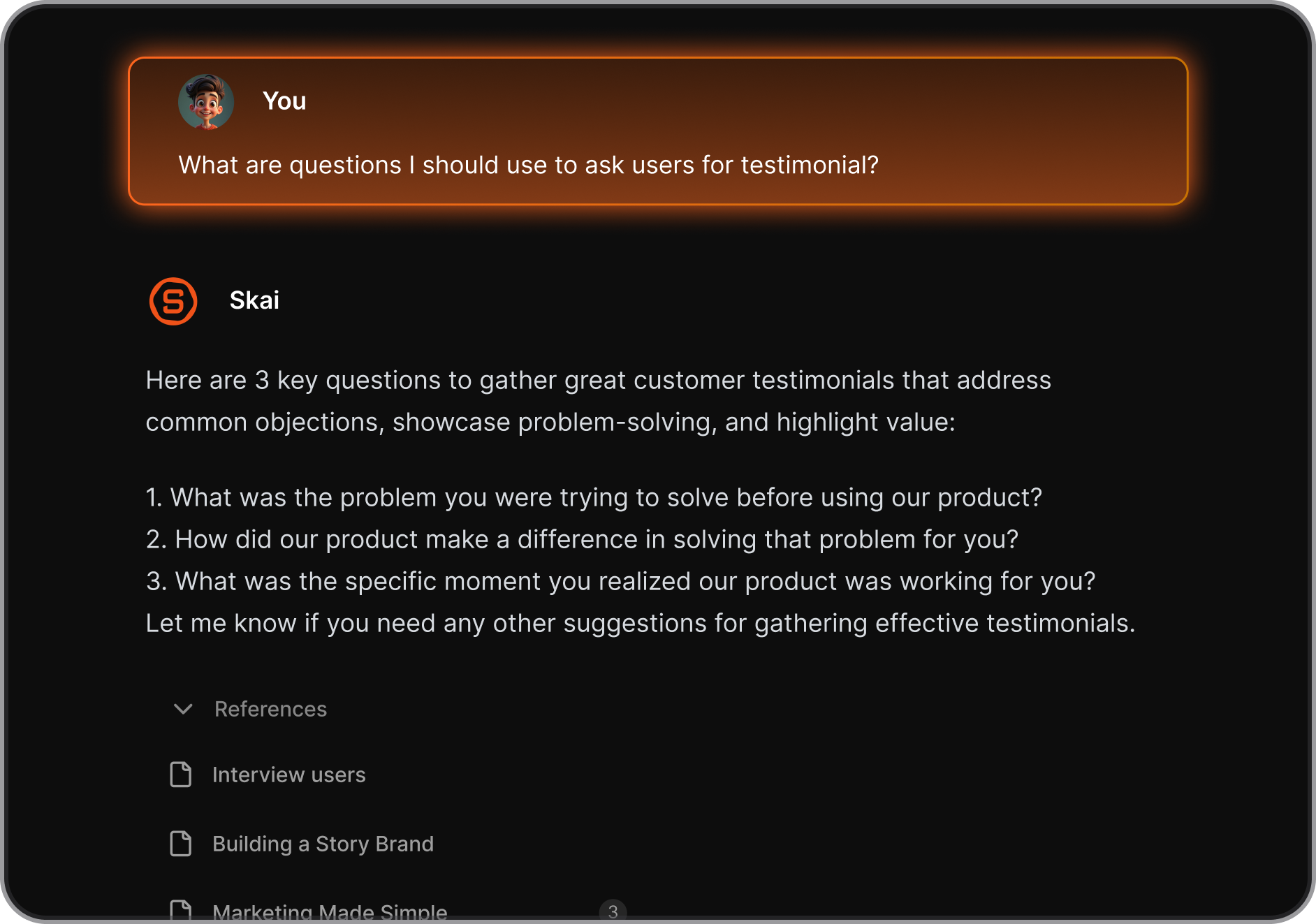
- Knowledge management with Skai. Ask Skai natural language questions about your own notes and get direct answers, not a list of links. This is particularly useful for IT managers who take notes across multiple tools and later struggle to find what they wrote down — reviews
Pros:
- Clean, distraction-free interface that works for professionals managing high information volume — reviews
- The daily planning feature is genuinely different from standard task managers — it's proactive rather than reactive.
- Combines notes, tasks, and connected apps in one searchable workspace, removing the need to maintain separate tools for capture and planning.
Cons:
- Full team collaboration features are still in development — better suited to individual IT managers than cross-team project management currently — reviews
- Relies on internet connectivity for AI features — limited offline functionality — reviews
- Newer product compared to established tools on this list, which means the feature set is still evolving.
Pricing: Free plan available with core features. Paid plans from $8/month.
Who is it best for:
- IT managers who are managing their own cognitive load as much as their team's workload — those who attend too many meetings, maintain too many note-taking systems, and consistently feel behind on proactive work.
- Also a strong fit for IT managers with ADHD or high context-switching demands.
How to start: Create a free account at saner.ai, connect your email and calendar, and let Skai run its morning scan. The daily planning experience is the fastest way to understand whether the tool fits how you actually work.

Stay on top of your work and life
Conclusion
The best AI tools for IT managers don't all look like IT tools. Some are ITSM platforms and some are personal productivity systems. What they share is an ability to reduce the volume of decisions and manual work that falls on IT managers every day.
If you're running enterprise-scale operations, ServiceNow and Atera are the platforms doing the most technically sophisticated AI work. If your organization runs on Microsoft 365, Copilot is the most frictionless add-on available. For meeting capture, Otter.ai handles the basics well despite its limitations. And for scripting, documentation, and ad hoc problem-solving, ChatGPT fills a gap that every other tool on this list leaves open.
For the part of the job that none of the ITSM platforms address - your own priorities, context overload, and daily planning - Saner.ai is worth a look. Most tools help IT managers manage their systems. Saner.ai helps IT managers manage themselves.
FAQ on best AI for IT managers
- What is the best AI tool for IT managers overall? There's no single answer — it depends on where the biggest gap is. For infrastructure and incident management at scale, ServiceNow or Atera will have the most impact. For personal productivity and workload management, saner.ai addresses a gap that most IT-specific tools ignore entirely.
- Can AI replace an IT manager? No, and that's not what these tools are designed to do. AI handles repetitive, automatable work — ticket routing, transcription, documentation drafting, script generation. The judgment calls, vendor relationships, and team leadership still require a person. What AI can do is give IT managers more time and cognitive space for those higher-level tasks.
- How does Microsoft Copilot help IT managers specifically? It's most useful for teams already using Microsoft 365. Copilot handles meeting summaries in Teams, email summarization in Outlook, and document drafting in Word — all without requiring a separate tool. For IT managers who spend a lot of time in M365 apps, it reduces friction in the communications and documentation side of the job.
- Is ServiceNow worth the cost for a mid-sized IT team? Generally, no - not without a dedicated implementation partner and a clear business case. ServiceNow is built for enterprise complexity. Mid-sized teams often get better value from tools like Atera or Freshservice, which offer comparable AI capabilities at more accessible price points and with faster deployment.
- What AI tools help with IT knowledge management? ServiceNow's knowledge module and Saner.ai both address knowledge management from different angles. ServiceNow surfaces articles during ticket resolution at the enterprise level. saner.ai helps individual IT managers capture and retrieve their own notes and context across connected apps — making it more personal and immediately deployable.
- How can AI help with IT incident management? AI can triage incoming alerts, identify related incidents to prevent duplicate work, generate initial root cause hypotheses from historical data, draft post-mortem documentation, and suggest resolution steps based on past tickets. Platforms like Atera and ServiceNow offer the most mature versions of this today.
- Can ChatGPT help IT managers write scripts? Yes, and for many IT managers without formal development backgrounds, it's the fastest way to produce functional PowerShell, Bash, or Python scripts for automation. That said, outputs should always be reviewed before deployment in production environments, and more complex DevOps tasks may warrant a dedicated coding assistant.
- What is Saner.ai and how is it different from other AI productivity tools? saner.ai is a personal AI assistant that combines notes, tasks, calendar, and connected apps into one workspace. Its AI (Skai) proactively plans your day by scanning everything pending across your tools. Unlike task managers that wait for you to input tasks, Saner.ai pulls tasks automatically from emails and documents and proposes a day plan - making it more assistant than app.
- What should IT managers look for when evaluating AI tools? Start with the actual bottleneck. If incidents are consuming your team, focus on ITSM AI. If you personally feel scattered and reactive all day, a planning and task tool may help more than another infrastructure platform. Integration depth, pricing transparency, and real user feedback on G2 and Capterra are the most reliable filters once you've identified the right category.
Stay on top of your work and life



